
A fanless GPU is a graphics card cooled by a heatsink alone, without a built-in fan. That makes it silent, but silence comes with limits: passive cards usually use older, slower chips, need good case airflow, and can run much hotter than their fan-cooled equivalents.
The best fanless GPU for most buyers is therefore not the fastest card available. It is the card that matches a specific job: office graphics, home-theater playback, a small desktop, or light gaming where silence matters more than frame rate.
As an Amazon Associate we earn from qualifying purchases at no extra cost to you.


Our Top Picks
 GIGABYTE Radeon RX 9070 XT Gaming OC 16GRADEON9070XT11.34 x 5.2 x 2.2 Inches3.9 PoundsCheck on Amazon
 ASUS GeForce GT 1030 2GB GDDR5 Graphics CardGT 1030 2GB Low Profile6.8 x 2.7 x 0.1 inches1.75 PoundsCheck on Amazon
Top 3 picks at a glance
Quick picks
| Best for | What to buy | Main trade-off |
|---|---|---|
| Basic display and office work | GeForce GT 1030 passive | Very weak for modern gaming |
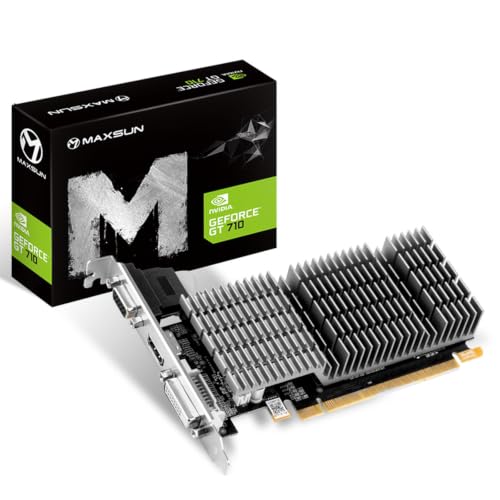
| Lowest-cost multi-monitor upgrade | GeForce GT 710 passive | Old architecture and poor driver longevity |
| Quiet 1080p gaming | Used GeForce GTX 1650 KalmX-class card | Rare, expensive, and highly airflow-dependent |
| Compact or low-power PC | Passive GT 1030, if compatible | Check slot width, outputs, and power requirements carefully |
Best overall: a passive GeForce GT 1030
A passive fanless GeForce GT 1030 graphics card is the sensible starting point for most silent-PC builds. It draws little power, normally needs no auxiliary power connector, and is fast enough for desktop work, 4K video output, web browsing, light photo editing, and older or undemanding games.
Do not confuse it with a gaming upgrade. GT 1030 cards commonly have only 2GB of VRAM, and the DDR4 versions are particularly slow. If you buy one, choose the GDDR5 version when the price difference is reasonable. It can handle games such as older esports titles at modest settings, but modern games will quickly expose its limits.
Passive GT 1030 designs vary in size. Some use a short heatsink that fits small cases; others occupy two slots and extend well beyond the circuit board. Check the measurements before ordering, especially if the card sits next to a sound card, Wi-Fi adapter, or a restricted case panel.
Best for gaming: a passive GTX 1650, if you can find one
A passive GeForce GTX 1650 is the fastest practical fanless gaming option commonly encountered, particularly the large-heatsink KalmX-style designs. It is a major step above the GT 1030 for 1080p gaming and has enough performance for many older AAA games at medium settings.
There are two problems. First, passive GTX 1650 cards are uncommon and can be priced far above their original value. Second, their large heatsinks do not make them immune to heat. In a case with no intake airflow, the GPU may reduce its clock speed, crash during long sessions, or become hot enough to warm nearby components.
For this reason, a passive GTX 1650 makes sense only if you already have a ventilated case or are willing to install a slow, quiet case fan. That sounds contradictory, but one large low-speed case fan can keep the entire system cooler than relying on the GPU heatsink alone. If you need a new card and see a normal fan-cooled GTX 1650 or newer low-power card at a much lower price, it is usually the better purchase.
Cheapest useful option: a passive GT 710
A fanless GeForce GT 710 graphics card is suitable for basic display output, not serious graphics work. It can add HDMI, DisplayPort, or extra monitor connections to an old desktop, and it is often useful when the processor lacks integrated graphics.
The cheaper option is fine when the computer will run office applications, remote-desktop software, point-of-sale software, or a simple media display. It is not a good choice for gaming, GPU-accelerated creative work, or a long-term upgrade. The GT 710 is based on very old hardware, and different versions can use substantially different memory types and output combinations.
Before buying, verify the exact outputs and resolution support. Some inexpensive cards have VGA and HDMI rather than the modern ports you need. Also avoid paying premium prices for a GT 710 simply because it is silent; a passive GT 1030 is much faster and often worth the modest extra cost.
What about AMD and Intel fanless GPUs?
AMD has produced low-power cards that can work well in compact systems, but genuinely fanless current Radeon models are less common than passive NVIDIA entry-level cards. Radeon RX 6400 cards, for example, are generally fan-cooled rather than passive. They can be excellent low-power choices, but they do not meet the strict fanless requirement.
Intel Arc cards are also normally active-cooled. Intel’s driver support has improved, but a fanless Arc card is not a standard retail option to plan around. If you need modern gaming performance, hardware video encoding, or better support for newer APIs, a quiet fan-cooled AMD, Intel, or NVIDIA card is usually a more realistic choice.
For browsing available models, compare passive low-profile graphics cards by their actual GPU and memory type rather than by the seller’s “4K” or “gaming” wording. A card can output a 4K desktop while still being far too slow for 4K gaming.
Compatibility and cooling checks
Measure the case before buying. A passive heatsink may make a single-slot card into a two-slot card, and some models extend several centimeters beyond the rear bracket. Small-form-factor systems may also require a low-profile bracket, which is not always included.
Check the power supply and connector requirements, but do not assume a low-power card will work in every old PC. The motherboard must have a compatible PCI Express slot, and some business desktops have proprietary power supplies or restricted BIOS support.
Case airflow is the biggest failure point. Passive cards need moving air around their fins. Symptoms of inadequate cooling include driver crashes, visual artifacts, sudden black screens, and performance that drops after several minutes. Keep cables away from the heatsink, clean dust from the fins, and use at least modest front-to-back airflow where possible.
Should you buy fanless?
Buy fanless if absolute silence, dust reduction inside the card, or a low-power office/media system matters more than performance. A passive GT 1030 is the safest general recommendation; a passive GTX 1650 is the specialist choice for light gaming when you find one at a sensible price.
Do not buy fanless simply because it sounds more reliable. The absence of a GPU fan removes one moving part, but high operating temperatures can create other problems. For gaming, video editing, or a workstation that runs for hours, a large fan-cooled card with a quiet fan curve is often cooler, faster, and easier to live with.
FAQ
Is a fanless GPU completely silent?
The GPU itself makes no fan noise, but the PC may still have processor, power-supply, or case fans. A quiet case fan is often useful for keeping a passive card stable.
Can a fanless GPU run modern games?
Only the faster passive GTX 1650-class cards are reasonable for modern games, and even those usually require reduced settings at 1080p. Passive GT 710 and GT 1030 cards are mainly for older or lightweight games.
Is a passive GT 1030 better than integrated graphics?
It depends on the processor. A newer integrated GPU can be faster, while an older office PC may benefit substantially from a GT 1030. Check the system’s existing video outputs before buying.
Does a fanless card need extra case cooling?
Usually, yes. It does not need a dedicated fan mounted on the card, but steady case airflow helps prevent thermal throttling, crashes, and excessive heat.



