Our Top Picks


Top 3 picks at a glance
The best CPU for RX 6800 XT in 2026
For most gaming PCs, the Ryzen 5 7600 is the best CPU for RX 6800 XT: it delivers strong 1080p performance, keeps frame rates high at 1440p, and gives you an upgrade path on AM5. If you already own an AM4 motherboard, the Ryzen 7 5700X3D is usually the more cost-effective upgrade. At 1440p, the graphics card does more of the work, so a sensible six-core CPU is generally enough.
Not sure your current processor will keep up? Run your exact pairing through our CPU and GPU bottleneck calculator to see whether the CPU or the graphics card sets your frame rate.
How to choose for your resolution and budget
The RX 6800 XT is a fast 1440p card with 16 GB of VRAM. At 1080p, especially with a high-refresh monitor or competitive settings, the CPU can limit peak frame rates and 1% lows. At 1440p with demanding graphics settings, the GPU is more often the limit. That means paying extra for a top-tier processor makes less sense if you mainly play visually demanding single-player games.
As an Amazon Associate we earn from qualifying purchases at no extra cost to you.


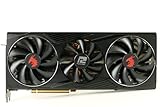
“Avoiding a bottleneck” does not mean keeping CPU and GPU usage perfectly matched. The limiting component changes with the game, resolution, settings, and target frame rate. A CPU that is a good pairing should keep gameplay smooth without making you pay for performance the GPU cannot use.
CPU comparison for the RX 6800 XT
| CPU | Platform | 1080p gaming | 1440p gaming | Best fit |
|---|---|---|---|---|
| Ryzen 5 5600 | AM4, DDR4 | Good at moderate frame rates; may trail in CPU-heavy games | Usually a reasonable match | Low-cost AM4 build or upgrade |
| Ryzen 7 5700X3D | AM4, DDR4 | Strong, particularly in games that benefit from 3D V-Cache | Strong; often close to faster CPUs when GPU-limited | AM4 owners wanting a substantial gaming upgrade |
| Ryzen 5 7600 | AM5, DDR5 | Strong high-refresh performance | Strong, with headroom for the RX 6800 XT | Best balanced new build |
| Ryzen 7 7800X3D | AM5, DDR5 | Excellent in CPU-limited games | Often diminishing returns over a less expensive CPU | High-refresh gaming and future GPU upgrades |
| Core i5-14600K | LGA1700, DDR4 or DDR5, depending on board | Strong; useful for gaming plus heavier productivity | Strong | Existing compatible system or mixed workloads |
Performance varies by game, memory configuration, and settings; the descriptions are relative guidance, not guaranteed frame rates. Prices also shift by region and stock. As a broad used-market guide, AM4 CPUs can be inexpensive, while AM5 parts cost more when motherboard and DDR5 memory are included. A Ryzen 5 7600-class CPU often sits in the roughly $150–$250 range, while higher-end X3D CPUs generally cost more. Check current local prices rather than judging the CPU price alone.
Head-to-head: which pairing makes sense?
Ryzen 5 7600: the balanced new-build pick
The Ryzen 5 7600 combines six Zen 4 cores with the newer AM5 platform. It is fast enough to feed the RX 6800 XT well in high-refresh 1080p play and is rarely an unreasonable match at 1440p. Its biggest advantage is not simply the frame rate today: AM5 also leaves room for a later CPU upgrade without replacing the motherboard and memory, subject to future CPU and BIOS compatibility.
Choose it for a new PC if the complete AM5 platform fits your budget. Factor in a compatible motherboard and DDR5 memory, not just the processor’s sticker price.
Ryzen 7 5700X3D: the AM4 upgrade choice
If you already have a compatible AM4 board and DDR4 memory, the Ryzen 7 5700X3D can be a compelling way to extend the life of your system. Its large cache helps in some games, improving CPU-limited performance and frame-time consistency. It is especially appealing if replacing the board and RAM would push the cost of an AM5 transition too high.
Before buying, check your motherboard’s CPU support list and BIOS requirements. A BIOS update may be necessary, and not every AM4 board supports every processor.
Ryzen 5 5600: the budget option
The Ryzen 5 5600 is a sensible pairing when keeping total cost low matters more than maximum 1080p frame rates. It can handle the RX 6800 XT well at 1440p in many games, but CPU-heavy titles, high-refresh targets, and background tasks may expose its limits sooner than a newer six-core CPU or the 5700X3D. It is most attractive when the rest of the AM4 system is already in place or the price is clearly lower.
Ryzen 7 7800X3D or Core i5-14600K: when the extra cost is justified
The 7800X3D is aimed at high-end gaming, particularly where the CPU sets the ceiling: competitive games, simulation titles, and high-refresh 1080p. With an RX 6800 XT at 1440p, many games will be GPU-limited before this CPU’s full gaming advantage matters. Buy it for demanding CPU-bound games or a planned graphics-card upgrade, not because the RX 6800 XT requires it.
The Core i5-14600K is a strong option if you already own an LGA1700 motherboard or need a PC for gaming and heavily threaded work. Platform details matter: motherboard memory support is specific to the board, and LGA1700 offers less forward upgrade flexibility than AM5. Compare the full platform cost before choosing it for a new gaming-only build.
Decision matrix
| Your situation | Recommended CPU | Why |
|---|---|---|
| Building new, want a balanced system | Ryzen 5 7600 | Strong gaming performance and an AM5 upgrade path |
| Already have AM4 and want more gaming headroom | Ryzen 7 5700X3D | Upgrades the CPU without replacing DDR4 memory and motherboard |
| Lowest-cost build or 1440p gaming at moderate refresh | Ryzen 5 5600 | Can be adequate when the GPU is the main limit |
| Competitive 1080p or CPU-heavy games, with a larger budget | Ryzen 7 7800X3D | More headroom where the CPU strongly affects frame rates |
| Already on LGA1700 or also do demanding productivity work | Core i5-14600K | Strong mixed-use performance without a platform change |
Check the whole system before upgrading
A CPU upgrade will not fix every low-frame-rate problem. Use these checks to identify whether the processor is actually holding the RX 6800 XT back:
- Compare resolutions: If frame rates rise substantially when you lower resolution or graphics settings, the GPU is likely the main limit. If performance barely changes and one or more CPU cores are heavily loaded, the game may be CPU-limited.
- Check frame-time consistency: Stutters can come from background tasks, shader compilation, memory pressure, or storage—not only the CPU. Look for recurring spikes rather than relying on average FPS alone.
- Confirm memory configuration: Use dual-channel RAM and enable the memory profile in BIOS. For AM5, a DDR5-6000 kit is a common practical target when supported; stability and the motherboard’s compatibility guidance matter more than chasing a particular speed.
- Check power and cooling: The RX 6800 XT has substantial power demands. A quality 750 W power supply is a practical baseline for many systems, though the exact requirement depends on the specific card, CPU, and PSU quality. Connect the card with separate PCIe power cables where the manufacturer recommends it, and make sure the CPU is not thermal-throttling.
- Update carefully: Install a compatible motherboard BIOS before an AM4 CPU swap if required, and use current chipset and graphics drivers. Verify the board’s CPU support list first.
As a rough workload check, gaming with the RX 6800 XT can put the GPU near its rated power, while a modern desktop CPU can add roughly 65–150 W depending on model and workload. Add the rest of the system and allow headroom for brief power excursions; do not choose a PSU based only on adding the CPU’s advertised base power to the graphics card’s rating.
Frequently asked questions
Will the RX 6800 XT be limited by the CPU at 1440p?
Usually, the GPU is more often the limit at 1440p with demanding graphics settings. The Ryzen 5 5600 can be a reasonable match in many games, while the Ryzen 5 7600 and Ryzen 7 5700X3D provide more headroom. CPU limits become more likely in CPU-heavy games, high-refresh gaming, or when targeting especially high frame rates.
Do I need to replace my motherboard and RAM when upgrading to a Ryzen 7 5700X3D?
No, not if you already have a compatible AM4 motherboard and DDR4 memory. The Ryzen 7 5700X3D can upgrade the CPU without replacing those components, although you should check the motherboard’s CPU support list and BIOS requirements first. A BIOS update may be necessary, and not every AM4 board supports every processor.
Is the Ryzen 5 7600 a good choice if I already own an AM4 system?
It can be a strong processor, but moving to the Ryzen 5 7600 requires the AM5 platform, including a compatible motherboard and DDR5 memory. If your existing AM4 board and DDR4 memory are suitable, the Ryzen 7 5700X3D is often the more cost-effective upgrade. Compare the complete platform cost rather than the processor alone.
What memory setup should I use with the RX 6800 XT and these CPUs?
Use dual-channel RAM and enable the memory profile in BIOS. AM4 systems use DDR4 in the pairings discussed, while AM5 systems use DDR5. For AM5, DDR5-6000 is a common practical target when supported, but stability and the motherboard’s compatibility guidance matter more than pursuing a particular speed.
What power supply should I use with an RX 6800 XT system?
A quality 750 W power supply is a practical baseline for many RX 6800 XT systems, although the exact requirement depends on the specific graphics card, CPU, and PSU quality. Add the rest of the system and allow headroom for brief power excursions. Use separate PCIe power cables where the card manufacturer recommends them.
Bottom line
For a new build, choose the Ryzen 5 7600 for the best balance of 1080p capability, 1440p performance, and future CPU upgrades. For an existing AM4 PC, the Ryzen 7 5700X3D is often the smarter value if your motherboard supports it. Choose the Ryzen 5 5600 to keep costs down, and step up to a 7800X3D or Core i5-14600K only when high-refresh CPU-bound gaming, productivity needs, or a future GPU upgrade justify the extra platform cost.