The best compact gaming pc depends on how small you really need it: a true mini PC of about 3 to 4 liters (Minisforum G1 Pro, ZOTAC Magnus, ASUS ROG NUC) fits a shelf, while a small tower such as the HP OMEN 16L keeps standard parts and easier cooling. Expect to trade upgrade room, noise and sustained power for size. Check the GPU type, power supply wattage and cooling before you buy.
A compact gaming PC is attractive for desks, living rooms and small apartments, but size always costs something. Smaller cases limit graphics card length, cooling capacity and power supply wattage, and many of the tiniest systems use laptop-class parts or proprietary power bricks that cannot be swapped. This guide separates the two sizes of compact PC, explains the cooling and power supply tradeoffs with a worked example, and lists model lines worth considering. Prebuilt configurations change often, so confirm the exact CPU, GPU, RAM and SSD on each listing.
Our Top Picks
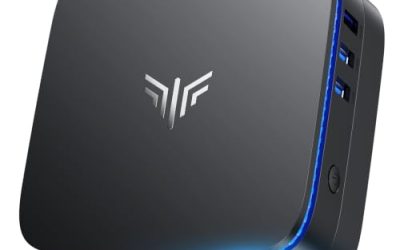
 ZOTAC Magnus EN275060TC Barebones Mini PCSmall Form Factor8.27 x 7.99 x 2.45 inches4.48 poundsCheck on Amazon
 ROG NUC 16 Gaming Mini PCRTX 5070Ti|32GB RAM|1TB SSD11.12 x 7.46 x 2.22 inches7.05 poundsCheck on Amazon


Top 3 picks at a glance
Quick comparison of the picks
| Pick | Size class | Best for | GPU type | Upgrade room |
|---|---|---|---|---|
| Minisforum G1 Pro line | About 3.8 liters | Best true mini with a desktop GPU | Desktop RTX 5060 8GB (per Minisforum) | RAM and SSD |
| ZOTAC Magnus EN275060TC | About 2.65 liters | Best smallest with 16GB VRAM | Desktop RTX 5060 Ti 16GB (per ZOTAC) | RAM and SSD |
| ASUS ROG NUC line | About 3 liters | Best flagship power in a mini | Laptop-class GPU (2025 model, per ASUS) | RAM and SSD |
| ASUS ROG GR70 line | Just under 3 liters | Best for a Ryzen 9 chip and 2TB drive | Laptop RTX 5070 (per coverage of ASUS specs) | RAM and SSD |
| HP OMEN 16L line | Small tower | Best standard-parts compact tower | Desktop RTX class | More than a mini |
| Skytech Chronos Mini line | Mini tower | Best budget-friendly small tower | Desktop RTX 5060 | More than a mini |
How We Chose
This is research-based editorial judgement. We did not use these computers ourselves. We read manufacturer pages and press specifications (Minisforum, ZOTAC, ASUS, HP), store listings, and published coverage of small form factor cooling and power supply limits. We ranked picks on whether the graphics card is a desktop or laptop part, the power supply type and wattage, cooling design, what can be upgraded, noise expectations from the design, and warranty and return terms. Models with an unclear GPU type are marked so you can confirm it.
Two kinds of compact PC
Mini PCs of roughly 2 to 4 liters
These are console-sized boxes. Some use a low-profile desktop graphics card (the Minisforum G1 Pro and ZOTAC Magnus do, according to their makers), others use laptop chips soldered to the board (the 2025 ASUS ROG NUC uses an RTX 5080 Laptop GPU, per ASUS). They usually accept only RAM and SSD upgrades. Their strength is footprint. Their weakness is sustained heat and noise, because a small enclosure moves less air.
Small towers of roughly 10 to 20 liters
Small towers such as the HP OMEN 16L and Skytech Chronos Mini use standard-size graphics cards and often standard or near-standard motherboards. They run cooler and quieter and allow a GPU or power supply change, although proprietary connectors can limit this. HP lists the OMEN 16L at 337 x 155 x 308 mm, which works out to roughly 10 to 11 liters by simple volume arithmetic, even though the product name says 16L.
The tradeoffs you cannot avoid
Cooling
Small cases limit radiators and fan sizes. Coverage of small form factor builds notes that case choice dictates GPU length, with many 2026 cases accepting cards of roughly 295mm to 330mm and some larger flagship designs accepting more. Common RTX 5070 dual-fan cards run about 300mm, so a card that is too long simply will not fit. Liquid coolers help in some designs, but they add noise from the pump and the small radiator fans. If you play long sessions, expect fan noise higher than a full tower.
Power supply
Compact towers use SFX or SFX-L power supplies, or a proprietary unit. SFX and SFX-L share width and height, but SFX-L is longer, and some small cases take only true SFX. Mini PCs often use an external power brick instead. ZOTAC lists a 330W external adapter for the Magnus, and Minisforum lists a 350W power supply for the G1 Pro, which TechRadar describes as leaving limited headroom when both CPU and GPU are at sustained load. This is a design limit, not a fault, but it means you cannot drop a larger graphics card into a mini PC later.
Upgrades and repairs
RAM and SSD are usually accessible. GPU, CPU and motherboard usually are not in a mini PC. A small tower can often take a new graphics card if the length and wattage fit. If a model uses a proprietary power supply, check whether a standard replacement exists.
Worked example: does the power budget fit
| Component | Planning figure | Note |
|---|---|---|
| Graphics card | 145W (the desktop RTX 5060 in the G1 Pro per Minisforum) | Board power class |
| CPU under gaming load | 45W to 100W typical for a mobile HX class chip | Planning estimate, varies by game |
| RAM, SSD, fans, USB | 30W to 50W | Planning estimate |
| Total under load | about 220W to 295W | Within a 330W to 350W supply, but with limited margin |
These are approximate planning ranges, not measurements. The point is that a 350W supply can run this class of hardware, yet it has little room for a larger GPU. For a small tower, a 650W to 750W SFX unit is typical, which leaves plenty of room for a 200W to 300W card. This arithmetic is why mini PCs are usually sealed at the performance level they ship with.
Best picks in detail
Minisforum G1 Pro line: best true mini with a desktop GPU
As an Amazon Associate we earn from qualifying purchases at no extra cost to you.

Minisforum describes the G1 Pro (also sold as the AtomMan G1 Pro) as a 3.8 liter system with a Ryzen 9 8945HX, a low-profile desktop RTX 5060 with 8GB of GDDR7, 32GB of DDR5 and a 1TB SSD. It measures 215 x 57 x 315 mm and weighs about 3.8 kg. Because the card is a desktop part, performance is closer to a small tower than a laptop would give. The 8GB VRAM limits 1440p ultra settings, and the 350W supply leaves limited headroom.
- CPU: Ryzen 9 8945HX, 16 cores, mobile class
- GPU: desktop RTX 5060 8GB
- RAM: 32GB DDR5, supports up to 96GB
- SSD: 1TB PCIe 4.0, two M.2 slots
- PSU: 350W
Best for: 1080p and 1440p gaming on a shelf or TV stand. Skip if: you want future GPU swaps or 16GB of VRAM.
Pros: small, desktop GPU, Wi-Fi 7. Cons: 8GB VRAM, tight power margin, fan noise under load.
ZOTAC Magnus EN275060TC: best smallest with 16GB VRAM

ZOTAC lists the Magnus at 2.65 liters with an Intel Core Ultra 7 255HX, a desktop GeForce RTX 5060 Ti with 16GB GDDR7, two memory slots, one PCIe 5.0 and one PCIe 4.0 M.2 slot, dual 2.5GbE, Wi-Fi 7 and a 330W external adapter. The store listing we found is the barebone version, which means you add memory, storage and Windows yourself; ZOTAC also sells a Windows version with 16GB of memory and a 1TB SSD. Read the listing carefully to see which one you are buying.
- CPU: Core Ultra 7 255HX, 20 cores
- GPU: desktop RTX 5060 Ti 16GB
- RAM: two SO-DIMM slots, up to 96GB
- SSD: two M.2 slots
- Power: 330W external adapter
Best for: a minimal setup that still handles 16GB-VRAM tasks such as local AI and 1440p. Skip if: you do not want to assemble RAM and storage.
Pros: tiny, 16GB card, plenty of ports. Cons: barebone assembly, external brick, limited cooling headroom.
ASUS ROG NUC line: best flagship power in a mini

The ROG NUC is ASUS’s 3 liter gaming mini PC. The 2025 model uses a Core Ultra 9 275HX with a soldered RTX 5080 Laptop GPU, three fans and a dual vapor chamber, and allows user upgrades only to RAM and SSD. The store lists a newer ROG NUC 16 with an Ultra 9 290HX Plus and an RTX 5070 Ti; the listing does not say whether the GPU is a laptop part, and it is not confirmed here, so assume mobile-class until the ASUS page says otherwise. This is the pick for people who want the most power in the smallest case and accept no GPU upgrades.
- CPU: Core Ultra 9 HX class
- GPU: RTX 5070 Ti class on this listing (type to confirm)
- RAM: 32GB DDR5 SO-DIMM on the listing
- SSD: 1TB, expandable
Best for: high-end 1440p gaming in a tiny footprint. Skip if: you want a desktop GPU or a repair-friendly design.
Pros: powerful, compact, strong connectivity. Cons: mobile-class parts, cost, no GPU upgrade.
ASUS ROG GR70 line: best for a Ryzen 9 mobile chip

The GR70 listing shows a Ryzen 9 9955HX, an RTX 5070, 32GB DDR5-5600 and a 2TB SSD in a chassis of 282.4 x 187.7 x 56.5 mm, just under 3 liters. Coverage of the ASUS specifications describes the RTX 5070 as a laptop GPU with 8GB of GDDR6, with memory supporting up to 96GB of DDR5 SO-DIMM and a triple-fan cooler. That means desktop RTX 5070 benchmarks do not apply directly. It is a good fit for people who want a 2TB drive out of the box.
- CPU: Ryzen 9 9955HX, mobile class
- GPU: RTX 5070 Laptop GPU, 8GB
- RAM: 32GB DDR5-5600
- SSD: 2TB
Best for: shelf-friendly 1440p gaming with plenty of storage. Skip if: you want a desktop GPU.
Pros: large drive, ROG support. Cons: laptop-class GPU with 8GB, limited upgrade room.
HP OMEN 16L line: best standard-parts compact tower

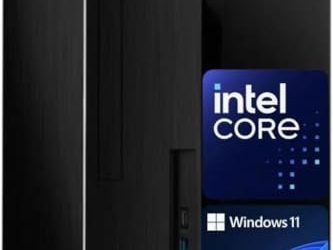
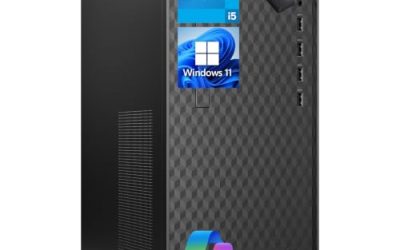
HP describes the OMEN 16L as a compact gaming tower, and this configuration lists a Ryzen 7 8700F, 32GB of RAM, a 1TB SSD and an RTX 5060. A small tower runs cooler than a mini PC, and the discrete desktop card sits in a standard slot. HP gives the dimensions as 337 x 155 x 308 mm, so it is small, but still a tower. Check the power supply wattage and whether the case allows a larger card before planning an upgrade.
- CPU: Ryzen 7 8700F, 8 cores
- GPU: RTX 5060 8GB class
- RAM: 32GB
- SSD: 1TB
Best for: desks where a mini PC runs too hot or loud. Skip if: you need a shelf-sized box.
Pros: standard slot GPU, easier cooling. Cons: larger than a mini, power supply details vary.
Skytech Chronos Mini line: best budget-friendly small tower

This Chronos Mini configuration pairs an Intel Ultra 7 270K Plus with an RTX 5060, 32GB DDR5-5600 and a 1TB NVMe. We found no official volume for the Chronos Mini, and community part lists point to a micro ATX mini tower rather than Mini-ITX, so treat it as a smaller tower and not a shelf-sized PC. The upside is conventional parts and a simple upgrade path.
- CPU: Intel Ultra 7 270K Plus
- GPU: RTX 5060 class
- RAM: 32GB DDR5-5600
- SSD: 1TB NVMe
Best for: people who want smaller than a mid tower without mini PC limits. Skip if: your desk or shelf needs a very small box.
Pros: conventional parts, 32GB RAM. Cons: bigger than it sounds, 8GB GPU class.
Desktop GPU or laptop GPU: why the label matters
Two mini PCs can both say “RTX 5070” and perform very differently. A desktop-class card is allowed to draw far more power, so it sustains higher clocks. A laptop-class chip carries the same marketing name but runs at a lower power limit, and memory configurations can differ. Coverage of ASUS specifications lists the GR70’s RTX 5070 as a laptop part with 8GB of GDDR6 and a power limit of up to 100W plus 15W of dynamic boost, while Minisforum and ZOTAC state that the G1 Pro and Magnus use desktop cards. The practical effect is that desktop reviews of a given GPU name do not transfer to a laptop-class mini PC.
| Check | Desktop GPU in a mini | Laptop GPU in a mini |
|---|---|---|
| Power draw | Higher, needs a 330W to 350W class supply | Lower, easier to cool |
| Performance per name | Closer to a normal tower | Below the same-named desktop card |
| Repair and upgrade | Low-profile card, still hard to swap | Soldered, not replaceable |
| Noise | Loud under sustained load | Moderate, depends on the cooler |
| What to verify | Low-profile card model and VRAM | Wattage limit and VRAM |
Cooling choices explained
Compact designs cool in a few different ways, and each shapes how the PC behaves during a long session.
- Vapor chamber and multi-fan mini designs: ASUS describes a three-fan, dual vapor chamber layout for the 2025 ROG NUC. These move heat efficiently but depend on fans, so sustained noise is the tradeoff.
- Small tower with standard coolers: a tower cooler or small liquid cooler can use larger, slower fans. This is why small towers tend to be quieter.
- Large liquid cooler in a small case: coverage of small form factor builds mentions designs that pair a 280mm liquid cooler with a compact case to handle a high-end X3D processor and a 16GB card. This shows what is possible, but those are not the same class as sealed mini PCs.
- Passive or fanless boxes: fine for office use, but not for gaming with a discrete GPU.
When reading owner feedback, look for comments about fan noise at idle, throttling in long sessions and coil whine. Those three problems appear most often in compact systems.
Who should avoid a compact gaming PC
A compact PC is not the right answer for everyone. If your priority is the most frames per money spent, a mid tower with the same GPU is usually cheaper, quieter and easier to upgrade. If you plan to move to a much larger graphics card in two or three years, a mini PC locks you out. If your desk has room and noise bothers you, a small tower is the better balance. Pick a mini PC when size is a firm requirement: a TV cabinet, a shared bedroom, a dorm, or frequent travel.
A final consideration is resale and support. Mini PCs from well-known brands tend to keep clearer documentation, BIOS updates and driver pages, which helps when a graphics driver or firmware update fixes fan curves or stability. Small brands may sell similar hardware but publish fewer updates, so check the support page for the model before you buy.
Questions to ask before you pay
- Is the GPU a desktop or laptop part, and how much VRAM does it have?
- What is the power supply wattage, and is it internal, external or replaceable?
- How many memory slots and M.2 slots are there, and are they populated?
- Is it a barebone product that needs memory, storage and Windows?
- What are the warranty length, the return window and who handles service?
Which size should you pick
| Your situation | Choose | Why |
|---|---|---|
| TV stand or shelf, 1080p to 1440p | Mini PC with a desktop GPU | Smallest size with respectable performance |
| Desk with limited room, quiet matters | Small tower | Larger fans, lower noise |
| Want to upgrade the GPU later | Small tower with standard PSU | Mini PCs are sealed |
| Local AI or heavy VRAM use | 16GB VRAM option | The 8GB cards run out of memory |
| Travel to LAN parties | Mini PC | Light and portable |
Buying guide and red flags
- 8GB VRAM for 1440p and above: workable for 1080p, limiting beyond.
- Unclear GPU type: if a listing says RTX 5070 but does not say desktop or laptop, find the manufacturer page.
- Proprietary power supply: hard to replace, check the model before buying.
- Single-channel memory: reduces performance, look for two memory slots populated.
- No second M.2 slot: limits storage.
- Weak cooling reputation: read owner feedback on temperatures and fan noise.
- Barebone products: need memory, storage and Windows.
Warranty and return policy
HP, ASUS, ZOTAC, Minisforum and Skytech each publish their own warranty and support terms. Read coverage length, whether the seller or the brand handles repairs, and the return window. Compact systems are harder to fix at home, so a good return window matters.
Upgrade path
| Part | Mini PC | Small tower |
|---|---|---|
| RAM | Yes, SO-DIMM | Yes |
| SSD | Yes, one or two M.2 slots | Yes |
| GPU | No on most | Often, if length and wattage fit |
| CPU | No on most | Sometimes |
| Power supply | No (external brick or fixed) | Possible with SFX |
Setup tips for a compact PC
- Leave several centimeters of clear space around vents and avoid enclosed cabinets.
- Clean dust filters every few months, because small fans clog sooner.
- Cap the frame rate to your monitor’s refresh rate to cut heat and noise.
- Use a quiet fan profile or power mode if the system offers one.
- Use the display connections on the graphics card, not the motherboard, on systems with a discrete GPU.
Frequently Asked Questions
Can a mini PC really play modern games?
Yes, models with an RTX 5060 class or higher run current games at 1080p and often 1440p. Performance depends on whether the GPU is a desktop or laptop part and on cooling.
Are compact gaming PCs louder?
Often, under load. Smaller fans spin faster, and the enclosure moves less air. Small towers are usually quieter than mini PCs.
Can I upgrade a compact gaming PC?
Mini PCs usually allow only RAM and SSD upgrades. Small towers can sometimes take a new graphics card, subject to length and power supply limits.
What power supply do I need in a small form factor PC?
A branded SFX or SFX-L unit of about 650W to 750W suits a mid-range tower, per small form factor build coverage. Mini PCs use fixed or external supplies.
Is a mini PC with a laptop GPU worth it?
It can be, if you accept no GPU upgrades. Laptop-class GPUs use less power, so the performance per watt is good, but you pay a premium for the small design.
Is 8GB VRAM enough in a compact PC?
For 1080p, mostly. For 1440p and new games at high settings, 12GB to 16GB is safer.
Sources
- Minisforum G1 Pro product page and Guru3D coverage
- ZOTAC Magnus EN275060TC product page
- ASUS ROG NUC (2025) product page and TechPowerUp coverage
- HP OMEN 16L product page
- Small form factor build guidance on SFX power supplies and GPU clearance
Last updated: October 2026
Related guides
More from Amazon
Programs that pair well with the guide above. Offers and eligibility are set by Amazon and may change.
A free business account with business pricing and bulk-buying tools for work, shop or home office.
Create a business accountFree shipping on eligible items, Prime Video and more. Eligible new members can start with a free trial.
Start a Prime free trialAudiobooks and podcasts to listen to on the go. Eligible new members can start with a free trial.
Try Audible freeAd-free music streaming. Eligible new subscribers can start with a free trial.
Try Music Unlimited freeAs an Amazon Associate we earn from qualifying purchases.