The best cheap PC speakers for most gamers are a basic USB-powered stereo pair such as the Logitech Z120 for the lowest price, or the Creative Pebble for noticeably fuller sound at a still-modest cost. If you want to spend a bit more, the Edifier R1280DB bookshelf speakers are the usual step up and deliver a far bigger sound than any speaker at the very bottom of the market.
Searches for “10 dollar speakers” are really asking what you can get at the budget end. The honest answer is that ultra-cheap speakers are fine for voice, videos and casual games, but they lack bass and volume. This guide shows where the money is best spent and how to avoid the common pitfalls.
Quick comparison of the picks
| Pick | Best for | Key specs | Typical price range |
|---|---|---|---|
| Logitech Z120 | Cheapest usable pair | USB powered, small stereo pair, about 1.2 W RMS total | usually $10-$20 |
| Creative Pebble | Best budget desktop sound | 2.0 USB powered, about 4.4 W RMS total, angled drivers | usually $20-$35 |
| Logitech Z313 | Best budget with a subwoofer | 2.1 system, about 25 W RMS, wired subwoofer | usually $40-$60 |
| Redragon GS500 Stentor | Best budget for looks | Wooden-style stereo pair, 3.5 mm, RGB-free | usually $20-$35 |
| Edifier R1280DB | Best step-up value | Powered bookshelf pair, Bluetooth, optical and RCA inputs | usually $100-$140 |
Cheapest usable pair: Logitech Z120
The Z120 is tiny, powered by USB and plugs in through a 3.5 mm jack. It is a sensible choice for a dorm desk, an office or a laptop that needs better sound than its built-in speakers. Expect modest volume and almost no bass. It is a good backup pair, and not what you want for immersive gaming.
Best budget desktop sound: Creative Pebble
The Pebble uses angled drivers that aim the sound toward your ears instead of the wall, which improves clarity at a desk. According to the manufacturer’s spec sheet, it uses USB power and a 3.5 mm audio cable, which keeps the setup simple. The trade-off is that the small drivers cannot produce real bass, and USB power limits maximum volume.
Best budget with a subwoofer: Logitech Z313
A 2.1 system adds a subwoofer, and that is where explosions and music gain weight. The Z313 plugs into the wall and connects via 3.5 mm. Its drawback is the separate sub that takes space under a desk and a wired control pod. It is a strong choice if your budget allows.
Best for looks: Redragon GS500 Stentor
If you want a desk speaker that looks more like furniture than plastic, the GS500 is a common pick. It delivers more warmth than the very small pairs. Quality control varies at this price, so check the return policy and test it as soon as you receive it.
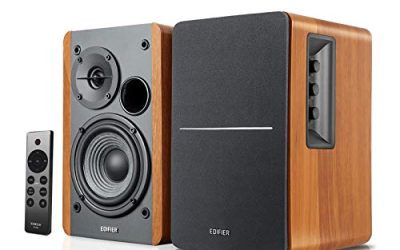
Best step-up value: Edifier R1280DB
This pair is a step up in price, but it uses real bookshelf-sized drivers and a powered design that sounds far bigger than the others. It adds Bluetooth, optical and RCA inputs, so it works with a PC, a console and a phone. The cost is desk space and a power cable. If you can afford it, it is the best way to get clearly better sound.
Worked example: what power and size give you
Watts on the box are less important than most buyers think. Doubling amplifier power adds only about 3 dB, which is a small step in perceived loudness. The perceived volume roughly doubles for every 10 dB. The table compares typical budget classes by RMS power and what the numbers mean.
| Class | Typical RMS power (total) | Gain vs 1.2 W pair | What you hear |
|---|---|---|---|
| Tiny USB pair | about 1.2 W | baseline | Quiet, thin sound, fine at arm’s length |
| Desktop 2.0 (USB) | about 4-5 W | about +5.5 dB | Fills a small room at low volume |
| 2.1 with subwoofer | about 25 W | about +13 dB | Clear bass and plenty of volume |
| Powered bookshelf pair | about 40-60 W | about +15-17 dB | Loud, with solid mid-range |
The calculation uses the formula 10 x log10(power ratio). Going from 1.2 W to 4.4 W is a ratio of 3.7, which equals about 5.7 dB. Going from 1.2 W to 25 W is a ratio of about 21, which equals about 13 dB. That is more than a doubling of perceived loudness. So if you listen at a desk where moderate volume is enough, the smallest speakers are fine; if you want impact in games, a 2.1 system is the largest improvement per dollar.
How to choose cheap PC speakers
- Decide how you listen. If you only listen at arm’s length, small pairs work. If you want to fill a room, go to 2.1 or bookshelf speakers.
- Check the connection. USB speakers draw power and create a digital audio path, but most of these still use 3.5 mm for audio. Bluetooth is convenient but adds a little delay, which matters in fast games.
- Look at RMS, not peak power. Peak power figures are inflated. RMS is the sustained rating.
- Consider desk space. A subwoofer needs to sit on the floor, and bookshelf speakers need around 15-20 cm of clearance behind them.
- Think about headphones. For competitive play, a headset is usually the better value because it gives directional cues. Speakers are for general entertainment.
Setup tips that improve sound for free
- Place speakers at ear height and form a triangle with your head. About 60 degrees between the two speakers works well.
- Keep speakers away from walls and corners that boost muddy bass.
- Set the PC volume to around 70-80% and use the speaker knob for adjustments to reduce distortion.
- Turn off audio enhancements in Windows if sound seems harsh, and try a neutral equalizer setting.
- Use a ground-loop isolator if you hear humming from a mix of USB and wall power.
When to skip cheap speakers
If you play competitive shooters, if your room is noisy or if you share space, a pair of headphones is more practical. Speakers also do not suit late-night play. For music, a small powered pair gives good value, and for movies a 2.1 system is more satisfying.
Frequently Asked Questions
Are cheap PC speakers any good?
They are good enough for voice, videos and casual games at normal desk distance. They are limited in bass and volume, and the cheapest models can sound harsh at higher volumes. If sound matters to you, set aside a little more money for a 2.1 system.
Do USB speakers sound better than 3.5 mm speakers?
Not necessarily. Most USB-powered speakers only use USB for power, and the audio still arrives through the 3.5 mm cable. A speaker with a true USB audio interface has its own digital-to-analog converter, which can help with noisy motherboards.
Is a subwoofer worth it for a desk setup?
Yes if you play action games or watch movies. The extra low frequencies make a big difference. If you live in a shared space, the bass may carry through floors, so keep the level moderate.
Are Bluetooth speakers good for gaming?
Bluetooth often adds noticeable delay, which causes audio to lag behind the picture. Wired speakers avoid that. If you use Bluetooth, look for low-latency codec support on both devices.
Should I buy speakers or a headset for gaming?
For competitive play, a headset gives better directional cues and does not disturb others. For solo games, movies and music, speakers are more comfortable for long sessions. Many players keep both.
Related guides
More from Amazon
Programs that pair well with the guide above. Offers and eligibility are set by Amazon and may change.
A free business account with business pricing and bulk-buying tools for work, shop or home office.
Create a business accountFree shipping on eligible items, Prime Video and more. Eligible new members can start with a free trial.
Start a Prime free trialAudiobooks and podcasts to listen to on the go. Eligible new members can start with a free trial.
Try Audible freeAd-free music streaming. Eligible new subscribers can start with a free trial.
Try Music Unlimited freeAs an Amazon Associate we earn from qualifying purchases.