- Top Pick: Elgato 4K X
- Runner-up: AVerMedia Live Gamer Ultra 2.1 (GC553G2)
- Also consider: Elgato 4K S
The best capture card for most PS5 players is the Elgato 4K X, because its HDMI 2.1 passthrough carries the console’s full 4K120 and VRR output to your TV while it captures at up to 4K144 over USB. If you mainly stream rather than record, the Elgato 4K S captures 4K60 for less money in tier terms, and the AVerMedia Live Gamer Ultra 2.1 adds a dedicated party chat input that the Elgato cards lack.
Every card here connects the same way: the PS5 plugs into the card’s HDMI input, the card’s HDMI output feeds your TV or monitor, and a USB or Thunderbolt cable carries the captured feed to a PC, Mac or laptop running OBS or similar software. What separates the picks is how much of the PS5 signal survives that trip. HDMI 2.1 models pass 4K120 and variable refresh rate untouched, while HDMI 2.0 models top out at 4K60 passthrough, which is still fine for the majority of PS5 games that run at 60 frames per second or below.
As an Amazon Associate, we earn from qualifying purchases.
Top 3 picks at a glance
Quick Answer
For PS5 and PS5 Pro owners who play in 120 Hz modes, pick the Elgato 4K X or the AVerMedia Live Gamer Ultra 2.1, the two HDMI 2.1 cards here with 4K60 capture and full-refresh passthrough. The Elgato 4K S is the mid-range choice for 4K60 capture on an HDMI 2.0 chain, the HD60 X covers 1080p60 streaming on a budget, and the Live Gamer Bolt suits Thunderbolt laptops.
Table of Contents
- Elgato 4K X
- AVerMedia Live Gamer Ultra 2.1 (GC553G2)
- Elgato 4K S
- Elgato HD60 X
- AVerMedia Live Gamer Bolt (GC555)
- How to Choose a Capture Card for PS5
- Who Should Skip a Capture Card
- FAQ
- Final Verdict
- Product and ASIN Reference
Elgato 4K X

The 4K X is the card that asks the fewest compromises from a PS5 or PS5 Pro. Its HDMI 2.1 input and output pass through up to 4K144 with HDR10 and VRR, so a PS5 running a 120 Hz performance mode reaches your display exactly as the console outputs it. On the capture side it records up to 4K144, 1440p144 or 1080p240 over a USB 3.2 Gen 2 connection, which leaves plenty of headroom for recording at 4K60 while streaming at 1080p60.
Elgato bundles an 8K-rated HDMI cable and a USB-C to USB-C cable in the box, and the card works with PC, Mac and iPad. Full capture rates need a USB 3.2 Gen 2 port; a Gen 1 port works with reduced capture resolution. This is the premium tier pick for players who use 120 Hz modes and do not want the capture chain to become the bottleneck.
Specs:
- Model: 20GBH9901
- Interface: USB 3.2 Gen 2 (USB-C)
- Input and output: HDMI 2.1
- Max capture: 2160p144, 1440p144, 1080p240
- Max passthrough: 2160p144 with HDR10 and VRR
- In the box: 4K X, USB 3.2 C-to-C cable, 8K HDMI cable
AVerMedia Live Gamer Ultra 2.1 (GC553G2)

AVerMedia’s flagship USB card matches the 4K X on the specs that matter for a PS5: HDMI 2.1 passthrough up to 4K144 with HDR and VRR, and capture up to 4K60. It connects over USB 3.2 Gen 2 Type-C and uses the standard UVC protocol, so OBS and other broadcast software recognise it without a driver install on PC or Mac.
Its standout feature for console streamers is party chat. A pair of 3.5 mm TRRS jacks, one for a headset and one for the gamepad, let you route PS5 party chat into the recording, something most capture cards cannot do without extra splitters or a chat link cable. AVerMedia also adds a customisable RGB lightbar and P010 HDR capture alongside YUY2, NV12 and RGB24. At 115 g it is a small box that sits neatly under a TV, in the premium tier next to the 4K X.
Specs:
- Model: GC553G2
- Interface: USB 3.2 Gen 2 Type-C (UVC)
- Input and output: HDMI 2.1
- Max capture: 2160p60
- Max passthrough: 2160p144 with HDR and VRR
- Audio: 3.5 mm TRRS headset and gamepad jacks for party chat
- Dimensions: 120 x 70 x 27.6 mm; weight 115 g
Elgato 4K S

The 4K S is Elgato’s mid-range card and the natural successor to the HD60 line. It captures at up to 2160p60, 1440p60 or 1080p120, which covers 4K60 recording for YouTube and more than enough for a 1080p60 stream. Passthrough runs to 2160p60, 1440p120 or 1080p240 over HDMI 2.0, with HDR10 passthrough and VRR support.
That HDMI 2.0 ceiling defines who should buy it. PS5 games played at 4K60 pass through untouched, and 120 Hz modes still work if you run the console at 1440p or 1080p, but a 4K120 signal is capped at 60 Hz on the way to the display. HDR10 capture tops out at 1080p60 and is Windows only, while Mac and iPad users get HDR passthrough instead. A 3.5 mm analogue audio input is included for adding a microphone or mixer feed directly to the capture.
Specs:
- Model: 20GBR9901
- Interface: USB-C (USB 3.0)
- Input and output: HDMI 2.0
- Max capture: 2160p60, 1440p60, 1080p120
- Max passthrough: 2160p60, 1440p120, 1080p240 with HDR10 and VRR
- Audio: 3.5 mm analogue audio input
- Dimensions: 112 x 72 x 18 mm; weight 90 g
Elgato HD60 X
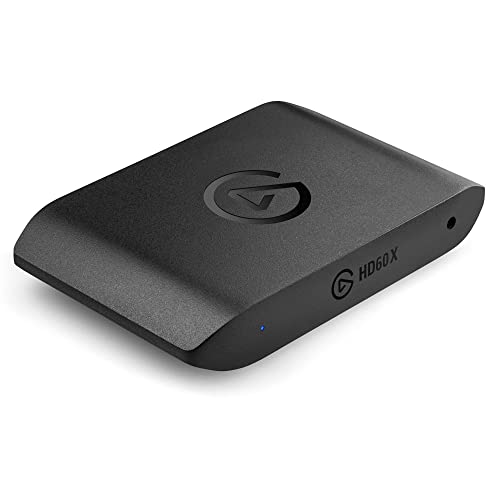
The HD60 X is the budget tier entry and remains a sensible pick for streamers whose output is a 1080p60 broadcast. It captures 1080p60 HDR10, 1440p60 or 4K30, while the passthrough side handles 4K60 HDR10, 1440p120 and 1080p240 with VRR, so the game on your TV looks identical to a direct console connection at the frame rates most PS5 titles use.
Because capture tops out at 4K30, this is not the card for archiving 4K60 gameplay, and 120 Hz modes pass only at 1440p or 1080p rather than 4K. For a creator streaming story games, sports titles or shooters at 1080p60, though, the published specification covers the job, and the card works with PC and Mac over a single USB 3.0 connection with no separate power supply.
Specs:
- Model: 10GBE9901
- Interface: USB 3.0 (USB-C)
- Input and output: HDMI 2.0
- Max capture: 2160p30 HDR10, 1440p60, 1080p60 HDR10
- Max passthrough: 2160p60 HDR10, 1440p120, 1080p240 with VRR
- Dimensions: 112 x 72 x 17 mm; weight 91 g
AVerMedia Live Gamer Bolt (GC555)

The Live Gamer Bolt takes a different route from every other card here: it connects to the computer over Thunderbolt 3 instead of USB, and AVerMedia is explicit that it is not compatible with ordinary USB ports. In exchange it captures uncompressed 2160p60 HDR, 1440p144 or 1080p240, figures that match internal PCIe cards, with passthrough at the same rates over HDMI 2.0.
For PS5 use the HDMI 2.0 ports are the limit to note, since passthrough stops at 4K60 and 120 Hz console modes are not carried at 4K. The Bolt suits a creator with a Thunderbolt 3 laptop who records at 4K60 HDR and values the high-frame-rate capture at lower resolutions. AVerMedia lists Windows 10 and macOS 10.15 or later support, and notes the card is not for Apple M1 computers, so check your machine first. It is a premium tier specialist rather than a general recommendation.
Specs:
- Model: GC555
- Interface: Thunderbolt 3 (not USB compatible)
- Input and output: HDMI 2.0
- Max capture: 2160p60 HDR, 1440p144, 1080p240
- Max passthrough: 2160p60 HDR, 1440p144, 1080p240
- Dimensions: 120 x 120 x 29.3 mm; weight 348 g
- Software: RECentral
How to Choose a Capture Card for PS5
Start with passthrough, because that is the signal you actually play on. If you use the PS5’s 120 Hz performance modes at 4K, only an HDMI 2.1 card such as the 4K X or Live Gamer Ultra 2.1 passes that signal to your TV unchanged. If you play at 4K60 or run 120 Hz at 1440p, HDMI 2.0 cards are fine and sit in lower tiers.
Next, match capture resolution to your output. Streams on the major platforms run at 1080p60, so any card here can feed a broadcast; 4K60 capture matters when you record footage for edited videos. Then check the computer connection. The 4K X and Ultra 2.1 need a USB 3.2 Gen 2 port for their full capture rates, the 4K S and HD60 X run on USB 3.0, and the Bolt needs Thunderbolt 3 specifically.
Finally, plan for audio and settings. Turn off HDCP in the PS5 system settings under HDMI, or the console will block capture, and note that media apps stay unavailable while it is off. For party chat, the Ultra 2.1’s gamepad jack is the simplest route; with other cards you will typically add a chat link cable.
Who Should Skip a Capture Card
Skip the capture card entirely if you only clip short moments, since the PS5’s built-in capture and Share Play features already record gameplay and stream to a linked account without extra hardware. Players on a single 4K60 TV who never record also gain nothing here, because passthrough only preserves the signal rather than improving it.
Also skip the HDMI 2.0 cards if 4K120 play is your priority, and skip the Live Gamer Bolt if your laptop has USB-C ports without Thunderbolt 3, or an Apple M1 processor, since it will not connect at all. Creators who record on a desktop with a free PCIe slot may prefer an internal card instead of a USB box.
FAQ
Do I need to turn off HDCP on my PS5 to use a capture card?
Yes. The PS5 encrypts its HDMI output with HDCP, and capture cards cannot record an encrypted signal. Turning HDCP off in the system settings under HDMI lets gameplay pass to the card, although streaming and media apps on the console will not run while it is disabled.
Can I play at 120 Hz on PS5 while capturing?
Yes, with the right card. An HDMI 2.1 model such as the Elgato 4K X or AVerMedia Live Gamer Ultra 2.1 passes 4K120 through to the display while capturing. HDMI 2.0 cards cap passthrough at 4K60, though most still pass 120 Hz at 1440p or 1080p.
Is 4K60 capture worth it if I stream at 1080p60?
For live streaming alone, not really, because platforms receive a 1080p60 feed either way. It becomes worthwhile when you record gameplay for edited videos, crop vertical clips from a 4K frame, or archive footage. If none of that applies, a 1080p60 card covers your needs.
Do these capture cards work with a laptop or Mac?
Most do. The USB cards here are UVC devices that work in OBS on Windows and macOS without drivers, and the Elgato cards also support iPad capture. The exception is the Live Gamer Bolt, which needs a Thunderbolt 3 port and is listed as not for Apple M1 computers.
Final Verdict
Buy the Elgato 4K X if you play PS5 or PS5 Pro games in 120 Hz modes and want the strongest capture ceiling over USB. Choose the AVerMedia Live Gamer Ultra 2.1 for the same HDMI 2.1 passthrough plus proper party chat inputs. The Elgato 4K S is the balanced mid-range pick for 4K60 capture, the HD60 X keeps 1080p60 streaming simple on a budget, and the Live Gamer Bolt is the niche choice for Thunderbolt laptop recording at 4K60 HDR.
Related guides
More from Amazon
Programs that pair well with the guide above. Offers and eligibility are set by Amazon and may change.
A free business account with business pricing and bulk-buying tools for work, shop or home office.
Create a business accountFree shipping on eligible items, Prime Video and more. Eligible new members can start with a free trial.
Start a Prime free trialAudiobooks and podcasts to listen to on the go. Eligible new members can start with a free trial.
Try Audible freeAd-free music streaming. Eligible new subscribers can start with a free trial.
Try Music Unlimited freeAs an Amazon Associate we earn from qualifying purchases.


