
The best budget GPU for rendering is usually the one with enough VRAM for your scenes and reliable support in the software you use. For most Blender users, that means an NVIDIA card with 8GB or 12GB of memory. A cheaper AMD or Intel card can be a sensible buy for certain workloads, but renderer compatibility matters more than gaming frame rates here.
For a general-purpose budget workstation, I would start by comparing RTX 3060 12GB graphics cards and newer 8GB NVIDIA options. The RTX 3060 is not fast by current gaming standards, but its 12GB of VRAM and mature CUDA/OptiX support make it unusually useful for entry-level GPU rendering.
As an Amazon Associate we earn from qualifying purchases at no extra cost to you.

Our Top Picks
 GIGABYTE GeForce RTX 3050 WINDFORCE OC V2 6GStandard7.5 x 4.4 x 0.1 Inches0.88 PoundsCheck on Amazon


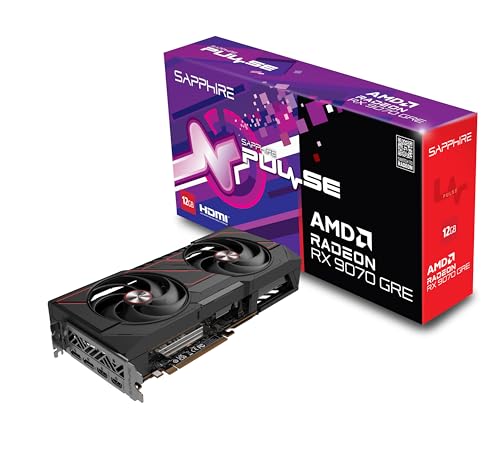
What matters in a budget rendering GPU
VRAM is the first limitation. Your GPU must hold the scene, textures, geometry, acceleration structures, and rendering overhead. If it runs out of VRAM, the software may fall back to system memory, render on the CPU, or fail outright. More VRAM does not automatically make a card faster, but it can determine whether a project renders at all.
Software support is just as important as raw performance. Blender supports NVIDIA CUDA and OptiX, AMD HIP, and Intel oneAPI depending on the version and operating system. NVIDIA generally remains the safest choice for broad compatibility, especially if you use several creative applications rather than only Blender.
Cooling and power also affect the result. Rendering can keep a GPU at high load for hours. A cheap card with a weak cooler may throttle, become noisy, or fail sooner than a slightly more expensive model with a substantial heatsink. Check your case clearance and power supply before buying.
Best budget GPU choices for rendering
| GPU category | Typical VRAM | Best use | Main advantage | Main drawback |
|---|---|---|---|---|
| Used NVIDIA RTX 3060 | 12GB | Blender and general GPU rendering | Good VRAM and mature OptiX support | Older and slower than newer mid-range cards |
| New NVIDIA 8GB card | 8GB | Small scenes and mixed creative work | Efficient, newer features and warranty | VRAM can become a hard limit |
| AMD Radeon 12GB or 16GB card | 12GB–16GB | Blender HIP and some OpenCL workloads | Often strong memory capacity for the money | Less consistent application support |
| Intel Arc B-series card | Usually 12GB or more | Supported Blender and creator workloads | Competitive hardware value | Software and driver support need checking |
Best cheap all-rounder: NVIDIA RTX 3060 12GB
The RTX 3060 12GB is the budget rendering pick when you can find it at a reasonable price. Its 12GB frame buffer gives it more room for large textures and moderately complex scenes than many newer 8GB cards. NVIDIA’s OptiX acceleration is also well supported in Blender and other rendering applications.
Its weakness is speed. A newer card can finish simple scenes faster, use less power, and offer better gaming performance. The 3060 also has limited value if you mainly render on the CPU or use software that does not support its GPU acceleration. Do not pay near the price of a substantially newer card just to get the 12GB capacity.
Buy a used RTX 3060 only after checking the seller’s return policy, card condition, and whether the fans produce grinding or rattling noises. Cards used for mining are not automatically bad, but they may have worn fans or a tired thermal interface. A stress test and temperature check during the return period are worthwhile.
Best safer purchase: a new NVIDIA budget GPU
A new 8GB NVIDIA card is often the better choice if you want a warranty, lower power consumption, and less uncertainty. It suits beginners rendering product scenes, animation exercises, architectural interiors, and other projects that fit comfortably within 8GB.
The failure mode is predictable: you start a larger scene, add high-resolution textures, and the render stops because the card is out of memory. This is why an 8GB card can be faster yet less useful than a slower 12GB card. Before buying, check the estimated VRAM requirement of your renderer and leave some headroom.
Look for NVIDIA RTX graphics cards with 8GB if your projects are modest and you also want a capable gaming GPU. Avoid paying extra for factory overclocking; it has little effect on long rendering jobs compared with the GPU tier and VRAM capacity.
When AMD or Intel makes more sense
AMD can be excellent value when you need memory capacity for the money. A 12GB or 16GB AMD Radeon card may handle scenes that exceed an 8GB NVIDIA card’s capacity. Blender’s HIP support has improved, but performance and feature support can vary by GPU generation, operating system, and Blender version.
Choose AMD when you have confirmed that your renderer supports your exact card and features. It is a less comfortable recommendation for a machine used with several different creative programs, plug-ins, or commercial renderers. Some may support NVIDIA acceleration but offer limited or no AMD GPU support.
Intel Arc cards can also be attractive on price and memory capacity. They are worth considering for Blender users whose version supports the relevant oneAPI features and who are comfortable keeping drivers current. They are not the safest blind purchase: application compatibility, viewport behavior, and render performance can vary more than with NVIDIA.
Practical buying advice
For a first rendering PC, prioritize the GPU, 32GB of system RAM, and a modern six-core or better CPU. System RAM still matters when preparing scenes, simulating effects, or handling assets that do not fit in VRAM. A fast GPU cannot compensate for constant memory swapping.
If your budget is tight, buying a used 12GB NVIDIA card is often more sensible than buying a new 8GB card solely because it is newer. If reliability and warranty matter more than maximum scene size, choose the new card. If you render professionally, the cheapest option may cost more in waiting time; calculate the value of faster render completion rather than comparing gaming benchmarks alone.
Also check whether your power supply has the required connectors and enough capacity. Keep at least one intake and one exhaust fan in the case, and avoid compact models with restricted airflow if the system will render overnight.
FAQ
Is 8GB VRAM enough for rendering?
It is enough for many small Blender scenes, product renders, and learning projects. Large environments, high-resolution textures, heavy geometry, and complex simulations can exceed it quickly, so 12GB is a more flexible budget target.
Is NVIDIA better than AMD for Blender?
NVIDIA is usually the safer choice because CUDA and OptiX support is broad and mature. AMD can be good value when HIP supports your exact setup, but verify compatibility before buying.
Should I buy a used RTX 3060 for rendering?
Yes, if the price is clearly below newer alternatives and the card has 12GB of VRAM, a return window, and acceptable condition. Test temperatures, fan noise, display outputs, and sustained rendering immediately after purchase.
Does a more expensive GPU always render faster?
No. A faster GPU may render supported scenes more quickly, but VRAM capacity can matter more. A card that cannot fit the scene may be less useful than a slower card with more memory.



