- Top Pick: GL.iNet GL-MT6000 (Flint 2)
- Runner-up: TP-Link Archer GXE75
- Also consider: TP-Link Archer AXE75
The best budget gaming router is the GL.iNet GL-MT6000 (Flint 2), because low latency at this tier comes from traffic control rather than raw radio speed, and its OpenWrt software offers the deepest QoS and SQM tools for stopping bufferbloat. The TP-Link Archer GXE75 is the strongest made-for-gaming alternative, with a dedicated gaming port and game acceleration on a Wi-Fi 6E platform. The Archer AXE75 adds a clean 6 GHz band for wireless PCs, the Archer AX55 covers the basics for the least money in this roundup, and the NETGEAR Nighthawk RAX43 suits bigger homes that need coverage first. Every pick is Wi-Fi 6 or 6E and can prioritize game traffic.
As an Amazon Associate, we earn from qualifying purchases.
Top 3 picks at a glance
Quick Answer
Buy the GL.iNet GL-MT6000 (Flint 2) if you want the lowest latency per dollar, since its OpenWrt SQM tools directly attack bufferbloat. Choose the TP-Link Archer GXE75 for a true gaming feature set, the Archer AXE75 for a 6 GHz band, the Archer AX55 on the tightest budget, and the NETGEAR Nighthawk RAX43 for wider coverage in larger homes.
Table of Contents
- GL.iNet GL-MT6000 (Flint 2)
- TP-Link Archer GXE75
- TP-Link Archer AXE75
- TP-Link Archer AX55
- NETGEAR Nighthawk RAX43
- How to Choose
- Who Should Skip
- FAQ
- Final Verdict
GL.iNet GL-MT6000 (Flint 2)

The Flint 2 is the latency specialist of this group. It runs pre-installed OpenWrt firmware, which gives it full Smart Queue Management with fq_codel and cake-style shaping, the single most effective fix for ping spikes when someone else starts a big download or cloud backup. Most consumer routers at this tier offer a simple priority toggle; the Flint 2 lets you shape the connection itself. The hardware backs that up with a quad-core 2.0 GHz processor, 1 GB of memory and two 2.5 Gbps ports, so gigabit fiber plans are no strain. OpenVPN and WireGuard clients and servers are built in, and the same open platform supports network-wide ad blocking. It is the premium pick here, aimed at players comfortable opening an advanced settings page.
Specs:
- Wi-Fi standard: Wi-Fi 6 (802.11ax), dual-band AX6000
- Band speeds: up to 4,804 Mbps on 5 GHz, up to 1,148 Mbps on 2.4 GHz
- Processor: MediaTek MT7986 quad-core at 2.0 GHz
- Memory: 1 GB DDR4 RAM, 8 GB eMMC storage
- Ethernet: two 2.5 Gbps ports (WAN and WAN/LAN), four Gigabit LAN ports
- USB: one USB 3.0 port
- Latency features: OpenWrt firmware with full QoS and SQM (fq_codel and cake)
- VPN: OpenVPN and WireGuard client and server built in
TP-Link Archer GXE75

The Archer GXE75 is the only router here designed purely for gaming, and it shows in the details: a dedicated gaming port that automatically prioritizes whatever is plugged into it, a game accelerator that shortens routing paths to game servers, and a gaming dashboard with real-time connection status. Its tri-band Wi-Fi 6E design gives wireless gaming PCs a 6 GHz band that is still largely empty in most neighborhoods, for steadier ping than a crowded 5 GHz channel. Wired support is strong for the tier, with a 2.5 Gbps port for a multi-gig internet plan or a fast NAS. EasyMesh support lets you add compatible nodes later, and HomeShield covers basic security and parental controls. Choose the GXE75 if you want gaming features without learning OpenWrt.
Specs:
- Wi-Fi standard: Wi-Fi 6E (802.11ax), tri-band AXE5400
- Band speeds: up to 2,402 Mbps on 6 GHz, up to 2,402 Mbps on 5 GHz, up to 574 Mbps on 2.4 GHz
- Ethernet: one 2.5 Gbps port and four Gigabit ports
- USB: one USB 3.0 port
- Gaming features: dedicated gaming port, game accelerator, gaming panel with RGB lighting
- Security: TP-Link HomeShield, free basic plan with optional Pro plan
- Expansion: EasyMesh compatible
TP-Link Archer AXE75

The Archer AXE75 delivers the same tri-band Wi-Fi 6E layout as its gaming sibling in a plainer, cheaper package. The 6 GHz band is the headline: a Wi-Fi 6E or 7 gaming laptop can sit on a wide, uncongested channel while phones and smart gear stay on 5 and 2.4 GHz. A 1.7 GHz quad-core processor and 512 MB of memory keep the interface responsive with many devices connected, and the port layout includes a 2.5 Gbps WAN/LAN connection for faster fiber plans. TP-Link’s QoS lets you prioritize a gaming device, and OneMesh support allows a compatible extender later. It lacks the GXE75’s dedicated gaming port and accelerator, so think of it as the value route to 6 GHz rather than a gaming router in name.
Specs:
- Wi-Fi standard: Wi-Fi 6E (802.11ax), tri-band AXE5400
- Band speeds: up to 2,402 Mbps on 6 GHz, up to 2,402 Mbps on 5 GHz, up to 574 Mbps on 2.4 GHz
- Processor: 1.7 GHz quad-core, 512 MB RAM
- Ethernet: one 2.5 Gbps WAN/LAN, one Gigabit WAN/LAN, three Gigabit LAN ports
- USB: one USB 3.0 port
- Latency features: device-priority QoS, OFDMA and MU-MIMO
- Security: WPA3, TP-Link HomeShield, VPN server and client support
- Expansion: OneMesh compatible
TP-Link Archer AX55
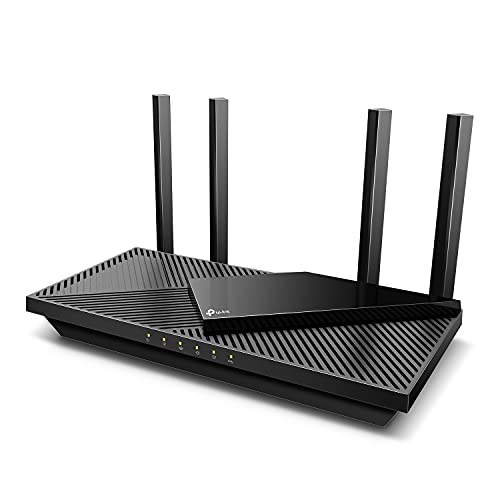
The Archer AX55 is the entry point: an AX3000 Wi-Fi 6 router that keeps the features a single gaming setup actually uses. Its 5 GHz band runs at up to 2,402 Mbps with wide 160 MHz channels, which is plenty for one gaming PC plus a house of streaming devices, and OFDMA keeps latency even when many small devices chat at once. QoS by device is on board, along with VPN client and server support and HomeShield’s basic security tier. All four LAN ports are Gigabit, and EasyMesh compatibility gives it a growth path the cheapest routers usually lack. It gives up the 6 GHz band and multi-gig ports of the picks above, but for an apartment or a first gaming setup it is the sensible floor.
Specs:
- Wi-Fi standard: Wi-Fi 6 (802.11ax), dual-band AX3000
- Band speeds: up to 2,402 Mbps on 5 GHz with 160 MHz channels, up to 574 Mbps on 2.4 GHz
- Ethernet: one Gigabit WAN port, four Gigabit LAN ports
- USB: one USB 3.0 port
- Latency features: device-priority QoS, OFDMA and MU-MIMO
- Security: TP-Link HomeShield, WPA3, VPN client and server support
- Expansion: EasyMesh and OneMesh compatible
NETGEAR Nighthawk RAX43

The Nighthawk RAX43 is the coverage pick. NETGEAR rates it for homes up to 2,500 square feet and up to 25 devices, and its five-stream AX4200 radios push more wireless capacity than the AX55 above, suiting a family home where the gaming PC shares airtime with several TVs. Four external antennas and beamforming help it hold a steadier signal through walls, and a triple-core 1.5 GHz processor runs the show. QoS is included for prioritizing a console or PC, and the Nighthawk app handles setup and management. NETGEAR Armor security and Smart Parental Controls are subscription extras after their trial periods, so factor that into the running cost. Pick the RAX43 when the router has to live far from the gaming room and signal reach matters more than exotic latency tools.
Specs:
- Wi-Fi standard: Wi-Fi 6 (802.11ax), dual-band AX4200, five streams
- Band speeds: up to 3,600 Mbps on 5 GHz, up to 600 Mbps on 2.4 GHz
- Coverage: up to 2,500 square feet and 25 devices (manufacturer rating)
- Processor: triple-core at 1.5 GHz
- Ethernet: one Gigabit WAN port, four Gigabit LAN ports
- USB: one USB 3.0 port
- Latency features: QoS, OFDMA, MU-MIMO and beamforming
- Security: NETGEAR Armor and Smart Parental Controls, subscription after trial
How to Choose
Start with the latency feature, not the speed class. Bufferbloat, the queue that builds on a busy connection, causes most home lag spikes, and SQM is the direct cure; only the Flint 2 offers full SQM here, while the others rely on device-priority QoS, which helps but cannot shape the internet link itself. Second, decide how your gaming machine connects. A wired PC only needs a free LAN port and good QoS, but a wireless setup benefits most from a tri-band router whose 6 GHz band is free of legacy devices, which is where the GXE75 and AXE75 earn their tier. Third, match the WAN port to your internet plan: Gigabit ports cap faster fiber, while the 2.5 Gbps ports on the Flint 2, GXE75 and AXE75 leave headroom. Fourth, size the coverage honestly; a strong single router suits most apartments and mid-size homes, and mesh only helps when distance and walls are the problem. Finally, check the subscription column, since security suites on several brands become paid extras after a trial.
Who Should Skip
Skip this tier if your internet plan is faster than gigabit and several wired devices need multi-gig ports at once; that points to a flagship gaming router or a mesh system. Skip it if your gaming room sits two or more walls away from where the modem must live, because no single budget router fixes a dead zone, and a mesh kit is the right tool. Tinkerers who want custom firmware beyond OpenWrt’s mainstream builds, and households wanting whole-home parental controls without a subscription decision, should also look elsewhere. And if your current router already has working QoS and your ping is stable, an upgrade here buys features, not lower latency.
FAQ
Will a budget gaming router actually lower my ping?
It can remove the spikes your home network adds. SQM and QoS stop other traffic from queuing ahead of your game packets, which flattens ping under load. No router can beat the baseline latency set by your internet provider and your distance to the game server, so judge success by stability during busy hours, not by a lower best-case number.
Is SQM better than a gaming port or game accelerator?
They solve different problems. SQM shapes the whole internet connection to prevent bufferbloat, which is the most common cause of lag spikes at home. A gaming port simply prioritizes one wired device on the local network, and an accelerator optimizes routing beyond your house. For a shared, busy connection, SQM is the stronger tool; for a quiet connection, the simpler features are enough.
Do I need Wi-Fi 6E for low-latency gaming?
Only if you game over Wi-Fi. The 6 GHz band is wide and still lightly used, so a compatible PC or console gets a cleaner channel with less contention. If your gaming machine is wired, Wi-Fi 6E adds nothing to your latency, and a cheaper Wi-Fi 6 router with good QoS is the smarter buy.
How many Ethernet ports do I need on a gaming router?
At minimum, one for your gaming PC or console, since a wired connection is still the lowest-latency option. Add ports for anything else at the desk, such as a streaming PC or NAS. Four LAN ports, as on every pick here, cover most setups; choose a 2.5 Gbps model if your internet plan or local transfers exceed gigabit.
Final Verdict
Buy the GL.iNet GL-MT6000 (Flint 2) for the best latency control at this tier; its OpenWrt SQM is a feature routers several classes up still hide. Choose the TP-Link Archer GXE75 if you want gaming branding with substance behind it, the Archer AXE75 for 6 GHz on a value budget, and the Archer AX55 when the budget is firm and the setup is simple. Take the NETGEAR Nighthawk RAX43 when coverage across a larger home is the priority. Any of the five beats an aging ISP rental router with no traffic controls at all.
Related guides
More from Amazon
Programs that pair well with the guide above. Offers and eligibility are set by Amazon and may change.
A free business account with business pricing and bulk-buying tools for work, shop or home office.
Create a business accountFree shipping on eligible items, Prime Video and more. Eligible new members can start with a free trial.
Start a Prime free trialAudiobooks and podcasts to listen to on the go. Eligible new members can start with a free trial.
Try Audible freeAd-free music streaming. Eligible new subscribers can start with a free trial.
Try Music Unlimited freeAs an Amazon Associate we earn from qualifying purchases.


