
Our Top Picks
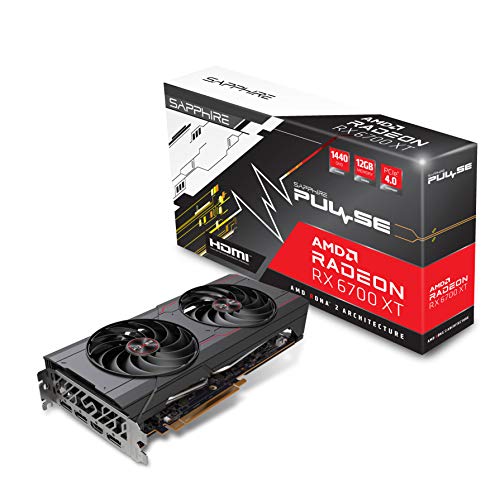


Top 3 picks at a glance
What budget 1440p actually needs
1440p has about 78% more pixels than 1080p. That hits both the GPU core and VRAM harder. For 60-90 fps at high settings in modern AAA games, you need at least 12GB of VRAM and rasterization performance around a last-gen 70-class card. 8GB cards can still run 1440p, but they force you to drop textures first, and that is exactly what makes games look blurry at higher resolution.
Below that you are buying a 1080p card and upscaling your way to 1440p. Above that you are in comfortable 1440p ultra territory, not budget.
As an Amazon Associate we earn from qualifying purchases at no extra cost to you.



Quick comparison
| GPU | VRAM | Real 1440p target | Best for | Watch out for |
|---|---|---|---|---|
| AMD RX 6700 XT 12GB | 12GB | 60-75 fps high | Varies | Used mining cards, loud blower models, weak ray tracing |
| AMD RX 7700 XT 12GB | 12GB | 75-100 fps high | Best value for most buyers | Higher power draw, needs good case airflow |
| NVIDIA RTX 4060 Ti 16GB | 16GB | 70-90 fps high, better RT | 1440p if you want DLSS 3 and efficiency | 128-bit bus, not much faster than 8GB version in pure raster |
| Intel Arc B580 12GB | 12GB | 60-80 fps medium-high | Tight budgets, strong upscaling | Needs Resizable BAR on, older CPUs lose 10-15% |
Best overall: AMD RX 7700 XT 12GB
For most budget 1440p builds, the Radeon RX 7700 XT is the sweet spot. It is typically 15-20% faster than the older 6700 XT at 1440p and has enough VRAM headroom for ultra textures in games like Baldur’s Gate 3, Elden Ring, and Call of Duty. Expect 80-100 fps at high settings in competitive shooters and 65-80 fps in heavy single-player titles without upscaling.
Trade-offs are real. It draws around 245W, so budget 550W PSUs with only one PCIe cable daisy-chained will run hot and noisy. Use two separate cables. Ray tracing is playable at 1440p medium with FSR, but it is a full tier behind NVIDIA. If you mainly play Cyberpunk with path tracing or Alan Wake 2 with full RT, this is not your card.
Failure mode to know: heat. Cheap dual-fan 7700 XT models will sit at 75-78C with hotspot temps over 95C in a closed case. It will not die, but fans get loud. Who suits: Ryzen 5 5600 / 7600 or i5-12400F and up, 144Hz 1440p monitor, no interest in streaming AV1 at highest quality.
NVIDIA pick if you need DLSS and efficiency: RTX 4060 Ti 16GB
The RTX 4060 Ti 16GB makes sense for one specific buyer: you value DLSS 3 Frame Generation, better ray tracing, and low power draw over raw fps per dollar. It pulls only 160W, runs cool in small cases, and DLSS Quality at 1440p looks cleaner than FSR Quality in motion. In supported games, Frame Generation takes a 65 fps base to over 100 fps with acceptable latency for single-player.
Do not buy it expecting it to crush the 7700 XT in raster. It usually does not. The 128-bit memory bus means at 1440p ultra without DLSS, it can fall 5-10% behind the 7700 XT despite having 16GB. The 8GB version of the same card is a trap for 1440p – same name, same core, but texture-heavy games will stutter when VRAM fills. If you go NVIDIA on a budget, it has to be the 16GB version.
Who suits: SFF builds, 500-550W PSU with no upgrade path, streamers who want NVENC, and anyone playing a lot of RTX-heavy games. If you do not care about ray tracing or Frame Gen, save the money and get AMD.
Cheapest worth buying: RX 6700 XT used or Intel Arc B580 new
Check for repasted cards with original BIOS, ask for a TimeSpy or game benchmark video, and avoid listings with no returns. Mining history alone is not fatal, but cards run 24/7 in dusty farms often have worn fans.
The alternative new is the Intel Arc B580. In DX12 titles it punches close to a 6700 XT. In DX11 and older games, or on systems without Resizable BAR enabled, performance can drop hard. I saw 12-18% losses on a B450 board with BAR off. This card suits new builders on Intel 12th-gen or Ryzen 5000 and newer who play modern titles and are comfortable updating drivers.
Be honest about when cheaper is fine: if you mostly play Apex, Valorant, Fortnite, League, or Overwatch 2 at 1440p 144Hz, you do not need a 7700 XT. A B580 or used 6700 XT with competitive settings will hold 120+ fps easily.
What to avoid for 1440p
Do not buy any new 8GB card as a primary 1440p card in 2026 unless it is strictly temporary. RTX 4060 8GB and RX 7600 8GB are excellent 1080p cards, but Hogwarts Legacy, Starfield, and Diablo 4 with high textures will exceed 8GB at 1440p and cause 1% low stutters that average fps hides. Upscaling does not fix VRAM capacity.
Also avoid single-fan ITX versions of 200W+ cards unless your case is truly tiny. They thermal throttle after 20 minutes and hold clocks 100-150MHz lower. And check your power supply: budget 1440p AMD builds want a quality 650W unit with two dedicated 8-pin cables.
How to buy right
Buy based on your monitor and CPU. For 1440p 75Hz, all four cards above are fine. For 1440p 165Hz, aim for 7700 XT minimum unless you play esports only. Pair with at least a Ryzen 5 5600, i5-12400F, or newer – older 4-core CPUs will bottleneck and give you stutter no GPU can fix.
Enable Resizable BAR in BIOS for AMD and especially Intel. Use separate PCIe power cables, set a slightly aggressive fan curve, and turn on upscaling to Quality, not Performance, at 1440p. Quality mode at 1440p renders at 960p internally and still looks sharp. Performance mode looks soft and is rarely needed on these cards.
What to Look For in a Budget 1440p Card
Raw speed is only part of the picture at this resolution. Memory design, power requirements and platform compatibility decide whether a card behaves well in a real build, and these are the areas where budget options differ most.
Memory Capacity and Bus Width Together
Capacity gets the headlines, but bandwidth comes from the memory bus multiplied by the memory speed. A 192-bit bus running at 18 Gbps delivers 432 GB/s, which is what the RX 7700 XT is specified for. The Arc B580 reaches 456 GB/s with a 192-bit bus at 19 Gbps. A 128-bit design at the same 18 Gbps delivers 288 GB/s, which is why the RTX 4060 Ti 16GB leans on a large on-chip cache to compensate. That works well in many games, but it can fall behind when a game streams large textures constantly. Compare both capacity and bus width, not one alone.
Power Supply and Connectors
The RX 7700 XT is specified at 245 W total board power with two 8-pin connectors, and AMD recommends a 700 W power supply. Intel lists 190 W for the Arc B580 with a single 8-pin connector and a 600 W minimum system supply. Partner cards often differ slightly from the reference design, so read the exact model sheet. If you are upgrading an older prebuilt, count the available connectors before choosing, because adapters and weak supplies are a common source of crashes under load.
PCIe Lanes and Slot Generation
Several cards in this segment use only eight PCIe lanes. The B580 and the RTX 4060 Ti both use a PCIe 4.0 x8 connection. In a PCIe 4.0 motherboard that is fine. In an older PCIe 3.0 board the bandwidth halves, which can cost noticeable performance in some games, particularly when VRAM runs short. Know your slot generation before you pick a card.
CPU Pairing and Platform Features
Intel asks for Resizable BAR to be enabled with the Arc B-series, and driver overhead can reduce performance on older or slower processors. This applies mainly to the B580. AMD and NVIDIA cards are less sensitive, but a very weak processor will still limit high-refresh gaming at 1440p. Check that your motherboard firmware is up to date and that Above 4G Decoding is available if you choose an Intel card.
Which One Should You Buy?
| If you… | Choose… |
|---|---|
| Want the strongest raster performance and 12GB of VRAM in this group | AMD RX 7700 XT 12GB |
| Value DLSS, low power draw and a compact build | RTX 4060 Ti 16GB |
| Want the most capable new card for the least spend | Intel Arc B580, on a platform with Resizable BAR |
| Are comfortable with used hardware and want 12GB on a 192-bit bus | RX 6700 XT, from a seller offering a return window |
| Run an older PCIe 3.0 motherboard | A card with a full x16 interface, or one with enough VRAM to avoid spilling over the bus |
Common Mistakes When Buying a 1440p GPU
- Buying on VRAM alone. Twelve gigabytes on a slow core gives textures with no way to render them at a good frame rate. Balance capacity against raw performance.
- Forgetting the monitor. A 1440p panel at 60 Hz needs far less from a card than a 165 Hz one. Pick the card for the refresh rate you will actually use.
- Ignoring case clearance. Many partner models are long and thick. Measure available length and slot width before ordering.
- Underestimating the power supply. An old 450 W unit may not carry a modern card through transient power spikes, even when the average draw looks acceptable.
- Skipping used-card checks. Ask for proof of working condition and a return window, and watch for mining wear and replaced thermal pads.
- Chasing ray tracing at this tier. Ray tracing is demanding and often needs upscaling to stay playable on cards at this level. Decide first whether you will use it at all.
Settings That Make 1440p Easier on a Budget Card
Hardware is only half the story. A few in-game choices can recover a lot of frame rate without making the picture look noticeably worse.
- Lower shadow quality and volumetric effects first, since they cost far more performance than they add to image quality.
- Keep textures high if the card has 12GB or more, because that setting uses memory rather than processing power.
- Try the upscaler in quality mode. FSR, XeSS and DLSS render at a lower internal resolution and rebuild the image, which often recovers a meaningful share of frame rate.
- Cap the frame rate slightly below your monitor’s refresh rate to smooth out pacing and reduce heat.
- Skip ray tracing unless a game’s implementation makes a clear visual difference, and plan to use upscaling alongside it.
How to Verify Before You Commit
Search for benchmark footage of the exact games you play at 1440p, then check the frame rate and the memory use together. Look at the average frame rate and the slowest one percent, because stutter shows up in the second figure. A card that averages well but dips often will feel worse than the average suggests.
FAQ
Is 12GB VRAM enough for 1440p in 2026?
Yes for high settings. Ultra texture packs in a few new ports can use 13-14GB, but dropping textures from ultra to high saves 2-3GB with almost no visual difference at 1440p. 16GB is nicer for future-proofing, but not required for budget builds.
Do I need to upgrade my CPU for a budget 1440p GPU?
At 1440p the GPU does most of the work, so a 6-core CPU from the last 4 years is usually enough. If you have an older 4-core or Ryzen 2600-level chip, upgrade that first or you will see low 1% fps and stutters even with a good GPU.
Is used or refurbished safe for budget 1440p?
Yes if you buy a 12GB AMD card with buyer protection, test it immediately with a 30-minute stress test, and check VRAM temps. Avoid cards with modified BIOS, missing screws, or sellers who refuse to show it working.
Ray tracing on a budget 1440p card – worth it?
Only light to medium RT. NVIDIA handles it better and DLSS helps a lot. On AMD and Intel budget cards, turn RT off for 25-35% more fps unless the game implements it well. Raster with high settings still looks excellent at 1440p.



