The best Alder Lake motherboard for most builders is a mid-range B660 board such as the MSI MAG B660M Mortar WiFi DDR4 or the ASUS TUF Gaming B660-Plus WiFi D4. Pair one with a locked 12th-gen chip like the Core i5-12400 or i5-12400F. Only unlocked K-series CPUs (i5-12600K, i7-12700K, i9-12900K) justify a Z690 board such as the MSI MAG Z690 Tomahawk WiFi or ASUS ROG Strix Z690-E Gaming WiFi. In 2026 most of these boards are leftover new stock or used, so the real decision is chipset, memory type (DDR4 or DDR5) and VRM headroom, not feature-chasing.
As an Amazon Associate we earn from qualifying purchases at no extra cost to you.
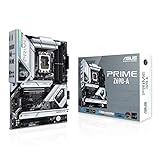


Top 3 picks at a glance
Quick comparison of the picks
| Pick | Best for | Key specs | Price range |
|---|---|---|---|
| MSI MAG Z690 Tomahawk WiFi | Best overall, K-series CPUs | Z690, ATX, DDR5 (a DDR4 variant exists), PCIe 5.0 x16, Wi-Fi 6E, 2.5GbE | Mid-range to upper mid-range |
| MSI MAG B660M Mortar WiFi DDR4 | Best value for i5/i7 non-K | B660, micro-ATX, DDR4, Wi-Fi, 2.5GbE, memory overclocking | Mid-range |
| ASUS TUF Gaming B660-Plus WiFi D4 | Best full-size B660 with expansion | B660, ATX, DDR4, Wi-Fi, 2.5GbE, several M.2 slots | Mid-range |
| ASRock B660M Pro RS | Best budget | B660, micro-ATX, DDR4, two M.2 slots, no Wi-Fi | Budget |
| ASUS ROG Strix Z690-E Gaming WiFi | Best for overclocking and flagship CPUs | Z690, ATX, DDR5, high-phase-count VRM, Wi-Fi 6E, 2.5GbE | Premium |
| ASUS ROG Strix B660-I Gaming WiFi | Best mini-ITX | B660, mini-ITX, DDR5, Wi-Fi 6E, 2.5GbE | Upper mid-range |
Specs above follow each manufacturer’s published listings. Exact M.2 counts, USB layouts and VRM details differ between DDR4 and DDR5 variants, so check the exact SKU before buying.
Decide the chipset first: Z690, B660 or H610
Alder Lake (12th-gen Core) uses the LGA 1700 socket and 600-series chipsets. The chipset decides overclocking, expansion and how many fast drives you can run.
- Z690: The only 600-series chipset that officially supports CPU multiplier overclocking on K-series chips. It has the widest chipset connection (DMI 4.0 x8) and the most PCIe 4.0 lanes and USB ports. It also supports memory overclocking.
- B660: No CPU multiplier overclocking, but memory overclocking is supported. It uses a narrower DMI 4.0 x4 link, which rarely matters for a gaming PC with one or two NVMe drives. It is the sweet spot for locked chips.
- H610: The cheapest option. It has no memory overclocking, so RAM runs at the CPU’s rated speed. Boards usually have two DIMM slots, minimal M.2 and few USB ports. It suits an i3 or i5-12400F office or entry gaming build.
Locked CPUs cannot be overclocked on any of these. A K-series chip on B660 still works, but it runs at stock multipliers, so you pay for an unlocked chip and cannot use it.
Best overall: MSI MAG Z690 Tomahawk WiFi
The Tomahawk is the safe middle of the Z690 range. It has a VRM designed for K-series chips, a PCIe 5.0 x16 slot, multiple M.2 slots and built-in Wi-Fi 6E. It suits an i5-12600K or i7-12700K build that you want to tune. The trade-off is cost. If you will never overclock or run heavy all-core loads, a B660 board delivers nearly the same gaming performance for noticeably less.
Best value: MSI MAG B660M Mortar WiFi DDR4
This micro-ATX board targets the i5-12400, i5-12500 and i7-12700 non-K class. You get a reinforced VRM for the segment, Wi-Fi, 2.5GbE and DDR4 support, which lets you reuse an existing kit or buy cheap RAM. The trade-off is size: only four DIMM-and-slot layouts typical of micro-ATX, so fewer PCIe slots and fewer expansion options than a full ATX board.
Best full-size B660: ASUS TUF Gaming B660-Plus WiFi D4
Choose this if you want the extra PCIe slots and M.2 positions of full ATX on a locked-CPU budget. It also suits builders who plan to add a capture card or a second NVMe drive. The trade-off is that DDR4 limits future memory upgrades. A later move to DDR5 means replacing the board.
Best budget: ASRock B660M Pro RS
This is a no-frills B660 board with two M.2 slots and no Wi-Fi. It pairs well with an i3-12100F or i5-12400F and a mid-range graphics card. The trade-off is a lighter VRM and heatsinks. Avoid pairing it with a 150 W-class CPU, and add a USB Wi-Fi adapter or PCIe card if you need wireless.
Best for overclocking: ASUS ROG Strix Z690-E Gaming WiFi
This is the pick for an i9-12900K or i7-12700K that you actually push. It has a high-phase-count VRM, DDR5 support, Wi-Fi 6E, 2.5GbE and a full set of M.2 and USB connections. The trade-off is that you pay premium money for headroom most gamers never use, and DDR5 kits add to the total.
Best mini-ITX: ASUS ROG Strix B660-I Gaming WiFi
For compact builds, this DDR5 mini-ITX board pairs well with an i5-12400 through i7-12700 in a small case. The trade-off is thermals. Small boards have compact VRM heatsinks, so a 190 W-class chip can throttle in a cramped case without good airflow. Keep the CPU in the 65 W class if the case is small.
How to size the VRM: a worked power budget
Spec sheets list phase counts, which say little on their own. A better check is to estimate the current the VRM must deliver. Current equals power divided by core voltage. Intel’s published PL2 (short-term turbo limit) values give a worst-case figure. The table assumes roughly 1.2 V under load.
| CPU | PL2 (Intel spec) | Approx. core current at 1.2 V | Suitable board class |
|---|---|---|---|
| Core i3-12100(F) | 89 W | about 74 A | H610 or entry B660 |
| Core i5-12400(F) | 117 W | about 98 A | Any B660 |
| Core i5-12600K | 150 W | about 125 A | Mid-range B660 or Z690 |
| Core i7-12700K | 190 W | about 158 A | Solid Z690 (or strong B660) |
| Core i9-12900K | 241 W | about 201 A | Upper-tier Z690 with large heatsinks |
As a rule of thumb, look for a board whose VRM is built for CPUs of at least this class. Boards with a 90 A power stage in a 12-phase layout have a nominal capacity above 1,000 A, so the VRM is rarely the limit. The real limit is heat. Budget boards with bare or thin heatsinks can throttle long before hitting their rated current. That is why cheap boards suit 65 W chips and why the i9 deserves large heatsinks.
DDR4 or DDR5: the numbers
Memory type is fixed by the board; the two are not interchangeable. Peak bandwidth is transfer rate times 8 bytes times two channels.
- DDR4-3200 dual channel: 3200 × 8 × 2 = 51.2 GB/s
- DDR5-4800 dual channel: 4800 × 8 × 2 = 76.8 GB/s
- DDR5-5600 dual channel: 5600 × 8 × 2 = 89.6 GB/s
DDR5 has the higher bandwidth, but its latency is also higher. Published reviews of Alder Lake generally show small gaming differences between good DDR4 and DDR5 kits, with the gap varying by game, resolution and GPU. For a gaming build paired with a mid-range GPU, DDR4 usually delivers the better value. Choose DDR5 when you want a longer upgrade path or run memory-hungry creative work.
Decision matrix: match your situation to a board
| Your situation | Choose |
|---|---|
| i5-12400F, gaming, tight budget | B660 micro-ATX, DDR4 (ASRock B660M Pro RS class) |
| i5-12400 or i7-12700, wants Wi-Fi and 2.5GbE | MSI MAG B660M Mortar WiFi DDR4 |
| Extra NVMe drives and a capture card | Full-size B660 such as the ASUS TUF Gaming B660-Plus WiFi D4 |
| i5-12600K or i7-12700K, mild tuning | MSI MAG Z690 Tomahawk WiFi |
| i9-12900K, heavy overclocking or workloads | ASUS ROG Strix Z690-E Gaming WiFi |
| Small-form-factor build | ASUS ROG Strix B660-I Gaming WiFi |
| Office PC, i3 or Pentium-class | H610 micro-ATX such as the ASRock H610M-HDV/M.2 |
Checks before you buy
- Memory type: confirm DDR4 or DDR5 in the exact model name (a “D4” suffix or “DDR4” label means DDR4).
- BIOS: if you plan a future 13th- or 14th-gen CPU, the board needs a BIOS update. Alder Lake itself works out of the box on 600-series boards, but update the BIOS anyway for stability fixes.
- Cooler mount: LGA 1700 has a different hole pattern from LGA 1200, so older coolers may need a mounting kit.
Related guides
More from Amazon
Programs that pair well with the guide above. Offers and eligibility are set by Amazon and may change.
A free business account with business pricing and bulk-buying tools for work, shop or home office.
Create a business accountFree shipping on eligible items, Prime Video and more. Eligible new members can start with a free trial.
Start a Prime free trialAudiobooks and podcasts to listen to on the go. Eligible new members can start with a free trial.
Try Audible freeAd-free music streaming. Eligible new subscribers can start with a free trial.
Try Music Unlimited freeAs an Amazon Associate we earn from qualifying purchases.

