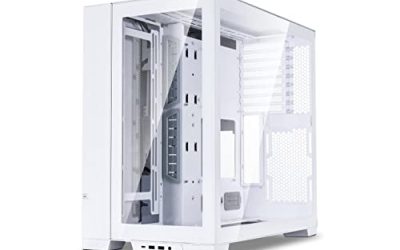
Our Short List of 3

- Best for: a first ATX build that needs strong intake, room for a long card, and a tall air cooler without extra fan shopping.
- Included fans: two 160mm ARGB front fans and one 140mm rear PWM fan
- Maximum graphics card length: 392mm
- Maximum CPU cooler height: 180.5mm
- Motherboard support: E-ATX under 280mm in width, ATX, Micro-ATX, and Mini-ITX

- Best for: a large gaming build that needs four 140mm fans, E-ATX support, and room for a long graphics card without buying fans separately.
- Included fans: three 140mm ARGB PWM front fans and one 140mm PWM rear fan
- Maximum graphics card length: 400mm
- Maximum CPU cooler height: 180mm
- Motherboard support: E-ATX, ATX, Micro-ATX, and Mini-ITX

- Best for: a gaming PC with a long, hot graphics card that benefits from bottom intake and a roomy interior.
- Included fans: three 120mm front fans
- Maximum graphics card length: 410mm
- Maximum CPU cooler height: 185mm
- Total fan capacity: up to 10 fans, with mounts at the front, top, bottom, and rear
All 4 Picks at a Glance
| Product | Specs | Action |
|---|---|---|
| LIAN LI LANCOOL 216 E-ATX PC Case, Airflow Focus RGB Gaming Computer Case with All-Around Mesh Panels, 2x160mm and 1x140mm PWM Fans Pre-Installed and Innovative Rear PCIe Fan Bracket Chassis (Black) |
| Check price on Amazon |
| Montech AIR 903 MAX, E-ATX Mid Tower Case, High Airflow, 3X 140mm ARGB PWM and 1x 140mm PWM Fans Pre-Installed, Tempered Glass Side Panel, Mesh Front, Type-C, Support 4090 GPUs, Black |
| Check price on Amazon |
| NZXT H7 Flow 2024 – Mid-Tower ATX Airflow Case – Includes Pre-Installed 3 x 120mm Fans – Supports Bottom Fans for Dedicated GPU Cooling – Cable Management – White |
| Check price on Amazon |
 CORSAIR 4000D RS ARGB Frame Modular Mid-Tower ATX PC Case, High Airflow, 3X Pre-Installed RS Fans, InfiniRail™ Mounting System, ASUS BTF, MSI Zero, Gigabyte Stealth, Black |
| Check price on Amazon |
A case decides how hard your fans have to work, how much dust reaches your parts, and how much room a long graphics card leaves for cables. A solid glass front can look clean on a desk and still choke intake air, while a mesh front can stay cool and let more sound escape. The choice is not about finding the largest box. It is about matching intake area, fan size, and clearance to the parts you already own or plan to buy.
This guide is for first-time builders who want a forgiving mid-tower, for gamers moving to a hotter graphics card, and for anyone rebuilding in a case that runs warm under load. Every pick below comes from the name and specifications shown on its Amazon product page, with fan counts, clearance figures, and front-panel design taken from the listing or the maker’s published specifications.
Our Top Picks
- LIAN LI LANCOOL 216 RGB Black ATX Mid-TowerMid-tower Case18.94 x 9.26 x 19.36 inches23.1 poundsCheck on Amazon
- MONTECH AIR 903 MAX High-Airflow E-ATX Mid-Tower PCAir 903 Max Black18.82 x 9.05 x 19.41 inches20.2 poundsCheck on Amazon
Top 3 picks at a glance
Quick Picks
As an Amazon Associate we earn from qualifying purchases.
| Product | Best for | Key spec from title |
|---|---|---|
| Lian Li Lancool 216 RGB | A first build that needs strong intake from the box | Two 160mm front fans and one 140mm rear fan, all-around mesh panels |
| Montech AIR 903 MAX | A large air-cooled build with four included fans | Three 140mm ARGB PWM fans and one 140mm PWM fan, mesh front |
| NZXT H7 Flow 2024 | A long graphics card that needs air from below | Three 120mm front fans, bottom fan mounts for direct GPU cooling |
| Corsair 4000D RS ARGB | A modular ATX build with room for a long card and two radiators | Three pre-installed RS ARGB fans, dual 360mm radiator support, 430mm GPU room |
| Fractal Design North | A living-room PC that should look like furniture | Genuine walnut wood front, mesh side panels, two 140mm Aspect PWM fans |
How to Choose
Mesh front or solid front
A mesh front lets intake fans pull air straight into the case, which matters most when a graphics card and CPU cooler share the same chamber. Solid fronts and glass fronts rely on side vents, so they need wider gaps and stronger fans to move the same volume. Mesh also shows dust sooner, which is a fair trade for lower component temperatures. If your desk sits against a wall, leave space behind the case as well, because a mesh front cannot help if exhaust air has nowhere to go.
Fan size, count, and placement
Larger fans move more air at lower speeds than smaller fans, so a pair of 160mm or 140mm intakes often runs quieter than three 120mm intakes doing the same job. Count matters less than layout. Front intake, rear exhaust, and a clear path across the graphics card form the basic pattern. Bottom fans help a card that draws air from below, while top fans help when a liquid cooler sits on the roof. Buy the case with the fans already fitted if you want fewer separate parts to choose.
Graphics card length and CPU cooler height
Measure the graphics card from its rear bracket to its far end, including any shroud overhang, then compare that number with the case maximum. A front radiator shortens the space left for a card, so check the reduced figure when you plan liquid cooling. CPU cooler height works the same way. A tall dual-tower cooler needs the listed clearance plus a small margin for the side panel. RAM height rarely limits a case, but a cooler that overhangs the first memory slot can block a tall module.
Dust filters and cable space
Removable filters on the front, top, and bottom make cleaning a short job instead of a teardown. A case without a bottom filter will pull floor dust into the power supply area, and a case without a front filter will coat intake fans faster. Cable space matters for airflow too. A tray with routing channels and tie points keeps thick power cables out of the intake path. Before ordering, confirm the depth behind the tray, the number of drive mounts you actually need, and whether the power supply length leaves room for its cables.
The 5 Best Options
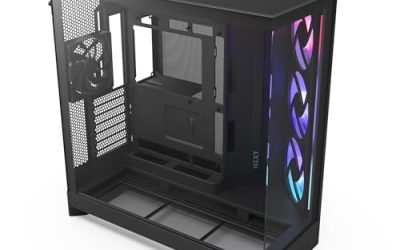
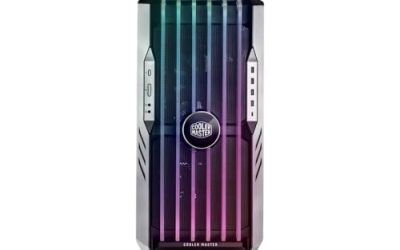
LIAN LI LANCOOL 216 E-ATX PC Case, Airflow Focus RGB Gaming Computer Case with All-Around Mesh Panels, 2x160mm and 1x140mm PWM Fans Pre-Installed and Innovative Rear PCIe Fan Bracket Chassis (Black)
- Best for: a first ATX build that needs strong intake, room for a long card, and a tall air cooler without extra fan shopping.
- Included fans: two 160mm ARGB front fans and one 140mm rear PWM fan
- Maximum graphics card length: 392mm
- Maximum CPU cooler height: 180.5mm
- Motherboard support: E-ATX under 280mm in width, ATX, Micro-ATX, and Mini-ITX
a first ATX build that needs strong intake, room for a long card, and a tall air cooler without extra fan shopping.
the E-ATX limit applies only to boards under 280mm wide, so check your board width and the grommet bar position before ordering.
The Lancool 216 suits a builder who wants airflow handled before the first power-on. Two large front fans cover most of the intake area, and the rear fan gives hot air a direct exit. Mesh on the front, top, and power supply shroud keeps the path open on several sides, and the rear PCIe fan bracket adds a mount aimed at the graphics card area. The movable motherboard tray lets you shift the board position for air cooling or water cooling.
Watch out for: the E-ATX limit applies only to boards under 280mm wide, so check your board width and the grommet bar position before ordering.
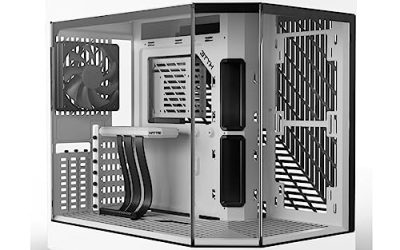
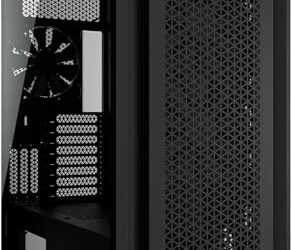
Montech AIR 903 MAX, E-ATX Mid Tower Case, High Airflow, 3X 140mm ARGB PWM and 1x 140mm PWM Fans Pre-Installed, Tempered Glass Side Panel, Mesh Front, Type-C, Support 4090 GPUs, Black
- Best for: a large gaming build that needs four 140mm fans, E-ATX support, and room for a long graphics card without buying fans separately.
- Included fans: three 140mm ARGB PWM front fans and one 140mm PWM rear fan
- Maximum graphics card length: 400mm
- Maximum CPU cooler height: 180mm
- Motherboard support: E-ATX, ATX, Micro-ATX, and Mini-ITX
a large gaming build that needs four 140mm fans, E-ATX support, and room for a long graphics card without buying fans separately.
the case is a full-size mid-tower at 478mm deep, so measure desk depth and the space in front of the case before ordering.
The AIR 903 MAX fits a build where four fans should already be in the box. Three 140mm fans sit at the front and one 140mm fan sits at the rear, so intake and exhaust are covered from the start. The metal front panel is listed at 51 percent ventilation, and the case takes E-ATX boards alongside smaller sizes. With 400mm of graphics card room and 360mm radiator mounts at the front and top, it leaves room for a large card and a large liquid cooler in the same build.
Watch out for: the case is a full-size mid-tower at 478mm deep, so measure desk depth and the space in front of the case before ordering.
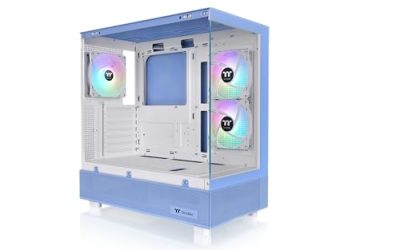
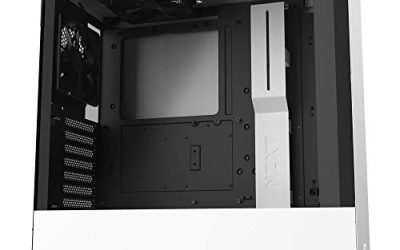
NZXT H7 Flow 2024 – Mid-Tower ATX Airflow Case – Includes Pre-Installed 3 x 120mm Fans – Supports Bottom Fans for Dedicated GPU Cooling – Cable Management – White
- Best for: a gaming PC with a long, hot graphics card that benefits from bottom intake and a roomy interior.
- Included fans: three 120mm front fans
- Maximum graphics card length: 410mm
- Maximum CPU cooler height: 185mm
- Total fan capacity: up to 10 fans, with mounts at the front, top, bottom, and rear
a gaming PC with a long, hot graphics card that benefits from bottom intake and a roomy interior.
no rear or top fan is included, so plan at least one exhaust fan or a top radiator if you want a complete airflow path.
The H7 Flow 2024 works best when the graphics card is the hottest part in the build. Three 120mm fans arrive fitted at the front, and the vertical power supply layout leaves space for three more 120mm fans at the bottom, aimed at the card. That bottom path is the point of this design. The perforated front and top panels keep intake and exhaust open, and the case still holds a 410mm card and a 185mm cooler, which covers most current air-cooled builds.
Watch out for: no rear or top fan is included, so plan at least one exhaust fan or a top radiator if you want a complete airflow path.
CORSAIR 4000D RS ARGB Frame Modular Mid-Tower ATX PC Case, High Airflow, 3X Pre-Installed RS Fans, InfiniRail™ Mounting System, ASUS BTF, MSI Zero, Gigabyte Stealth, Black
- Best for: a modular ATX build that needs three ARGB fans fitted, room for a 430mm card, and space for two 360mm radiators without moving to a larger case.
- Included fans: three 120mm RS ARGB front fans
- Maximum graphics card length: 430mm
- Maximum CPU cooler height: 170mm
- Motherboard support: Mini-ITX, Micro-ATX, ATX, and E-ATX up to 305mm by 277mm
a modular ATX build that needs three ARGB fans fitted, room for a 430mm card, and space for two 360mm radiators without moving to a larger case.
the 170mm cooler limit is tighter than the 180mm-plus limits of some cases here, so check a tall dual-tower cooler against it before ordering.
The 4000D RS ARGB is the modular successor to the older 4000D design in this group. Three RS ARGB fans arrive fitted at the front, behind a perforated steel panel with a three-dimensional Y-pattern, so intake air has a clear path into the case. The InfiniRail system lets you slide fans and radiators along their mounts instead of fixing them to set holes, and the case still takes a 430mm graphics card and a 170mm cooler. It also supports reverse-connector boards, so cable headers can sit behind the tray on a compatible motherboard.
Watch out for: the 170mm cooler limit is tighter than the 180mm-plus limits of some cases here, so check a tall dual-tower cooler against it before ordering.
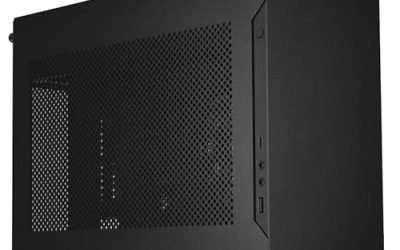
Fractal Design North – Genuine Walnut Wood Front – Mesh Side Panels – Two 140mm Aspect PWM Fans Included – Type C USB – ATX Airflow Mid Tower PC Gaming Case, Charcoal Black
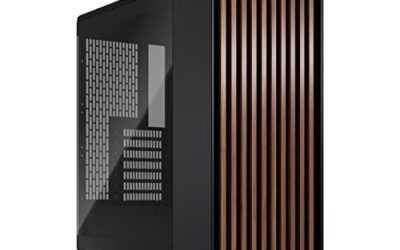
The North is for a PC that sits in view. Real walnut slats run across the front, with mesh behind them, so the case reads as furniture from across the room and still draws air through the front. Two 140mm Aspect PWM fans arrive fitted, and the mesh side panel adds another intake path. It takes ATX, Micro-ATX, and Mini-ITX boards, a 355mm card, and a 170mm cooler, which covers a mainstream gaming build without pushing into full-tower size.
Specs
- Included fans: two 140mm Aspect PWM front fans
- Maximum graphics card length: 355mm, or 300mm with a 360mm front radiator fitted
- Maximum CPU cooler height: 170mm
- Motherboard support: ATX, Micro-ATX, and Mini-ITX
- Radiator support: up to 360mm at the front and 240mm at the top
- Front I/O: one USB-C, two USB-A, headphone, and microphone
Best for: a home or office PC where appearance matters as much as airflow and the build uses a mainstream card and cooler.
Watch out for: graphics card room drops to 300mm when a 360mm front radiator is fitted, so measure the card and radiator together before ordering.
Which One Fits Your Situation
A first build with no extra fans to buy
Pick the Lian Li Lancool 216 RGB. Its two 160mm front fans and one 140mm rear fan cover intake and exhaust, and the mesh panels leave little to adjust. The 392mm card limit and 180.5mm cooler limit also give a new builder room to choose parts without checking every millimetre twice.
A large build with a long card and a big cooler
Pick the Montech AIR 903 MAX. Four 140mm fans arrive fitted, the case takes a 400mm card and a 180mm cooler, and E-ATX boards fit as well. It is the pick when the parts list is already long and you want the case to absorb that size rather than limit it.
A hot graphics card in a warm room
Pick the NZXT H7 Flow 2024 and add bottom fans. The front fans handle general intake, while the bottom mounts push air straight at the card. With 410mm of card room and 185mm of cooler room, it also leaves headroom for a taller cooler if you move from a stock cooler later.
A living-room PC that needs to blend in
Pick the Fractal Design North. The walnut front and mesh side panel suit a shared room, and two 140mm fans keep a mainstream build cool without a wall of RGB. Check the 355mm card limit first, because the design-first shape trades a little maximum length for its smaller footprint.
Common Mistakes
- Choosing a solid front panel for a hot card, then adding faster fans to fix a restriction the panel created.
- Buying a long graphics card without checking the reduced clearance that applies when a front radiator is fitted.
- Filling every fan mount with intake fans and leaving no rear or top exhaust, so hot air circles inside the case.
- Skipping dust filters and cable routing, which lets dust and loose cables block the intake path over time.
- Ordering a tall CPU cooler or a wide E-ATX board without comparing its exact height and width with the case limits.
Frequently Asked Questions
Does a mesh front really help airflow?
Yes, when the front fans sit directly behind it. Mesh lowers the resistance in front of the intake fans, so the same fans move more air at the same speed. A solid front with narrow side vents forces air through a smaller opening, which raises fan speed and noise for the same cooling result.
How many fans does an airflow case need?
Three fans form a useful baseline: two intakes at the front and one exhaust at the rear. That layout moves air across the graphics card and CPU cooler in one direction. Add a top exhaust or bottom intake only when a specific part needs it, such as a hot card or a top radiator.
Will a larger case always run cooler?
No. A larger case helps only when its extra volume holds more intake area, more fan mounts, or longer clearance for your parts. A compact mesh case with a clear front-to-rear path can cool a mainstream build better than a large case with a blocked front and tangled cables.
Should I choose 140mm or 120mm fans?
Choose 140mm fans when the case supports them at the front, because they move more air at lower speeds and often run quieter. Choose 120mm fans when the mount, radiator, or bottom position only fits that size, or when you want a wider choice of radiators and fan models.
Related guides
More from Amazon
Programs that pair well with the guide above. Offers and eligibility are set by Amazon and may change.
A free business account with business pricing and bulk-buying tools for work, shop or home office.
Create a business accountFree shipping on eligible items, Prime Video and more. Eligible new members can start with a free trial.
Start a Prime free trialAudiobooks and podcasts to listen to on the go. Eligible new members can start with a free trial.
Try Audible freeAd-free music streaming. Eligible new subscribers can start with a free trial.
Try Music Unlimited freeAs an Amazon Associate we earn from qualifying purchases.