A gaming PC in a warm room starts every session at a disadvantage, because the air feeding its coolers is already heated before it reaches a single fin. The real decision is not which case looks open, but which one moves the largest volume of genuinely fresh air across the GPU and CPU with the fans already in the box, since added fans cost extra and a restrictive front panel cannot be fixed later.
This roundup suits builders running high-draw graphics cards in rooms without air conditioning, players in upstairs or sun-facing spaces, and anyone moving an existing build out of a closed, glass-fronted chassis. Every pick below is chosen from the fan counts, clearances and panel designs published on its Amazon product page.
Our Top Picks


Top 3 picks at a glance
Quick Picks
As an Amazon Associate we earn from qualifying purchases.
| Product | Best for | Key spec from title |
|---|---|---|
| Fractal Design Torrent Black | Maximum stock airflow for a flagship GPU | Two 180mm PWM and three 140mm fans included |
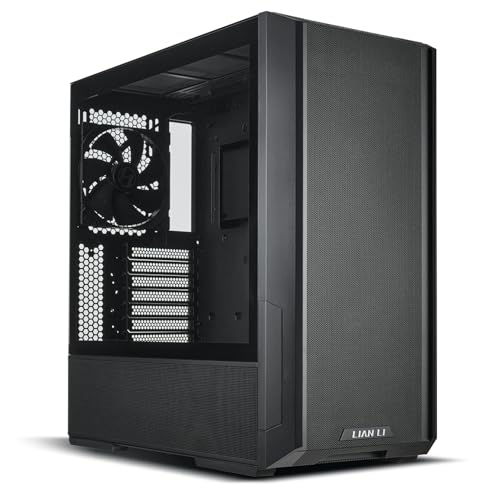
| Lian Li Lancool 216 Black | Balanced cooling on a mid-range budget | Dual 160mm PWM front fans, airflow focused |
| Montech AIR 903 MAX Black | Wide E-ATX builds that run hot | Four 140mm PWM fans pre-installed |
| Lian Li Lancool 207 Black | Compact desks in warm small rooms | 2x140mm ARGB and 2x120mm PWM fans included |
| Corsair Frame 4000D RS ARGB Black | Back-connector boards and tidy cabling | 3x pre-installed RS ARGB fans, InfiniRail mounting |
How to Choose
Start with the fans already in the box
In a hot room, the included fan set matters more than the number of empty mounts, because every missing fan is extra cost and extra delay before the build runs cool. Large front fans are the shortcut worth paying for: a pair of 160mm or 180mm intakes moves a broad column of air at moderate speeds, feeding the graphics card directly instead of relying on small fans spinning fast. Count the rear exhaust too, since intake alone pressurizes the case without giving heated air a clean exit path behind the CPU tower.
Judge the front panel by its open area
A mesh front only helps when the mesh covers most of the panel and sits close to the fans behind it. Fine steel mesh, open grilles and perforated fronts all pass air well, while a solid panel with narrow side vents starves the intakes no matter how strong the fans are. In warm rooms this gap widens, because the GPU cooler recirculates its own exhaust when intake flow is weak. Prefer cases where the product page describes mesh or grille coverage across the front, top and power supply shroud rather than a single decorative strip.
Match clearance to your hottest parts
Heat output follows the hardware, so check the listed GPU length, CPU cooler height and radiator support against the parts you already own. Long flagship cards need the stated clearance with the front fan still installed, a figure some listings quote separately. Tall dual-tower air coolers need roughly 170mm or more of listed height clearance. If you run a liquid cooler instead, confirm the radiator size for the exact mount you plan to use, since a case may accept a large front radiator while offering no top mount at all.
Plan for dust, filters and fan control
Warm rooms often mean open windows, and open windows bring dust that coats radiators and fan blades until airflow drops. Removable filters at the front and bottom intakes slow that build-up and make cleaning a two-minute job instead of a teardown. PWM fans are the other quiet essential: they let the motherboard raise speeds only under load, so the case stays tolerable during desktop work in a room that is already warm, then ramps up properly when a game pushes temperatures higher.
The 5 Best Options
Fractal Design Torrent Black

The Torrent is the pick when the room is warm and the graphics card is the most expensive, hottest part in the build. Its open grille front feeds two huge 180mm intakes, and three 140mm fans along the bottom push air straight up into the GPU cooler, which is exactly the path heated rooms punish most. The layout skips a top radiator mount entirely, so it suits air-cooled and front-radiator builds rather than top-mounted liquid cooling.
Specs
- Included fans: 2x 180mm PWM front, 3x 140mm PWM bottom
- Motherboard support: E-ATX, ATX, Micro-ATX, Mini-ITX, SSI-EEB, SSI-CEB
- GPU clearance: 461mm total, 423mm with front fan installed
- CPU cooler clearance: 188mm
- Radiator support: up to 360/420mm front and bottom, 120/140mm rear, no top mount
- Front I/O: 1x USB Type-C, 2x USB 3.0, audio
- Model: FD-C-TOR1A-01, light tint tempered glass
Best for: Flagship GPU builds in rooms without air conditioning
Watch out for: There is no top radiator mount, so plan liquid cooling around the front or bottom positions.
ASIN: B08697H54B
Lian Li Lancool 216 Black
The Lancool 216 takes a simpler route to the same goal: two 160mm front fans behind a fine mesh front, a mesh top and mesh on the power supply shroud, so air can enter and leave from several directions at once. The non-RGB black version keeps the focus on moving air rather than lighting, and the modular motherboard tray can shift position to suit air or liquid cooling. It is a sensible middle ground for a warm-room build that still needs E-ATX headroom.
Specs
- Included fans: 2x 160mm PWM front, 1x 140mm PWM rear
- Motherboard support: E-ATX, ATX, Micro-ATX, Mini-ITX
- GPU clearance: 392mm
- Front panel: fine mesh front, top and PSU shroud side
- Dimensions: 480.9 x 235 x 491.7mm
- Model: LANCOOL 216-X
- Side panel: tempered glass
Best for: Mid-range and upper mid-range builds that need strong stock cooling
Watch out for: Only three fans are included, so the top mounts stay empty unless you add your own.
ASIN: B0BRP58KHT
Montech AIR 903 MAX Black
The AIR 903 MAX is the wide-body option, an E-ATX mid tower whose mesh front hides three 140mm ARGB PWM intakes with a fourth 140mm PWM fan at the rear, all wired through an included fan and lighting hub. That hub earns its place in a hot room, because every fan answers to one control point when you set an aggressive curve for summer. Clearances are generous across the board, including room for the tallest common air coolers and long flagship cards.
Specs
- Included fans: 3x 140mm ARGB PWM front, 1x 140mm PWM rear, hub included
- Motherboard support: E-ATX, ATX, Micro-ATX, Mini-ITX
- GPU clearance: 400mm long, 190mm wide
- CPU cooler clearance: 180mm
- Radiator support: up to 360mm front and top, 120mm rear
- Dimensions: 478 x 230 x 493mm
- Expansion slots: 7
Best for: Wide E-ATX builds and tall air coolers in warm rooms
Watch out for: Some secondary sources quote higher clearance figures, so confirm the 400mm GPU and 180mm cooler limits on the listing before ordering parts.
ASIN: B0C98RRPXL
Lian Li Lancool 207 Black

The Lancool 207 shrinks the airflow formula into a compact ATX footprint that fits smaller desks and tighter rooms, where a full-size tower would sit against a wall and recycle its own exhaust. Two 140mm ARGB fans pull air through the mesh front while two 120mm PWM fans mounted low in the shroud blow directly at the graphics card, a layout borrowed from much larger cases. It is the natural choice when floor space is limited but the room still runs warm.
Specs
- Included fans: 2x 140mm ARGB front, 2x 120mm PWM bottom
- Motherboard support: ATX, Micro-ATX, Mini-ITX
- GPU clearance: not stated
- Front I/O: USB Type-C, USB 3.0
- Panels: mesh front with tempered glass side panel
- Model: LAN207RX
- Form factor: compact ATX mid tower
Best for: Small rooms and compact desks that still need direct GPU airflow
Watch out for: The listing does not state a GPU clearance figure, so measure a long card against the published dimensions before buying.
ASIN: B0DHXWYK4J
Corsair Frame 4000D RS ARGB Black
The Frame 4000D RS ARGB rebuilds a familiar airflow nameplate around a modular frame, with three RS ARGB fans pre-installed and an InfiniRail mounting system that lets you slide fan positions instead of accepting fixed screw points. That adjustability helps in a hot room, where aligning intakes with a long graphics card matters more than filling every mount. The case also supports the current back-connector motherboard designs from ASUS, MSI and Gigabyte, keeping cables out of the main airflow path entirely.
Specs
- Included fans: 3x RS ARGB fans pre-installed
- Motherboard support: ATX, including ASUS BTF, MSI Project Zero and Gigabyte Project Stealth back-connector boards
- Fan mounting: InfiniRail adjustable fan rails
- GPU clearance: not stated
- Radiator support: not stated
- Model: CC-9011296-WW
- Form factor: mid tower
Best for: Back-connector motherboard builds that need a clean, open airflow path
Watch out for: The listing leaves GPU clearance and radiator support unstated, so verify both against your parts on the product page first.
ASIN: B0DFHNV7TK
Which One Fits Your Situation
Your room has no air conditioning and the GPU is a flagship card
Choose the Fractal Design Torrent Black. Its two 180mm front fans and three bottom intakes deliver the strongest out-of-box airflow in this group, and the bottom fans feed the graphics card directly, which is where a hot room hurts first. The 423mm of GPU clearance with the front fan fitted covers the longest current cards.
The build is mid-range and the budget has to cover everything
Choose the Lian Li Lancool 216 Black. Three large PWM fans, mesh on three sides and E-ATX support arrive in one box, so no extra fan order is needed before the PC can run through a warm evening. Add a top exhaust later only if temperatures still climb under load.
Your desk space is tight and the case sits close to a wall
Choose the Lian Li Lancool 207 Black. The compact footprint leaves more breathing room around the chassis, and its low-mounted 120mm fans aim air at the graphics card instead of relying on front intake alone. Keep a few centimetres of clearance behind the rear exhaust so heated air can escape.
You are rebuilding around a back-connector motherboard
Choose the Corsair Frame 4000D RS ARGB Black. It is the only pick here listed for ASUS BTF, MSI Project Zero and Gigabyte Project Stealth boards, and moving the cables behind the tray removes a real obstruction from the intake path. The adjustable InfiniRail mounts help you line the included fans up with a long card.
Common Mistakes
- Judging airflow by the number of fan mounts instead of the fans actually included in the box.
- Placing a mesh-front case inside a closed desk cabinet, which traps exhaust air and cancels the intake advantage.
- Reading the GPU clearance figure that assumes the front fan has been removed, then finding a long card no longer fits.
- Running every fan at a fixed low speed for quiet, then blaming the case when a warm room pushes the GPU into throttling.
- Ignoring intake filters in a room with open windows, until dust mats the mesh and airflow falls off over a few months.
Frequently Asked Questions
Does a mesh front case really help in a hot room?
Yes, within limits. A case cannot cool parts below room temperature, but an open mesh front with large intake fans keeps the GPU and CPU much closer to that floor by constantly replacing heated internal air. The gain is largest under long gaming loads, where a restrictive case keeps recycling warm air around the graphics card.
How many included fans should I look for?
Three is a workable minimum and four or five is better for a warm room, provided the sizes are large and one fan works as a rear exhaust. Two big front intakes plus a rear exhaust beat five small fans with no exhaust path. Check the listing’s included fan list rather than the total mount count.
Should I choose air cooling or liquid cooling for a warm room?
Either can work, and the case decides which fits. A tall air cooler in a high-airflow case is simple and effective, while a front-mounted radiator needs a case that lists support for its size. Avoid top-mount plans in cases with no top radiator support, and never mount a radiator where it only receives heated internal air.
Where should the PC sit in a hot room?
On or beside the desk, out of direct sunlight, with clear space at the front intake and rear exhaust. Floor placement against a wall or inside a cabinet traps heat, and carpet can block bottom intakes and filters. A small gap on every vented side makes a measurable difference over a long session.
Related guides
More from Amazon
Programs that pair well with the guide above. Offers and eligibility are set by Amazon and may change.
A free business account with business pricing and bulk-buying tools for work, shop or home office.
Create a business accountFree shipping on eligible items, Prime Video and more. Eligible new members can start with a free trial.
Start a Prime free trialAudiobooks and podcasts to listen to on the go. Eligible new members can start with a free trial.
Try Audible freeAd-free music streaming. Eligible new subscribers can start with a free trial.
Try Music Unlimited freeAs an Amazon Associate we earn from qualifying purchases.