- Top Pick: ASUS ROG Ryujin III 360 ARGB
- Runner-up: NZXT Kraken Elite 360 RGB (Black)
- Also consider: Corsair iCUE LINK TITAN 360 RX LCD (Black)
The best AIO liquid coolers with LCD screens pair a 360mm radiator with a pump-block display that shows coolant and CPU temperatures, fan speeds, custom images, or animated GIFs while you play. For most gaming builds, the NZXT Kraken Elite 360 RGB is the standout pick: its 2.72-inch IPS panel is the sharpest round screen in this group, and its Turbine pump is built for low noise. Builders who want the biggest possible canvas should look at the TRYX Panorama 360 and its curved 6.67-inch AMOLED, while the ASUS ROG Ryujin III 360 ARGB adds an embedded fan that cools the motherboard voltage regulators.
Every cooler below uses a 360mm radiator, so all five demand a case with room for a radiator roughly 400mm long plus fans. All five support Intel LGA 1700 and AMD AM5 sockets, and all five carry six-year warranties, which matters on a sealed loop you cannot refill yourself.
As an Amazon Associate, we earn from qualifying purchases.
Our Top Picks
Top 3 picks at a glance
Quick Answer
The NZXT Kraken Elite 360 RGB is the easiest LCD AIO to recommend, thanks to its large 2.72-inch screen at 640 by 640 resolution and a quiet Turbine pump. The Corsair TITAN 360 RX LCD fits iCUE LINK builds, the ASUS ROG Ryujin III 360 ARGB adds a VRM fan, the Lian Li HydroShift II LCD-S hides its tubing, and the TRYX Panorama 360 carries the largest curved display here.
Table of Contents
- NZXT Kraken Elite 360 RGB
- Corsair iCUE LINK TITAN 360 RX LCD
- ASUS ROG Ryujin III 360 ARGB
- Lian Li HydroShift II LCD-S 360TL
- TRYX Panorama 360
- How to Choose
- Who Should Skip
- FAQ
- Final Verdict
- Product and ASIN Reference
NZXT Kraken Elite 360 RGB
NZXT’s flagship is the most polished screen-first cooler in this roundup. The round 2.72-inch IPS display runs at 640 by 640 resolution with a 60 Hz refresh rate and up to 690 cd/m2 of brightness, so system stats and GIFs stay legible through a tempered glass side panel. A ring of eight LEDs surrounds the screen and syncs through NZXT CAM, the same software that drives the display content and fan curves.
Under the screen sits the NZXT Turbine pump, which spins from 1,200 to 2,800 RPM over a copper cold plate. Instead of three separate fans, the radiator carries a single F360 RGB Core unit, a one-piece frame holding three 120mm fans, which simplifies wiring and keeps the lighting continuous. Plan case clearance around a 400mm-class radiator plus the fan frame.
Specs:
- Radiator: 360mm, 401 x 120 x 27 mm
- Display: 2.72-inch IPS LCD, 640 x 640, 60 Hz, up to 690 cd/m2
- Pump: NZXT Turbine, 1,200 to 2,800 RPM, copper cold plate
- Fans: F360 RGB Core single-frame triple fan
- Sockets: Intel LGA 1851, 1700, 1200 and 115X; AMD AM5 and AM4
- Warranty: 6 years
- Tier: premium
Corsair iCUE LINK TITAN 360 RX LCD
Corsair’s TITAN RX LCD is the pick for builders already invested in the iCUE LINK ecosystem. Its 2.1-inch IPS screen is smaller than the NZXT panel but still runs 480 by 480 resolution at 600 cd/m2 brightness and 30 frames per second, driven entirely through iCUE. The FlowDrive cooling engine uses a three-phase pump motor, and the cold plate arrives with thermal paste pre-applied.
The three RX120 RGB fans connect through iCUE LINK, Corsair’s daisy-chain system that routes power and data through a single cable run back to the included System Hub, so the screen, pump, and fans all report to one hub. Fan speed spans 300 to 2,100 RPM with airflow rated at 10.4 to 73.5 CFM, and the 450mm sleeved tubes give flexible routing in larger cases.
Specs:
- Radiator: 360mm, 396 x 120 x 27 mm, aluminum
- Display: 2.1-inch IPS LCD, 480 x 480, 600 cd/m2, 30 FPS
- Pump: FlowDrive cooling engine, three-phase motor, copper cold plate
- Fans: 3 x RX120 RGB, 300 to 2,100 RPM, 10.4 to 73.5 CFM, 10 to 36 dB(A)
- Tubing: 450mm, black sleeved low-permeation rubber
- Sockets: Intel LGA 1851 and 1700; AMD AM5 and AM4
- Extras: iCUE LINK System Hub included
- Warranty: 6 years
- Tier: premium
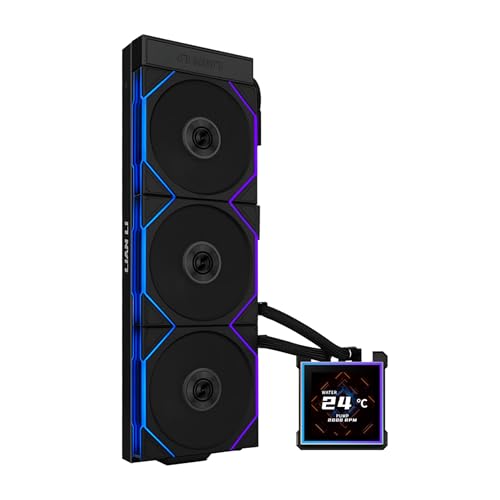
ASUS ROG Ryujin III 360 ARGB

The Ryujin III 360 ARGB carries the largest conventional screen here: a 3.5-inch full-color LCD with doubled internal storage compared with the previous generation, supporting up to 2,000 frames of custom animation. It can mirror AIDA64 Extreme data, and ASUS bundles a one-year subscription to that monitoring tool with the cooler.
Cooling hardware is equally serious. The 8th generation Asetek pump uses a three-phase motor spinning from 800 to 3,600 RPM, and the water block hides an embedded Axial-tech fan that blows air over the motherboard’s voltage regulator area, a feature no other cooler here offers. That block is tall, at 89 by 91 by 101 mm, so check RAM clearance. The radiator is thicker than most at 30mm, and the three ROG fans snap together magnetically, so one cable drives the whole array.
Specs:
- Radiator: 360mm, 399.5 x 120 x 30 mm, aluminum
- Display: 3.5-inch full-color LCD, up to 2,000 animation frames
- Pump: 8th generation Asetek, three-phase motor, 800 to 3,600 RPM
- Embedded fan: Axial-tech VRM fan, 5,100 RPM, 21.08 CFM
- Fans: 3 x ROG magnetic daisy-chain ARGB, 600 to 2,200 RPM, 70.07 CFM, 36.45 dB(A)
- Tubing: 400mm sleeved rubber with braided mesh
- Sockets: Intel LGA 1851, 1700, 1200 and 115x; AMD AM5 and AM4
- Warranty: 6 years
- Tier: premium
Lian Li HydroShift II LCD-S 360TL
Lian Li attacks the problem every display AIO creates: cables and tubes crossing the prettiest part of the build. The HydroShift II routes its coolant tubes along the side of the radiator instead of draping them across the motherboard, and the wiring hides inside the sleeved tube assembly, so the pump block and its screen stay the visual focus.
That screen is a 3.4-inch IPS panel at 480 by 480 resolution, 500 nits of brightness, and a 60 Hz refresh rate. It mounts magnetically and is hot-swappable, and Lian Li’s L-Connect 3 software offers offline, wireless, and USB-connected control modes, so the display can keep working with reduced software overhead. The 360TL version ships with three TL120 ARGB fans that daisy-chain together. If your build theme is a clean showcase with visible RAM and motherboard lighting, this is the cooler designed around that goal.
Specs:
- Radiator: 360mm with side-mounted coolant pathway
- Display: 3.4-inch IPS LCD, 480 by 480, 500 nits, 60 Hz, magnetic hot-swap mount
- Fans: 3 x TL120 ARGB, daisy-chain
- Control: L-Connect 3, with offline, wireless, and USB modes
- Sockets: Intel LGA 1851 and 1700; AMD AM5 and AM4
- Warranty: 6 years
- Tier: premium
TRYX Panorama 360
The Panorama 360 is built around one idea: the screen is the product. Its 6.67-inch curved AMOLED wraps over the pump block in an L-shaped curve and uses an anamorphic 3D effect, so images appear to float in front of the glass rather than sitting flat on a panel. Nothing else in this roundup, or in mainstream AIO cooling, offers a display anywhere near this size.
The cooling side is conventional in a good way. An Asetek 8th generation V2 pump drives the loop, TRYX rates the cooler at a 320W TDP, and the magnetic performance fans connect with pogo pins to cut down on loose cabling. The trade-off is focus: the Panorama’s software is less elaborate than the Corsair or NZXT ecosystems, so this pick suits builders who value the display above granular fan-curve tooling.
Specs:
- Radiator: 360mm
- Display: 6.67-inch curved AMOLED, 3D anamorphic effect
- Pump: Asetek 8th generation V2
- Rated TDP: 320W per manufacturer listing
- Fans: magnetic performance fans with pogo-pin connection
- Sockets: Intel LGA 1851 and 1700; AMD AM5 and AM4
- Tier: premium
How to Choose
Start with case fit, because every cooler here is a 360mm design. Allow roughly 400mm of radiator length plus fan thickness; the ASUS radiator is also 30mm thick rather than the usual 27mm, which can matter against tall motherboard heatsinks.
Next, pick the screen you will actually enjoy. Resolution and size decide how readable stats are from your chair: the NZXT panel is the sharpest round display, the ASUS 3.5-inch screen is the largest flat panel, and the TRYX AMOLED is a showpiece, not a data readout. Brightness ratings between 500 and 690 cd/m2 read fine through tinted glass.
Then check the software commitment. Each brand locks its display, lighting, and fan control into its own application: CAM for NZXT, iCUE for Corsair, Armoury Crate for ASUS, L-Connect 3 for Lian Li. Matching the cooler to fans you already own avoids running two control suites at once. Finally, confirm socket support for your next upgrade; all five cover AM5 and LGA 1700, and most add LGA 1851.
Who Should Skip
Skip display AIOs entirely if your case has no window or sits under a desk, since the screen is the main reason these coolers cost more than screen-free equivalents. Skip them if your case only fits a 240mm or 280mm radiator, because no amount of display quality fixes a radiator that cannot mount. Builders chasing the lowest possible noise should also compare large air towers, which move heat with fewer moving parts and no pump. And if you dislike background software, every model here needs its vendor application running to feed the screen, so a plain AIO or air cooler is the simpler tool.
FAQ
Do LCD AIO coolers cool better than regular AIO coolers?
Not because of the screen. Cooling performance comes from the radiator, fans, and pump, and these five use the same class of 360mm hardware as their screen-free siblings. The display adds monitoring and personalization, not thermal headroom, so choose on pump design, fan specs, and warranty first.
What happens to the screen if the software is not running?
The coolers store default animations and can show preset content, and the Lian Li HydroShift II even offers offline and wireless control modes. Custom images, GIFs, and live sensor data, however, are fed by each brand’s application, so full functionality needs that software installed and running.
Will a 360mm LCD AIO fit in a mid-tower case?
Often yes, but measure first. These radiators run from about 396mm to 401mm long before fans, and the ASUS block stands 101mm tall. Check your case’s listed radiator support, then confirm clearance against RAM height, VRM heatsinks, and the top panel if you plan a top mount.
How long do sealed AIO coolers last?
All five coolers here carry six-year warranties, which is the manufacturer’s own statement of expected service life. The loop is sealed and not refillable, so when the pump eventually wears out, the whole unit is replaced rather than repaired.
Final Verdict
For most gaming PCs, the NZXT Kraken Elite 360 RGB is the LCD AIO to buy: the sharpest screen, a quiet purpose-built pump, and the simplest fan wiring. Choose the Corsair TITAN 360 RX LCD if your build already runs on iCUE LINK, the ASUS ROG Ryujin III 360 ARGB if you want the big 3.5-inch panel and VRM cooling, the Lian Li HydroShift II LCD-S 360TL for the cleanest tubing layout, and the TRYX Panorama 360 when the display itself is the centerpiece of the build.



Related guides
More from Amazon
Programs that pair well with the guide above. Offers and eligibility are set by Amazon and may change.
A free business account with business pricing and bulk-buying tools for work, shop or home office.
Create a business accountFree shipping on eligible items, Prime Video and more. Eligible new members can start with a free trial.
Start a Prime free trialAudiobooks and podcasts to listen to on the go. Eligible new members can start with a free trial.
Try Audible freeAd-free music streaming. Eligible new subscribers can start with a free trial.
Try Music Unlimited freeAs an Amazon Associate we earn from qualifying purchases.


