
Our Top Picks
 GIGABYTE Radeon RX 9070 XT Gaming OC 16GRADEON9070XT11.34 x 5.2 x 2.2 Inches3.9 PoundsCheck on Amazon

Top 3 picks at a glance
The best RX 6600 GPU to buy
If you mean an AMD Radeon RX 6600 graphics card, the best choice for most people is the cheapest well-reviewed model that fits your case and has a sensible cooler. Different board partners’ RX 6600 cards perform nearly the same; paying extra for a fancier cooler rarely makes sense unless you value lower noise or need a particular size.
The RX 6600 remains a reasonable budget card for 1080p gaming, especially if you already have a compatible PC and find one at a good price. It is less appealing as a new, full-price purchase: its 8GB of VRAM and modest ray-tracing performance put limits on demanding modern games. Check current alternatives before buying, and compare the card’s price against newer entry-level GPUs.
As an Amazon Associate we earn from qualifying purchases at no extra cost to you.


What the RX 6600 is good at
The RX 6600 is built for conventional 1080p gaming. In many games, it can deliver smooth performance at high settings, but the results depend on the game, processor, and graphics settings. Newer, demanding releases may call for medium settings or upscaling to maintain a steady frame rate.
Its 8GB of VRAM is adequate for many 1080p workloads, but it can become a constraint when a game uses high-resolution textures, or when you raise settings beyond what the GPU can comfortably handle. If you regularly play new AAA releases, stream while gaming, or want a card to keep for several years, a faster GPU with more memory is a safer buy.
Ray tracing is another trade-off. The RX 6600 can run some ray-traced effects, but performance can fall sharply compared with conventional rendering. Buy it for standard rasterized gaming, not as a budget route to high ray-tracing settings.
Which RX 6600 should you choose?
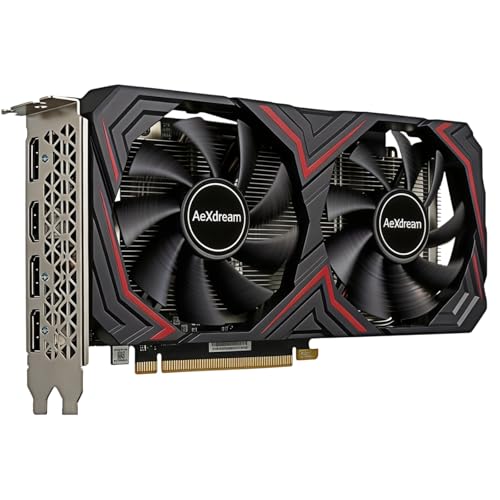
RX 6600 cards based on the same GPU have very similar gaming performance. Cooler design, dimensions, fan noise, warranty, and price matter more than small factory overclocks. Compare the available RX 6600 graphics cards, but check the exact product listing: used, renewed, and new cards can appear together in search results.
| Option | Best for | Main trade-off |
|---|---|---|
| Cheapest reputable RX 6600 | Budget 1080p builds | May run warmer or louder than premium designs |
| Compact RX 6600 | Small cases with limited clearance | Smaller coolers can be louder under load |
| Premium or overclocked RX 6600 | Buyers who prioritize cooler noise or build quality | Often poor value if priced much above basic models |
| Used RX 6600 | Experienced buyers finding a substantial discount | Unknown usage history and limited or no warranty |
Before ordering, measure the available GPU length and check the card’s thickness. Also confirm that your power supply has the required PCIe power connector and enough capacity for the whole system. The RX 6600 is relatively efficient, but a card that does not fit or cannot be powered correctly is no bargain.
When a different GPU is the better buy
Compare the RX 6600 with other budget cards available in your region. A newer card may offer more performance, longer support, or newer display and upscaling features—but only if the price difference is justified. Look at independent gaming benchmarks for the specific games and resolution you use rather than relying on a single headline performance figure. The current budget 1080p graphics-card options can help you compare listings, but verify each card’s memory, dimensions, and condition.
It can also be sensible to keep an existing GPU for longer. If your current card handles your games at the settings you want, replacing it with an RX 6600 may not be a meaningful upgrade. Conversely, a substantially faster card is worth considering if you play at 1440p, use ray tracing, or want higher frame rates in demanding games.
For a new build, account for the full system cost. A suitable power supply, a case with good airflow, and a CPU that can keep up matter too. A very old or low-end processor can limit performance, particularly in esports games at high frame rates. The RX 6600 does not need an expensive system, but pairing it with a weak CPU can leave some of its gaming capability unused.
Checks before you buy
- Confirm condition: New and used listings can be mixed. Make sure the listing states what is included and what warranty applies.
- Check the return policy: This matters if a card arrives damaged, runs unusually hot, or has a fan problem.
- Inspect the exact model: Partner cards differ in length, thickness, and cooling. Do not assume every RX 6600 will fit your case.
- Set realistic settings: For newer demanding games, expect to adjust textures, shadows, or other options rather than assume ultra settings will always run well.
For a first gaming PC or an inexpensive upgrade focused on 1080p, a sensibly priced RX 6600 is still easy to recommend. The strongest reason not to buy one is price: if it costs close to a faster current-generation alternative, spend the extra money only after confirming the newer card is a worthwhile step up in the games you play.
FAQ
Is the RX 6600 good for 1080p gaming?
Yes, particularly for older games, esports, and many titles at medium or high settings. Demanding new games may need reduced settings or upscaling.
Is 8GB of VRAM enough?
It is enough for many 1080p games, but can limit texture quality in some newer releases. It is less suitable if you want high settings in demanding games for years to come.
Does the RX 6600 need a large power supply?
It is a relatively low-power GPU, but check the power supply manufacturer’s recommendation, the card’s connector, and your other components before buying.
Should I buy a used RX 6600?
Only if the discount is worthwhile and you can verify the card’s condition and return or warranty terms. For a small saving, a new card with clear coverage is the safer choice.



