
If your power supply only has a 6-pin PCIe cable, you are shopping in a very specific corner of the GPU market. Most modern midrange cards want an 8-pin or the new 16-pin connector. A true 6-pin card maxes out around 150W total board power in theory, but in practice most are 75W to 130W.
That limit is actually useful. It means you can upgrade an older Dell, HP, Lenovo, or budget build with a 400-500W PSU without replacing the power supply. The trade-off is clear: you give up high-end performance and you have to check physical size, slot power, and driver support carefully. Get those right and a 6-pin GPU is still a solid 1080p upgrade.
As an Amazon Associate we earn from qualifying purchases at no extra cost to you.


Our Top Picks
 GIGABYTE Radeon RX 9070 XT Gaming OC 16GRADEON9070XT11.34 x 5.2 x 2.2 Inches3.9 PoundsCheck on Amazon
Top 3 picks at a glance
What a 6-pin limit really means
A 6-pin PCIe plug is officially rated for 75W, plus up to 75W from the PCIe slot. In the real world, most single 6-pin cards are designed for 100-130W total. That puts you in the GTX 1060 / GTX 1660 / RTX 3050 / RX 6500 XT performance class, not RTX 4060 Ti or RX 7700 XT territory.
Check three things before you buy. First, open the case and confirm you have a native 6-pin cable from the PSU, not just a spare SATA or Molex plug. SATA-to-6-pin adapters work on paper, but they are the most common failure mode I see in prebuilt upgrades: melted plugs, random black screens under load, and shutdowns in demanding games. Second, measure length and height clearance. Many 6-pin capable cards are short dual-fan models, but some are still 2.5 slots thick and will block a Wi-Fi card. Third, check your PSU wattage and 12V rating on the label. A quality 350-450W unit is usually fine for these cards. A no-name 300W unit from 2012 is not.
Who should buy a 6-pin GPU
This category suits three buyers. You have a prebuilt with only one 6-pin lead and you do not want to swap the PSU. You have a small case or low-airflow office conversion where a 200W card would just cook itself. Or you want a cheap 1080p card for esports, older AAA games, and general use without paying for power you cannot feed.
If you have an 8-pin cable available, do not limit yourself to this list. The cheaper option is often fine here too: if you only play League of Legends, Valorant, CS2, Fortnite at competitive settings, or do desktop work, a 75W card with no connector is enough. Do not pay extra for 8GB and ray tracing you will never use.
Best 6-pin GPUs to buy now
Best all-round single 6-pin for 1080p: GeForce RTX 3050 8GB. Most 8GB models use a single 6-pin and draw about 130W. You get 8GB VRAM, DLSS, NVENC for streaming, and much better driver support than older GTX cards. It is about 25-35% faster than a GTX 1650 and handles 1080p high settings in most games at 60 fps with DLSS Quality. Downsides: it is overpriced at MSRP, the 128-bit bus limits it at 1440p, and some compact models run hot. It suits a prebuilt upgrade where you want to keep the card for 3-4 years. Look for a RTX 3050 8GB with a single 6-pin layout and avoid the cut-down 6GB version unless power is extremely tight.
Best proven used option: GeForce GTX 1060 6GB / GTX 1660 / 1660 Super. Almost all GTX 1060 6GB cards are single 6-pin at 120W, and many GTX 1660 variants are 6-pin or 8-pin depending on the board partner, so check photos of the connector. In raw fps, a 1660 Super still beats an RTX 3050 6GB and trades blows with the 8GB 3050 without DLSS. For pure esports and 1080p medium-high, they remain excellent. The failure modes are age: worn fans, dried thermal paste, ex-mining cards with tired memory, and no DLSS or Frame Generation. If you buy used, ask for a Time Spy or in-game temperature screenshot, budget for repasting, and skip cards with a bent bracket or missing screws. Search for a GTX 1660 Super with single 6-pin power if you want new-old-stock or renewed stock with returns.
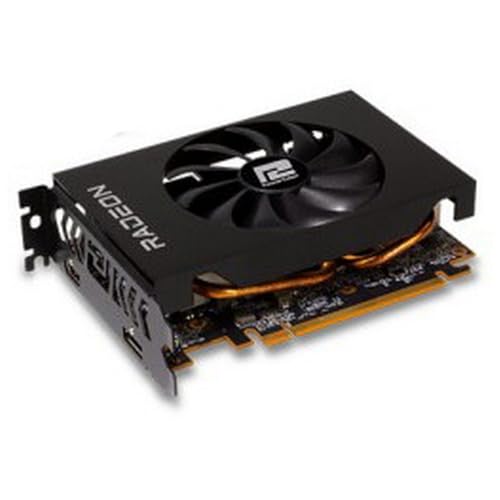
Best low-power AMD option: Radeon RX 6500 XT. It uses a single 6-pin at around 107W and is often cheaper than the RTX 3050. At 1080p medium it is playable and power-efficient. But there is a major trade-off: it only uses PCIe x4 lanes. On a PCIe 4.0 board it is fine. On an older PCIe 3.0 prebuilt, which is exactly where most 6-pin buyers are, you can lose 10-20% performance and the 4GB VRAM stutters in texture-heavy games. It also lacks hardware encoding for streaming. Buy it only if your board has PCIe 4.0 or the price is significantly lower. A typical listing for an RX 6500 XT will show the single 6-pin clearly in the photos.
Best no-connector fallback: GeForce GTX 1650 GDDR6 and Radeon RX 6400. Technically these are 0-pin cards, but they matter for 6-pin shoppers because if your PSU is weak, the cheaper option is fine. The GTX 1650 GDDR6 at 75W runs almost anything esports-related at 1080p and does not stress an old PSU. The RX 6400 is even lower power but suffers the same PCIe x4 problem as the 6500 XT and is weaker overall. Choose the GTX 1650 if you have PCIe 3.0 and want plug-and-play reliability. Choose neither if you want high settings in Starfield, Alan Wake 2, or Cyberpunk – you need the 3050 class for that.
Comparison table
| Card | Typical power / connector | VRAM | Best resolution | Who it suits |
|---|---|---|---|---|
| RTX 3050 8GB | 130W / 1x 6-pin | 8GB GDDR6 | 1080p high | Prebuilt upgrade, wants DLSS + NVENC |
| GTX 1660 Super | 125W / 1x 6-pin or 8-pin* | 6GB GDDR6 | 1080p high | Best raw fps per dollar used |
| GTX 1060 6GB | 120W / 1x 6-pin | 6GB GDDR6 | 1080p medium-high | Cheapest usable upgrade |
| RX 6500 XT | 107W / 1x 6-pin | 4GB GDDR6 | 1080p medium | PCIe 4.0 systems on a budget |
| GTX 1650 GDDR6 | 75W / none | 4GB GDDR6 | 1080p low-medium / esports | Weak PSU, no cable, office PC |
*Check the specific model. Many 1660 Super cards use 8-pin, some use 6-pin. Do not assume.
Mistakes to avoid with 6-pin builds
Do not buy a card that needs 8-pin and assume a 6-pin will fit. It physically will not latch, and forcing it risks a short. Do not stack two adapters into one SATA chain to make a 6-pin. That chain was never designed for 75W sustained GPU load. If you only have SATA power, stay with a 75W slot-powered card like the GTX 1650.
Also watch Intel Arc A380 models. Some use a single 6-pin or 8-pin and look tempting for AV1 encoding, but older systems with Resizable BAR disabled lose a lot of performance, and drivers are still less mature in older DirectX 9/11 titles. On a 10-year-old prebuilt, NVIDIA or AMD is safer.
Finally, update the motherboard BIOS and use DDU to wipe old drivers when swapping from AMD to NVIDIA or vice versa. Half the no signal complaints I see are driver conflicts, not dead cards.
FAQ
Can I use an 8-pin GPU with only a 6-pin cable?
No. Use only a card rated for 6-pin or slot power. Adapters from SATA or Molex to 8-pin can boot, but they overload small wires and cause crashes or melted connectors under gaming load. If you need 8-pin power, replace the PSU.
Is 450W enough for a single 6-pin GPU?
Usually yes if it is a decent unit with a native 6-pin lead. A Core i5 / Ryzen 5 plus an RTX 3050 or GTX 1660 Super draws around 250-300W in games. If your PSU is a generic 300W unit with no PCIe cable, stay with a 75W card or upgrade the PSU.
Is the RTX 3050 6GB version worth it?
Only for very weak power supplies. The 6GB version uses less power and often needs no connector, but it is noticeably slower than the 8GB version and has less VRAM. If you have a 6-pin available, the 8GB model is the better buy for longevity.
Should I buy a used GTX 1060 6GB in 2026?
For under $80-90 for a clean, tested card, yes for esports and older games. Above that, buy a newer card. You lose DLSS, better NVENC, and efficiency, and you take on fan and thermal paste age. Ask for temperature proof and buy where you can return it.



