
The best RTX 3090 for gaming is usually not the fastest factory-overclocked model. It is the one with a healthy cooler, reasonable price, and enough power and case clearance for your system. The RTX 3090 remains a capable 4K card thanks to its 24GB of VRAM, but it is now a used-market purchase and has several drawbacks that newer cards avoid.
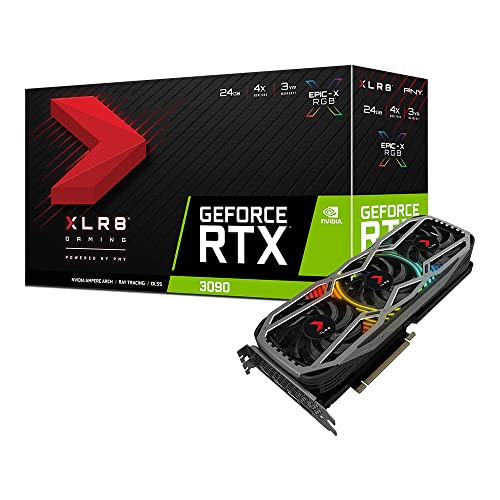
For most buyers, the best used RTX 3090 listings are large triple-fan cards from ASUS, MSI, Gigabyte, or EVGA. Among them, the ASUS TUF Gaming GeForce RTX 3090 is one of the safest all-round choices. It runs relatively quietly, has a substantial heatsink, and is less troublesome than thin two-slot designs. Buy the Founders Edition or another compact model only if your case cannot accommodate a very large card.
As an Amazon Associate we earn from qualifying purchases at no extra cost to you.


Our Top Picks
 GIGABYTE Radeon RX 9070 XT Gaming OC 16GRADEON9070XT11.34 x 5.2 x 2.2 Inches3.9 PoundsCheck on Amazon
Top 3 picks at a glance
Quick picks
| Pick | Best for | Main advantage | Main drawback |
|---|---|---|---|
| ASUS TUF Gaming RTX 3090 | Most buyers | Strong cooler and sensible acoustics | Very large and often expensive used |
| MSI RTX 3090 Suprim X | Quiet high-end builds | Excellent cooler and low fan noise | Heavy, thick, and usually commands a premium |
| EVGA RTX 3090 FTW3 Ultra | Existing EVGA owners | Good cooler and useful monitoring features | Used warranty support may be limited or unavailable |
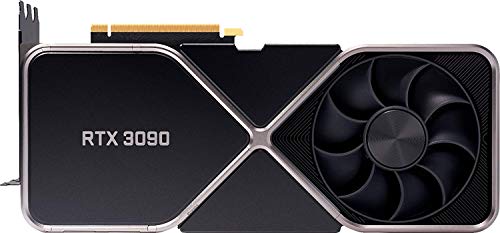
| RTX 3090 Founders Edition | Compact cases and Nvidia collectors | Shorter card with a distinctive design | GDDR6X memory can run hot; less convenient to service |
Best overall: ASUS TUF Gaming GeForce RTX 3090
The ASUS TUF Gaming RTX 3090 is the model I would target first when its price is close to other reputable 3090 cards. Its thick heatsink and three fans give it enough thermal headroom for sustained 4K gaming without needing an aggressive fan curve. It is also a better bet for long sessions than compact cards with limited cooling capacity.
The catch is physical size. Check the card length, height, and thickness against your case before buying; many RTX 3090 versions occupy roughly three expansion slots and can block neighboring slots or interfere with front-mounted radiators. It also needs a strong power supply and two or three separate PCIe power cables, depending on the card’s connector arrangement.
This is the right choice for a buyer who wants a dependable 4K card and is willing to purchase used. It is not worth paying a small premium over a faster, newer GPU with a warranty.
Best for quiet gaming: MSI RTX 3090 Suprim X
The MSI Suprim X is one of the more attractive options for a quiet gaming PC. Its oversized cooler can keep temperatures and fan speeds under control, and its factory settings are generally aimed at high performance rather than minimal power use. In practice, that means it is a good fit for someone who dislikes fan noise and has a spacious case.
Its size is also its biggest problem. This is a heavy card, so use a support bracket or another suitable anti-sag solution. Confirm that the bracket will not press against exposed components on the underside of the card. Do not assume a “large ATX case” automatically has enough clearance; drive cages, radiator fans, and side panels can all reduce usable space.
Choose the Suprim X when its condition is excellent and its price is sensible. Avoid paying a collector-style premium for a small clock-speed increase that will barely change game performance.
Best EVGA option: RTX 3090 FTW3 Ultra
The EVGA FTW3 Ultra is a strong used-market pick, particularly for people who already know and like EVGA’s software and support ecosystem. It has a capable triple-fan cooler and usually performs within a narrow margin of other factory-overclocked RTX 3090 cards.
There are two reasons to inspect one carefully. First, EVGA no longer makes new graphics cards, so the original warranty status and transfer rules matter. Ask for the serial number and proof of purchase where possible. Second, a used 3090 may have spent years under heavy memory load, cryptocurrency mining, or poor ventilation. A clean exterior does not prove that its memory thermal pads and fans are still healthy.
Buy this model when you find a tested example from a seller with a return period. Skip it if the listing has no photographs, no test results, or an unusually low price with an unclear history.
Best compact choice: RTX 3090 Founders Edition
Nvidia’s Founders Edition is shorter than many board-partner cards, making it useful in cases where a 330-millimeter triple-slot card will not fit. It has a distinctive through-flow cooler and performs well when the case has good front-to-back airflow.
It is not automatically the best thermal choice. The GDDR6X memory can become very hot, especially in workloads that keep the card busy for long periods. A Founders Edition card that repeatedly crashes, shows visual corruption, or throttles under load may need thermal-pad or cooler servicing. That work is possible, but it adds risk and cost to a used purchase.
Choose it for its dimensions, not because it is a special performance edition. If your case has room for a larger card, a well-cooled triple-fan model is usually easier to live with.
What to check before buying a used RTX 3090
Start with the power supply. Nvidia rates the RTX 3090 for a 750-watt system, but a quality 850-watt unit is a more comfortable pairing for a modern CPU, especially if the processor is also power-hungry. Check that the supply has the required PCIe connectors. Avoid using one daisy-chained cable for every connector when separate cables are available.
Measure your case rather than relying on the product name. Check GPU length, height, thickness, radiator clearance, and whether the card will block your motherboard’s lower expansion slots. The RTX 3090 is also heavy enough to flex a motherboard slot if left unsupported.
Ask the seller for a video or screenshot showing a demanding game or benchmark running for at least 15 to 20 minutes. Look for stable clock speeds, normal fan operation, and no artifacting. Software readings are useful but not definitive: memory junction temperature is more revealing than the basic GPU temperature when it is available.
Inspect the power connector for melting or discoloration, the fans for grinding, and the rear screws for signs of repeated disassembly. A card that has had new thermal pads installed is not necessarily bad, but poor pad thickness or sloppy assembly can make temperatures worse.
When a different GPU is the better buy
The RTX 3090’s 24GB of VRAM is its strongest feature, but it is not efficient by current standards. It draws substantially more power than many newer cards and lacks newer-generation improvements in ray tracing, frame generation, media encoding, and warranty coverage.
If you mainly play standard 1440p games, a cheaper card is fine. You will often get a similar practical experience with a newer midrange GPU while using less electricity and producing less heat. If you want 4K ray tracing, compare the total price against a newer high-end card rather than assuming the 3090 is the bargain option.
The 3090 makes the most sense for 4K rasterized gaming, heavy texture packs, modded games, and applications that benefit from 24GB of VRAM. It is a poor choice when its used price approaches a current-generation card with better efficiency and a full warranty. If you are set on buying one, browse triple-fan RTX 3090 cards first, then compare the exact dimensions and seller protection.
FAQ
Is the RTX 3090 still good for gaming?
Yes, particularly for 4K rasterized gaming. Its 24GB of VRAM is generous, but newer GPUs can offer better ray tracing, efficiency, features, and warranty support.
How much should I pay for a used RTX 3090?
Use current prices for newer cards as your ceiling. A 3090 is only attractive when it is clearly cheaper than a comparable new GPU and comes from a seller offering returns. Pricing changes quickly, so avoid treating any fixed dollar figure as permanent.
Is 750 watts enough for an RTX 3090?
It can be, provided it is a high-quality power supply and the rest of the system is moderate. An 850-watt unit gives more margin for a powerful CPU, transient loads, and future upgrades.
Which RTX 3090 brand should I avoid?
Do not judge by brand alone. Avoid any individual card with overheating, noisy or failing fans, damaged connectors, missing screws, no return option, or an unexplained price far below the market.



