The best gaming PC under $3000 in 2026 is a prebuilt that pairs an RTX 5070 Ti class graphics card with a Ryzen 7 X3D or similar high-end gaming CPU, 32GB of DDR5, a 1TB to 2TB NVMe drive and a standard (not proprietary) power supply. That combination covers 1440p at high refresh rates and handles 4K with upscaling. If you want the best high end gaming PC and can stretch past the cap, the RTX 5080 tier is the next real step up.
Short answer: spend a $3000 budget on the graphics card first. An RTX 5070 Ti with a Ryzen 7 9800X3D class CPU, 32GB DDR5-6000, an 850W Gold supply and a 240mm to 360mm liquid cooler or a large dual-tower air cooler is the sweet spot. Skip anything with 16GB of RAM or a proprietary board at this budget.
This guide is written from spec sheets, vendor product pages, editorial reviews and owner feedback. We did not use these machines ourselves, so the picks below are model lines and spec classes to shortlist, not endorsements of a single configuration. Prebuilt configurations change often, so always check the exact CPU, GPU, RAM, PSU and cooler on the page before you order.
Our Top Picks


Top 3 picks at a glance
Quick comparison of the picks
| Pick | Tier | GPU class | CPU class | Best for |
|---|---|---|---|---|
| Skytech Ryzen 7 9800X3D / RTX 5070 Ti | Best overall in the budget | RTX 5070 Ti 16GB | Ryzen 7 X3D | High-refresh 1440p, light 4K |
| ZOTAC MEK Ryzen 7 9700X / RTX 5070 Ti | Best value | RTX 5070 Ti 16GB | Ryzen 7 non-X3D | Gamers who also stream or create |
| Lenovo Legion Tower 5 (2026) | Best for warranty and support | RTX 5070 Ti | Ryzen 7 9800X3D | People who want a major-brand service network |
| Acer Nitro 60 | Best for cost control | RTX 5070 Ti | Ryzen 9 7900 (12 cores) | Gaming plus heavy multitasking |
| GIGABYTE AORUS Prime 5 | Best for a clean parts mix | RTX 5070 12GB | Ryzen 7 9700X | 1440p players who want to upgrade the GPU later |
| Alienware Aurora (RTX 5080) | High-end stretch pick | RTX 5080 16GB | Core Ultra 9 | 4K gaming, quieter operation |
| ASUS ROG GM700 | High-end stretch pick | RTX 5080 | Ryzen 7 9800X3D | Top gaming CPU with a 4K-class GPU |
The last two sit at or slightly above the budget depending on the configuration and the week. We list them because many readers searching for the best high end prebuilt gaming PC land on this page, and they are the models to compare against.
What $3000 actually buys in 2026
At this budget a prebuilt can finally avoid every major compromise. NVIDIA positions the RTX 5090 and RTX 5080 for 4K at maximum settings, and the RTX 5070 Ti, RTX 5070 and RTX 5060 Ti for 1440p at maximum settings, according to NVIDIA’s own GeForce RTX 50 series page. That makes the RTX 5070 Ti the natural centrepiece of a $3000 build: it is the top of the 1440p class, it carries 16GB of VRAM, and it can run many games at 4K once DLSS upscaling is on.
The trade-off is simple. Money spent on an RTX 5080 pushes the system over $3000 in most retail configurations, which forces cuts elsewhere (16GB of RAM, a single 1TB drive, a basic power supply). A balanced RTX 5070 Ti system beats a lopsided RTX 5080 system with cut-down parts for most buyers.
Spec targets by component
| Part | Target at this budget | Red flag |
|---|---|---|
| GPU | RTX 5070 Ti 16GB (or RX 9070 XT class) | Any 8GB card at a $3000 budget |
| CPU | Ryzen 7 9800X3D or 9850X3D; Core Ultra 7 or 9 as an alternative | Previous-generation chips sold at current-generation cost |
| RAM | 32GB DDR5-6000 in two sticks | 16GB, or a single 32GB stick |
| Storage | 1TB Gen4 NVMe minimum, 2TB preferred | Drive model not listed anywhere |
| PSU | 850W 80+ Gold, ATX standard | Unlisted brand or proprietary form factor |
| Cooling | 240mm to 360mm AIO or a large dual-tower air cooler | Stock-size cooler on a high-wattage CPU |
| Warranty | At least one year parts, ideally with phone support | Sold by a reseller with no stated policy |
Worked example: power budget for a $3000 build
NVIDIA’s reference figures list total graphics power of about 300W for the RTX 5070 Ti and about 360W for the RTX 5080, with recommended supplies of 750W and 850W respectively. AMD rates the Ryzen 7 9800X3D at a 120W TDP, while Intel lists 125W base and a 250W turbo limit for the Core Ultra 9 285K.
| Build | GPU | CPU | Rest of system | Subtotal | With 25% headroom |
|---|---|---|---|---|---|
| RTX 5070 Ti + Ryzen 7 9800X3D | 300W | 120W | about 80W | 500W | about 625W |
| RTX 5080 + Core Ultra 9 285K | 360W | 250W | about 80W | 690W | about 860W |
The “rest of system” figure is an approximate allowance for fans, drives, RAM and the motherboard, a rough planning allowance. The takeaway is that an 850W Gold supply comfortably serves the first build, while the second build lives close to the edge of an 850W unit once the CPU runs at its turbo limit. That is why Intel flagship CPUs paired with an RTX 5080 deserve a 1000W supply.
The picks in detail
Skytech Ryzen 7 9800X3D with RTX 5070 Ti: best overall
As an Amazon Associate we earn from qualifying purchases at no extra cost to you.

Skytech sells many configurations of this basic recipe, and this one lines up with the ideal profile for a $3000 budget: a Ryzen 7 X3D processor, an RTX 5070 Ti, 32GB of DDR5-6000, a 2TB Gen4 NVMe drive and an 850W Gold ATX supply, according to the listing. The X3D chip is the strongest gaming CPU class for the money, and the standard ATX parts mean a later GPU or PSU swap is straightforward.
- CPU: Ryzen 7 9800X3D class
- GPU: RTX 5070 Ti 16GB
- RAM/SSD: 32GB DDR5-6000, 2TB NVMe
- PSU: 850W 80+ Gold
Best for: high-refresh 1440p and upscaled 4K. Skip if: you want a large brand’s service network.
Pros: top gaming CPU class, standard parts, generous storage. Cons: boutique-builder support is less proven than a big OEM, and cable management quality varies by unit.
ZOTAC MEK Ryzen 7 9700X with RTX 5070 Ti: best value

ZOTAC builds its own graphics cards, which is a quiet advantage in a prebuilt: the GPU maker is also the system builder. This line pairs a Ryzen 7 9700X with an RTX 5070 Ti 16GB, 32GB of DDR5 and a 750W 80+ Gold supply, per the listing. It trades the X3D cache for a lower entry cost and strong productivity performance.
- CPU: Ryzen 7 9700X (non-X3D)
- GPU: RTX 5070 Ti 16GB
- RAM/SSD: 32GB DDR5, 1TB NVMe
- PSU: 750W 80+ Gold
Best for: mixed gaming and streaming. Skip if: you play CPU-limited games at very high frame rates, where X3D parts pull ahead.
Pros: GPU vendor builds the PC, sensible cost tier. Cons: 750W meets NVIDIA’s minimum for this card but leaves limited headroom for a future GPU upgrade; 1TB fills quickly.
Lenovo Legion Tower 5 (2026) with RTX 5070 Ti: best for warranty and support
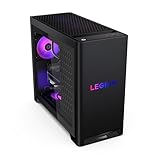
Lenovo’s Legion Tower 5 is the mainstream-OEM answer at this budget. The listing shows a Ryzen 7 9800X3D, RTX 5070 Ti, 32GB of memory and 1TB of storage. Major OEMs usually come with phone support and a defined return process, which matters when a prebuilt arrives with a fault. Legion towers can use more custom cases and layouts than boutique builders, so check upgrade room before buying.
- CPU: Ryzen 7 9800X3D class
- GPU: RTX 5070 Ti
- RAM/SSD: 32GB, 1TB
- PSU: confirm wattage and connector on the spec page
Best for: buyers who value a supported warranty over maximum parts transparency. Skip if: you plan to swap the power supply or motherboard yourself.
Pros: large service network, X3D CPU. Cons: OEM cases and PSUs can limit future upgrades; storage starts at 1TB.
Acer Nitro 60 with RTX 5070 Ti: best for cost control

Acer’s Nitro 60 is listed with a 12-core Ryzen 9 7900 and an RTX 5070 Ti. The CPU is a previous-generation chip with strong multi-core power rather than a gaming-focused X3D part, so it lands lower in the cost tier while keeping the same graphics card. For a gamer who streams, edits video or keeps many applications open, the extra cores make sense.
- CPU: Ryzen 9 7900 (12 cores)
- GPU: RTX 5070 Ti
- RAM/SSD: check the listing for capacity
- PSU: verify wattage before buying
Best for: gaming plus productivity on a tighter budget. Skip if: maximum frame rate in esports titles is the only goal.
Pros: keeps the RTX 5070 Ti, strong multi-core CPU. Cons: older platform generation; confirm the PSU and cooling because OEM mid-tower airflow is not always generous.
GIGABYTE AORUS Prime 5 with RTX 5070: best for a clean parts mix

GIGABYTE makes motherboards, graphics cards and cases, so the AORUS Prime 5 is built around the company’s own parts ecosystem. The listing shows a Ryzen 7 9700X, an RTX 5070 12GB, 32GB of DDR5 and a 1TB PCIe 4.0 drive. An RTX 5070 is one tier below the RTX 5070 Ti, but it leaves budget for a later GPU swap.
- CPU: Ryzen 7 9700X
- GPU: RTX 5070 12GB
- RAM/SSD: 32GB DDR5, 1TB Gen4
- PSU: check the spec page
Best for: 1440p at high settings with an upgrade plan. Skip if: you want 4K without heavy upscaling, since 12GB of VRAM is the limit to watch.
Pros: single-vendor parts, DDR5 platform. Cons: 12GB VRAM is tight for the heaviest 4K texture settings.
Alienware Aurora with RTX 5080: high-end stretch pick

Dell’s Aurora page lists RTX 5080 as the top graphics option, and the base configuration shown there uses an air cooler and a 500W Platinum supply. TechRadar’s spec table and other listings show 240mm liquid cooling and a larger supply on higher configurations, so confirm that the exact model includes both before you buy. The listing shows a Core Ultra 9 285, RTX 5080, 1TB SSD and 32GB of DDR5.
- CPU: Core Ultra 9 class
- GPU: RTX 5080 16GB
- RAM/SSD: 32GB DDR5, 1TB
- Cooling: 240mm liquid on some configurations; air on base ones
Best for: 4K gaming with a quieter, major-brand chassis. Skip if: you need a large SSD without paying for an upgrade.
Pros: RTX 5080, Wi-Fi 7, mainstream-brand support. Cons: sits at the top of or above the budget; 1TB of storage is small at this tier.
ASUS ROG GM700 with RTX 5080: high-end stretch pick

The 2026 ROG GM700 listing combines a Ryzen 7 9800X3D with an RTX 5080 and a 2TB M.2 NVMe drive. That is the strongest gaming CPU class paired with a 4K-capable GPU, and 2TB of storage saves an early upgrade. It tends to sit above $3000 in most configurations, so treat it as the next step if your budget can move.
- CPU: Ryzen 7 9800X3D
- GPU: RTX 5080
- SSD: 2TB NVMe
- Brand: ASUS ROG with a defined warranty process
Best for: the best high end prebuilt gaming PC experience without moving into RTX 5090 territory. Skip if: a firm $3000 ceiling matters more than 4K headroom.
Pros: flagship gaming CPU, 2TB storage. Cons: cost tier; brand cases can limit upgrades.
Best high end gaming PC: when to go past $3000
Readers searching for the best high end prebuilt gaming PC, or even “the best gaming PC ever”, are asking where the ceiling is. As of this writing the ceiling is an RTX 5090 system with a Ryzen 9 X3D or Core Ultra 9 chip, 64GB of RAM and a large NVMe drive, and it costs several times the budget of this guide. The RTX 5090 carries 32GB of VRAM and a 575W graphics power rating, with NVIDIA recommending a 1000W supply. For most gamers the gap between an RTX 5080 and RTX 5090 buys little in a 1440p game and moderate gains at 4K, so there is rarely a good reason to pay for it unless you run 4K at very high refresh rates or work with AI and rendering tools.
A practical rule: if your monitor is 1440p, stay in this guide’s range. If your monitor is 4K 120Hz or faster, move to an RTX 5080 and plan on a bigger power supply.
Decision matrix: match the monitor to the build
The graphics card is only as useful as the screen it drives. Use this table to decide which pick fits your display before you worry about brands.
| Your monitor | Best fit from this guide | Why | What to avoid |
|---|---|---|---|
| 1440p, 144Hz to 240Hz | RTX 5070 or RTX 5070 Ti systems | NVIDIA targets both at 1440p maximum settings | Paying extra for an RTX 5090 |
| Ultrawide 3440 x 1440 | RTX 5070 Ti with 16GB | About 20 percent more pixels than 16:9 1440p | 12GB cards if you enable ray tracing |
| 4K, 60Hz to 120Hz | RTX 5070 Ti with upscaling, or RTX 5080 | RTX 5080 is NVIDIA’s 4K class card | 8GB or 12GB VRAM |
| 4K, 144Hz or higher | RTX 5080 or RTX 5090 stretch | Highest frame rates need the biggest GPU and a 1000W supply | Systems with 16GB of RAM |
| Competitive 1080p esports | Any X3D build; GPU matters less | CPU cache drives high frame rates in esports titles | Overspending on the GPU |
The pixel arithmetic behind the ultrawide row is simple: 3440 x 1440 is about 4.95 million pixels, 2560 x 1440 is about 3.69 million, and 3840 x 2160 is about 8.29 million. Native 4K therefore asks the graphics card to draw roughly 2.25 times as many pixels as 1440p, which is why upscaling is the practical bridge for a 4K display on an RTX 5070 Ti class card.
Common mistakes when shopping at this budget
- Paying for a CPU you will not use. A Core Ultra 9 or Ryzen 9 helps with video editing, but for games a Ryzen 7 X3D matches or beats it. Put the difference toward the GPU or storage.
- Ignoring the power supply line. Listings that say only “850W PSU” without an 80+ rating or brand deserve a question to the seller.
- Buying on the RGB. Fans and light strips raise a listing’s appeal without improving frame rates. Airflow and radiator size matter more than lighting.
- Forgetting the peripherals. Some listings bundle a keyboard and mouse and still use weaker core parts. Check the parts list first, then the extras.
- Skipping the return policy. A system that arrives with a faulty GPU is a hassle without a clear return window. Read the policy before you order.
How We Chose
We compared the model lines on spec sheets and vendor pages, then checked each against criteria that decide long-term satisfaction rather than headline numbers:
- Component quality: branded power supplies, standard ATX motherboards, dual-channel DDR5.
- Cooling: liquid or large air cooling on any CPU with a high power limit.
- Upgrade path: standard connectors, room for a bigger GPU, spare M.2 slots.
- Warranty and returns: stated policies and support channels.
- Owner feedback: recurring patterns in reviews, such as shipping damage or loose GPU supports.
We did not use any of these systems. The rankings are editorial judgement based on that research.
Buying guide: red flags and thresholds
RAM and storage
32GB of DDR5 in two sticks is the baseline at this budget. Single-channel memory roughly halves memory bandwidth, and 16GB leaves little room for a modern game plus a browser and voice chat. For storage, 1TB is the floor and 2TB is more comfortable, since many large games exceed 100GB.
Graphics memory
Do not pay a $3000 budget for an 8GB graphics card. Tom’s Hardware compared the RTX 5060 Ti 8GB with the 16GB version and reported the 8GB model slower on average at 1440p ultra (roughly 18 percent in the figures we saw cited) and slower still in ray-tracing titles. That gap shows how quickly memory limits show up. A 4K frame buffer is small by itself (3840 x 2160 pixels at 4 bytes is roughly 33MB per render target), but textures, ray tracing data and frame generation buffers add up, which is why 16GB is the comfortable level at 4K.
Proprietary parts
Some large OEMs use custom motherboards, power supplies or front-panel connectors. They work fine until you want to replace something. Prefer standard ATX layouts if you expect to upgrade.
Cooling
An X3D chip runs warm in a closed case. A 240mm or 360mm liquid cooler, or a large dual-tower air cooler, keeps boost clocks consistent and fan noise lower. Liquid cooling is not a requirement for the RTX 5070 Ti and Ryzen 7 combination, but a stock-size cooler is a flag at this budget.
Upgrade path
| Component | First upgrade | When it makes sense | Check before buying |
|---|---|---|---|
| Storage | Add a second 2TB NVMe | Library over 800GB | Free M.2 slot |
| RAM | Move from 32GB to 64GB | Heavy streaming or editing | Four DIMM slots, matching kit |
| GPU | Next-generation card | Two to three years later | PSU wattage, case length, 12V-2×6 cable |
| PSU | 1000W ATX 3.1 unit | Before an RTX 5080 or 5090 swap | ATX standard (not proprietary) |
| CPU | Next AM5 chip | Long-term, if the socket continues | BIOS support |
Frequently Asked Questions
What is the best gaming PC under $3000?
A prebuilt with an RTX 5070 Ti, a Ryzen 7 X3D processor, 32GB of DDR5 and a 2TB NVMe drive is the best balance. It handles 1440p at high settings and 4K with upscaling.
Is an RTX 5080 gaming PC possible under $3000?
Occasionally, but many listings run higher and cut RAM or storage to hit a lower tier. A balanced RTX 5070 Ti system is the safer pick for most buyers.
What is the best high end prebuilt gaming PC?
A system with an RTX 5080 or RTX 5090, an X3D or Core Ultra 9 CPU, 32GB to 64GB of DDR5, liquid cooling and a 1000W or larger supply. The ASUS ROG GM700 and Alienware Aurora lines are two RTX 5080 options to compare.
Is the best gaming PC ever worth the cost?
For most players, no. An RTX 5090 system is built for 4K at very high refresh rates and for creative or AI workloads. At 1440p the extra cost buys little.
Should I build instead of buying a prebuilt?
Building can save money and give you better parts control, but prebuilts include assembly, a warranty and a single support contact. If the prebuilt uses standard parts, the difference is small.
Is 32GB of RAM necessary?
For a $3000 build, yes. It prevents memory pressure when gaming with background applications and costs little compared with the rest of the system.
Do I need liquid cooling?
Not strictly, but a good AIO or dual-tower air cooler is worth having on an X3D or Core Ultra 9 processor. Avoid stock-size coolers on high-wattage chips.
Sources
- NVIDIA GeForce RTX 50 series product page
- Dell Alienware Aurora product page
- TechRadar Alienware Aurora ACT1250 review
- Tom’s Hardware RTX 5060 Ti 8GB vs 16GB face-off
- Tom’s Hardware Ryzen 7 9800X3D vs Core Ultra 9 285K face-off
Last updated: October 2026