Most people who shop for a laptop that handles both gaming and work are really shopping for a compromise. A true gaming laptop tends to be loud, heavy, and short on battery life, while a work laptop tends to ship with weak graphics and a dim screen. The goal is a machine that survives a nine-to-five of spreadsheets and video calls, then switches to a recent game in the evening without sounding like a hair dryer or dying in two hours on the couch.
This guide is for remote workers, students, and freelancers who want one laptop for both jobs. It covers eight gaming-class laptops, from entry-level graphics to the newest RTX 50-series cards, and judges them only on the facts in each product title: processor, graphics, memory, storage, display, and ports. Heading into 2026, the key differences are the graphics card tier, the screen’s refresh rate and resolution, and whether the operating system edition suits workplace tools.
Our Top Picks


Top 3 picks at a glance
Quick Picks
As an Amazon Associate we earn from qualifying purchases at no extra cost to you.


| Product | Best for | Key spec from the title |
|---|---|---|
| HILLSUSU 15.6″ Gaming Laptop | Big memory on a budget | Ryzen 7 6800H, 24 GB DDR5, 1 TB NVMe |
| Acer Nitro V 16S AI | Modern GPU with a tall screen | RTX 5060, Ryzen 7 260, 16″ WUXGA 180 Hz |
| 18.5″ Gaming Laptop | Huge screen, light games | Ryzen 7430U, Radeon RX Vega 7, 16 GB |
| ASUS ROG Strix G16 | Fast, polished all-rounder | RTX 5060, Core i7 14650HX, 165 Hz |
| Lenovo LOQ | Memory and ports for work | RTX 4050, Ryzen 5 7235HS, 32 GB DDR5 |
| Alienware 16 Aurora | Premium design and Wi-Fi 7 | RTX 5050, Core 7 240H, WQXGA 120 Hz |
| Gaming Laptop with Windows 11 Pro | Office-first buyers | Core i7, 16 GB RAM, 512 GB SSD, Pro edition |
| HP Victus 15.6″ | Entry-level GPU play | RTX 3050, Core i5-12450H, 144 Hz |
How to Choose
Match the graphics card to your games
An RTX 3050 or 4050 plays most esports and older titles at 1080p, an RTX 5050 or 5060 gives noticeably more headroom for newer releases, and integrated Radeon graphics only suit light games. The card matters more than the processor for frame rates, while the processor matters more for spreadsheets, compiling, and running many apps together. A listing that never names a graphics card is not a gaming laptop, regardless of the label.
Check memory and storage for work needs
16 GB of RAM is the working minimum for a browser full of tabs, chat apps, and a game launcher at once. 24 GB or 32 GB is useful if you edit video or run virtual machines. Plan on 1 TB of storage, since modern game installs are large and a 512 GB drive fills in a few titles. Look for NVMe or PCIe wording.
Pick a screen that works for both jobs
A 144 to 180 Hz panel makes games smoother and also makes scrolling documents pleasant. A taller 16:10 shape or a 1920 x 1200 WUXGA resolution gives more rows of text for work. Higher resolutions such as WQXGA are sharper but demand more from the graphics card. Ignore peak brightness claims unless the title gives a number.
Think about ports, wireless, and battery
Work setups benefit from HDMI, USB-C, and Ethernet, which appear in some titles above. Wi-Fi 6 or Wi-Fi 7 helps stable calls and downloads. Gaming laptops typically give modest battery life under load, so expect to carry the charger. Large milliamp-hour figures on unbranded laptops tell you little without a runtime or voltage, and budget models cut corners on cooling and screen quality first.
The 8 Best Options
HILLSUSU 15.6″ Gaming Laptop
This budget-minded laptop is for buyers who want lots of memory and storage. The title lists an AMD Ryzen 7 6800H with 8 cores and 16 threads up to 4.7 GHz, 24 GB of DDR5 RAM, a 1 TB NVMe SSD, Windows 11 Pro, and a backlit keyboard.
- 24 GB of RAM and 1 TB of storage is a rare pairing at this tier.
- Windows 11 Pro helps with workplace tools and security features.
- Trade-off: the visible title names no dedicated graphics card, so confirm the GPU before assuming gaming strength.
Skip it if you need verified graphics performance for recent AAA games. The Ryzen 7 6800H is a capable eight-core chip for work, so this is best seen as a productivity-first laptop that may also run lighter games, rather than a dedicated gaming rig.
Acer Nitro V 16S AI
The Nitro V 16S suits people who want current graphics with a work-friendly display. The title lists an AMD Ryzen 7 260, an NVIDIA RTX 5060 Laptop GPU, a 16″ WUXGA IPS display at 180 Hz, and 32 GB of memory.
- A 16-inch WUXGA panel at 180 Hz works for both documents and games.
- 32 GB of memory suits heavy multitasking.
- Trade-off: the visible title does not state the storage capacity.
Skip it if you need confirmed storage details or a very light body. The RTX 5060 pairing with a 180 Hz screen is the most current graphics generation among the mid-range picks, which matters if you want the laptop to stay relevant for upcoming games.
18.5″ Gaming Laptop
This is an unusual oversized machine. The title lists an 18.5-inch screen, a 7000 mAh battery, an AMD Ryzen 7430U up to 4.3 GHz, Radeon RX Vega 7 graphics, 16 GB of DDR4 RAM, a 512 GB SSD, Wi-Fi 6, and USB-C.
- The large screen gives plenty of workspace for spreadsheets.
- USB-C adds a modern connection for chargers and displays.
- Trade-off: Radeon Vega 7 is integrated graphics, which suits light games only.
Skip it if you want to play recent 3D games at high settings. A 7000 mAh battery figure also says little without a stated runtime, so do not assume it lasts through a workday unplugged.
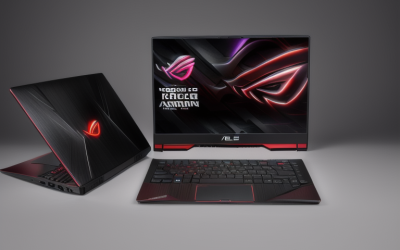
ASUS ROG Strix G16
The ROG Strix G16 is for gamers who also need a capable work machine. The title lists a 16″ FHD+ 16:10 display at 165 Hz, an NVIDIA RTX 5060, an Intel Core i7 14650HX processor, 16 GB of DDR5, and a 1 TB Gen 4 SSD.
- The 16:10 shape suits documents and the 165 Hz refresh suits games.
- A Core i7 HX processor is strong for demanding work apps.
- Trade-off: 16 GB of RAM is adequate rather than generous.
Skip it if you want a quiet, understated design for meetings. Gaming-oriented styling and cooling usually mean louder fans under load, so a call-heavy job may be better served by a plainer chassis.
Lenovo LOQ
The LOQ is a work-friendly gaming machine. The title lists an RTX 4050, an AMD Ryzen 5 7235HS, a 15.6″ FHD display at 144 Hz, 32 GB of DDR5, a 1 TB SSD, Wi-Fi 6, Ethernet, USB-C, and HDMI.
- 32 GB of DDR5 and 1 TB of storage give long-term headroom.
- Ethernet, USB-C, and HDMI cover a docked desk setup.
- Trade-off: the RTX 4050 is a previous-generation entry-level card.
Skip it if you want the newest graphics generation. For most 1080p games and for productivity, however, the 4050 remains a competent card, and the extra memory means it should age better than its spec line suggests.
Alienware 16 Aurora
This Alienware is for buyers who want a premium look and modern connectivity. The title lists an RTX 5050, an Intel Core 7 240H, a WQXGA 120 Hz display, 16 GB of DDR5 RAM, a 1 TB SSD, Wi-Fi 7, and Windows 11 Home.
- A WQXGA display is sharper than standard FHD panels.
- Wi-Fi 7 is the newest wireless standard in this group.
- Trade-off: an RTX 5050 may struggle to drive a sharper screen at high settings.
Skip it if you need Windows 11 Pro features for a managed workplace. Remote workers who rely on a company VPN and device policies should check with their IT team before choosing a Home edition.
Gaming Laptop with Windows 11 Pro
This unbranded listing leans on its work credentials. The title advertises a current-year model with Office and Windows 11 Pro, a Core i7 processor, 16 GB of RAM, a 512 GB SSD, a 15.6″ FHD display, a backlit keyboard, and a two-year warranty.
- Windows 11 Pro and a stated warranty are practical for office use.
- A backlit keyboard helps in dim rooms.
- Trade-off: no graphics card is named, so gaming ability is unconfirmed.
Skip it if gaming performance is your priority.
HP Victus 15.6″
The Victus is an entry-level gaming laptop from a familiar brand. The title lists a 15.6″ Full HD display at 144 Hz, an Intel Core i5-12450H, an RTX 3050, 16 GB of RAM, a 512 GB PCIe SSD, Wi-Fi 6, and a backlit keyboard.
- A dedicated RTX card and 144 Hz screen run most esports titles well.
- 16 GB of RAM and a PCIe SSD are a solid base.
- Trade-off: the processor and GPU are older generations.
Skip it if you want to play the newest demanding titles for years. It makes the most sense for students or remote workers who play popular esports games and want a recognizable brand with accessible support.
Which One Fits Your Situation
You work from home and game on weekends
The Lenovo LOQ gives 32 GB of RAM, 1 TB of storage, Ethernet, and HDMI for docked work, plus an RTX 4050 for weekend play.
You want the strongest gaming performance in the group
The ASUS ROG Strix G16 with an RTX 5060 and a Core i7 HX processor leads, and the Acer Nitro V 16S AI is its closest rival with a taller screen and 32 GB of memory.
You are on a tight budget
The HP Victus keeps a dedicated RTX 3050 and 144 Hz screen at an entry price, while the HILLSUSU offers more memory if you can verify its graphics.
Your job needs Windows Pro and a long warranty
The unbranded Windows 11 Pro gaming laptop lists a two-year warranty, and the HILLSUSU also lists Windows 11 Pro, but confirm graphics details on both.
Common Mistakes
- Buying a laptop labeled gaming without a named graphics card.
- Choosing a sharp screen but pairing it with an entry-level GPU.
- Ignoring Windows edition when work software needs Pro features.
- Counting on long battery life during gaming sessions.
- Skimping on storage, then running out of room for games and work files.
Related guides
- Replacement Cables For Gaming Mice And Headsets
- Nvidia Control Panel Best Settings For Gaming
- How To Test Gpu Stability After Overclocking
Frequently Asked Questions
Can one laptop really handle gaming and work?
Yes, if it has a dedicated graphics card and 16 GB or more of RAM. The trade-off is weight, fan noise, and shorter battery life than a work-only laptop.
Is 144 Hz worth it for office use?
It makes scrolling smoother and is a nice bonus, but the main benefit is for games.
Should I buy Windows 11 Pro?
Choose Pro if your employer requires domain join or management tools. Home is fine for personal use.
How much storage do I need?
Plan on 1 TB if you install several modern games, since single titles can take up tens of gigabytes.