
The best CPU cooler for most gaming PCs is the Thermalright Peerless Assassin 120 SE: it offers the strongest balance of cooling capacity, low noise, compatibility, and budget value for mainstream and high-performance air-cooled builds. Choose the ARCTIC Liquid Freezer III Pro 360 A-RGB instead for a high-wattage processor, sustained rendering, or a premium build with room for a 360 mm radiator; choose the Thermalright Assassin X120 Refined SE for an inexpensive six-core gaming system. The Minorsonic 360 mm AIO and Thermaltake TH360 ARGB Sync V2 suit buyers who want large liquid coolers and lighting, while the Jungle Leopard Chill Arc 360 is aimed at showcase systems where its 2K AMOLED display is part of the build. The Thermalright TL-C12C-S X3 is not a complete CPU cooler, but it can be a useful three-fan airflow upgrade when the existing heatsink is adequate.
Top 3 picks at a glance
Quick Comparison
| Product | Best for | Key specs stated by listing | Price tier |
|---|---|---|---|
| Minorsonic AIO CPU Cooler | Affordable 360 mm liquid cooling with ARGB | 360 mm radiator; high-speed ceramic-bearing pump; three PWM ARGB fans; three-phase motor | Mid-range |
| ARCTIC Liquid Freezer III Pro 360 A-RGB | High-performance CPUs and sustained workloads | 360 mm AIO; A-RGB lighting; Liquid Freezer III Pro platform; radiator-mounted PWM fans | Mid-range |
| Thermalright Peerless Assassin 120 SE | Best overall value air cooling | Dual-tower air cooler; six heat pipes; two 120 mm PWM fans; AGHP technology; up to 1550 RPM | Budget |
| Thermalright Assassin X120 Refined SE | Budget gaming PCs and moderate CPUs | Single-tower air cooler; four heat pipes; one TL-C12C PWM fan; aluminium heatsink cover | Budget |
| Jungle Leopard Chill Arc 360 | Display-focused showcase PCs | 360 mm AIO; 2K AMOLED screen; black finish designation | Premium |
| Thermalright TL-C12C-S X3 | Adding case airflow | Three 120 mm ARGB case fans; four-pin PWM; S-FDB bearing | Budget |
| Thermaltake TH360 ARGB Sync V2 | ARGB-equipped 360 mm liquid builds | 360 mm AIO; three 120 mm fans; PWM control; 500–2000 RPM fan range; mirror waterblock design | Premium |
How We Chose
This roundup compares the products by cooling class, stated construction, installation requirements, likely use case, and upgrade path rather than by a single headline specification. A dual-tower air cooler, a 360 mm all-in-one liquid cooler, and a three-pack of case fans solve different problems, so treating them as interchangeable would produce poor buying advice. We considered radiator or heatsink size, fan count, pump or heat-pipe design, lighting and display features, motherboard control requirements, likely clearance issues, and the practical consequences of long-term maintenance.
The products are also separated by budget role. The Peerless Assassin 120 SE is judged as a value performance cooler, the Assassin X120 as an entry-level tower, and the three fan pack as an airflow accessory. The liquid coolers are compared on radiator size, control features, visual design, and suitability for sustained power. Exact CPU temperatures, noise levels, and benchmark results vary with processor, room temperature, case, mounting pressure, fan curves, BIOS settings, and workload, so no invented performance figures are used.
1. Minorsonic AIO CPU Cooler – Best for Affordable 360 mm Liquid Cooling
As an Amazon Associate we earn from qualifying purchases at no extra cost to you.

The Minorsonic AIO CPU Cooler is aimed at builders who want the visual impact and broad heat-transfer area of a 360 mm all-in-one cooler without immediately moving into the most expensive display-equipped category. Its listing identifies a high-speed ceramic-bearing pump, three PWM ARGB fans, and a three-phase motor. Those details place it in the feature-rich mainstream AIO class rather than the basic single-tower air-cooler class.
A 360 mm radiator uses three 120 mm fans and gives a larger fin area than a 240 mm radiator. That can be useful with a high-performance desktop CPU, particularly when the processor is rendering, compiling, streaming, or otherwise held under load for several minutes. It is less automatically useful for a low-power gaming processor: at modest gaming loads, a quality air cooler may deliver similar practical results with fewer components and less installation complexity.
Key specifications and fit
- 360 mm all-in-one liquid-cooling format.
- High-speed ceramic-bearing pump, as stated by the listing.
- Three PWM ARGB fans.
- Three-phase pump motor design, as stated by the listing.
- Requires a compatible case with mounting support for a 360 mm radiator and three 120 mm fans.
- Requires motherboard or controller support for PWM and ARGB connections, depending on the included cabling.
The most important compatibility check is physical rather than electrical. Measure the intended radiator position, including the thickness of the radiator and fans together, and check whether the assembly conflicts with the motherboard’s upper heatsinks or tall memory modules. Front mounting can be easier in some cases, but it may place the radiator between the front intake and the rest of the system. Top mounting usually gives cleaner exhaust airflow, provided the case has enough clearance above the motherboard.
Strengths
The main strength is capacity per radiator footprint. Three fans can move air through a substantial radiator while operating at a lower speed than a smaller cooler would need for the same heat load. PWM control also allows the motherboard to adjust fan speed according to CPU temperature instead of leaving the fans at a fixed speed. ARGB gives the builder control over the appearance without making lighting the only feature.
The pump design is another reason to consider it for a modern performance system. A ceramic bearing and three-phase motor are category-level features associated with smooth pump operation, although actual noise depends on pump speed, mounting, firmware, and the individual unit. Buyers should still regard every AIO as a pump-dependent component with more potential failure points than a passive heatsink and fan.
Pros
- Large 360 mm radiator for sustained CPU workloads.
- Three PWM ARGB fans are included.
- High-speed ceramic-bearing pump and three-phase motor are specified by the listing.
- Suitable for builds where a large radiator and coordinated lighting are priorities.
Cons
- Needs a case that genuinely supports a 360 mm radiator.
- More installation and cable management than a tower air cooler.
- Pump adds a powered component that an air cooler does not need.
- Exact socket support, software behavior, and included accessories should be checked before purchase.
Its nearest alternative here is the ARCTIC Liquid Freezer III Pro 360 A-RGB. Both are 360 mm AIOs with addressable lighting, but the ARCTIC model is the stronger choice when the priority is an established performance-oriented platform and clearer high-load positioning. The Minorsonic is more compelling when its lower market tier, listed pump features, and included ARGB fan arrangement matter more than brand ecosystem. Compared with the Peerless Assassin 120 SE, the Minorsonic offers a cleaner radiator-based aesthetic but gives up the air cooler’s simpler maintenance and lower pump-related risk.
2. ARCTIC Liquid Freezer III Pro 360 A-RGB – Best for High-Wattage CPUs

The ARCTIC Liquid Freezer III Pro 360 A-RGB is the most performance-focused choice in this list for a builder who has the space for a 360 mm radiator and wants to keep a powerful CPU under control during sustained workloads. It belongs to ARCTIC’s Liquid Freezer III Pro family and combines a 360 mm radiator with A-RGB lighting. The important buying decision is whether the system needs liquid cooling capacity, not whether the lighting is enabled.
A 360 mm AIO is most valuable when CPU power remains high for long periods. Modern processors can boost aggressively and may use substantially more power in all-core workloads than in ordinary games. Cooling headroom can help the processor maintain its intended boost behavior, reduce fan ramping, and give an enthusiast room to tune power limits. It cannot, however, make an incompatible case compatible or eliminate the need for correct pump and fan control.
Key specifications and fit
- 360 mm all-in-one liquid CPU cooler.
- Liquid Freezer III Pro platform.
- A-RGB lighting.
- Three 120 mm radiator-fan positions are implied by the 360 mm format.
- Requires radiator clearance, motherboard mounting compatibility, and suitable PWM/lighting headers.
Before selecting it, check the case manufacturer’s radiator specifications rather than relying only on a generic “360 mm support” label. A nominal 360 mm mount may support the radiator length but not the combined radiator-and-fan thickness at the top of the chassis. Also check the position of the CPU socket, VRM heatsinks, memory slots, and graphics card. Top mounting is commonly preferred when the case permits it because the radiator can exhaust warm air without placing it directly ahead of the graphics card intake path.
Strengths
The platform’s strongest argument is its orientation toward serious thermal workloads. The 360 mm format offers a large heat-exchange area, and the Pro designation signals that this is not merely a decorative entry-level AIO. A-RGB support makes it suitable for a coordinated build, but the lighting can normally be treated as an optional visual layer rather than a reason to accept poor airflow.
It is also a sensible upgrade path for a buyer who expects to move from a midrange processor to a hotter model later. Cooling hardware cannot overcome every CPU power limit, but starting with a substantial radiator avoids replacing the cooler during a processor upgrade. The trade-off is that a future CPU must still use a supported mounting kit, and the case must continue to accommodate the radiator.
Pros
- 360 mm radiator format is appropriate for sustained high CPU power.
- Performance-focused Liquid Freezer III Pro family.
- A-RGB lighting supports modern gaming-PC aesthetics.
- More upgrade headroom than a basic single-tower cooler.
Cons
- Requires a large compatible case and careful clearance checks.
- More expensive and complex than a capable air cooler.
- Contains a pump and tubing that are not present in a tower heatsink.
- May be excessive for a modest gaming CPU used primarily for short gaming sessions.
The closest alternative is the Minorsonic 360 mm AIO. Choose ARCTIC when sustained thermal performance, platform maturity, and a performance-first design are the priority; choose Minorsonic when its mid-range positioning and listed three-phase pump features better suit the budget. The Thermaltake TH360 ARGB Sync V2 is the nearest visual alternative, especially for a system built around synchronized lighting, but the ARCTIC is the clearer recommendation when the cooler’s primary job is high-load CPU control rather than a mirror-finish presentation.
3. Thermalright Peerless Assassin 120 SE – Best Overall Value

The Thermalright Peerless Assassin 120 SE is the best overall value choice in this roundup for most gaming PCs that do not specifically require a 360 mm radiator. Its design uses two heatsink towers, six heat pipes with AGHP technology, and two 120 mm PWM fans rated by the listing up to 1550 RPM. That combination gives it considerably more heat-dissipation hardware than a basic single-tower cooler while avoiding a pump, radiator, and liquid loop.
The Peerless Assassin is especially well suited to mainstream and upper-mainstream gaming processors. It is a strong match for a build where the graphics card is the largest heat source and the owner wants reliable CPU cooling without using front-panel radiator space. It can also be a sensible option for a high-end CPU operated within reasonable motherboard power limits, though the exact result depends on the processor and case airflow.
Key specifications and fit
- Dual-tower air-cooler design.
- Six heat pipes using AGHP technology.
- Two 120 mm PWM fans.
- Fan speed listed up to 1550 RPM.
- Needs CPU-socket mounting compatibility and sufficient case height.
- Memory clearance must be checked because the front fan may overlap tall modules.
Air cooler clearance is three-dimensional. Case height is the obvious measurement, but memory and motherboard clearance are just as important. If the front fan sits above a tall memory heat spreader, it may need to be raised, increasing total cooler height. That can make an otherwise compatible cooler too tall for the side panel. Before installation, compare the cooler’s listed height with the case limit and account for any fan adjustment needed over the DIMM slots.
Strengths
The dual-tower layout distributes heat across a large fin area and gives the two fans a clear push-pull airflow path. Six heat pipes provide multiple routes from the CPU contact area into the fin stacks. PWM control allows a quiet idle curve and a more assertive response under heavy load. Since there is no pump, the basic operating system is mechanically simpler than an AIO.
The Peerless Assassin also preserves radiator positions for case airflow. A front radiator can restrict or pre-warm intake air before it reaches the graphics card; using a tower cooler lets the case use front fans as direct intake and the rear or top fans as exhaust. That layout can be particularly attractive in a gaming system with a power-hungry graphics card.
Pros
- Dual-tower design with six heat pipes.
- Two PWM fans are included.
- Strong budget-to-performance positioning.
- No pump or liquid loop to manage.
- Leaves 240 mm and 360 mm radiator mounts available for future changes.
Cons
- Large height and memory-clearance requirements.
- May obstruct access around the memory slots during installation.
- Does not provide the display or radiator aesthetics of a premium AIO.
- Exact socket support and dimensions should be confirmed for the target platform.
Its nearest alternative is the Thermalright Assassin X120 Refined SE. The Assassin X120 is easier to fit and costs less, but the Peerless Assassin has a substantially larger dual-tower cooling class and is the better long-term choice for a hotter CPU. Compared with the ARCTIC Liquid Freezer III Pro 360 A-RGB, the Peerless Assassin is less suitable for extreme sustained CPU power but is simpler, cheaper, and free of pump noise and radiator-placement concerns. For a normal gaming build, those practical advantages make it the default recommendation.
4. Thermalright Assassin X120 Refined SE – Best for Entry-Level Gaming PCs

The Thermalright Assassin X120 Refined SE is the sensible budget pick for a compact or moderately powered gaming PC. It is a single-tower air cooler with four heat pipes, one TL-C12C PWM fan, and an aluminium heatsink cover. The design is less substantial than the Peerless Assassin 120 SE, but that is also its point: it uses less space, fewer parts, and a simpler installation path for CPUs that do not need a large dual-tower cooler.
This cooler fits best in a system built around an efficient six-core or midrange processor operating near its normal stock limits. It can also suit a small upgrade from a boxed cooler when the case has limited height. Buyers should avoid choosing it solely because it is inexpensive for a CPU that regularly runs heavy all-core workloads or has unusually high sustained power limits. A bigger cooler is often more economical than replacing a small cooler later.
Key specifications and fit
- Single-tower air cooler.
- Four heat pipes.
- One TL-C12C PWM fan.
- Aluminium heatsink cover.
- Compact relative to a dual-tower cooler, but case height and socket compatibility still need checking.
The single fan can be controlled through the motherboard’s CPU_FAN header. A useful starting curve is around 30–40% duty at idle or low temperatures, approximately 50–65% during moderate loads, and a more aggressive setting near the upper temperature range. Exact percentages depend on the fan and motherboard, but the principle is to avoid constant speed changes around the temperature threshold. A short fan-delay or hysteresis setting can prevent unnecessary ramping during brief game-menu spikes.
Strengths
The four heat pipes give the cooler a direct thermal path into the fin stack without requiring a pump or radiator. The aluminium cover adds a cleaner appearance than an exposed fin stack, while the PWM fan permits automatic speed adjustment. A single-tower layout also creates fewer conflicts with the memory area than a large front-fan dual-tower design.
For an entry-level gaming computer, the cooler’s value is not just its purchase price. It can reduce the need for a larger case, preserve access to memory slots, simplify cable routing, and reduce the number of components that must be powered. Those benefits are meaningful when the system is being assembled around a modest budget.
Pros
- Budget-friendly single-tower format.
- Four heat pipes provide a meaningful step above very basic heatsinks.
- One PWM fan keeps wiring and control simple.
- Aluminium cover gives the cooler a finished appearance.
- Usually easier to fit than a large dual-tower cooler.
Cons
- Less thermal capacity than the Peerless Assassin 120 SE.
- Single-fan design is not ideal for unusually high sustained CPU power.
- Lighting is not the central feature of this model.
- Socket support and final height should be checked for the intended build.
The nearest alternative is the Peerless Assassin 120 SE. Pick the Assassin X120 when case space, budget, or a moderate CPU matters most; pick the Peerless Assassin when the processor is hotter or the system may be upgraded later. The three-fan Thermalright TL-C12C-S X3 is not a replacement for either CPU cooler: it can improve case airflow, but it does not transfer heat from the processor. A useful budget build can use the Assassin X120 for CPU cooling and add case fans only if the chassis actually needs them.
5. Jungle Leopard Chill Arc 360 – Best for Display-Focused Showcase PCs
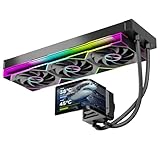
The Jungle Leopard Chill Arc 360 is designed for the builder who wants the CPU cooler to be a visible part of the PC’s presentation. Its listing identifies a 360 mm AIO format and a 2K AMOLED screen, with the “BK” designation indicating the black version. That display is the distinguishing feature: unlike a conventional liquid cooler, this model is intended to show information or graphics in the central pump area while the radiator handles CPU heat.
A display-equipped AIO should be evaluated in two separate ways. First, it needs to fit and cool the CPU as a 360 mm liquid cooler. Second, its screen, software, USB connection, cable route, and viewing angle need to work in the finished case. The display does not improve thermal transfer by itself. It adds visual value and may make the cooler worthwhile in a showcase build, but it also adds another component and compatibility question.
Key specifications and fit
- 360 mm all-in-one liquid CPU cooler.
- 2K AMOLED screen on the pump assembly, according to the listing.
- Black finish designation.
- Requires space for a 360 mm radiator and three 120 mm fan positions.
- Display functions may require an internal USB connection and compatible control software; verify the included requirements before purchase.
The screen should be considered during case selection. A pump display facing a side panel or hidden behind a thick radiator position may be difficult to see. Top mounting can make the screen orientation less convenient, depending on the case and tubing direction, while front mounting may show the pump clearly but affect graphics-card intake temperature. Plan the radiator, tubing, USB cable, and graphics-card position together rather than installing the cooler as an afterthought.
Strengths
The 2K AMOLED display gives the system a distinctive focal point. It can support a themed build, show monitoring information, or simply provide a custom visual element that ordinary pump blocks do not offer. The 360 mm format also gives it the broad radiator class expected by buyers considering a high-performance AIO.
The value proposition is therefore broader than raw temperature. A display can make a case window feel intentional, particularly when the rest of the build uses coordinated lighting and matching cable colors. Buyers should still decide whether the screen will remain useful after the novelty fades. If the answer is no, a simpler air cooler or conventional AIO may provide better value.
Pros
- Distinctive 2K AMOLED pump display.
- 360 mm radiator class suits high-load CPU cooling.
- Strong fit for themed and showcase gaming PCs.
- Black finish can work with understated or high-contrast interiors.
Cons
- Display may require extra software, USB wiring, and setup.
- Needs a large case with suitable radiator and screen visibility.
- More expensive than a conventional air cooler because of the display feature.
- Screen orientation and viewing angle can depend heavily on the case.
The closest alternative is the Thermaltake TH360 ARGB Sync V2. Choose Jungle Leopard when the pump display is central to the build; choose Thermaltake when motherboard-synchronized ARGB and a mirror waterblock appearance are more important than a screen. The ARCTIC Liquid Freezer III Pro 360 A-RGB is the more conservative performance-first alternative. In other words, Jungle Leopard is a design purchase with 360 mm cooling, while ARCTIC is primarily a cooling purchase with lighting.
6. Thermalright TL-C12C-S X3 – Best for Adding Case Airflow

The Thermalright TL-C12C-S X3 is a three-pack of 120 mm ARGB case fans, not a complete CPU cooler. It belongs in this roundup because airflow around the CPU cooler and graphics card is part of the cooling system, but it should not be confused with a heatsink or AIO. The listing specifies four-pin PWM control and an S-FDB bearing, making the pack relevant to builders who need additional intake or exhaust fans.
Its best use is completing a case airflow plan. A common arrangement is two or three front intake fans, one rear exhaust fan, and optional top exhaust fans. The exact number should follow the case’s mesh area, dust-filter design, graphics-card heat output, and available mounts. More fans do not automatically mean lower temperatures: poorly arranged fans can create turbulence, extra noise, or excessive dust entry.
Key specifications and fit
- Three 120 mm case fans.
- ARGB lighting.
- Four-pin PWM connection.
- S-FDB bearing, as stated by the listing.
- Designed for case airflow rather than direct CPU heatsink mounting.
Use the four-pin PWM plugs on motherboard fan headers or an appropriate hub, and connect ARGB leads only to compatible addressable RGB headers or a suitable controller. Do not connect a 5-volt three-pin ARGB plug to a 12-volt four-pin RGB header. That mismatch can damage the lighting hardware. The fan power and lighting connections are separate systems even when both are routed together.
Strengths
The three-fan quantity makes it easier to establish balanced intake and exhaust without buying individual fans. PWM control gives the motherboard the ability to lower speed at idle and increase it when CPU or system temperature rises. ARGB adds visual coordination for builders who already use illuminated memory, GPU supports, or a lit CPU cooler.
The fans can also support a radiator if their frame, pressure behavior, and mounting dimensions suit that job, but the listing presents them as case coolers. For a radiator replacement, verify the required static-pressure characteristics and connector arrangement rather than assuming every 120 mm fan is equally effective through dense fins. As case intake and exhaust fans, the pack is the more natural match.
Pros
- Three 120 mm fans provide a practical airflow starting point.
- Four-pin PWM enables automatic speed control.
- ARGB lighting suits coordinated gaming-PC builds.
- S-FDB bearing is specified by the listing.
Cons
- Does not include a CPU heatsink, heat pipes, radiator, or pump.
- Requires available 120 mm mounting positions.
- ARGB header compatibility must be checked carefully.
- May require a splitter or hub if the motherboard lacks enough headers.
The nearest alternatives are the fans included with the liquid coolers in this list, but those are tied to their respective radiator systems. The TL-C12C-S X3 is better viewed as an airflow upgrade for a separate CPU cooler such as the Assassin X120 or Peerless Assassin. If a case already has enough quiet fans and temperatures are acceptable, spending on a larger CPU cooler will usually produce more direct CPU benefits than adding a third or fourth case fan.
7. Thermaltake TH360 ARGB Sync V2 – Best for Synchronized ARGB Builds

The Thermaltake TH360 ARGB Sync V2 is a 360 mm liquid CPU cooler for builders who want a large radiator, three 120 mm fans, PWM control, and a mirror-style waterblock appearance. Its listing states a 500–2000 RPM fan range and describes the cooler as ARGB Sync V2. The combination makes it a natural fit for a gaming PC assembled around coordinated motherboard lighting rather than a screen-equipped pump.
The 500–2000 RPM range gives the control system a broad operating window. At light loads, a sensible fan curve can keep the fans near the lower end to reduce noise. Under sustained rendering or heavy compilation, the curve can allow higher speed to move more air through the radiator. A wide range is useful only when the curve is configured properly; leaving all fans at maximum all the time wastes the acoustic advantage of PWM control.
Key specifications and fit
- 360 mm all-in-one liquid cooler.
- Three 120 mm fans.
- PWM fan control.
- Fan speed range listed as 500–2000 RPM.
- ARGB Sync lighting support.
- Mirror waterblock design.
Check the case’s top and front radiator support before ordering. A 360 mm mount must accommodate the full length of three fans, the radiator thickness, and the chosen tubing direction. If top-mounted, verify that the radiator does not collide with memory or VRM heatsinks. If front-mounted, make sure the graphics card still receives sufficient cool intake air and that the tubing can reach the CPU socket without sharp bends.
Strengths
The cooler combines the capacity of a 360 mm radiator with an appearance that works well in a glass-sided gaming case. ARGB Sync lets the lighting follow the motherboard ecosystem instead of forcing the builder to use a separate visual language. The mirror waterblock design gives the CPU area a reflective focal point, while the three fans provide a consistent radiator face.
It is also a flexible option for buyers whose needs are between practical performance and presentation. A 360 mm radiator can be justified by a high-power processor, but the cooler does not require a screen or other specialized display hardware. The main requirement is a case with sufficient space and a willingness to manage pump, fan, ARGB, and motherboard cables.
Pros
- Large 360 mm radiator with three included 120 mm fans.
- Wide listed 500–2000 RPM PWM fan range.
- ARGB Sync support for coordinated lighting.
- Mirror waterblock appearance suits showcase builds.
Cons
- Needs a spacious, compatible case.
- Liquid cooling adds pump and tubing complexity.
- May be excessive for a low-power CPU.
- Lighting connections and motherboard header compatibility require planning.
Its nearest alternatives are the Minorsonic 360 mm AIO and Jungle Leopard Chill Arc 360. Minorsonic is the more budget-oriented 360 mm option with listed ceramic-bearing pump and three-phase motor features. Jungle Leopard is the choice for a 2K AMOLED display. Thermaltake is the better middle ground when synchronized ARGB, the mirror waterblock, and the stated 500–2000 RPM range are more important than a screen or the lowest possible purchase tier.
How to Choose
Start with CPU power, not the cooler’s appearance
The right cooler depends first on how much heat the processor produces and for how long. Gaming often creates a fluctuating workload: one or more CPU cores may boost high while total package power moves up and down. Rendering, code compilation, video encoding, simulation, and stress tests can hold every core near its sustained limit. A cooler that is perfectly comfortable in games may run much louder during a long all-core job.
For an efficient mainstream gaming CPU, the Assassin X120 Refined SE is a reasonable budget class. For a hotter mainstream processor, a dual-tower model such as the Peerless Assassin 120 SE offers more thermal mass and fin area. A 360 mm AIO becomes more attractive when the CPU operates at high sustained power, the user wants to tune power limits, or the build’s appearance and radiator layout justify the added complexity.
A simple heat-budget calculation
Coolers are not rated in a way that translates perfectly into a universal CPU wattage limit, because temperature depends on mounting, airflow, ambient temperature, and the processor’s heat density. A useful planning calculation is still possible. Assume a gaming PC room temperature of 24°C, a desired sustained CPU temperature ceiling of 85°C, and a graphics card that adds 350 W of heat inside the case. The CPU has a 160 W sustained package limit.
The CPU-to-room temperature difference is 85 − 24 = 61°C. The cooler must transfer roughly 160 W through that temperature difference, but the case must also remove approximately 510 W of heat from the internal air once the graphics card and CPU are included. That does not mean the fans need a literal 510 W electrical rating; it means the case airflow plan is as important as the heatsink. A large AIO with a radiator mounted as front intake can cool the CPU while pre-warming air entering the case, potentially affecting the graphics card. A Peerless Assassin with front mesh intake and rear/top exhaust may provide a better whole-system balance even if its CPU-only capacity is lower.
Air cooler or AIO?
Choose air cooling when simplicity, durability, value, and easy maintenance are priorities. A tower air cooler has no pump, no radiator placement decision, and no liquid tubing. Dust still needs to be removed, and the fan can eventually be replaced, but the basic design is easy to understand and service. Air coolers also leave more front intake area available for the graphics card.
Choose an AIO when you need a large heat-exchange area, prefer a clean CPU-socket appearance, have a case designed around a radiator, or want features such as ARGB or a pump display. The trade-offs are pump noise, extra cabling, installation complexity, radiator clearance, and a finite pump life. A 360 mm AIO is not automatically quieter than a dual-tower air cooler; fan speed, pump speed, fin density, and the temperature target determine the result.
Use a compatibility checklist
- Socket: Confirm that the exact motherboard platform is supported by the cooler’s included mounting hardware. Do not assume a cooler supports every current socket simply because the brand sells modern products.
- Case height: For the Peerless Assassin and Assassin X120, compare the cooler height with the case’s maximum CPU-cooler height. Allow for a front fan raised over tall memory.
- Radiator length: A 360 mm radiator needs three 120 mm mounting positions. Check the actual chassis diagram, not only the product summary.
- Radiator thickness: Add radiator and fan thickness together. Top clearance may be reduced by memory modules and motherboard heatsinks.
- Graphics-card clearance: A front-mounted radiator may reduce the maximum graphics-card length. Measure from the front mount to the expansion-slot area.
- Memory: Tall RGB memory can conflict with the front fan of a dual-tower cooler. Moving the fan upward may violate the case height limit.
- Headers: PWM fans use four-pin fan headers. ARGB commonly uses a five-volt, three-pin addressable header. Verify both before assembly.
- USB: Display-equipped pumps may need an internal USB connection and software. Reserve a header and plan the cable route.
Plan airflow around the graphics card
For a conventional mesh-front case, start with two front intake fans and one rear exhaust fan. Add a third front intake or top exhaust fan when the case, graphics card, and noise target justify it. Keep intake and exhaust directions consistent: the open side of a typical fan draws air in, while the side with the support struts and motor label generally exhausts air. Confirm the arrow marks on the frame if uncertain.
A slightly positive pressure arrangement, with a little more filtered intake capacity than exhaust capacity, can reduce unfiltered gaps drawing dust into the case. It is not a strict rule; filters, fan curves, and restrictions matter. With the TL-C12C-S X3, three fans might be used as two front intakes and one rear exhaust, or three front intakes if the case already includes a rear exhaust. Installing all three as exhaust while providing little intake is usually a poor starting point.
Configure fan and pump curves
After installation, enter the motherboard firmware and confirm that the CPU_FAN header detects the CPU cooler fan. For a tower cooler, begin with a quiet low-temperature duty cycle and increase fan speed progressively above roughly 60°C. Avoid a curve that jumps from nearly silent to maximum speed at one narrow threshold; that causes audible oscillation whenever the CPU briefly boosts.
For an AIO, identify whether the pump is controlled through a dedicated pump header or a combined cable. Many users run the pump at a steady speed or use the manufacturer’s recommended control mode, while the radiator fans respond to CPU temperature. If the pump speed changes rapidly with every small temperature spike, the system may produce distracting tonal noise. A steady pump setting with a gradual fan curve is often easier to live with, provided the manufacturer’s instructions permit it.
Decide whether lighting adds value
ARGB should be treated as a visual feature, not a cooling specification. It is worthwhile when the case has a window, the build uses a consistent color scheme, and the motherboard or controller has enough compatible connections. It is less important in a closed case or a workstation where the money would be better spent on airflow or a larger heatsink.
The products divide neatly by visual purpose. The Assassin X120 is understated, the Peerless Assassin emphasizes practical cooling, the Minorsonic and Thermaltake provide illuminated 360 mm options, the Jungle Leopard adds a screen, and the Thermalright three-pack adds lighting to the case itself. Match the cooler to the whole build rather than buying the brightest individual component.
Consider installation and maintenance
Install the backplate and mounting hardware before the motherboard becomes difficult to access. Remove the protective film from the cooler’s contact plate, apply the recommended amount of thermal compound, and tighten screws gradually in an alternating pattern. For an air cooler, make sure both fans face the same front-to-back airflow direction. For an AIO, avoid sharp tubing bends and position the radiator so that the pump is not the highest point in the loop when the case layout allows a better alternative.
Dust filters and heatsink fins need periodic cleaning. A tower cooler can usually be cleaned in place with the system powered off and unplugged. An AIO radiator should also be kept free of dust, especially when mounted behind a restrictive filter. If a pump begins making unusual grinding, bubbling, or clicking sounds, check mounting orientation, pump speed detection, and trapped air before assuming the CPU itself is the problem.
Choose for the upgrade path
If the current processor is modest but a future upgrade is likely, the Peerless Assassin 120 SE is the most balanced hedge in this list. It can avoid an immediate cooler replacement without requiring a radiator-ready case. If the planned upgrade is a high-power processor and the current case supports it, a 360 mm AIO can provide more headroom, but confirm future socket mounting support before treating it as a permanent platform.
Conversely, do not buy a 360 mm cooler solely because the system might someday use a hotter CPU. A radiator can force a larger case, add cost, and complicate airflow today. The best upgrade path is the one that matches a plausible processor change, not an unlimited hypothetical one.
Frequently Asked Questions
Which is the best CPU cooler for most gaming PCs?
The Thermalright Peerless Assassin 120 SE is the best all-round choice here because its dual-tower design and six heat pipes provide substantial cooling without a pump or radiator. It suits many mainstream and high-performance gaming builds, provided the case and memory clearances work.
Is a 360 mm AIO always better than the Peerless Assassin 120 SE?
No. A 360 mm AIO has a larger radiator class and can be advantageous under sustained high CPU power, but the Peerless Assassin is simpler and may be enough for gaming workloads. Case airflow, mounting, fan curves, ambient temperature, and CPU power limits determine the practical result.
Is the Thermalright TL-C12C-S X3 a CPU cooler?
No. It is a three-pack of 120 mm ARGB case fans. It can improve intake or exhaust airflow around a separate CPU cooler, but it does not include a heatsink, heat pipes, radiator, or pump.
Do I need a 360 mm radiator for gaming?
Most gaming PCs do not require one. A 360 mm AIO makes more sense for a high-power CPU, sustained workloads, aggressive tuning, or a build where the radiator appearance is important.
Can I install a dual-tower cooler with tall RGB memory?
Often yes, but the front fan may need to be raised to clear the memory modules. Raising it increases the cooler’s total height, so check both memory clearance and the case’s maximum CPU-cooler height.
Where should a 360 mm radiator be mounted?
Top exhaust is often a clean arrangement when the case provides enough clearance above the motherboard. Front mounting can also work, but it may warm the intake air reaching the graphics card and can reduce graphics-card clearance.
Do ARGB fans work with every RGB motherboard header?
No. Addressable RGB commonly uses a five-volt, three-pin connection, while older non-addressable RGB commonly uses 12 volts and four pins. Check the header voltage and pin arrangement before connecting the lighting.
How often should I replace thermal paste or clean the cooler?
Clean visible dust from filters, fans, and heatsink fins periodically, with the interval depending on pets, smoking, room dust, and case airflow. Thermal paste usually does not require replacement on a fixed short schedule; replace it when removing the cooler, after a poor mount, or when temperatures change unexpectedly after ruling out dust and fan problems.
Final Recommendations by Build Type
For the best value in a normal gaming PC, choose the Thermalright Peerless Assassin 120 SE. For a budget system using a moderate CPU, the Thermalright Assassin X120 Refined SE is the more compact and economical option. For sustained high CPU power, choose the ARCTIC Liquid Freezer III Pro 360 A-RGB. Choose the Minorsonic 360 mm AIO when you want a mid-range liquid cooler with listed pump features and ARGB fans, or the Thermaltake TH360 ARGB Sync V2 when synchronized lighting and a mirror waterblock are central to the build.
The Jungle Leopard Chill Arc 360 is the specialist choice for a showcase system where the 2K AMOLED display matters. The Thermalright TL-C12C-S X3 is the supporting purchase: use it to build a sensible case-airflow layout, not as a substitute for a CPU heatsink or liquid cooler.


