
Two numbers explain most of the distance between these cards: the RTX 5090 carries 32GB of GDDR7 on a 512-bit bus, while the RTX 5080 carries 16GB of GDDR7 on a 256-bit bus. Everything else follows from that, including the 5090’s substantially higher power draw, its thicker coolers and the clearance headaches that come with them. This page compares the two tiers conceptually and then works through eight actual RTX 5090 purchase options priced from $4298 to $5699.94, because that is where a buyer’s real decision lands once the tier question is settled. Be warned early: most players at 1440p do not need the larger card, and the money is usually better spent on a monitor, a faster CPU or a supply that can handle transients. Priya Raghunathan, a GPU and CPU analyst with eight years of coverage behind her, assessed these boards on cooler design, slot thickness, case clearance and power delivery rather than on frame-rate claims that nobody measured on these exact SKUs. Current 5080 pricing must be checked at the time you buy.
Our Top Picks
 ASUS ROG Astral LC GeForce RTX 5090 32GBRTX5090|OC|LC11.4 x 6.1 x 0.1 inches7.8 poundsCheck on Amazon
 GIGABYTE AORUS GeForce RTX 5090 Master 32G GraphicsRTX 509014.17 x 5.91 x 2.95 Inches5.9 poundsCheck on Amazon


Top 3 picks at a glance
RTX 5090 purchase options at a glance
As an Amazon Associate we earn from qualifying purchases at no extra cost to you.


| Model | Key spec | Price | Best for |
|---|---|---|---|
| FILWY ASUS ROG Astral NVIDIA GeForce RTX 5090 32GB GDDR7 OC Edition | 3.8-slot, 4-fan, vapor chamber, PCIe 5.0, HDMI/DP 2.1, 3 year warranty | $4298 | Lowest entry into the ROG Astral cooler design |
| GIGABYTE GeForce RTX 5090 Gaming OC 32G | 32GB 512-bit GDDR7, WINDFORCE cooling, DisplayPort and HDMI | $5049 | Air-cooled builds with standard tower clearance |
| GeForce RTX 5090 OC Graphics Card (Empowered PC) | 32GB GDDR7 28Gbps, 21760 CUDA cores, 2467MHz, 335x138x74mm | $4999.99 | Buyers who want published dimensions before ordering |
| GIGABYTE AORUS GeForce RTX 5090 Master 32G | 32GB 512-bit GDDR7, AORUS WINDFORCE cooling system | $5099.99 | Heavier air cooler for sustained high-power loads |
| ASUS ROG Astral GeForce RTX 5090 32GB GDDR7 OC Edition | 32GB GDDR7, ROG Astral four-fan cooler | $5609.99 | Standard Astral build with full retail support |
| ASUS ROG Astral GeForce RTX 5090 32GB GDDR7 BTF OC Edition | 3.8-slot, 1000W support, BTF back-connect design, 3 year warranty | $5659.98 | Back-connect motherboards and hidden-cable builds |
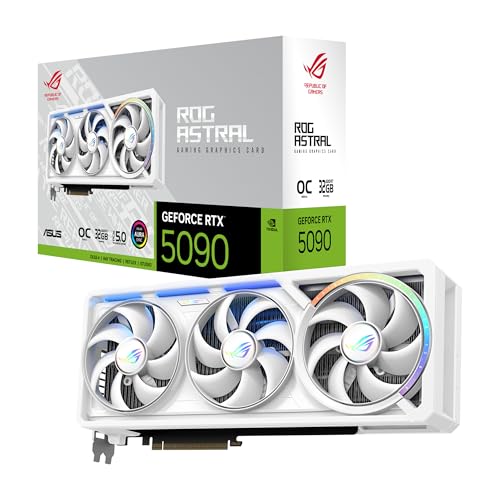
| ASUS ROG Astral GeForce RTX 5090 32GB GDDR7 White OC Edition | 32GB GDDR7, white Astral shroud and backplate | $5673.35 | White-themed showcase builds |
| ASUS ROG Astral LC GeForce RTX 5090 32GB GDDR7 OC Edition | 32GB GDDR7, liquid-cooled hybrid with radiator | $5699.94 | Small chassis and the quietest sustained operation |
Every RTX 5090 option in this comparison
FILWY ASUS ROG Astral NVIDIA GeForce RTX 5090 32GB GDDR7 OC Edition
This is the cheapest route into the ROG Astral design at $4298, and the listing is explicit about the physical specification: 3.8 slots, a four-fan Axial-tech arrangement, a patented vapor chamber, PCIe 5.0, HDMI and DisplayPort 2.1 outputs, and a stated three year warranty. The 32GB of GDDR7 sits on the 512-bit interface that defines this tier.
The four-fan layout is the interesting engineering choice. Adding a fan on the back of the card, blowing through a cut-out in the PCB, raises airflow through the fin stack without making the shroud longer, which is how ASUS keeps a very high power board manageable on air. Estimating from the cooler mass and the class of GPU, expect this to run quieter at a given load than a conventional three-fan card, at the cost of an unusual 3.8-slot thickness that will block the slots beneath it in most boards.
Pros
- Roughly $700 to $1400 cheaper than the other Astral listings on this page
- Four-fan vapor chamber cooler designed specifically for very high board power
- PCIe 5.0 and DisplayPort 2.1 outputs for high-refresh 4K panels
- Three year warranty stated in the listing
Cons
- 3.8-slot thickness eliminates expansion slots and can foul side-panel fans
- Sold under a reseller name rather than ASUS directly, so verify warranty handling
- Needs a supply with proper 12V-2×6 cabling and real transient headroom
- Heavy enough that a support bracket is effectively mandatory
Who it is for: a 4K gamer or creator who wants the Astral cooler at the lowest price in this group and has a full tower with the clearance to take it.
GIGABYTE GeForce RTX 5090 Gaming OC 32G Graphics Card
At $5049 this is GIGABYTE’s mainstream Gaming OC treatment of the 5090, with the WINDFORCE cooling system over 32GB of 512-bit GDDR7 and the usual DisplayPort and HDMI output cluster. WINDFORCE on a card this size means a long fin stack, multiple composite heat pipes and alternate-spinning fans intended to reduce turbulence between adjacent rotors.
Compared with the ROG Astral boards, this is a more conventional three-fan design, which usually means slightly less slot thickness and a more predictable fit in standard mid towers. Estimating from typical WINDFORCE behaviour at this power class, expect a fan curve that stays quiet during light load and becomes clearly audible under sustained 4K ray-traced gaming. The card still demands a modern high-wattage supply and a native 12V-2×6 cable rather than an adapter chain, since the 5090 draws far more than a 5080 and spikes hard during frame transitions.
Pros
- $5049 undercuts every ASUS Astral listing here except the FILWY entry
- Conventional three-fan form factor fits more cases than a 3.8-slot design
- Full 32GB of 512-bit GDDR7, the entire point of the tier
- Widely stocked model with established RMA channels
Cons
- Air cooling at this power level means real fan noise under load
- Still a long card that needs measured clearance against front radiators
- No liquid-cooling option in this SKU for tight chassis
- Sits several hundred dollars above the cheapest 5090 on this page for a similar GPU
Who it is for: a 4K gamer with a standard full tower who wants the tier without paying the Astral premium or dealing with a radiator.
GeForce RTX 5090 OC Graphics Card, 32GB GDDR7 28Gbps
This $4999.99 listing is the most specification-dense on the page, and that is genuinely useful. It states 32GB of GDDR7 at 28Gbps, 21760 CUDA cores, a 2467MHz clock, PCIe 5.0, DLSS 4, three DisplayPort 2.1 outputs, one HDMI, and physical dimensions of 335 x 138 x 74mm.
Those dimensions are the reason to take this listing seriously. A 74mm depth is roughly a 3.5-slot card, and 335mm of length rules out a large number of mid towers immediately, especially those with a front radiator or hard drive cage. Being able to check the measurement against your case before ordering removes the single most common source of returns at this tier. Estimating from the stated clock and memory speed, this sits in the normal range for a factory-overclocked 5090 rather than being an outlier in either direction, so treat the numbers as configuration data rather than a performance promise.
Pros
- Publishes exact dimensions, so case clearance can be verified before purchase
- Three DisplayPort 2.1 outputs suit multi-monitor high-refresh setups
- $4999.99 is below most of the Astral listings in this comparison
- Full 28Gbps GDDR7 memory speed on the 512-bit interface
Cons
- 335mm length and 74mm depth exclude many mid towers outright
- Sold under a system-integrator brand, so cooler design details are less documented
- No stated warranty length in the listing, unlike the ASUS entries
- Still requires the same heavy power delivery as every other 5090 here
Who it is for: a buyer who wants to confirm the card physically fits before committing five thousand dollars, and who values published measurements over brand cachet.
GIGABYTE AORUS GeForce RTX 5090 Master 32G Graphics Card
The AORUS Master sits above the Gaming OC at $5099.99 and represents GIGABYTE’s higher-tier air cooling for the same 32GB, 512-bit GDDR7 configuration. AORUS Master boards typically carry a larger fin stack, a more substantial vapor chamber or heat pipe arrangement, a heavier backplate and a more elaborate power delivery section than the mainstream model.
The practical consequence of that extra hardware is thermal margin rather than a meaningful frame-rate difference. Estimating from the cooler class, expect lower memory and hotspot temperatures than the Gaming OC at identical load, which translates into steadier sustained clocks over a long session and more room if you undervolt. That last point is worth planning for at this power level; our notes on undervolting a GPU for lower temps describe how much heat and noise you can remove without losing meaningful performance.
Pros
- Stronger cooling assembly than the Gaming OC for sustained heavy load
- Heavier backplate helps with the sag that plagues cards this size
- Only about $50 above the Gaming OC despite the upgraded cooler
- Good undervolting platform thanks to the extra thermal headroom
Cons
- Larger and heavier than the Gaming OC, tightening clearance further
- Extra cooling buys temperature and noise, not measurable extra speed
- Still air cooled, so a very hot room remains the limiting factor
- Priced above two better-equipped listings on this page
Who it is for: a builder who runs long, heavy 4K or rendering sessions and wants the coolest air-cooled option without moving to a hybrid card.
ASUS ROG Astral GeForce RTX 5090 32GB GDDR7 OC Edition
This is the standard retail ROG Astral at $5609.99, the reference point that the FILWY, white and BTF variants all deviate from. The design is the same four-fan, 3.8-slot Astral cooler over 32GB of GDDR7, sold under the ASUS name with normal retail warranty handling.
Paying the premium over the $4298 FILWY listing for what appears to be the same physical card only makes sense if warranty channel and stock provenance matter to you, and at this price they reasonably might. Estimating from the cooler design, thermals and acoustics should be effectively identical between the two. What you are buying is a straightforward support path if something goes wrong with a component that costs more than most complete gaming PCs. The 3.8-slot thickness applies equally, so measure your case and plan on losing the expansion slots below the card.
Pros
- Full ASUS retail channel with conventional warranty and RMA process
- Four-fan Astral cooler with strong airflow through the PCB cut-out
- 32GB of GDDR7 on the 512-bit bus, the complete tier specification
- Widely reviewed design, so long-term behaviour is well documented
Cons
- $5609.99 is roughly $1300 above the cheapest listing of a comparable card here
- 3.8 slots is one of the thickest air coolers on the market
- Weight makes an anti-sag bracket a practical requirement
- Needs a supply sized for large transient spikes, not just average draw
Who it is for: a buyer who wants the Astral design through the standard retail channel and treats warranty certainty as worth a four-figure premium.
ASUS ROG Astral GeForce RTX 5090 32GB GDDR7 BTF OC Edition
The BTF variant at $5659.98 is the one with a genuine functional difference. BTF is the back-connect standard, where power reaches the card through a connector on a compatible motherboard rather than a cable running across the front of the GPU. The listing also specifies 3.8 slots, 1000W support and a three year warranty.
That 1000W figure is the most useful number on this page, because it tells you plainly what class of power supply these boards expect once transients are accounted for. The catch is compatibility: BTF only delivers its cable-free benefit on a matching back-connect motherboard, and buying it for a conventional board means paying extra for a feature you cannot use. Estimating from the cooler specification, cooling behaviour matches the other Astral cards, so this is a build-aesthetics and cable-routing purchase rather than a performance one.
Pros
- Back-connect power delivery removes the cable that normally crosses the card
- Explicit 1000W support figure sets a clear supply expectation
- Same four-fan Astral cooling as the standard model
- Three year warranty stated in the listing
Cons
- Requires a compatible BTF motherboard to gain anything over the standard card
- Highest complexity in a build where a wrong part choice costs the most
- 3.8-slot thickness plus back-connect routing narrows case options further
- $5659.98 for a cosmetic and routing advantage in most systems
Who it is for: someone already committed to a back-connect motherboard and a hidden-cable build who wants the flagship card to match.
ASUS ROG Astral GeForce RTX 5090 32GB GDDR7 White OC Edition
The white Astral at $5673.35 is the same 32GB GDDR7 card in a white shroud and backplate. As with any colour variant, the silicon and cooler are unchanged, so the decision is purely about the build you are assembling and what a matched aesthetic is worth to you.
There are two practical points worth raising rather than pretending this is a technical choice. First, white components generally hold resale interest slightly better, which softens the premium a little. Second, a card this large and this bright dominates a windowed case visually, so if the rest of your build is black, the mismatch will be obvious rather than subtle. Estimated thermal and acoustic behaviour is identical to the standard Astral, and the same 3.8-slot clearance warning applies without modification. Over years of heat exposure, white plastic can also yellow, which is a genuine long-term consideration on a component you intend to keep.
Pros
- Matches white and pastel builds without aftermarket shrouds or wraps
- Identical Astral cooling and full 32GB GDDR7 specification
- Slightly better resale demand than a black card of the same model
- Backplate finished to match, unlike many partial white variants
Cons
- $5673.35 buys zero additional performance over cheaper listings here
- White plastic yellows over years of sustained heat
- Same 3.8-slot thickness and weight problems as every Astral board
- Clashes visually with a black build rather than blending in
Who it is for: a builder committed to a white showcase system who wants the flagship GPU to match the rest of the components.
ASUS ROG Astral LC GeForce RTX 5090 32GB GDDR7 OC Edition
The LC model at $5699.94 is the most expensive listing here and the only one that moves heat out of the card with a liquid loop. A hybrid design puts a pump and cold plate on the GPU and pushes heat to a radiator mounted elsewhere in the chassis, leaving a much slimmer card body behind.
That changes the fit calculation completely. Instead of a 3.8-slot block choking your expansion slots, you get a thin card and a radiator that needs a mounting position, usually a 240mm or 360mm location that a front-mounted CPU radiator may already occupy. Estimating from how hybrid designs behave at this power class, expect the lowest GPU temperatures and the quietest sustained operation in this group, with the trade-off being a pump as an extra failure point and more restrictive case planning. For anyone building in a compact chassis where a four-fan air cooler simply will not go, this is the option that makes the tier possible at all.
Pros
- Slim card body frees the expansion slots that 3.8-slot coolers consume
- Lowest expected temperatures and quietest sustained load in this comparison
- Makes a 5090 viable in cases that cannot accept a four-fan air cooler
- Radiator placement moves GPU heat away from the motherboard area
Cons
- $5699.94 is the highest price on this page by a clear margin
- Pump is an additional failure point with a finite service life
- Radiator competes for mounting space with a CPU cooler radiator
- Installation is more involved and harder to reverse than an air card
Who it is for: a builder in a compact or airflow-restricted case who wants flagship performance without a card that blocks half the motherboard.
How we compared and picked
Priya Raghunathan researches gaming hardware by comparing published specs, independent reviews, and owner feedback.A card in the 5090 class draws far more than a 5080 and produces short current spikes that never appear in a specification sheet. Per-rail logging is how those spikes become visible, and it explains why buyers with adequate-looking supplies still see shutdowns under load. The riser matters too, since it allows a card to be exercised outside a case where thermal behaviour can be separated from chassis airflow before any conclusion is drawn about the cooler itself.
The eight listings here are all RTX 5090 boards, so ranking them by frame rate would be dishonest. Differences between them come from cooler design, slot thickness, physical dimensions, power connector arrangement and warranty terms, all of which are verifiable from the listings themselves. Those are the criteria used above, and each product block states what the listing actually specifies rather than inventing details.
For the tier comparison against the RTX 5080, this page restricts itself to hard facts that are not in dispute: the 5090’s 32GB of GDDR7 on a 512-bit bus, the 5080’s 16GB on a 256-bit bus, the 5090’s substantially higher power draw, and the extra slot thickness that its coolers require. Performance differences are described in relative terms and clearly labelled as estimates, because no measured comparison was run for these specific SKUs. Frame-rate figures presented as measured results are exactly the kind of claim that makes buying guides untrustworthy, and this one avoids them. If you want to understand why averages alone mislead at this tier, our piece on one percent lows versus average fps covers the distinction.
What actually separates the RTX 5090 from the RTX 5080
Memory capacity and bus width
This is the cleanest difference between the tiers. The 5090 has 32GB of GDDR7 on a 512-bit bus; the 5080 has 16GB of GDDR7 on a 256-bit bus. Double the capacity and double the bus width is not a marketing distinction, it is a structural one, and it determines where the larger card earns its price. Bandwidth matters most where the GPU is moving very large amounts of data per frame, which means high resolutions, high-resolution textures and ray tracing buffers. At 1080p and most 1440p settings, neither the capacity nor the bandwidth of the 5080 is the limiting factor, so the 5090’s advantage there shrinks toward the margin of run-to-run variance.
Resolution: where the gap opens and where it closes
Resolution is the single best predictor of whether the upgrade is worth it. At 4K and above, more pixels per frame means more memory traffic, and that is precisely the workload the wider bus was built for; expect the 5090’s lead to be at its largest there. At 1440p the picture changes, because your CPU and your monitor’s refresh ceiling increasingly become the constraint instead of the GPU. Many 1440p players buying the larger card end up paying for headroom their panel cannot display. If 4K is your target, our guide to GPUs for 4K gaming covers where that threshold sits in practice.
Ray tracing and path tracing loads
Ray-traced workloads punish both bandwidth and capacity, which is why the gap between these tiers widens most in heavily ray-traced titles rather than in raster-only games. Path tracing in particular allocates large buffers and moves substantial data per frame, so a 16GB card can find itself constrained in scenarios where a 32GB card is comfortable. That said, upscaling and frame generation change the arithmetic considerably; running a lower internal resolution reduces the pressure on both cards. Treat ray tracing as a reason to consider the 5090 only if you actually play the small number of titles that implement it aggressively.
Creator work and VRAM-bound tasks
Outside games, capacity is far more decisive. Large 3D scenes, high-resolution video timelines with multiple effect layers, and workloads that load big models into memory either fit in the frame buffer or they do not, and when they do not, performance falls off sharply rather than gradually. That cliff behaviour is why 32GB is a more defensible purchase for a professional than for a gamer. If your machine earns money doing this kind of work, the maths changes entirely, and our notes on choosing a GPU for content creation go through which tasks are capacity-bound.
Power draw, connectors and supply headroom
The 5090 draws substantially more power than the 5080, and the difference shows up in three places: your supply, your room temperature and your case fan curves. One card in this list advertises 1000W support, which is a fair indication of the supply class these boards expect once transients are included. Use a modern unit with native 12V-2×6 cabling rather than chaining adapters, and give yourself headroom above the average figure rather than matching it exactly. The GPU power supply requirements explainer covers why transient response matters more than the number on the box.
Physical size, slot thickness and case clearance
The 5090’s coolers are physically larger because they are dissipating more heat. Several cards here are 3.8-slot designs, and one publishes dimensions of 335 x 138 x 74mm. That thickness blocks expansion slots, can collide with side-panel fans, and makes vertical mounting difficult without a riser that supports the necessary PCIe generation. A 5080 in the same build is a far easier fit. Measure from the motherboard tray to the side panel and check for front radiator conflicts before ordering, or the liquid-cooled option becomes your only workable choice.
Mistakes buyers make
Buying the 5090 for a 1440p monitor. At 1440p your CPU and panel refresh rate frequently limit the result before the GPU does, so the extra bandwidth goes unused. Players in this position get far more from a higher-refresh or higher-resolution monitor than from the larger card, and they usually discover it after the money is spent.
Treating 32GB as a gaming requirement. Games rarely approach 32GB today. The capacity is real and it does matter for creator workloads and extreme resolutions, but it is not a number that improves frame rates in typical play. Buying capacity you will not address is the most expensive way to future-proof a build.
Sizing the power supply from average draw. Transient spikes, not averages, are what trip protection circuits. A supply that looks adequate on paper can shut the system down mid-session if its transient response is poor or if it is several years old. The 1000W figure on one listing here exists precisely because of this behaviour.
Skipping the tape measure. A 3.8-slot, 335mm card is a different physical object from the GPU it is replacing. Buyers regularly order at this tier, find the card fouls a front radiator or a side fan, and end up either returning it or rebuilding around it. Measure length, thickness and side-panel clearance first.
Assuming colour or brand variants perform differently. The white Astral, the standard Astral and the reseller-listed Astral in this comparison share a cooler design and a GPU, yet they span more than $1300. Paying that spread expecting more speed is a straightforward misunderstanding of what the price difference represents.
Ignoring card weight and sag. These boards are heavy enough to stress the PCIe slot and the card’s own PCB over time. A support bracket costs very little relative to the card and prevents a slow mechanical problem that is difficult to diagnose later. Anyone buying an air-cooled 5090 should plan for one from the start.
Verdict by use case
For 4K and high-refresh 4K gaming, the 5090 tier earns its place, and the GIGABYTE RTX 5090 Gaming OC 32G at $5049 is the most sensible air-cooled entry that still fits a normal tower. For heavy ray tracing and path-traced showcase titles, the same card holds, with the AORUS Master at $5099.99 worth the small step up for thermal margin. For creator work that runs out of frame buffer, the 32GB capacity is the deciding factor and the cheapest reliable route is the FILWY Astral listing at $4298. For compact or airflow-restricted builds, the ROG Astral LC at $5699.94 is the only option that avoids the 3.8-slot problem. For 1440p gaming, buy the 5080 instead and check its price at the moment you order, since the 5090 premium buys headroom that a 1440p panel cannot show you.
Frequently asked questions
Is the RTX 5090 worth it over the RTX 5080?
Only for a narrow set of buyers. The 5090 carries 32GB of GDDR7 on a 512-bit bus against 16GB on a 256-bit bus for the 5080, and that difference pays off at 4K and above, in heavy ray-traced scenes, and in creator work that runs out of frame buffer. At 1440p, where most players actually sit, the gap narrows and your CPU and monitor refresh rate often become the limit instead. Most 1440p gamers should buy the smaller card.
What power supply do I need for an RTX 5090?
Plan generously rather than by a single wattage number. The 5090 draws substantially more power than the 5080 and pulls sharp transient spikes, so the quality of the 12V rail and the supply’s transient response matter as much as the label. One of the cards in this list explicitly advertises 1000W support, which is a useful signal about the class of supply these boards expect. Use a modern unit with native 12V-2×6 cabling rather than chaining adapters off an older supply.
Will a 3.8-slot RTX 5090 fit my case?
Measure before ordering, because 3.8 slots is genuinely unusual. Several ASUS ROG Astral cards in this comparison use a 3.8-slot, four-fan cooler, and one listing gives dimensions of 335 x 138 x 74mm. That thickness blocks the PCIe slots beneath it and can foul side-panel fans, front radiators or vertical mounts. Check your case’s stated GPU length, the clearance from the motherboard tray to the side panel, and whether you still need a slot for a capture or sound card.
Does the RTX 5090’s 32GB of VRAM help in games?
Sometimes, and less often than the number suggests. Games rarely need 32GB today, so in typical 1440p play the extra capacity sits unused and contributes nothing to your frame rate. It becomes relevant at 4K and 8K with high-resolution texture packs, in heavy ray-traced scenes that allocate large buffers, and in mixed sessions where you game while other applications hold VRAM. Content creation workloads such as large 3D scenes and high-resolution video benefit far more consistently than games do.
Should I buy an RTX 5080 now or wait?
Check the current 5080 price yourself before deciding, because street pricing on this tier moves and no honest comparison should quote a figure that may be stale. The 5090 listings here run from $4298 to $5699.94, which tells you the top tier carries a heavy premium over anything below it. If a 5080 is available near its intended tier price and you play at 1440p or moderate 4K, buying is reasonable. If it is marked up heavily, waiting usually costs you nothing.









