Our Short List of 3

- Best for: USB-C laptop owners who want one cable and clearer voices on calls.
- 2.0 USB-C desktop speakers, model MF1700
- 8W RMS total output, up to 16W peak power
- 2.25-inch full-range drivers, elevated at 45 degrees
- Single USB-C cable for audio and power; USB-A converter included

- Best for: People who split listening between a laptop and a phone all day.
- 2.0 stereo computer speakers, model 980-001294
- 10W peak power, 5W RMS
- Bluetooth connection for up to two devices at once
- Logitech Easy-Switch technology for moving between sources
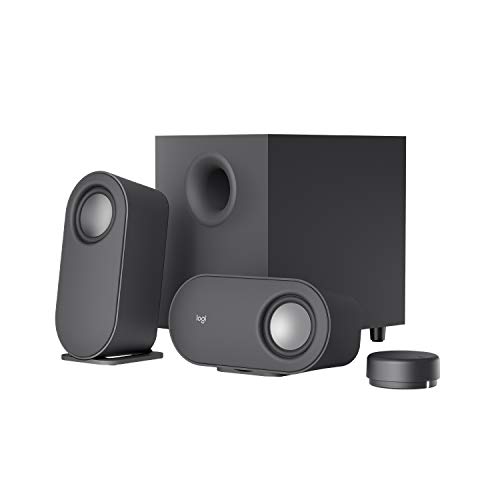
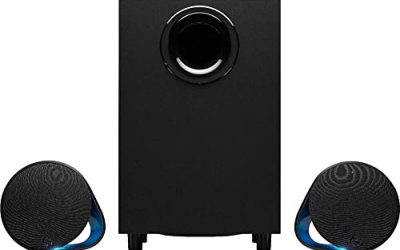
- Best for: Laptop film and game sessions where bass matters more than tidiness.
- 2.1 computer speaker system, model 980-001347
- 80W peak power, 40W RMS
- Down-firing subwoofer for low-end output
- Wireless control dial for volume and playback
All 4 Picks at a Glance
| Product | Specs | Action |
|---|---|---|
| Creative Pebble V3 |
| Check price on Amazon |
| Logitech Z207 |
| Check price on Amazon |
| Logitech Z407 |
| Check price on Amazon |
 Creative Pebble V2 |
| Check price on Amazon |
Laptop speakers usually fire downward or hide behind the hinge, so voices on calls sound thin and films lose their low end. The real decision is not loudness on a spec sheet; it is which connection your laptop actually offers, how much desk the speakers may take, and whether you need a subwoofer or just clearer speech. A USB-C-only machine rules out some wired pairs, while a desk in a shared room may rule out a subwoofer entirely.
This guide is for laptop owners who work, study, and watch at the same desk. The five picks below were chosen from their Amazon listings because each one names laptop or computer use and states its connection, power output, and driver setup plainly. They range from a single-cable USB pair to a 2.1 system with a separate subwoofer and wireless dial.
Our Top Picks
Top 3 picks at a glance
Quick Picks
As an Amazon Associate we earn from qualifying purchases.
| Product | Best for | Key spec from title |
|---|---|---|
| Creative Pebble V3 | One-cable USB-C laptop desks | USB-C audio and power, 8W RMS |
| Logitech Z207 | Switching between laptop and phone | Bluetooth plus 3.5 mm input |
| Creative Stage Air V2 | A single bar under the screen | USB soundbar with built-in battery |
| Logitech Z407 | Films and games needing bass | 2.1 system, 80W peak, subwoofer |
| Creative Pebble V2 | A simple powered pair on a budget desk | USB-C powered, 3.5 mm AUX-in |
How to Choose
Match the Connection to Your Laptop’s Ports
Count your ports before you fall for a speaker. Many current laptops ship with USB-C only, so a set that takes audio and power over one USB-C cable, like the Pebble V3, plugs in with nothing extra. Older pairs draw USB power but still need a 3.5 mm jack for sound, which a slim laptop may not have. Bluetooth sets dodge the port question for audio yet still need a wall outlet or a USB port for power. The listing states each input plainly, so compare it against the sides of your machine, not against the laptop you owned three years ago.
Decide Whether You Need a Subwoofer
A 2.0 pair puts all the sound in two small cabinets, which keeps speech clear and the desk tidy but limits deep bass. A 2.1 system adds a subwoofer that handles the low notes, and film effects, game rumbles, and electronic music gain weight that small drivers cannot fake. The trade is space and cabling: the subwoofer needs floor or desk room and its own place in the cable run. If your listening is calls, lectures, podcasts, and light music, a good 2.0 pair is enough. If films and games anchor your evenings, the subwoofer earns its footprint.
Check the Footprint Against Your Desk
Measure the strip of desk on either side of your laptop before ordering. Compact pairs like the Pebble models sit in rounded shells a few inches wide and angle their drivers up toward your ears, which suits shallow desks. Taller stereo speakers such as the Z207 need vertical clearance and a little distance from the wall. A soundbar takes a different route entirely, sliding under the laptop or an external screen in one piece. Cable length between the two speakers also matters: a short link cable forces both units close together and narrows the stereo image on a wide desk.
Look at Controls You Will Actually Touch
Daily convenience hides in small controls. A volume knob on the front of a speaker beats reaching for a laptop function key during a call, and a headphone jack on the speaker itself saves unplugging anything when you need privacy. The Z407 moves control to a wireless dial you can place anywhere on the desk, while the Z207 puts pairing and volume on the right speaker. Think about where your hands rest and what you adjust most: volume mid-call, switching from laptop to phone, or muting fast when someone walks in.
The 5 Best Options
Creative Pebble V3
- Best for: USB-C laptop owners who want one cable and clearer voices on calls.
- 2.0 USB-C desktop speakers, model MF1700
- 8W RMS total output, up to 16W peak power
- 2.25-inch full-range drivers, elevated at 45 degrees
- Single USB-C cable for audio and power; USB-A converter included
USB-C laptop owners who want one cable and clearer voices on calls.
The gain switch only helps on a 10W USB-C or USB-A port; a weak port leaves the pair quieter than the headline figure suggests.
If your laptop has USB-C and your desk has no spare room, the Pebble V3 is the tidy answer. One USB-C cable carries both audio and power, and a USB-A converter sits in the box for older ports. Its 2.25-inch drivers tilt up at 45 degrees, aiming sound at your ears instead of the desk surface, and Creative’s Clear Dialog processing keeps spoken words forward in films and calls. Bluetooth 5.0 and a 3.5 mm input cover a phone or a second device. It fits students and home workers who want one cable out when the laptop leaves the desk.
Watch out for: The gain switch only helps on a 10W USB-C or USB-A port; a weak port leaves the pair quieter than the headline figure suggests.
Logitech Z207
- Best for: People who split listening between a laptop and a phone all day.
- 2.0 stereo computer speakers, model 980-001294
- 10W peak power, 5W RMS
- Bluetooth connection for up to two devices at once
- Logitech Easy-Switch technology for moving between sources
People who split listening between a laptop and a phone all day.
The speakers run on mains power, so Bluetooth removes the audio cable but not the power cord; plan for a free wall outlet.
The Z207 suits a desk where sound comes from more than one device. It pairs with two Bluetooth devices at once, and Logitech Easy-Switch moves playback between them by pausing one and playing the other, so a laptop and a phone can share the speakers without re-pairing. A 3.5 mm input covers anything wired. Each speaker pairs an active driver with a passive radiator, and the right unit carries the power, volume, and pairing controls plus a headphone jack for private listening. Output is modest, so it fits near-field desk listening rather than filling a large room.
Watch out for: The speakers run on mains power, so Bluetooth removes the audio cable but not the power cord; plan for a free wall outlet.
Creative Stage Air V2
A soundbar solves a different problem: no room on either side of the laptop. The Stage Air V2 is a single bar, 410 mm wide, built to sit under a screen, with dual full-range racetrack drivers inside. It takes digital audio over the included USB-C to USB-A cable, streams over Bluetooth 5.3, and accepts a 3.5 mm source as well. A built-in battery gives up to six hours away from the desk, so the same bar can move to a kitchen counter or a garden table. Output stays near-field in scale, which matches laptop viewing distances.
Specs
- 2.0 under-monitor USB soundbar, model 51MF8395AA000
- Dual custom-tuned full-range racetrack drivers
- 10W RMS output, 20W total peak power
- USB audio via included USB-C to USB-A cable
- Bluetooth 5.3 with up to 10 m range
- 3.5 mm AUX-in for analog sources
- Built-in 2200 mAh battery, up to 6 hours of playback
- Dimensions 410 x 94 x 75 mm
Best for: Cramped desks where one bar under the screen beats two separate speakers.
Watch out for: Six hours of battery is a workday away from the plug, not a weekend; heavy daily use still means regular USB-C charging.
Logitech Z407
- Best for: Laptop film and game sessions where bass matters more than tidiness.
- 2.1 computer speaker system, model 980-001347
- 80W peak power, 40W RMS
- Down-firing subwoofer for low-end output
- Wireless control dial for volume and playback
Laptop film and game sessions where bass matters more than tidiness.
The subwoofer needs its own space under or beside the desk, and the extra cables make this the least portable set in the guide.
When laptop listening means films and games, the Z407 is the step up. This 2.1 system pairs two satellite speakers with a down-firing subwoofer, reaching 80W peak and 40W RMS, so explosions and soundtracks carry weight the smaller pairs here cannot match. The satellites can stand upright or lie flat to fit around your setup. Control comes from a wireless dial that handles volume, play and pause, and source changes from anywhere on the desk. Bluetooth, a micro USB audio input, and a 3.5 mm input cover laptops, phones, and consoles without swapping cables.
Watch out for: The subwoofer needs its own space under or beside the desk, and the extra cables make this the least portable set in the guide.
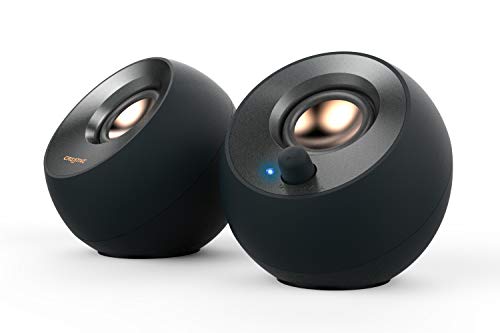
Creative Pebble V2
- Best for: A fixed laptop desk that needs a simple, always-ready powered pair.
- 2.0 USB-C powered desktop speakers, model CT-PEBBLEV2-BK
- Up to 8W RMS total power
- USB-C connection for power, Type-A adapter included
- 3.5 mm AUX-in carries the audio signal
A fixed laptop desk that needs a simple, always-ready powered pair.
Audio arrives only through the 3.5 mm jack, so a laptop without a headphone port needs a USB-C audio adapter before this set makes any sound.
The Pebble V2 keeps the formula plain: USB-C provides the power, a 3.5 mm cable provides the sound, and the rounded shells angle their drivers up at 45 degrees toward the listener. It reaches up to 8W RMS, and the longer cable between the two speakers gives more freedom to spread them across a desk than the first Pebble generation allowed. A USB-C to Type-A adapter is included, so older laptops are covered. There is no Bluetooth and no USB audio, which keeps setup simple and removes pairing from the equation entirely. It suits a fixed desk that rarely changes.
Watch out for: Audio arrives only through the 3.5 mm jack, so a laptop without a headphone port needs a USB-C audio adapter before this set makes any sound.
Which One Fits Your Situation
Your Laptop Has Only USB-C Ports
Choose the Pebble V3. It draws audio and power from a single USB-C cable, so there is no headphone jack to miss and no adapter to buy. The included USB-A converter still covers an older machine at a second desk. Its Clear Dialog processing also helps if most of your listening is lectures, meetings, and spoken video rather than music with heavy bass.
You Switch Between a Laptop and a Phone
Choose the Z207. Easy-Switch holds two Bluetooth pairings and moves between them with a pause and a play, which fits a workday split between laptop calls and phone music. The 3.5 mm input remains as a wired fallback, and the headphone jack on the speaker handles the moments when the room needs quiet.
You Watch Films and Play Games at the Desk
Choose the Z407. The subwoofer supplies the low end that gives films and games their weight, and the wireless dial keeps volume within reach from the couch side of the desk. Make sure you have floor or desk space for the subwoofer before ordering, because the satellites alone are not the point of this system.
Your Desk Has No Room Beside the Laptop
Choose the Stage Air V2. One bar slides under the laptop or screen and asks for no side space at all. USB audio keeps the connection digital, Bluetooth covers your phone, and the built-in battery lets the bar travel to another room for up to six hours when the desk work is done.
Common Mistakes
- Buying a USB-powered pair for a laptop with no headphone jack, then finding the 3.5 mm audio cable has nowhere to plug in.
- Assuming Bluetooth speakers are fully wireless, when most desk sets still need a wall outlet or a USB port for power.
- Placing both speakers on one side of the laptop, which collapses the stereo image into a single point.
- Expecting deep bass from a small 2.0 pair; without a subwoofer, low notes stay light no matter how far the volume knob turns.
- Hiding speakers behind the laptop lid, where the screen blocks the drivers and muffles voices on calls.
Frequently Asked Questions
Will USB speakers work if my laptop has only USB-C ports?
Some will, some will not. A set like the Pebble V3 takes audio and power over one USB-C cable and works directly. A USB-powered pair that uses a 3.5 mm cable for sound still needs a headphone jack or a USB-C audio adapter. Read the listing’s connection lines and match them to your ports before ordering.
Are external speakers noticeably better than built-in laptop speakers?
For most listeners, yes, mainly in clarity and volume headroom. Separate speakers sit beside the screen and aim at your ears, while laptop drivers often fire downward into the desk. Speech on calls and lectures gains the most. Deep bass only improves in a real way when the system adds a subwoofer, as the Z407 does.
Can I use the same speakers for my laptop and my phone?
Yes, if the set offers Bluetooth or a second input. The Z207 holds two Bluetooth pairings and switches between them, the Pebble V3 adds Bluetooth beside its USB audio, and the Stage Air V2 streams over Bluetooth 5.3. A purely wired pair like the Pebble V2 stays tied to whichever device its cable reaches.
Where should I place desk speakers for the best sound?
Put one speaker on each side of the laptop, roughly at ear height or angled up toward you, with a clear path to your seat. Keep them out from behind the lid and a little away from the wall if the sound turns boomy. Wider spacing gives a broader stereo image, as long as the link cable allows it.
Related guides
More from Amazon
Programs that pair well with the guide above. Offers and eligibility are set by Amazon and may change.
A free business account with business pricing and bulk-buying tools for work, shop or home office.
Create a business accountFree shipping on eligible items, Prime Video and more. Eligible new members can start with a free trial.
Start a Prime free trialAudiobooks and podcasts to listen to on the go. Eligible new members can start with a free trial.
Try Audible freeAd-free music streaming. Eligible new subscribers can start with a free trial.
Try Music Unlimited freeAs an Amazon Associate we earn from qualifying purchases.