Finding the best ssds for apple devices is less about chasing the biggest speed number on the box and more about matching a drive to the ports, file system and habits of the Mac or iPad it will live with. Modern Macs and iPads use USB-C, macOS reads and writes exFAT and APFS, and Time Machine has its own formatting rules. The traps are just as consistent: a drive built for a 20 gigabit USB mode will not reach that figure on a Mac, a drive formatted for Windows will not back up a Mac until it is reformatted, and a bare internal drive bought for a Mac upgrade will not fit every model. This guide covers three portable drives that connect directly to Apple devices over USB-C and are built for daily carrying.
Our Top Picks


Top 3 picks at a glance
What to Look For
Start with the port. Every current MacBook Air, MacBook Pro, iMac, Mac mini and Mac Studio has USB-C ports, and current iPad Pro and iPad Air models do too, so a portable SSD with a USB-C connector plugs straight in with no dongle. The cable matters as much as the port: the drives below ship with a USB-C to USB-C cable, and some also include a USB-C to USB-A cable for older machines. A drive with only a USB-A cable will need an adapter on a modern Mac.
Next, understand the speed figure. Listings quote sequential read and write speeds measured in perfect conditions, and the drives here list read speeds from 1,050 MB/s to 2,000 MB/s. Those numbers describe the drive, not the connection. A USB 3.2 Gen 2 port moves data at up to 10 gigabits per second, which in practice caps transfers near 1,050 MB/s, and a drive built for USB 3.2 Gen 2×2 can only go faster on a host that supports that 20 gigabit mode. On a Mac, the practical ceiling is the 10 gigabit rate of the Mac USB-C port, still roughly ten times the speed of a portable hard drive and fast enough to edit video directly from the drive. Small files transfer more slowly than one large video file.
Capacity is the decision that is hardest to undo. A 1TB drive holds a system backup, a photo library and a working set of project files with room to spare for most people, but video editors, photographers shooting raw files and anyone keeping a large media library will fill 1TB faster than they expect, and a nearly full drive leaves little room for temporary files during editing. The drives below also come in larger capacities, so treat the 1TB versions as a starting point: measure the library you carry today, then add headroom for a year of growth. A backup-only drive can be smaller than one bought as working storage.
Formatting is the step most Apple buyers miss. Portable SSDs usually arrive formatted as exFAT, which both macOS and Windows can read and write, and that is convenient if the drive moves between a Mac and a Windows PC. For a drive that will live on a Mac, APFS is the better choice: it is the native macOS file system and it supports Time Machine backups on current macOS. A new drive bought for backups must be erased and reformatted in Disk Utility before the first backup, and erasing deletes everything on the drive, so do it before copying files onto it. On an iPad, the Files app works with APFS and exFAT drives over USB-C.
Ruggedness deserves attention because a portable drive for a MacBook is a travel item. The drives below carry IP65 protection against dust and water and list drop resistance up to 3 metres onto a hard surface. Those figures describe controlled laboratory conditions, not a promise against every accident, but they are a meaningful difference from a bare drive in a plastic shell, and a rubberised exterior also absorbs knocks and stops the drive sliding around on a desk. In a bag with keys and chargers, a rugged enclosure is worth more than a small speed advantage. All three drives below include AES 256-bit hardware encryption, which protects the contents if the drive is lost, so keep the password or recovery key somewhere safe. Warranty length is a useful tiebreaker: the drives below carry three-year and five-year limited warranties.
The Shortlist
Samsung T7 Shield Portable SSD 1TB
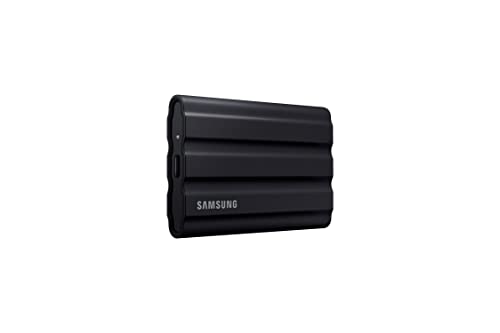
Samsung T7 Shield Portable SSD 1TB on Amazon
The T7 Shield is the rugged member of Samsung’s T7 family: the Amazon listing describes it as Mac compatible, and it connects to Mac, iPad and iPhone models with a USB-C port. It is a 1TB portable SSD with a USB 3.2 Gen 2 interface, listing sequential read speeds up to 1,050 MB/s and write speeds up to 1,000 MB/s. The enclosure is rubberised, carries IP65 protection against water and dust, and lists drop resistance up to 3 metres. It measures 88 by 59 by 13 millimetres and weighs 98 grams. The drive includes AES 256-bit hardware encryption and Samsung’s Dynamic Thermal Guard, which manages heat during long transfers, and it ships with USB-C to USB-C and USB-C to USB-A cables. Samsung backs it with a three-year limited warranty, and it is also available in 2TB and 4TB capacities.
This drive suits a MacBook owner who carries a drive every day and wants it to survive the bag. The rubber exterior grips rather than slides, the IP65 protection covers rain and dust on location, and the 1,050 MB/s read speed is the full speed a Mac USB-C port delivers, so nothing is wasted. Photographers working on location will value the drop resistance. It is also a sensible Time Machine drive for a MacBook, once reformatted to APFS.
Considerations: the rubberised surface collects dust and lint more readily than a smooth aluminium body, and the drive is a little thicker than the plain T7. Its speed matches the Mac USB-C port rather than exceeding it, so buyers who want headroom for faster USB modes should look at the T9 below. Encryption software is a separate download.
SanDisk Extreme Portable SSD 1TB
SanDisk Extreme Portable SSD 1TB on Amazon
The SanDisk Extreme Portable SSD is the long-running rugged option in this category, model number SDSSDE61-1T00-G25. This 1TB version lists read speeds up to 1,050 MB/s and write speeds up to 1,000 MB/s over USB 3.2 Gen 2, with a USB-C connector. It carries IP65 protection against water and dust and lists drop resistance up to 3 metres. A carabiner loop lets it clip to a bag strap. It includes 256-bit AES hardware encryption and ships with a USB-C to USB-C cable plus a USB-C to USB-A adapter. SanDisk backs it with a five-year limited warranty, and it is also available in capacities up to 8TB.
This drive suits a Mac owner who wants the longest warranty in this guide and a drive that is easy to carry outdoors. The carabiner loop suits photographers and field workers who clip the drive to a bag instead of burying it in a pocket. The 1,050 MB/s read speed matches the Mac USB-C port, and the five-year warranty is the longest cover of the three drives here. It also works as a portable Time Machine drive reformatted to APFS.
Considerations: the listing for this model is marked as an older model, because SanDisk now sells a newer Extreme with a 2,000 MB/s headline speed. That newer model needs a USB 3.2 Gen 2×2 port to reach its headline speed, which a Mac does not provide, so the older 1,050 MB/s model loses nothing in practice on a Mac. Check model number SDSSDE61-1T00-G25 when ordering, to be sure of receiving the 1,050 MB/s version described here. The drive is a little larger than the T7 Shield, and its smooth body is less grippy than the Shield’s rubber exterior.
Samsung T9 Portable SSD 1TB
Samsung T9 Portable SSD 1TB on Amazon
The Samsung T9 is the fastest drive in this guide on paper, model number MU-PG1T0B/AM. It is a 1TB portable SSD with a USB 3.2 Gen 2×2 interface, listing sequential read and write speeds up to 2,000 MB/s. It measures 88 by 60 by 14 millimetres and weighs 122 grams. It lists drop resistance up to 3 metres, includes AES 256-bit hardware encryption and Samsung’s Dynamic Thermal Guard, and Samsung backs it with a five-year limited warranty. It ships with two USB-C cables and is also available in 2TB and 4TB capacities.
This drive suits a Mac owner who wants the fastest available portable SSD and is willing to pay attention to the port it is plugged into. On a Mac, the T9 connects at the 10 gigabit rate of the Mac USB-C port, so it runs at the same practical speed as the other two drives here. It still makes sense for two groups: people who also use the drive with a Windows machine that supports the 20 gigabit USB mode, where the full 2,000 MB/s is available, and people buying for the long term. It is also the best of the three for editing high-bitrate video directly from the drive.
Considerations: the headline 2,000 MB/s figure is not reachable on a Mac, so buyers who will only ever use the drive with Apple hardware should weigh the T9 against the T7 Shield and the SanDisk Extreme on build, warranty and size rather than on speed. The T9 is the heaviest and thickest drive here.
Comparison
| Drive | Capacity | Interface | Listed read speed | Listed write speed | Protection | Encryption | Warranty |
|---|---|---|---|---|---|---|---|
| Samsung T7 Shield 1TB | 1 TB | USB 3.2 Gen 2, USB-C | Up to 1,050 MB/s | Up to 1,000 MB/s | IP65, drop resistance to 3 m | AES 256-bit | 3 years |
| SanDisk Extreme Portable SSD 1TB | 1 TB | USB 3.2 Gen 2, USB-C | Up to 1,050 MB/s | Up to 1,000 MB/s | IP65, drop resistance to 3 m | AES 256-bit | 5 years |
| Samsung T9 Portable SSD 1TB | 1 TB | USB 3.2 Gen 2×2, USB-C | Up to 2,000 MB/s | Up to 2,000 MB/s | Drop resistance to 3 m | AES 256-bit | 5 years |
All three drives connect to Mac, MacBook and iPad models over USB-C. On a Mac, all three run at the practical speed of the Mac USB-C port, so the T9’s higher listed speed only shows on hosts that support the 20 gigabit USB mode.
Choosing for Your Use Case
For everyday MacBook use, the T7 Shield is the simplest recommendation. It is the lightest drive here, its rubber body survives daily carrying, and its speed matches the Mac port exactly. Size and weight matter more than speed here, and the Shield wins on both. For a Mac desktop, ruggedness matters less and any of the three will serve; pick by warranty and capacity.
For photo and video work, capacity planning comes first. Count the size of a typical shoot and multiply it by the number of shoots kept on the drive before clearing it. A 1TB drive holds a large working library, but video editors working in 4K will want to consider the 2TB versions of these same drives. The T9 is the strongest choice for editing directly from the drive, and it is the drive to pick if it will also be used with a Windows workstation that supports the faster USB mode.
For backups, any of the three works once reformatted to APFS. The first backup of a full Mac can take a long time even over a fast connection, so start it overnight. A backup drive should be larger than the data it protects: Time Machine keeps older versions until the drive fills, so a bigger drive keeps a longer history. Keep the backup drive separate from the working drive: a single drive holding both the only copy of a project and its backup is not a backup at all.
For iPad use, all three drives work through the Files app on iPad Pro and iPad Air models with a USB-C port. The drive draws power from the iPad, so no separate power supply is needed. The iPad USB-C port is also a 10 gigabit connection, so transfers run at the same practical speed as on a Mac.
Care and Use
Format the drive before first use. Open Disk Utility on the Mac, select the drive, choose Erase, and pick APFS for a Mac-only drive or Time Machine, or exFAT if the drive must move between a Mac and a Windows PC. Eject the drive before unplugging it: use the eject icon in Finder or drag the drive icon to the trash, which turns into an eject symbol. Pulling a drive out during a write can corrupt the file being written and damage the file system.
Portable SSDs slow down when they get hot, so store the drive in a shaded bag pocket rather than a hot car. Keep the USB-C cable that came with the drive, or a cable built for the same USB mode: a charging-only USB-C cable, or an older USB 2.0 cable with a USB-C connector, will limit the drive to a fraction of its speed, and that is the most common reason a fast SSD feels slow.
Disk Utility’s First Aid can check the file system. If a drive starts disconnecting on its own, try a different cable and a different port before assuming the drive has failed: cables and ports fail more often than the drive itself. Keep a second copy of anything irreplaceable: a portable SSD is reliable storage, not indestructible storage.
FAQ
Do these SSDs work with Apple silicon Macs?
Yes. All three drives connect over USB-C and work with Apple silicon Macs, Intel Macs and iPad models with a USB-C port. macOS recognises them as external storage, and they appear in Finder like any other external drive. No driver is needed.
Will the Samsung T9 reach 2,000 MB/s on a Mac?
No. The T9 needs a USB 3.2 Gen 2×2 host to reach its listed speed, and Macs do not provide that 20 gigabit USB mode. On a Mac, the T9 runs at the 10 gigabit rate of the Mac USB-C port, which gives practical transfer speeds near 1,050 MB/s, the same as the other two drives here. It is still worth considering for use with a Windows machine that supports the faster mode.
What format should I use for a Time Machine drive?
Use APFS. Time Machine on current versions of macOS requires an APFS-formatted drive. Portable SSDs usually arrive formatted as exFAT, so open Disk Utility, select the drive, choose Erase, and select APFS before the first backup. Erasing deletes everything on the drive, so do it before copying files onto it. Keep a separate drive for Time Machine if the drive must also work with a Windows PC.
Can I use these SSDs with an iPad?
Yes, on iPad Pro and iPad Air models with a USB-C port. Connect the drive with the included USB-C cable and open the Files app to browse, copy and move files. The iPad powers the drive, and it works with APFS and exFAT formatting on iPadOS. Older iPads with a Lightning port cannot use these drives directly and need an adapter.
Is 1TB enough for a Mac backup?
It depends on how much data the Mac holds. A 1TB drive is enough for a Mac with a 512GB internal drive and a moderate amount of data, because Time Machine needs room for the first full backup plus older versions of changed files. A Mac with a 1TB internal drive that is mostly full, or a Mac with a large photo or video library, will need a larger backup drive. Check used space in System Settings before choosing, and pick a backup drive larger than that figure.
Conclusion
The best SSDs for Apple devices are the ones that fit the Mac or iPad they serve: USB-C throughout, a rugged body for a drive that travels, APFS formatting for Time Machine, and a capacity chosen from the real size of the library it will hold. The Samsung T7 Shield is the easiest daily carry, the SanDisk Extreme brings the longest warranty and a handy carabiner loop, and the Samsung T9 is the fastest of the three for anyone who will also use it with a host that supports its full speed. Any of the three is a solid match; pick by size, warranty and build.
Disclosure: As an Amazon Associate, we earn from qualifying purchases.
Related guides
More from Amazon
Programs that pair well with the guide above. Offers and eligibility are set by Amazon and may change.
A free business account with business pricing and bulk-buying tools for work, shop or home office.
Create a business accountFree shipping on eligible items, Prime Video and more. Eligible new members can start with a free trial.
Start a Prime free trialAudiobooks and podcasts to listen to on the go. Eligible new members can start with a free trial.
Try Audible freeAd-free music streaming. Eligible new subscribers can start with a free trial.
Try Music Unlimited freeAs an Amazon Associate we earn from qualifying purchases.