If you are shopping for the best pc cases under 30, you are really shopping for the foundation of the whole build. The case decides how cool the components run, how quiet the room stays, how painful the first build feels, and how easy every future upgrade becomes. A handsome case that chokes airflow will frustrate you within a month, and a brilliant airflow case that fights you at every cable tie will frustrate you within an afternoon.
The three cases below cover three kinds of builder: the first-time builder who wants a full-size ATX tower, the compact-desk builder who wants a small micro-ATX box, and the showcase builder who wants tempered glass and modern front connectivity without leaving the budget tier. Before ordering any of them, measure your graphics card, your CPU cooler, and your power supply, then compare those numbers with the clearances below. Listings change bundles and revisions without announcement, so confirm the included fans, the panel type, and the front-panel connections on the listing itself before you check out.
Top 3 picks at a glance


What to Look For in a Budget PC Case
Motherboard size comes first, because it rules out more cases than any other number. A full ATX board needs a mid tower with ATX mounting points, while a micro-ATX or Mini-ITX board fits in both mid towers and compact mini towers. Buying a compact case for an ATX board you already own is a dead end, and buying a large tower for a tiny board wastes desk space.
Graphics card clearance comes second. The listings below give a maximum GPU length for each case, and that figure usually assumes no front fan is mounted in the way, so leave a little margin rather than aiming for an exact match. CPU cooler height is the third clearance that catches builders out: a tall tower air cooler needs headroom between the motherboard tray and the side panel, and the number on the listing is a hard ceiling. Liquid cooling changes the question rather than removing it. Check radiator positions and sizes, because a case that lists front radiator support up to 280mm gives you a real upgrade path, while a case with no radiator mounts at all locks you into air cooling.
Fan mounts and included fans decide how the case behaves on the day it arrives. A case that ships with a single rear exhaust fan is a base to build on, not a finished cooling solution, so plan on adding one or two front intakes for any build with a real graphics card. Count the mounts, not the photographs: photographs often show fan configurations that the shipped bundle does not include. Mesh front panels help intake air reach the components, solid panels keep noise in and dust out, and tempered glass shows the build while adding weight and a panel that needs careful handling.
Front-panel connections, dust filters, and cable space decide the daily experience. A USB Type-C port on the front keeps the case current with modern phones and drives, while audio jacks are handy for headsets. Magnetic or slide-out filters on the top, front, and bottom are easy to pop off and clean, which keeps airflow strong over months of use. Space behind the motherboard tray lets cables sit flat instead of bulging against the side panel, and one 3.5-inch bay plus a couple of 2.5-inch mounts covers storage upgrades without a rethink.
Three Budget PC Cases Worth a Closer Look
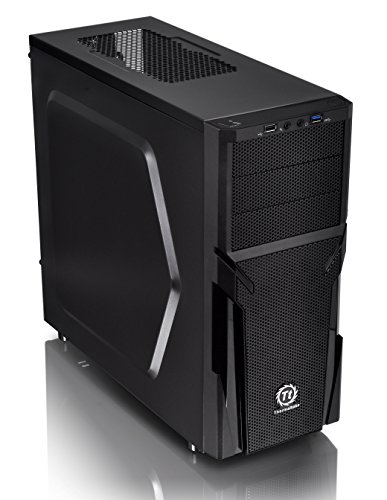
1. Thermaltake Versa H21
View the Thermaltake Versa H21 on Amazon
The Thermaltake Versa H21 is a steel ATX mid tower with a restrained, office-friendly exterior and no fragile panels to manage. Its full listing title is Thermaltake Versa H21 SPCC ATX Mid Tower Computer Chassis CA-1B2-00M1NN-00, Black, and the model number CA-1B2-00M1NN-00 is the identifier to match when you confirm the exact variant. The chassis measures 429 x 209 x 480 mm, supports motherboards up to standard ATX as well as Micro-ATX, and is built from SPCC steel with a perforated mesh front bezel and a cleanable air filter. Pre-mounted holes support motherboard and CPU cooler installation, long graphics cards are supported, and the layout includes cable management routing and liquid cooling support.
Its size is what makes the H21 the most forgiving pick here. A full ATX mid tower gives a first-time builder room to route cables, seat a long graphics card, and reach the motherboard headers without scraping knuckles on every edge. The mesh bezel lets intake air through the front, the washable filter keeps dust out between cleanings, and the solid side panel will not scratch or shatter during assembly. That suits a first build, a machine that gets moved between rooms, and a shared room or office corner where a plain black tower disappears into the working space.
The trade-offs are plain. There is no tempered glass, so a showcase build is off the table, and no Type-C front connectivity is listed, so check the front-panel layout on the listing if a front Type-C port matters to you. Fan provision is basic, so expect to add front intake fans for any build with a graphics card that runs warm, and confirm the included fan count and front I/O on the listing before ordering.
2. Thermaltake Versa H17
View the Thermaltake Versa H17 on Amazon
The Thermaltake Versa H17 is a compact micro-ATX mini tower for builders who want a small footprint without giving up proper component support. Its full listing title is Thermaltake Versa H17 Black SPCC Micro ATX Mini Tower Gaming Computer Case CA-1J1-00S1NN-00, and the model number CA-1J1-00S1NN-00 is the identifier to match. The chassis measures 398 x 205 x 438 mm and weighs 4.5 kg, supports Micro-ATX and Mini-ITX motherboards, and is built from SPCC steel with solid panels and a brushed aluminium look front panel. A full-length power supply cover with a window hides cables and the power supply from view, and the case carries a 3-year warranty.
Cooling is where the H17 earns its keep. A 120mm rear fan is included and runs at 1000 rpm at 16 dBA, the front supports three 120mm fans or two 140mm fans, and the top supports one 120mm or one 140mm fan. Radiator support runs to 240mm or 280mm at the front and 120mm at the rear, so a compact liquid cooler is a realistic upgrade later. Clearances are generous for the size: graphics cards up to 350mm, CPU coolers up to 155mm, and power supplies up to 220mm, with four expansion slots. Front I/O gives one USB 3.0 port, two USB 2.0 ports, and HD audio through microphone and headphone jacks.
The H17 suits a micro-ATX board on a compact desk: it fits on or under a desk without taking over the room, the solid panels keep the build quiet and out of sight, and the PSU cover keeps the interior tidy even for a first build. Its limits are clear. A standard ATX board will not fit, only one fan is included so plan on adding front intakes for a gaming build, and there is no window or tempered glass, so showcase builders should look at the third pick instead.
3. DARKROCK EC2
View the DARKROCK EC2 on Amazon
The DARKROCK EC2 is the modern pick in this roundup: an ATX mid tower with a tempered glass side panel and front Type-C connectivity. Its full listing title is DARKROCK EC2 ATX Mid Tower Gaming Computer PC Case, Type-C Ready, Supports 50 Series Graphics Cards, Tempered Glass Side Panel, up to 8 x 120mm Fans and 360mm Radiator, 1 x Pre-Installed Fan, and the model number is CP-CASE-DR-EC2-BK. The case supports ATX, Micro-ATX, and Mini-ITX motherboards, has room for up to eight 120mm fans and a 360mm radiator, and ships with one pre-installed fan. Graphics card clearance runs to 340mm and CPU cooler clearance to 165mm, and the listing states support for current 50 Series graphics cards.
What sets the EC2 apart is upgrade headroom. Eight fan mounts and a 360mm radiator position mean the cooling layout can grow with the build instead of forcing a case replacement when the next graphics card or processor arrives. The tempered glass side panel shows the build, Type-C readiness on the front keeps the case current with modern devices, and the mesh front panel feeds intake air to the components behind it. It suits showcase builders and planners, and anyone moving up from a compact case who wants a full ATX tower with modern connectivity for the first time.
The trade-offs are plain. Only one fan is pre-installed, so budget for extra fans if your build includes a graphics card that runs warm. Glass needs careful handling: set the panel flat on a soft surface, keep it away from hard edges, and fit it last so it is not in the way while you work. Front connectivity beyond Type-C is minimal on the listing, so confirm the exact front-panel ports before ordering, and confirm the bundle and included fan count as well, because photographs can show configurations the shipped box does not include.
Budget PC Cases Compared
| Case | Motherboard support | Side panel | Max GPU length | Max CPU cooler height | Radiator support | Fans included | Front I/O |
|---|---|---|---|---|---|---|---|
| Thermaltake Versa H21 | ATX, Micro-ATX | Solid steel | Long graphics cards supported | Check cooler against listing | Liquid cooling supported | Basic provision, confirm on listing | Confirm on listing |
| Thermaltake Versa H17 | Micro-ATX, Mini-ITX | Solid panels | 350mm | 155mm | Front up to 240mm or 280mm, rear 120mm | 1 x 120mm rear | USB 3.0 x 1, USB 2.0 x 2, HD audio |
| DARKROCK EC2 | ATX, Micro-ATX, Mini-ITX | Tempered glass | 340mm | 165mm | Up to 360mm | 1 pre-installed | Type-C ready |
The H21 is the roomiest and most forgiving, the H17 is the most compact while still fitting a long graphics card, and the EC2 is the most modern, with glass, Type-C, and the largest radiator support. No single case wins every row, so let your parts list decide: a micro-ATX board with a long card points at the H17, a full ATX board with a tower cooler points at the H21 or the EC2, and a plan to add a large radiator later points at the EC2 first.
Choosing for Your Use Case
For a first build, the Versa H21 is the easiest place to begin. Its full-size interior forgives clumsy cable routing, its solid panels forgive knocks, and its ATX support means the board you already own will fit. Build on a clear table, fit the power supply and route its cables before the motherboard goes in, and leave the side panel off until the machine posts.
For a compact desk, the Versa H17 is the natural fit. Measure the space first, including clearance for the front intake, and keep the top of the case clear so warm air can leave. Pair it with a micro-ATX board, a graphics card within the 350mm limit, and one or two front intake fans, and the result is a small machine that stays cool without dominating the room.
For airflow-first builds in warm rooms, fan placement matters more than the badge on the box. Front intakes should bring cool air in, the rear fan should push warm air out, and the top mounts should help rather than fight that flow. Add the intakes before you judge temperatures, because a single rear fan on its own cannot cool a gaming build.
For a showcase build, the EC2 is the only pick here with a tempered glass panel, and that decides it. Route cables behind the motherboard tray so the interior looks tidy through the glass, and fit the glass panel last. A tidy interior is not vanity: cables that sit flat also let air move freely, so the showcase build and the cool build are the same build done carefully.
Care and Use
Dust is the slow enemy of every budget case, and the fix is simple. Pull the filters out every few weeks, rinse or brush them clean, and let them dry fully before they go back. A clean filter keeps intake air flowing and temperatures steady, while a clogged filter quietly chokes the build. While the filters are out, check that no cables have drifted into a fan path and that the intake side still has clear air around it.
Measure before every upgrade, not just the first one. Graphics cards, CPU coolers, and radiators all have hard limits in each case, and the numbers in this guide are the listing figures to check against. Handle glass panels with care: set a tempered glass panel flat on a soft surface, never lean it on a hard edge, and fit it after the interior is finished. Solid steel panels are more forgiving, but they still deserve a clean cloth rather than a harsh cleaner, and the mesh front of a case like the H21 should be brushed clear of dust rather than wiped with a wet cloth.
Frequently Asked Questions
What size motherboard fits a budget PC case?
It depends on the case. The Versa H21 and the DARKROCK EC2 support full ATX boards as well as Micro-ATX and Mini-ITX, while the Versa H17 supports Micro-ATX and Mini-ITX only. A standard ATX board will not fit in the H17, so confirm your board size before ordering, and match the board to the case listing rather than guessing from the case size alone.
How many fans does a budget case need?
Most budget cases ship with one fan, which is a base to build on rather than a finished cooling solution. One rear exhaust plus one or two front intakes is a sensible baseline for a build with a real graphics card. The EC2 supports up to eight 120mm fans and the H17 supports three 120mm fans or two 140mm fans at the front, so add the intakes first, then judge temperatures.
Will a long graphics card fit in these cases?
Yes, within the listed limits. The H17 takes graphics cards up to 350mm, the EC2 takes cards up to 340mm, and the H21 lists support for long graphics cards. Measure your card including any power connectors that stick out past the end, and leave a little margin rather than aiming for an exact match. If your card is close to the limit, check whether a front fan sits in the way.
Do budget cases support liquid cooling?
Two of the three picks here do. The EC2 supports radiators up to 360mm, and the H17 supports radiators up to 240mm or 280mm at the front and 120mm at the rear. The H21 lists liquid cooling support as well, so confirm the radiator positions on the listing for the exact variant you order. A compact liquid cooler is a realistic upgrade path here, provided the radiator size matches a mount the case actually provides.
Is tempered glass or a solid panel better at this tier?
It depends on what you value. Tempered glass, as on the EC2, shows the build and suits a showcase desk, but it adds weight and needs careful handling during assembly. Solid panels, as on the H21 and H17, keep the build quiet and out of sight, forgive knocks, and suit a bedroom, an office, or a shared room. Neither cools better on its own: airflow depends on the front panel, the fan layout, and the filters, not on the side panel material.
Conclusion
The best pc cases under 30 are not about finding the cheapest box, they are about finding the case that fits your board, your graphics card, and your desk without forcing a compromise you will regret. The Versa H21 is the forgiving full-size pick, the Versa H17 is the compact pick that still fits a long card, and the DARKROCK EC2 is the modern pick with glass, Type-C, and room to grow. Measure your parts, confirm the bundle on the listing, and choose the case whose trade-offs bother you least, because you will live with those trade-offs daily while the strengths quickly become invisible.
Disclosure: As an Amazon Associate, we earn from qualifying purchases.
Related guides
More from Amazon
Programs that pair well with the guide above. Offers and eligibility are set by Amazon and may change.
A free business account with business pricing and bulk-buying tools for work, shop or home office.
Create a business accountFree shipping on eligible items, Prime Video and more. Eligible new members can start with a free trial.
Start a Prime free trialAudiobooks and podcasts to listen to on the go. Eligible new members can start with a free trial.
Try Audible freeAd-free music streaming. Eligible new subscribers can start with a free trial.
Try Music Unlimited freeAs an Amazon Associate we earn from qualifying purchases.


