Editing punishes storage in a specific way: enormous media files move in long, sustained transfers, project libraries have to stay online and searchable, and every finished job adds another archive you cannot delete. The hard drive decision is therefore less about a headline speed and more about choosing the right shape of storage, a desk-bound desktop unit, a two-drive RAID box, or a portable drive that travels to shoots, with enough capacity that you are not reorganizing libraries mid-project.
This guide is for video and photo editors who deliberately want mechanical hard drives, for bulk media storage, project drives and archives where solid-state drives become impractical at scale. Every pick below is a spinning hard drive as its own Amazon listing states, chosen from the capacities, interfaces and performance figures those listings record. Solid-state portables dominate editing searches, but they are a different product, and none appears here.
Our Top Picks
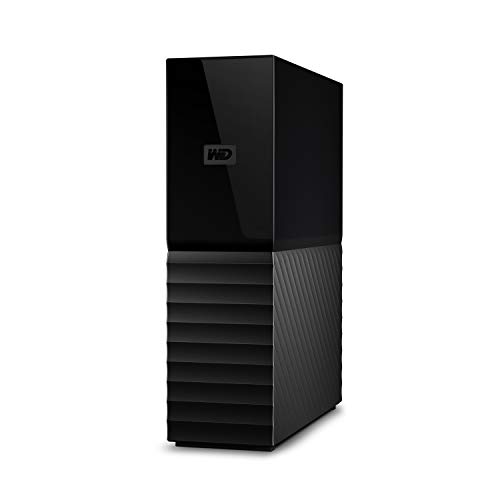 Western Digital 6TB My Book Desktop External Hard3.46 x 8.5 x 6.7 inches2.3 poundsDigitalCheck on Amazon

Top 3 picks at a glance

Quick Picks
As an Amazon Associate we earn from qualifying purchases
| Product | Best for | Key spec from title |
|---|---|---|
| WD My Book 6TB Desktop External Hard Drive | Everyday project and media storage at a desk | 6 TB desktop HDD with USB 3.0 |
| WD 12TB My Book Duo Desktop RAID External Hard Drive | Two-drive RAID storage for active projects | 12 TB RAID enclosure, USB 3.1 Gen-1 ready |
| LaCie Rugged USB-C Portable External Hard Drive 5TB | A portable drive that travels to shoots | 5 TB, drop, shock, dust and rain resistant |
| SanDisk Professional 12TB G-DRIVE Desktop Hard Drive | High-capacity enterprise-class desk storage | 7200RPM Ultrastar HDD inside |
| SanDisk Professional 6TB G-DRIVE PRO Desktop Hard Drive | A Thunderbolt 3 editing workstation drive | Thunderbolt 3 and USB-C, up to 250MB/s as listed |
How to Choose
Decide where the drive will live: desk or bag
Desktop drives and portable drives solve different editing problems. A desktop unit such as the My Book or G-DRIVE sits permanently beside the workstation, plugs into mains power, and offers the largest capacities for media libraries and archives. A portable drive such as the LaCie Rugged trades capacity for mobility, running off the computer connection and surviving the journey between studio, set and home. Many editors end up with both shapes, a desktop library at the desk and a portable for ingest and travel, so decide which role you are filling first instead of asking one drive to do everything.
Understand single drive versus RAID before you buy
Four picks here are single drives: one mechanism, one copy of your footage. The My Book Duo is different, a desktop enclosure holding two drives that can be configured as a RAID array. Its listing frames RAID-0 mode as the performance option, quoting sequential read speeds for that mode specifically. RAID-0 spreads data across both drives for speed but offers no protection if one drive fails, while mirrored configurations sacrifice capacity for a second copy. Neither replaces a backup. Choose the Duo when its capacity and configuration options fit your workflow, and keep a separate copy of irreplaceable media regardless.
Read interface and speed claims with care
The listings here span USB 3.0, USB-C at 10Gbps and Thunderbolt 3, and the interface sets the ceiling for how fast media can move on and off the drive. Just as important is how each speed figure is framed. The Duo’s headline number is a RAID-0 line claim, the G-DRIVE line’s fastest figure belongs to its largest capacity rather than the unit listed here, and the G-DRIVE PRO quotes its figure for its own model. Compare like with like: a figure stated for the exact drive and mode you will use is worth more than the biggest number on the box.
Plan capacity around how your media actually grows
Editing libraries grow in one direction. A single documentary project can consume terabytes in raw footage, proxies, renders and exports, and finished work usually has to stay archived rather than deleted. Buy capacity for the library you will have in two years, not the one on your desk today. Also note that line-wide claims in listing descriptions, such as a range offering capacities up to a much larger figure, describe the product family rather than the specific drive in the listing; the capacity in the title is the one that ships.
The 5 Best Options
WD My Book 6TB Desktop External Hard Drive
The My Book is the uncomplicated desk drive in this guide: a single 3.5-inch desktop hard drive with 6 TB of space, USB 3.0 connection, password protection and auto backup software, according to its listing. That combination suits the editor who needs a permanent home for project files and finished media without configuring anything more complex than backup software, and the listing notes it pairs with WD Backup or Apple Time Machine. It is not the fastest or largest drive here, and it is not meant to be: it is the straightforward library drive that most editing desks end up needing first.
Specs
- Digital storage capacity: 6 TB
- Hard disk form factor: 3.5 inches
- Hard disk description: Desktop
- Interface: USB 3.0
- Features as listed: Password protection and auto backup software
- Compatibility as listed: Pairs with WD Backup or Apple Time Machine
- Model: WDBBGB0060HBK-NESN
Best for: A first dedicated media library drive on an editing desk.
Watch out for: The listing description quotes capacities up to 18TB for the My Book line as a whole; this ASIN is the 6 TB model, so confirm the capacity in the live listing title before ordering.
ASIN: B01LQQHKZY
WD 12TB My Book Duo Desktop RAID External Hard Drive
The My Book Duo is the capacity-and-configuration pick: a desktop enclosure holding two drives for 12 TB total, which its listing describes as RAID storage suited to photos, videos, documents and music. Its description quotes RAID-0 mode providing up to 360MB/s sequential read speeds using the USB Type-C port, and that framing matters, because the figure belongs to the striped mode rather than every configuration. For editors whose active projects outgrow a single drive, the Duo offers room and options in one box. It is still one enclosure on one desk, so treat it as working storage, never as your only copy.
Specs
- Hard drive capacity: 12 TB desktop, two-drive RAID enclosure
- Hard drive interface: USB 3.1 (listing title: USB 3.1 Gen-1 ready, USB 3.0 compatible)
- Performance as listed: RAID-0 mode up to 360MB/s sequential read speeds using the USB Type-C port
- Model: WDBFBE0120JBK-NESN
Best for: Editors who need one large, configurable desktop volume for active projects.
Watch out for: The 360MB/s figure is the listing’s line and RAID-0 claim, not a promise for mirrored configurations, and the 16TB Duo is a separate listing; confirm the capacity and a buyable offer on the live listing.
ASIN: B074R59TLB
LaCie Rugged USB-C Portable External Hard Drive 5TB
Every other pick in this guide stays on a desk; the LaCie Rugged is the one that travels. Its title states 5 TB of portable hard drive storage over USB-C, with drop, shock, dust and rain resistance in the title itself, wrapped in the line’s orange bumper design. That makes it the natural ingest and shuttle drive for editors who shoot on location, hand footage to collaborators, or keep a working copy away from the studio. Five terabytes is modest beside the desktop drives here, but capacity is the deliberate trade: this drive’s job is to move media safely, not to hold the whole archive.
Specs
- Digital storage capacity: 5 TB
- Drive type: Portable external hard drive
- Interface: USB-C (listing copy ties the line to USB 3.0 compatibility)
- Resistance as titled: Drop, shock, dust and rain resistant
- Design: Orange rugged bumper, as pictured
- Model: STFR5000800
Best for: Location shoots, footage ingest and carrying a working copy between workplaces.
Watch out for: No drop height or IP rating was captured from this listing’s content, so do not assume a specific protection figure; sibling capacities such as 4 TB and 2 TB are separate listings with their own codes.
ASIN: B079H7JVL3
SanDisk Professional 12TB G-DRIVE Enterprise-Class Desktop Hard Drive

This G-DRIVE is the high-capacity workstation option: 12 TB of desktop storage built around a 7200RPM Ultrastar enterprise-class hard drive, connected over USB-C at USB 3.2 Gen 2 speeds, and listed as Mac ready. For editors, that combination targets the main library role, the drive that holds current projects and recent archives and stays spinning all day beside the workstation. Twelve terabytes in a single unit also simplifies a desk that would otherwise stack several smaller drives. One discipline matters with this listing: its family’s fastest advertised transfer figure belongs to a different capacity, so judge this unit on its stated interface and drive class instead.
Specs
- Digital storage capacity: 12 TB
- Drive inside: 7200RPM Ultrastar HDD, enterprise-class
- Interface: USB-C (10Gbps), USB 3.2 Gen 2
- Form factor: Desktop
- Compatibility as titled: Mac ready
- Model: SDPHF1A-012T-NBAAD
Best for: A main project library drive for a busy editing workstation.
Watch out for: The line’s description ties its up to 280MB/s figure to the 22TB capacity, so that number is not claimed for this 12 TB unit; confirm the live listing if transfer speed is central to your decision.
ASIN: B0BB8TPT2W
SanDisk Professional 6TB G-DRIVE PRO Enterprise-Class Desktop Hard Drive
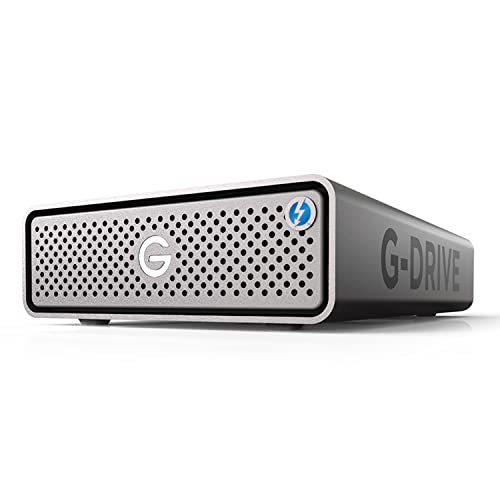
The G-DRIVE PRO is the performance-leaning pick, and the only drive in this guide whose own listing copy names audio and video editing as its purpose. Its title states Thunderbolt 3 and USB-C connections and a 7200RPM Ultrastar drive inside, and its description quotes powerful performance up to 250MB/s read and 250MB/s write. Six terabytes is the smallest desktop capacity here, which tells you its role: not the archive, but the active workstation drive for current projects on a Thunderbolt-equipped machine, where the interface and the stated transfer figures matter more than raw room.
Specs
- Hard drive: 6 TB mechanical hard disk
- Drive inside: 7200RPM Ultrastar drive
- Interfaces as titled: Thunderbolt 3 and USB-C
- Performance as listed: Up to 250MB/s read and 250MB/s write
- Listing positioning: For storage-intensive applications like audio/video editing or digital photography
- Model: SDPH51J-006T-NBAAD
Best for: A Thunderbolt 3 workstation’s active project drive.
Watch out for: A tracker record describes dual Thunderbolt 3 ports plus a single USB-C port, but that port count is tracker-sourced rather than listing-stated, so confirm the ports on the live listing before relying on daisy-chaining.
ASIN: B098S19Y1Q
Which One Fits Your Situation
You edit at one desk and your library keeps growing
Start with capacity at the desk. The 12 TB G-DRIVE suits a main library that stays online all day, while the 6 TB My Book covers a smaller or earlier-stage library at a simpler level. Either way, the drive lives beside the workstation, so plan shelf space, mains power and a backup routine around it from the start.
You shoot on location and shuttle footage back
Take the LaCie Rugged. Its resistance wording and portable format are built for bags and sets, and 5 TB is enough for a shoot’s media and a safety copy in transit. Back at the desk, its contents belong on a desktop drive as well, because a portable that holds the only copy of a day’s filming is a risk, not a workflow.
Your active projects no longer fit on one drive
Look at the My Book Duo. Two drives in one enclosure give you 12 TB and configuration choices, including the RAID-0 mode its listing quotes for performance. It fits editors juggling several large projects at once. Keep its limits in view: striped mode is about speed, not safety, and the enclosure itself remains a single point of failure.
Your workstation is Thunderbolt-based and speed matters daily
Choose the G-DRIVE PRO. Its listing is the one that names video editing directly, pairs Thunderbolt 3 with USB-C, and states its own read and write figures rather than borrowing a line-wide claim. With 6 TB it works best as the active project drive, backed by a larger desktop drive from this guide holding the archive behind it.
Common Mistakes
- Treating a product line’s largest capacity or fastest figure as the specification of the specific drive in the listing.
- Assuming RAID-0 protects your footage, when the striped mode the listing quotes is a performance configuration, not a backup.
- Buying a portable solid-state drive for a bulk media library that a mechanical drive would hold at a fraction of the cost per terabyte.
- Forgetting that desktop drives need mains power and a permanent home, so they cannot double as travel drives.
- Keeping the only copy of a finished project on the same single drive that holds your active work.
Frequently Asked Questions
Is a mechanical hard drive fast enough for video editing?
For many editing workflows, yes. Editors routinely cut from hard drives using proxy or optimized media, and the drives here state sequential figures suited to moving large files. What hard drives do not offer is solid-state responsiveness for many small files, so demanding multicam or high-resolution timelines may still belong on faster working storage with the HDD as library.
Why choose a hard drive over an SSD for editing?
Capacity per unit of cost. Media libraries grow into tens of terabytes, and mechanical drives remain the practical way to keep that much footage online and archived. Many editors combine both: solid-state speed for the current timeline, hard drive capacity for projects, media and archives. This guide covers the hard drive half of that setup, as the keyword asks.
What does the My Book Duo’s RAID-0 speed figure actually mean?
The listing quotes up to 360MB/s sequential reads for RAID-0 mode, where data is striped across both internal drives. That is a best-case sequential figure for that configuration, useful for moving large media files. It does not describe mirrored configurations, and striping provides no protection if a drive fails, so keep separate backups either way.
How much capacity should an editing drive have?
More than your current library, because archives only grow. Add up your existing media, a year of expected projects and your finished-work archive, then buy the next size above that total. Editors who underestimate end up splitting libraries across small drives, which makes projects harder to back up, search and hand over to collaborators later.
Related guides
More from Amazon
Programs that pair well with the guide above. Offers and eligibility are set by Amazon and may change.
A free business account with business pricing and bulk-buying tools for work, shop or home office.
Create a business accountFree shipping on eligible items, Prime Video and more. Eligible new members can start with a free trial.
Start a Prime free trialAudiobooks and podcasts to listen to on the go. Eligible new members can start with a free trial.
Try Audible freeAd-free music streaming. Eligible new subscribers can start with a free trial.
Try Music Unlimited freeAs an Amazon Associate we earn from qualifying purchases.