The best monitor arm for most gaming desks is a single gas-spring arm rated at least 20 to 30 percent above your panel’s weight without its stand, with a clamp that fits your desktop thickness. Ergotron’s LX line is the safe all-rounder, Ergotron’s HX is the choice for heavy ultrawides, and North Bayou-style budget arms cover 27-inch screens well. Check weight rating, VESA pattern, desk thickness and desk depth before anything else; style and cable clips matter far less.
As an Amazon Associate we earn from qualifying purchases at no extra cost to you.
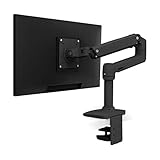


Top 3 picks at a glance
Quick comparison of the picks
| Pick | Best for | Key specs (per manufacturer spec sheets, approximate) | Price range |
|---|---|---|---|
| Ergotron LX Desk Monitor Arm | Best overall, single 24″-34″ screen | Gas-spring; roughly 3.2-11.3 kg per arm; VESA 75×75 and 100×100; clamp or grommet | Mid-range to premium |
| Ergotron HX Desk Monitor Arm | Heavy 34″-49″ ultrawides | Roughly up to 19 kg; VESA 75×75 and 100×100; long reach and large tilt range | Premium |
| North Bayou F80 (and similar) | Best budget, 17″-27″ screens | Gas-spring; about 2-9 kg; VESA 75×75 and 100×100; clamp and grommet | Budget |
| VIVO-style dual gas-spring arm | Best budget dual setup | Two articulating arms on one pole; about 2-9 kg each on typical models; VESA 75/100 | Budget to mid-range |
| Humanscale M2.1 | Premium, clean look, counterbalanced | Spring-balanced; wide weight range; VESA 75/100; tool-free adjustment | Premium |
| Secretlab Magnus Pro Monitor Arm | Owners of the Magnus Pro desk | Designed around the desk’s magnetic accessory system; check current weight limit | Mid-range to premium |
Models and weight limits change between revisions, so confirm the figures on the current spec sheet before you buy.
Best overall: Ergotron LX
The LX is the arm that other arms get compared to. It is a counterbalanced gas-spring design with a wide range of height, tilt, pan and rotation, and it handles most 27-inch and many 32-inch gaming monitors without fuss. It also comes in dual and stacked variants. Ergotron’s published weight range covers typical 1440p and 4K 27-32 inch panels.
Trade-off: it is not cheap, and very heavy curved ultrawides can exceed its limit. If your monitor is above roughly 9 kg without the stand, step up to the HX.
Best for heavy ultrawides: Ergotron HX
If you run a 34-inch curved ultrawide or a 49-inch super ultrawide, the HX is the arm class to look at. It carries a notably higher load than the LX, and its reach lets you pull a wide panel back to a comfortable distance. Large, curved screens put the most torque on a clamp, so the HX’s better hardware matters more than the extra range does.
Trade-off: it is bulky and costs more. On a shallow desk, the long arm adds little. A 49-inch panel also needs a desktop that can take the load (see the clamp section below).
Best budget: North Bayou F80 and similar
North Bayou’s gas-spring arms are a common budget pick for 17-27 inch monitors, and VIVO and Huanuo make comparable models. At the budget tier the real compromises are in the details: looser tilt friction, thinner clamp plates and fiddly cable management. For a 24-27 inch 1440p panel weighing 4-6 kg, they do the job.
Trade-off: weight ratings at this tier are often optimistic at full extension. Stay below about 70 percent of the stated limit, and expect to re-tension the arm over time.
Best budget dual setup: dual gas-spring arms on one pole
Two arms on one pole is the cheapest way to get two monitors off the desk. It works well for a main gaming screen plus a secondary one for Discord, a browser or monitoring tools. Look for models with per-arm weight ratings, not a combined rating.
Trade-off: one clamp carries the whole load, and both arms share a single pivot point on the pole. Heavy screens on both arms can make the pole sag or twist. Keep the heavier monitor on the lower arm.
Best premium and desk-matched options
Humanscale’s M2.1 is a spring-balanced arm with a very clean look, a good fit for a minimalist setup. Secretlab’s Magnus Pro Monitor Arm makes sense mainly if you already own the Magnus Pro desk, since it is built around that desk’s design and avoids drilling or clamping. Outside those cases, an Ergotron arm usually gives better value for the money.
How to choose: the numbers that matter
1. Weight: use the panel without its stand
Arm ratings refer to the display head only. Stand-less weights vary a lot, and are listed in the monitor’s spec sheet as “weight without stand”. Typical ranges:
| Monitor class | Typical weight without stand | Arm rating to look for (with about 25% margin) |
|---|---|---|
| 24″ 1080p | 2.5-3.5 kg | 5 kg or more |
| 27″ 1440p | 3.5-5.5 kg | 7-8 kg or more |
| 32″ 4K | 5-7.5 kg | 9-10 kg or more |
| 34″ curved ultrawide | 5.5-8.5 kg | 10-11 kg or more |
| 49″ super ultrawide | roughly 10-15 kg | Heavy-duty class (about 15-19 kg) |
Gas springs are tuned to a weight window. A very light panel on a strong arm will float upward, and a heavy one on a weak arm will droop. Many arms let you adjust spring tension with a hex key, but only within the window.
2. A worked example: why reach loads the clamp
Say you mount a 34-inch ultrawide weighing 8 kg and extend it 45 cm from the clamp. The turning force at the clamp is roughly mass × gravity × distance: 8 × 9.81 × 0.45 ≈ 35 N·m, ignoring the arm’s own weight. Fold the same monitor back to 20 cm from the pole and the figure drops to about 16 N·m. That is why the same arm feels solid when tucked in and wobbles when stretched. If your desk is a thin particle-board top, keep the screen close to the pole, or add a steel reinforcement plate under the clamp.
3. Desk thickness and material
- Clamp range: most clamps fit desktops of roughly 10-80 mm. Check the maximum against your desk edge, including any lip or apron below it.
- Particle board or MDF under 25 mm: use the included steel backing plate, or choose a grommet mount through a drilled hole with a reinforced washer.
- Glass desks: do not clamp to glass unless the maker explicitly supports it.
- Standing desks: choose an arm whose full range clears the desk’s lowest and highest heights without cables being stretched.
4. VESA pattern and monitor back
Most arms support 75×75 and 100×100 mm. Some curved or thin OLED monitors have recessed mounting holes, or a plastic bulge that stops the plate from sitting flat; you may need the longer screws or spacers. A few monitors, especially some ultrawides, have no VESA holes at all. Check before you buy.
5. Height and distance
Set the top edge of the screen at or just below eye level. For a 27-inch 1440p panel, a comfortable viewing distance is roughly 60-80 cm. For a 34-inch ultrawide, a similar distance works. Your desk should be deep enough that the screen can sit about an arm’s length away, ideally 70 cm or more. On a shallow desk of around 60 cm, an arm gains you back space by letting the monitor hang beyond the edge.
Decision matrix: which arm for your setup
| Your situation | Choose | Why |
|---|---|---|
| One 27″ 1440p monitor, standard desk | Budget single gas-spring arm | Weight is well inside the rating |
| One 32″ 4K monitor | Ergotron LX class | Margin on weight and better friction control |
| 34″ curved ultrawide | LX at the upper limit, or HX for margin | Curved panels are heavier and sit further from the pole |
| 49″ super ultrawide | HX or heavy-duty class | Most standard arms are rated below the panel weight |
| Two 24-27″ monitors side by side | Dual arm on one pole | Cheapest and keeps desk space clear |
| Thin particle-board desk | Any arm plus backing plate, kept compact | Protects the desktop from crushing |
| Standing desk | Arm with long vertical travel and cable slack | Avoids cable strain at full height |
| Magnus Pro desk owner | Secretlab’s matching arm | Designed for the desk’s mounting system |
Common mistakes to avoid
- Going by the monitor’s weight with stand. The stand can account for 1-3 kg.
- Ignoring cable weight. A thick DisplayPort or power cable can pull a light arm out of position.
- Buying a dual arm for two different monitor weights. One of them will never balance properly.
- Skipping the desk check. A cracked desk edge is a more common failure than a broken arm.
Frequently Asked Questions
Are monitor arms worth it for gaming?
Yes, for most people. An arm frees desk space, lets you set the screen at the right height and distance, and makes it easy to push the monitor aside. It does not improve image quality, but it helps with comfort and posture on long sessions.
Can a monitor arm hold a 34-inch curved ultrawide?
Many can, provided the rating exceeds the panel’s weight without stand by a comfortable margin. Most 34-inch ultrawides weigh roughly 5.5-8.5 kg without the stand, so an arm rated for 10 kg or more is sensible. Keep the screen close to the pole to reduce stress on the clamp.
Will a monitor arm damage my desk?
It can, if the desktop is thin or soft. Particle board and MDF can crush under a clamp, especially with a heavy screen held at full reach. Use the steel backing plate that comes with most arms, or fit one yourself, and avoid clamping near the edge of weak tops.
Is a gas-spring arm better than a basic fixed-tension arm?
For gaming desks, usually yes. A gas-spring arm lets you move the screen with one hand and have it stay put. Fixed-friction arms are cheaper and fine if you adjust once and leave it, but they are harder to reposition.
What VESA size do I need?
Check the back of your monitor or its spec sheet. Most gaming monitors use 100×100 mm, and some smaller ones use 75×75 mm. Nearly all quality arms support both. Monitors without VESA holes need an adapter bracket, which adds cost and may not suit every model.
Should I get a single arm or a dual arm?
Choose a single arm for one main monitor, and a dual arm if you use two screens of similar weight. If your second monitor is much lighter, two separate single arms are often easier to balance than one dual arm.
Related guides
More from Amazon
Programs that pair well with the guide above. Offers and eligibility are set by Amazon and may change.
A free business account with business pricing and bulk-buying tools for work, shop or home office.
Create a business accountFree shipping on eligible items, Prime Video and more. Eligible new members can start with a free trial.
Start a Prime free trialAudiobooks and podcasts to listen to on the go. Eligible new members can start with a free trial.
Try Audible freeAd-free music streaming. Eligible new subscribers can start with a free trial.
Try Music Unlimited freeAs an Amazon Associate we earn from qualifying purchases.


