The best pre-built PC websites for most gamers in 2026 are the mainstream system builders: NZXT, Corsair, CyberPowerPC, iBuyPower and Skytech Gaming. They sell standard-part desktops at competitive prices. Boutique builders such as Maingear, Falcon Northwest and Digital Storm suit buyers who want premium craftsmanship and support, while Alienware, HP Omen and Lenovo Legion suit buyers who want a big-brand warranty. The right site depends less on brand name than on whether the listing shows exact parts, uses standard components and offers a solid warranty.
As an Amazon Associate we earn from qualifying purchases at no extra cost to you.


Our Top Picks
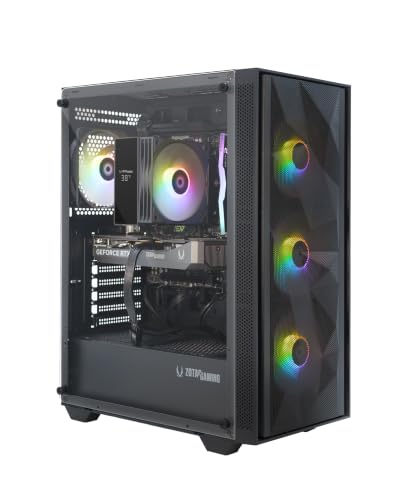
 msi Codex Z2 Gaming Desktop: AMD Ryzen R5-8400F19.1" x 8.4" x 16.1"16 x 8.38 x 19 inches21.3 poundsCheck on Amazon

Top 3 picks at a glance
Quick comparison of the best places to buy a pre-built gaming PC
| Pick | Best for | What to expect | Price tier |
|---|---|---|---|
| CyberPowerPC / iBuyPower / Skytech Gaming | Best value | Wide range of GPU/CPU combos, mostly standard ATX parts, RGB-heavy cases, variable PSU and SSD quality | Budget to upper mid-range |
| NZXT (Player series) | Clean builds, simple buying | Own cases and coolers, tidy cable management, limited configuration range | Mid-range to premium |
| Corsair (Vengeance line) | Upgrade-friendly mid to high-end | Corsair PSU, RAM, cooling and case, generally standard layouts | Mid-range to premium |
| Maingear / Falcon Northwest / Digital Storm | Premium custom builds | Hand-built, extensive configurators, strong support, higher markup | Premium to enthusiast |
| Alienware / HP Omen / Lenovo Legion | Big-brand warranty, frequent sales | Some models use proprietary parts, so upgrades can be restricted | Budget to premium |
| Micro Center (PowerSpec) / Best Buy | Buying in person, easy returns | Stock varies by store, simple return process | Budget to mid-range |
| Puget Systems | Creators, workstation-class use | Stability-tuned builds, detailed testing documentation, not gaming-first | Premium |
Best for value: CyberPowerPC, iBuyPower and Skytech Gaming
These high-volume builders sell most of the pre-builts people actually buy. They put current GPUs in fixed-spec configurations at tight margins, so you often get the most graphics power per unit of money here. They suit first-time buyers who want to plug in and play at 1080p or 1440p.
Main trade-off: component quality varies between listings. Check for a branded 80 Plus Bronze-or-better PSU, dual-channel RAM and an SSD with a named model. Vague entries like “750W PSU” or “1TB NVMe” without brands are a warning sign.
Best for clean builds: NZXT
NZXT designs its own cases, coolers and software, and its Player-series desktops are built around a consistent look and straightforward ordering. It suits buyers who want a tidy, good-looking system without wading through dozens of options.
Main trade-off: fewer configurations and a premium for the aesthetic. Compare the exact CPU/GPU pairing against rivals, because you may pay more for the same silicon.
Best for upgradeability: Corsair
Corsair makes its own PSUs, memory, cooling and cases, so its Vengeance systems use recognizable parts you can service later. It is a sensible pick if you plan to add storage or swap the GPU in two or three years.
Main trade-off: the lineup is narrower and the pricing sits above bargain builders. Confirm the exact motherboard model, since that decides your upgrade path.
Best premium custom: Maingear, Falcon Northwest and Digital Storm
These builders offer deep configurators, hand assembly, burn-in testing and responsive support. They suit buyers building high-end 4K or compact systems who value time over savings.
Main trade-off: you pay a clear premium over the same parts bought separately. That is justified only if you value the finish, the support and the custom options.
Best for big-brand warranty: Alienware, HP Omen and Lenovo Legion
Dell’s Alienware, HP’s Omen and Lenovo’s Legion have large service networks and frequent promotions. They suit buyers who want a single company to call and are comfortable not modifying the machine.
Main trade-off: some models use proprietary motherboard layouts, non-standard power supplies or compact cases with limited cooling. Check whether the PSU is a standard ATX unit before you buy if you expect to upgrade the GPU.
Best for buying in person: Micro Center and Best Buy
Retail chains let you see the case, check the exact box and return easily. Micro Center’s PowerSpec line is a common in-store option. This route suits buyers who want to avoid shipping damage and get a fast swap if something is dead on arrival.
Main trade-off: inventory is limited to what is on the shelf, and not every location carries the same models.
Best for creators: Puget Systems
Puget Systems focuses on workstation-class reliability, publishes detailed documentation on its builds and tunes systems for editing, 3D and development work. It suits people who earn money from their PC. It is not the cheapest way to get gaming frame rates.
How to choose: a decision matrix
| Your situation | Go to | Why |
|---|---|---|
| First PC, limited budget, 1080p/1440p | CyberPowerPC, iBuyPower, Skytech | Most GPU for the money; verify PSU and RAM |
| Want a clean look, minimal fuss | NZXT | Consistent design, simple ordering |
| Plan to upgrade GPU within 3 years | Corsair or a standard-ATX value builder | Standard PSU and motherboard |
| Want one phone number for support | Alienware, Omen, Legion | Large service network, check for proprietary parts |
| High-end 4K, want custom finish | Maingear, Falcon Northwest, Digital Storm | Premium build and support |
| Want to inspect it and return it easily | Micro Center, Best Buy | In-person purchase and returns |
| Paid creative or engineering work | Puget Systems | Reliability and documentation |
Worked check 1: is the markup fair?
Add up the street price of the main parts (CPU, GPU, motherboard, RAM, SSD, PSU, case, cooler) and call it 100 units. A typical, reasonable pre-built from a mainstream builder lands around 105 to 125 units once assembly, Windows and warranty are included. Between 125 and 140 you should see something extra, such as a better case, a quality PSU or premium support. Above 140, you are paying for brand or aesthetics. The percentages are a rule of thumb rather than a published standard, and sales can push a pre-built below 100 when GPU stock is plentiful.
Worked check 2: is the power supply big enough?
Take a build with a GPU rated at 220 W board power and a CPU with a 120 W typical gaming draw, plus about 80 W for motherboard, RAM, SSD and fans. That sums to 220 + 120 + 80 = 420 W under load. Add headroom of 40 to 50 percent for transient spikes and efficiency sweet spots: 420 × 1.5 = 630 W. A 650 W to 750 W quality unit fits comfortably. If a listing pairs a 300 W-class GPU with a 550 W PSU, the numbers show it is tight (300 + 120 + 80 = 500 W, leaving only 10 percent headroom). Use the GPU maker’s recommended PSU wattage from its spec page as a floor, then confirm the PSU brand and rating.
Red flags on any pre-built website
- No exact part list. “Gaming motherboard” or “NVMe SSD” without a model means the builder can swap parts between batches.
- Single stick of RAM. One 16 GB module runs in single channel, which can cost performance in CPU-bound games. Look for two modules.
- Weak or unnamed PSU. This is the most common corner cut.
- Proprietary parts. Non-standard motherboard or PSU shapes limit upgrades and repairs.
- Short warranty or return window. Look for at least one year of parts coverage and a clear return policy. Check who pays shipping for repairs.
- Bloatware and trial software. Plan on a clean Windows install or a cleanup pass.
Before you order
- Match GPU tier to your monitor. A 1080p screen rarely needs a high-end card; a 1440p or 4K display benefits from more VRAM and bandwidth.
- Check the case for front intake mesh and at least one rear exhaust fan.
- Confirm the motherboard has a free M.2 slot and spare RAM slots.
- Read the warranty terms and whether opening the case voids coverage.
- Compare lead time: some builders ship in days, custom shops may take weeks.
Frequently Asked Questions
Is it cheaper to build a PC or buy a pre-built?
Building is usually a little cheaper when you count only parts, but pre-builts can match or beat that during sales because builders buy in volume. You also get a warranty, assembly and Windows in the price. Use the markup check above to compare a specific listing against its parts.
Which pre-built PC brand is the most reliable?
No brand is free of problems, and reliability depends mostly on the specific parts and assembly. Boutique builders and Corsair tend to use well-known components and provide strong support, while value builders vary by listing. Focus on the PSU, RAM configuration and warranty terms rather than the logo.
Can I upgrade a pre-built gaming PC later?
Usually yes, if it uses a standard ATX or micro-ATX motherboard and a standard PSU. Some Alienware, HP and Lenovo models use proprietary parts that restrict swaps. Check the motherboard and PSU details in the spec listing before buying.
Do pre-built PCs void the warranty if I open them?
It depends on the builder. Many allow you to add RAM or storage without voiding the warranty, while others use tamper stickers or restrict modifications. Read the warranty terms on the builder’s site before you open the case.
Are big-box retailers a good place to buy a pre-built?
They are good for easy returns and seeing the box in person, and sales on mainstream configurations can be strong. Selection is narrower than on builder websites, and you should still read the exact part list. For the best parts quality at a given price, dedicated system builders often have more options.
When is the best time to buy a pre-built gaming PC?
Prices tend to be lowest during major sale events and just after new GPU generations launch, when older configurations are cleared out. If you need a PC now, compare two or three builders using the markup check rather than waiting for a perfect moment.
Related guides
More from Amazon
Programs that pair well with the guide above. Offers and eligibility are set by Amazon and may change.
A free business account with business pricing and bulk-buying tools for work, shop or home office.
Create a business accountFree shipping on eligible items, Prime Video and more. Eligible new members can start with a free trial.
Start a Prime free trialAudiobooks and podcasts to listen to on the go. Eligible new members can start with a free trial.
Try Audible freeAd-free music streaming. Eligible new subscribers can start with a free trial.
Try Music Unlimited freeAs an Amazon Associate we earn from qualifying purchases.


