The best Android quick charger for most people is a 45W USB-C GaN wall charger that supports USB Power Delivery 3.0 with PPS (Programmable Power Supply). It covers Samsung Super Fast Charging 2.0, Pixel fast charging and most other phones that follow the USB-C standard, and it still has headroom for tablets. Phones that use proprietary protocols, such as OnePlus SuperVOOC or Xiaomi HyperCharge, only reach their top speed with the maker’s own charger and cable.
As an Amazon Associate we earn from qualifying purchases at no extra cost to you.
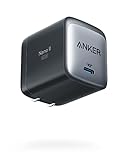

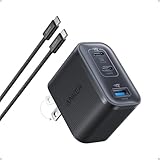

Top 3 picks at a glance
Quick comparison of the best Android quick chargers
| Pick | Best for | Key specs | Price range |
|---|---|---|---|
| 45W single-port PD 3.0 PPS GaN charger (e.g., Samsung 45W Wall Charger EP-T4511 or Google 45W USB-C Charger) | Best overall, Galaxy and Pixel owners | USB-C, PD 3.0 + PPS, 45W, about 3.3-21V PPS range | Budget to mid-range |
| 25W PPS charger (e.g., Samsung 25W Super Fast Charger) | Best budget, standard Galaxy and mid-range phones | USB-C, PD 3.0 + PPS, 25W, 3.3-11V PPS | Budget |
| 65W 3-port GaN charger (e.g., Anker 735 Charger) | Best for phone plus laptop or tablet | 2x USB-C + 1x USB-A, 65W total, PD + PPS on USB-C | Mid-range |
| 100W 4-port GaN charger (e.g., UGREEN Nexode 100W) | Best desk or travel hub | 3x USB-C + 1x USB-A, 100W total, power split between ports | Mid-range to premium |
| Manufacturer proprietary charger (OnePlus, Xiaomi, Oppo, Realme and similar) | Best for 65W-100W+ phones using their own protocol | Bundled or branded, protocol-specific, often needs the matching cable | Budget to mid-range |
Best overall: 45W PD 3.0 PPS single-port charger
A 45W PPS charger is the safe default because the USB-C standard does most of the work. PPS lets the phone request fine-grained voltage and current steps, which is how Samsung’s Super Fast Charging 2.0 reaches 45W on supported models such as the Galaxy S25 Ultra, per Samsung’s spec pages. Google’s own 45W charger is designed for the same PD/PPS approach on Pixel phones.
Who it suits: anyone with a recent Galaxy Ultra or Plus model, a Pixel, or a phone whose maker lists “USB PD PPS” support. It also tops up a small tablet reasonably well.
Main trade-off: if your phone only draws 25W or 30W, the extra capacity goes unused, though the charger does no harm. It is also a single port, so you need a second charger for earbuds or a watch.
Best budget: 25W PPS charger
If your phone tops out around 25W, a 25W PPS charger gets you the full speed for the least money. Standard Galaxy S-series models and many mid-range Android phones fall into this class. The PPS label matters more than the wattage. A cheap 25W charger without PPS can drop a Samsung phone from “Super Fast” to ordinary PD speeds of roughly 15W, according to Samsung’s charging guidance.
Main trade-off: it is slow for tablets and unsuitable for laptops. Choose it only if the phone is the only device you will charge.
Best for phone plus laptop or tablet: 65W 3-port GaN charger
A 65W multi-port GaN charger replaces both the phone brick and the laptop brick on a bag-sized budget. The Anker 735 Charger (GaNPrime, 65W, two USB-C and one USB-A) is a well-known example. The key is how the wattage is split when several ports are in use. Most chargers in this class give one port the full 65W only when it is alone and drop to something like 45W + 20W when two ports are occupied. Check the manufacturer’s power-distribution table before you buy.
Main trade-off: the second USB-C port often falls below your phone’s top speed when a laptop is plugged into the first. A 65W laptop plus a 45W phone needs 110W, which this charger cannot provide.
Best desk or travel hub: 100W 4-port GaN charger
A 100W four-port charger, such as the UGREEN Nexode 100W, suits a desk where a laptop, phone, tablet and earbuds all share one outlet. Its extra capacity means a 65W laptop and a 25W-30W phone can charge at full speed together (65 + 30 = 95W).
Main trade-off: it is bigger and heavier than a single-port charger, and it costs more. Many people also never use all the ports at once, so the extra wattage may be wasted.
Best for proprietary fast charging: use the maker’s charger
OnePlus, Xiaomi, Oppo, Realme, Honor and some others ship phones that charge at 65W-120W or more with their own protocols. A third-party PD charger usually works but may cap the phone at 18W-45W, depending on whether the phone also implements PD PPS. The phone’s spec sheet will list both the proprietary wattage and any USB PD support.
Main trade-off: these chargers are less versatile. Some work poorly with other phones, and the highest speeds often require the maker’s specific cable.
How to choose: match charger watts to the phone
Use this matrix to map your situation to a charger. The phone’s maximum wattage is the number in the manufacturer’s spec sheet, not the number printed on the box of an accessory.
| Your situation | Choose | Why |
|---|---|---|
| Phone max 15W-25W, PPS supported | 25W PPS charger | Matches the phone, cheapest way to reach full speed |
| Phone max 45W (Galaxy Ultra/Plus class) | 45W PD 3.0 PPS charger | Required for the top Samsung tier |
| Pixel phone | 30W-45W PD charger (check your model) | Pixels use USB PD and do not need extra watts beyond their limit |
| Phone 65W+ proprietary (OnePlus, Xiaomi etc.) | Maker’s own charger and cable | Protocol-locked top speeds |
| Phone + 65W laptop in one outlet | 100W multi-port GaN | 65W + 30W-35W without throttling |
| Phone + tablet only | 65W 3-port GaN or 45W + 20W combo | Enough for both with a small split |
Worked example: how long does a 5,000 mAh phone take?
A typical 5,000 mAh battery at a nominal 3.85V stores about 19.25 Wh (5.0 Ah x 3.85V). Charging losses and heat typically mean 80%-90% of the wall power reaches the battery, and phones taper the speed after about 50%-70%.
- 25W charger: roughly 20W reaches the battery at the start. 0-50% needs about 9.6 Wh, so around 30 minutes, then a slower second half. A full charge is typically around 75-90 minutes.
- 45W charger (phone supports 45W): roughly 35W-38W early on. 0-50% takes about 16-17 minutes, and a full charge is typically around 60 minutes, because the taper dominates the last 30%.
- Takeaway: going from 25W to 45W saves roughly 10-30 minutes on a full charge, but only if the phone actually accepts 45W. A 65W charger on a 25W phone saves nothing.
These figures are estimates for planning, not measured results. Real times vary with the phone, temperature, screen use and battery size.
Power budget for a multi-port charger
Add the maximum draw of every device you charge at the same time, then pick a charger rated above that total. A 65W laptop + a 25W phone + a 12W pair of earbuds and a watch needs about 102W, so a 100W charger will just reduce one port slightly. A 65W charger would leave you with roughly 40W-45W for the laptop under that load.
Check the PPS, GaN and cable details
- PPS support: look for “PD 3.0 PPS” or “PD 3.1 with PPS” in the listing. Without it, Samsung phones fall back to slower speeds.
- Cable rating: a standard USB-C cable is rated for 3A, or 60W. Anything above 60W needs a 5A cable with an e-marker chip. For a 45W phone charger, a 3A cable is enough.
- GaN construction: GaN (gallium nitride) chargers run cooler and are smaller than older silicon ones at the same wattage. This matters at 45W and above.
- Safety certification: look for UL, CE or equivalent, plus protection against over-voltage, over-current and over-temperature. Avoid no-name chargers with inflated wattage claims.
- Plug design: a folding plug is handy for travel. For a desk or bedside, a charger with the cable plugged into the side may block adjacent outlets.
Frequently Asked Questions
Is a higher-wattage charger bad for my Android phone?
No. The phone negotiates with the charger and only requests the power it can handle, so a 65W charger on a 25W phone simply delivers 25W. The risk comes from uncertified chargers and damaged cables, not from higher rated wattage.
Do I need a PPS charger for Samsung fast charging?
Yes, if you want Super Fast Charging at 25W or 45W. Samsung’s top speeds use PPS, so a plain PD charger often gives you much slower speeds. Check the charger listing or label for “PPS”.
Can I use my laptop’s USB-C charger for my phone?
Usually yes. Most USB-C PD laptop chargers work with phones and will deliver whatever the phone requests. The speed depends on whether the charger offers the voltage steps the phone needs, so PPS support still matters for Samsung’s fastest modes.
Why does my phone charge slowly with a fast charger?
The most common causes are a cable that cannot carry the power, a charger that lacks the right protocol (PPS or a proprietary standard), a hot phone that is throttling, or a limit set in the phone’s battery settings. Try a different cable and the maker’s own charger to isolate the cause.
Does fast charging damage the battery?
Modern phones manage heat and charging speed to limit wear, and the fastest phase happens at low battery levels where stress is lower. Heat is the real enemy, so avoid fast charging under a pillow or in a hot car. Many phones have an optional battery protection mode that caps charge at 80%-85% if you want to reduce wear.
Is a GaN charger worth it for phones?
For 25W it is a nice-to-have. At 45W and above, GaN charger designs are smaller and cooler, which is worth paying for if you travel or share a power strip. A multi-port GaN charger is also the simplest way to cut the number of bricks you carry.
Related guides
More from Amazon
Programs that pair well with the guide above. Offers and eligibility are set by Amazon and may change.
A free business account with business pricing and bulk-buying tools for work, shop or home office.
Create a business accountFree shipping on eligible items, Prime Video and more. Eligible new members can start with a free trial.
Start a Prime free trialAudiobooks and podcasts to listen to on the go. Eligible new members can start with a free trial.
Try Audible freeAd-free music streaming. Eligible new subscribers can start with a free trial.
Try Music Unlimited freeAs an Amazon Associate we earn from qualifying purchases.


