
Top 3 picks at a glance
The Short Answer
For a 1TB photo archive, you should buy a backup drive with at least 2TB of capacity — twice your archive size. Here’s why: a drive filled to 100% slows down, fails faster, and leaves no room for incremental backups, version history, or the thousands of photos you’ll shoot this year. The general rule among photographers is the 3-2-1 method: three copies of your data, on two different types of media, with one copy stored off-site. That means your backup drive should hold roughly double the archive, and ideally you’ll own two drives.
If your archive is exactly 1TB today and you shoot 100–300GB of new photos per year, a 2TB drive gives you three to four years of comfortable headroom. If you shoot heavily — 500GB or more annually — consider a 4TB drive so you’re not shopping again in eighteen months.
As an Amazon Associate we earn from qualifying purchases at no extra cost to you. Product prices and availability are accurate as of the date shown and are subject to change.



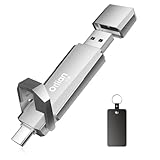
Physically, the good news is that capacity has almost nothing to do with size anymore. A 1TB portable SSD today is smaller than a deck of cards, weighs under 3 ounces, and slips into a jeans pocket. The “size” question is really about three things: storage capacity, physical footprint, and whether the drive fits your desk, bag, or drawer setup.
Standard Sizes
Portable backup drives come in two main physical formats: compact flash-drive style models and slightly larger portable SSDs. Below are typical dimensions for 1TB-class drives currently on the market, including the models most shoppers compare.
| Drive (1TB class) | Length | Width | Thickness | Weight | Price Range |
|---|---|---|---|---|---|
| SSK Portable SSD (USB-C, up to 1050MB/s) | ~3.9 in / 10 cm | ~1.2 in / 3 cm | ~0.4 in / 1 cm | ~1.6 oz / 45 g | $160–$175 |
| SanDisk 1TB Ultra Dual Drive Go (USB-C + USB-A) | ~2.4 in / 6.1 cm | ~0.8 in / 2 cm | ~0.4 in / 1 cm | ~0.5 oz / 14 g | $115–$130 |
| Move Speed 1TB Dual-Port Thumb Drive (Type C + USB 3.2) | ~2.5 in / 6.4 cm | ~0.8 in / 2 cm | ~0.4 in / 1 cm | ~0.6 oz / 17 g | $120–$135 |
| Orlian 1TB Portable SSD (USB 3.2 Gen 2, up to 1000MB/s) | ~2.6 in / 6.6 cm | ~1.0 in / 2.5 cm | ~0.45 in / 1.1 cm | ~1.1 oz / 30 g | $115–$130 |
All four are pocketable. The flash-drive style models (SanDisk, Move Speed) are lighter and plug directly into a port with no cable. The SSD-style models (SSK, Orlian) are faster — 1000MB/s versus roughly 400–560MB/s — and transfer a full 1TB archive in under 30 minutes versus closer to an hour, but they typically need a short USB-C cable.
For reference, a traditional 2.5-inch spinning hard drive measures about 5.1 x 2.9 x 0.6 inches (13 x 7.4 x 1.5 cm) and weighs 6–7 oz (170–200 g). It’s cheaper per terabyte but slower, bulkier, and more fragile — a meaningful consideration for a drive carrying your only backup copy.
How to Measure Your Space
Physical space is rarely the constraint with modern drives, but if you’re planning storage for a drawer, safe, camera bag pocket, or desk organizer, measure like this:
- Measure the clear interior space of your drawer, pouch, or safe compartment in inches, noting length, width, and depth.
- Subtract 0.5 inches from each dimension to allow room for cables, a small case, or labeling tape.
- Add the cable footprint if choosing an SSD. A coiled 8-inch USB-C cable adds roughly a 3-inch diameter circle of stored space.
- Account for a protective case. A padded EVA case adds about 0.3–0.5 inches of thickness around the drive. Expect total dimensions near 4.5 x 2.5 x 1.2 inches.
- Check port clearance on your laptop or hub. Wider thumb drives can block adjacent ports; measure the gap between your USB ports (typically 0.7–0.9 inches apart) against the drive’s width.
- If stacking multiple drives for a 3-2-1 setup, allow at least 0.75 inches of vertical spacing per drive so labels stay visible and heat can dissipate.
By Room or Use Case
Home Office Desk
A desk-based backup setup favors a portable SSD like the SSK or Orlian paired with a short fixed cable. Dedicate a 6 x 6 inch corner of the desk or a monitor-stand shelf. SSDs in this class draw minimal power (under 5 watts, bus-powered over USB — no wall adapter needed) and generate little heat. Mount the drive on a small tray or hook so it’s always connected for automated hourly backups via Time Machine, File History, or backup software.
Camera Bag
For backing up cards in the field, weight and durability matter more than raw speed. A flash-drive style unit like the Move Speed or SanDisk Dual Drive Go weighs under 0.6 oz and stores in a 3 x 4 inch accessory pouch alongside memory cards. The dual-port design matters here: you can offload from your phone, tablet, or a rental laptop without carrying a cable. Store it in a padded compartment separate from your laptop so a single drop or theft doesn’t take out both copies.
Fireproof Safe or Off-Site Storage
This is your third copy in the 3-2-1 strategy. Rotate a second drive into a home fireproof safe (interior shelves typically offer 12 x 12 inches or more — space is no issue) or swap drives with a family member’s home or a bank safe-deposit box. Because this drive sits idle for weeks, a thumb-drive style model is fine; speed only matters during transfer sessions. Label it with the last backup date in masking tape.
Travel and Work-From-Anywhere
If your archive travels with you, choose the smallest, lightest option that still hits acceptable speeds. A 1TB SSD in the 1–1.6 oz range with a braided 8-inch cable fits a passport wallet or tech organizer slot. Consider a second, lower-capacity 512GB drive for in-transit copies of your most important selections so your full archive never exists in only one place on the road.
Shared Family Setup
For households pooling photos from multiple phones, a dual-port drive (USB-C for new phones, USB-A for older computers) eliminates adapter hunting. Budget roughly $120–$135 for a 1TB unit, or $200–$250 for 2TB if the combined family archive is climbing past 1TB. Post it near the charging station so monthly backups actually happen.
Common Sizing Mistakes
- Buying exactly 1TB for a 1TB archive. A drive at full capacity slows dramatically, can’t run incremental backups, and any growth forces an emergency upgrade. Always buy 2x.
- Confusing 1TB with 1 TiB. A “1TB” drive offers about 931GB of usable space after formatting — your 1TB archive may already exceed it.
- Ignoring version history. Backup software keeping 30 days of snapshots can easily add 20–40% overhead on top of the archive itself.
- Buying one big drive instead of two smaller ones. A single 2TB drive is one point of failure. Two 2TB drives at roughly $110–$140 each beat one drive for the 3-2-1 method.
- Choosing speed you don’t need. Paying $170 for 1050MB/s makes sense for frequent full-archive transfers; for a monthly rotation drive, a $125 model at 400–560MB/s does the same job.
- Forgetting future file sizes. RAW files from newer cameras run 45–120MB each, and phone ProRAW formats are similarly large. A 1TB archive can grow 30–50% in a single year for an active shooter.
FAQ
Is 2TB enough to back up a 1TB photo archive?
Yes, for most people. A 2TB drive leaves roughly 1TB free after formatting overhead, which covers several years of new photos plus backup versioning. If you shoot more than 400–500GB per year, step up to 4TB.
Do I need an SSD or is a cheaper hard drive fine?
A hard drive is fine for a drive that sits in a safe and rotates monthly. For the drive that stays connected to your computer for automated backups, an SSD is worth the premium — it’s faster, silent, shock-resistant, and bus-powered, needing no outlet.
How long does it take to back up 1TB of photos?
On a 1000–1050MB/s USB 3.2 Gen 2 SSD, expect roughly 20–30 minutes in practice, since many small photo files transfer slower than a single large file. On a 400–560MB/s thumb drive, plan on 45–75 minutes.
Should I buy one 2TB drive or two 1TB drives?
Two drives, each at least 2TB if budget allows. A single copy — no matter how large the drive — protects you against accidental deletion or drive failure, but not against theft, fire, or ransomware. Two drives in different locations covers all of it for roughly $230–$300 total.
