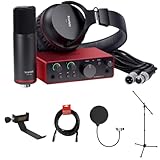
For clean speech, the best choice is usually a USB audio interface with an XLR microphone preamp, not a gaming sound card. The Focusrite Scarlett Solo (4th Gen) is the safest all-round pick for one voice, and the Scarlett 2i2 (4th Gen) or MOTU M2 suit two voices. If you only want better game audio and a headset-style mic, a Sound Blaster G6 or AE-7 is the better fit.
“Speech sound card” is an ambiguous search, so this guide assumes you want to record or transmit a voice clearly: voice chat, streaming commentary, podcasting, voice-over or dictation. The sections below cover how to pick, with the gain maths that decides whether a card works with your microphone.
As an Amazon Associate we earn from qualifying purchases at no extra cost to you.


Top 3 picks at a glance
Quick comparison of the best sound cards for speech
| Pick | Best for | Key specs (per manufacturer) | Price range |
|---|---|---|---|
| Focusrite Scarlett Solo (4th Gen) | Best overall, one voice | USB-C, 1 XLR mic preamp plus 1 instrument input, up to 24-bit/192 kHz, about 56 dB gain, Air mode, Auto Gain | Budget to mid-range |
| Focusrite Scarlett 2i2 (4th Gen) | Two speakers or host and guest | USB-C, 2 combo inputs, up to 24-bit/192 kHz, about 56 dB gain | Mid-range |
| MOTU M2 | Accurate monitoring and clean outputs | USB-C, 2 in / 2 out, up to 24-bit/192 kHz, about 53 dB gain, input and output metering on the unit | Mid-range |
| Audient EVO 4 | Easiest setup for beginners | USB, 2 inputs, 24-bit/96 kHz, Smartgain auto-levelling, about 58 dB gain | Budget to mid-range |
| Shure MVX2U | Compact single-XLR-mic adapter | USB, 48 V phantom power, 24-bit/96 kHz, gain up to 60 dB, headphone output, mute button | Budget to mid-range |
| Sound Blaster G6 | Gamers using a headset or 3.5 mm mic | External USB DAC/amp, up to 32-bit/384 kHz playback, 3.5 mm mic and headphone, optical I/O | Mid-range |
| Sound Blaster AE-7 | Internal card for playback-focused builds | PCIe, up to 32-bit/384 kHz, high-impedance headphone amp, desktop control module | Mid-range to premium |
Best overall: Focusrite Scarlett Solo (4th Gen)
The Solo gives a single voice what it needs: a quiet preamp, phantom power for condenser mics, a direct monitor output and a gain knob you can set by ear or with Auto Gain. It runs on USB-C bus power and works with standard Windows class-compliant drivers, with Focusrite’s ASIO driver for low latency. Its limit is one mic input, so it is the wrong choice for a two-person podcast at one desk.
Best for two voices: Scarlett 2i2 (4th Gen) or MOTU M2
Both give you two mic inputs. The Scarlett 2i2 adds the same Air mode and automatic gain tools as the Solo, which helps if you do not want to fiddle with levels. The MOTU M2 has detailed on-unit metering and strong output specs, which suits editing and monitoring. Its trade-off is a gain range of roughly 53 dB, which is tight for the quietest dynamic mics (see the calculation below).
Best for beginners: Audient EVO 4
The EVO 4 is built around Smartgain, which sets input level automatically after you speak for a few seconds. It has a simple one-knob layout and enough gain for most dynamic mics. The trade-off is a 96 kHz ceiling and fewer outputs, which does not matter for speech.
Best compact option: Shure MVX2U
This is a small XLR-to-USB adapter, not a full interface. It gives you phantom power, a gain control, a headphone output and a mute button. It suits a desk with one XLR mic and no wish for a larger box. The trade-off is a single input and no speaker outputs.
Best for gamers: Sound Blaster G6
The G6 is an external DAC and headphone amp that also handles a 3.5 mm headset mic, with surround processing and optical connections for consoles. It improves what you hear in games more than how your voice is captured. There is no XLR input, so it will not drive a studio-style mic. If you want a headset-class mic with better playback, this is the pick.
Best internal card: Sound Blaster AE-7
The AE-7 is a PCIe card with a desktop control module and a headphone amp for high-impedance headphones. It is a good fit for a desktop with demanding headphones, but its mic input is a 3.5 mm type. If your main goal is a quality speech recording, an external interface is the better buy.
Do you need a sound card at all?
Often you do not. A USB headset or USB microphone has its own converter, so a separate card adds nothing. Onboard motherboard audio is fine for casual voice chat with a headset. A dedicated card or interface pays off in three cases: you own an XLR microphone, your onboard mic input has audible hiss or interference, or you need low-latency monitoring of your own voice.
Decision matrix: match your situation to a card
| Your situation | Mic type | Best choice | Why |
|---|---|---|---|
| Voice chat, USB headset | Built into headset | No card needed | The headset’s own converter is used |
| Gaming, wired 3.5 mm headset | Headset mic | Sound Blaster G6 or AE-7 | Better playback and a cleaner analog mic path than many boards |
| Streaming solo, condenser mic | XLR condenser | Scarlett Solo, EVO 4 or MVX2U | Phantom power; modest gain needed |
| Streaming solo, dynamic mic | Low-output XLR dynamic | Scarlett Solo or 2i2, EVO 4, MVX2U | Need 50 dB or more of clean gain |
| Two-person podcast | Two XLR mics | Scarlett 2i2 or MOTU M2 | Two preamps, independent gain |
| Dictation or speech recognition | Close-talk headset or USB mic | Existing USB mic; interface optional | Recognition accuracy depends on mic distance and noise more than converter quality |
Worked example: how much gain does your mic need?
Gain is the number that most often decides whether a card works, so here is a rough calculation. Close-mic speech at about 10 cm is roughly 85 dB SPL. A 94 dB SPL tone equals 1 pascal, so 85 dB SPL is about 0.36 Pa, which is 9 dB below the reference.
- Low-output dynamic mic (sensitivity around -55 to -59 dBV/Pa, typical of broadcast dynamics): output is about -64 to -68 dBV. Lifting that to roughly -10 dBV (a typical line-level target) needs about 54 to 58 dB of gain.
- Condenser mic (sensitivity around -35 dBV/Pa): output is about -44 dBV, so you need about 34 dB.
The takeaway: a condenser works on any card in the table. A hungry dynamic mic sits near the ceiling of a roughly 53 to 56 dB preamp, where the preamp’s own noise becomes audible. For such a mic, choose a card with 56 dB or more (such as the Scarlett or EVO 4), or the MVX2U with its 60 dB range, or add an inline mic booster. These figures are estimates and vary with mic model, distance and speaking volume.
Settings that matter for speech
- Sample rate and bit depth: set 48 kHz and 24-bit in Windows Sound, Recording, Properties, Advanced. 48 kHz matches video and streaming software, avoiding resampling. Higher rates only inflate files for speech.
- Channels: use mono (1 channel) for a single mic. A single speaker recorded in stereo just doubles the data.
- Buffer size: 128 samples at 48 kHz is about 2.7 ms per buffer (128 / 48,000). That is low enough for monitoring yourself without echo and stable on most PCs. Raise to 256 if you hear crackles.
- Input level: set gain so normal speech peaks around -12 to -6 dBFS. This leaves headroom for loud moments without clipping.
- Exclusive mode: in the same Advanced tab, allow exclusive control only if you use ASIO or WASAPI exclusive. Otherwise it can block other apps from using the device.
- Noise handling: keep the mic 10 to 15 cm from your mouth and use a pop filter before using software noise suppression, which can add artefacts to speech.
File size is easy to budget: 48 kHz, 24-bit mono is 48,000 x 3 bytes = 144 KB per second, about 8.6 MB per minute or roughly 520 MB per hour per mic. A two-person podcast recorded on separate tracks uses about 1 GB per hour.
How to choose
- Count your mics. One XLR mic means a Solo, EVO 4 or MVX2U. Two means a 2i2 or M2.
- Check mic sensitivity. A dynamic mic below about -55 dBV/Pa needs a 56 dB or higher preamp.
- Check phantom power. Condenser mics need 48 V, which every interface above provides. Sound Blaster cards do not.
- Prioritise a clean mic path over playback specs. Sampling rates above 48 kHz do not improve speech clarity.
- Confirm the port. Most interfaces use USB-C, and some ship with a USB-A cable. Check your motherboard’s front or rear ports.
Frequently Asked Questions
Is a sound card worth it for voice chat?
Only sometimes. If you use a USB headset, a separate card adds nothing. It helps if your onboard mic input is noisy, or if you are moving to an XLR microphone that needs a preamp and phantom power.
Is an audio interface the same as a sound card?
Functionally, yes. Both convert analog audio to digital and back. An interface is an external USB box with mic preamps and XLR inputs, while gaming sound cards focus on playback features such as surround and headphone amplification.
Can a Sound Blaster card use an XLR microphone?
Not directly. Sound Blaster cards such as the G6 and AE-7 use 3.5 mm mic inputs and do not provide 48 V phantom power. To use an XLR mic you need an interface, or an XLR-to-USB adapter like the Shure MVX2U.
What sample rate should I use for speech?
Use 48 kHz at 24-bit. Human speech holds most of its information below about 8 kHz, so 96 or 192 kHz brings no audible improvement and
Related guides
More from Amazon
Programs that pair well with the guide above. Offers and eligibility are set by Amazon and may change.
A free business account with business pricing and bulk-buying tools for work, shop or home office.
Create a business accountFree shipping on eligible items, Prime Video and more. Eligible new members can start with a free trial.
Start a Prime free trialAudiobooks and podcasts to listen to on the go. Eligible new members can start with a free trial.
Try Audible freeAd-free music streaming. Eligible new subscribers can start with a free trial.
Try Music Unlimited freeAs an Amazon Associate we earn from qualifying purchases.