
The Short Answer
Yes — buy a QLC SSD for mass storage if your workload is mostly reading and writing large files: media libraries, game installations, photo and video archives, project backups. It is the wrong tool if you expect it to endure heavy, sustained writes like 24/7 video surveillance capture, daily multi-hundred-gigabyte scratch work, or as a fast cache drive for content creation. The one condition that decides everything: check the drive’s endurance rating (TBW) and make sure it comfortably exceeds your estimated writes per year. If it does, a QLC drive is one of the cheapest dollars-per-terabyte ways to get solid-state speed in 2026.
What You Actually Get
QLC stands for quad-level cell — each flash cell stores four bits of data, compared with three in TLC and two in MLC. Storing more bits per cell is what pushes the price down: a 2TB QLC NVMe drive typically runs $130–$250, roughly 30–50% less per terabyte than a comparable TLC model. The trade-offs show up in two places.
As an Amazon Associate we earn from qualifying purchases at no extra cost to you. Product prices and availability are accurate as of the date shown and are subject to change.

First, endurance. Four bits per cell put more stress on the silicon, so QLC drives carry lower TBW (terabytes written) ratings. A typical 2TB QLC drive is rated around 300–600 TBW; TLC equivalents in the same capacity often sit at 600–1,200 TBW. For most consumers that gap is academic — a typical household writes well under 20TB per year — but it matters if your workload is write-heavy.
Second, sustained write speed. QLC flash writes slowly once the drive’s fast SLC write cache fills up. On a 2TB-class drive, that cache commonly holds 100–300GB of incoming data. Copy a 150GB video project folder and you may never notice; copy 500GB of raw footage at once and the write speed can drop from 2,000–3,000 MB/s to 100–200 MB/s while the cache flushes. Reads stay consistently fast, which is exactly why QLC works so well as a “write once, read many” archive drive.
Power draw is another quiet benefit. QLC drives typically idle around 20–40 mW and peak near 3–5 watts under load, comparable to or slightly lower than TLC. A modern NVMe drive is far more efficient than a spinning 3.5″ drive, which idles at 4–8 watts — meaningful if you’re filling a home server or NAS chassis.
Pros
- Lowest cost per gigabyte in solid state. QLC consistently undercuts TLC by $20–$60 per terabyte, making 2TB–8TB solid-state storage realistic on a consumer budget.
- Fast everyday reads. QLC NVMe drives hit Gen3 speeds around 2,400–3,200 MB/s sequential read — roughly five times a SATA SSD and fifty times a hard drive. Games, media files, and archives open instantly.
- Silent, shock-resistant, and compact. An M.2 2280 drive measures 80 × 22 mm, weighs about 7 grams, has no moving parts, and runs on the motherboard — no power or SATA cables, no drive bays.
- Good for write-light archives. If data goes on once and gets read often — movie collections, completed project archives, system backup targets — QLC’s weakness is rarely triggered.
- Lower idle power than hard drives. Roughly 20–40 mW at idle versus 4–8 watts for a spinning disk, which adds up in multi-drive servers and helps laptop battery life.
- Simple capacity upgrades. Drives like the WD Green SN350 2TB (Gen3 x4, up to 3,200 MB/s read) at around $246 make doubling storage a five-minute, screwdriver-free job on any motherboard with a spare M.2 slot.
Cons
- Lower endurance ratings. Typical QLC TBW is half to two-thirds that of TLC at the same capacity, so a write-heavy workload ages the drive faster and may outlive the 3–5 year warranty window.
- Painful sustained writes. Once the SLC cache fills, write speeds can collapse to 100–200 MB/s — slower than a good hard drive. Large continuous transfers and heavy cache use will feel sluggish.
- Performance drops as the drive fills. QLC drives need free space to rebuild their write cache; past roughly 70–80% full, both write consistency and cache size shrink. Budget headroom or a larger drive than you think you need.
- Slower than TLC for mixed workloads. Editing directly off the drive, running virtual machines, or using it as a scratch disk will expose the gap. Don’t buy QLC as your working drive.
- Fewer high-endurance models available. The QLC market concentrates on consumer drives; you won’t find 3,000+ TBW QLC options the way you will with TLC and enterprise MLC.
Who Should Buy It
Buy a QLC SSD if your usage looks like this: a Steam library that’s outgrown your primary drive, a Plex or Jellyfin media server, a photo and 4K video archive you write once and browse often, or bulk storage in a secondary PC or home server. In those scenarios you get hard-drive-beating speed and reliability at hard-drive-adjacent prices. A 2TB drive in the $130–$250 range is the sweet spot for most buyers; the WD Green SN350 2TB at about $246 is a representative Gen3 example that works in virtually any desktop or laptop with an M.2 slot.
Who Should Skip It
Skip QLC if you’re a content creator who ingests hundreds of gigabytes of footage daily, if you run a NAS with continuous writes (surveillance cameras, download box, automated backups arriving around the clock), or if the drive will hold your operating system plus heavy working files. In those cases, spend the extra money on TLC — or better, keep a small fast NVMe drive for work and a QLC drive purely for cold storage. Also skip it if your data must survive untouched for a decade with no power: unpowered flash loses charge over many years, and for true cold archives, hard drives or optical/LTO media remain safer bets.
Cheaper Alternatives
| Option | Cost | Trade-off |
|---|---|---|
| Recertified or previous-generation TLC NVMe (512GB–1TB) | $40–$90 | Lower capacity and sometimes shorter warranty, but better sustained writes and endurance than QLC. |
| SATA QLC SSD (2.5″, 1TB–2TB) | $60–$140 | Capped at ~550 MB/s and needs a SATA port and power cable, but often cheaper and fine for media archives. |
| 3.5″ hard drive (4TB–8TB, 5,400–7,200 RPM) | $80–$160 | Dollars per terabyte still win at 8TB+, but expect 150–250 MB/s, noise, 4–8W idle draw, and vibration sensitivity. |
| External USB hard drive (2TB–5TB) | $60–$120 | Portable backup without opening the case; slower, bus-powered, and less durable than internal SSD storage. |
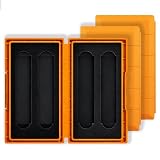
Whichever route you take, spare drives and upgrades are worth storing properly: a padded organizer like the GLOTRENDS 4-slot M.2 storage case (about $8) keeps spare 2280/2242/2230 drives from shorting against each other in a drawer, and it fits M.2 NVMe and SATA sticks of all four common lengths.
FAQ
How long will a QLC SSD last for storage?
For a read-mostly workload, likely far longer than you’ll want the drive. Endurance is measured in terabytes written: a 2TB QLC drive rated at 400 TBW could absorb 200GB of writes every month for over a decade. Writes, not age, are what wear it out — light archival use barely registers.
Is QLC slower than TLC in real use?
Only when writing large amounts at once. Day to day — booting apps, opening games, streaming media — you will not notice a difference. The gap appears in sustained transfers after the SLC cache fills, where QLC can drop to hard-drive-level write speeds.
Can I use a QLC SSD as a game drive?
Yes, and it’s one of the best uses for it. Games are written once and read constantly, load times are dramatically better than a hard drive, and a 2TB QLC drive holds 25–40 large modern titles for under the price of a midrange 1TB TLC drive.
Should I still keep a backup if I use an SSD?
Absolutely. No storage medium — QLC, TLC, or hard drive — replaces a backup. Follow the 3-2-1 habit: three copies of important data, on two different types of media, with one copy offsite. An SSD plus an external drive or cloud copy covers most household risks.


