The best affordable lap desk for most people is a hard-top, cushion-bottom model with a surface of roughly 20–24 inches wide, a wrist rest, and a weight under 3 pounds, usually $20–$40. Gaming laptop owners should spend a little more on a wide, ventilated or fan-assisted board, because a 16-inch or 17-inch laptop needs both physical space and clearance under the chassis. Size, weight and airflow matter far more than extras like cup holders or LED lights.
As an Amazon Associate we earn from qualifying purchases at no extra cost to you.
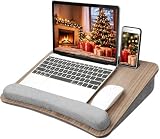


Top 3 picks at a glance
Quick comparison of the best affordable lap desk types
These are spec classes rather than single models, because affordable lap desks change constantly and many are sold under interchangeable brand names. Match the specs below to any listing you are considering.
| Pick | Best for | Key specs | Typical price |
|---|---|---|---|
| Hard-top cushioned board with wrist rest | Best overall | 20–24 in wide, 13–16 in deep, 2–3 lb, MDF or plastic top, foam or microbead bottom | $20–$40 |
| Slim microbead cushion pad | Best budget | 14–18 in wide, under 1.5 lb, soft top, no rigid surface | $12–$25 |
| Wide ventilated board with mouse wing | Best for gaming laptops | 24–28 in wide, cutouts or raised rails, mouse area 8–10 in wide | $30–$55 |
| USB-fan cooling lap desk | Hot-running laptops | 2 fans, about 5 V at 0.2–0.5 A total, mesh or vented top | $30–$60 |
| Tilting or adjustable-angle desk | Posture and reading | Tilt range of about 0–30°, stand-style legs, 3–5 lb | $30–$60 |
| Folding bed tray with legs | Bed or couch use | Legs fold flat, 22–26 in wide, 3–6 lb, rests on the mattress rather than on you | $25–$50 |
Best overall: hard-top cushioned board with wrist rest
This is the default recommendation because it solves the three most common problems at once. The rigid top gives the laptop a flat base, the cushion conforms to your legs, and the wrist rest keeps your forearms off the board’s edge. Look for a total weight of 2–3 lb, a top at least 1.5 inches wider than your laptop, and a bottom cushion that does not trap heat against your thighs.
Trade-off: most of these boards have no airflow design. They suit office laptops, ultrabooks and light gaming but can run warm under a sustained GPU load.
Best budget: slim microbead cushion pad
A soft pad is the cheapest option and the easiest to throw in a bag. It works for 13–15 inch laptops used for browsing, documents and video. Because the top is soft, the laptop can tilt slightly and sink into the pad, so avoid it for long typing sessions or any laptop with bottom intake vents.
Trade-off: soft tops can block bottom vents, and there is no room for a mouse. Treat it as a heat shield and comfort layer, not a workstation.
Best for gaming laptops: wide, ventilated board with mouse space
Gaming laptops are larger, heavier and hotter than ultrabooks, so they need a different class of desk. Choose a board at least 24 inches wide, with rails, feet or cutouts that lift the laptop’s bottom intake clear of the surface, and with a dedicated mouse area. Without a mouse area, you will be using a touchpad or balancing a mouse on your leg.
Trade-off: these boards are bulkier and heavier, often 3–4 lb, and they are harder to use in a small chair or a cramped sofa. A gaming laptop on a lap is also a poor long-term setup compared with a real desk, so keep sessions short.
Best for hot laptops: USB-fan cooling lap desk
Fan-equipped lap desks add forced airflow under the laptop. They help most with thin laptops that draw air from the bottom and with sessions where the chassis already feels hot. They do not replace the laptop’s own fans, but they can lower surface temperatures and help keep fan noise down.
Check the power draw before you buy. A USB 2.0 port supplies up to 5 V at 0.5 A (2.5 W), and a USB 3.x port up to 0.9 A (4.5 W), per the USB specifications. Two fans at 0.25 A each use the full 0.5 A, so a laptop with weak USB ports or a crowded hub may under-power them. Trade-off: they use a port, add noise, and make the board thicker.
Best for posture: tilting lap desk
An adjustable-angle desk lifts the rear or front edge to bring the screen closer to eye level and angle the keyboard comfortably. It is a good choice for long document work or reading, and it often raises the laptop’s rear for better airflow. Trade-off: the added hinges and legs make it heavier and bulkier, and cheap hinges can wobble.
Best for bed and couch: folding tray with legs
If you mostly work on a mattress or sofa, a legged tray is usually cooler and more stable because the weight rests on the furniture, not on your thighs. Look for locking legs, a lip to stop the laptop sliding, and a width of 22–26 inches. Trade-off: it is awkward in a recliner or on a narrow couch cushion and takes more storage space.
How to choose: size, weight and heat in numbers
Step 1: size the surface to your laptop
Take your laptop’s width and depth from the manufacturer’s spec sheet, then add margin. A workable rule is width plus 1 inch and depth plus 1.5 inches, with an extra 8 inches of width if you want a mouse on the board.
| Laptop class | Typical footprint (W × D) | Minimum desk, no mouse | Minimum desk, with mouse |
|---|---|---|---|
| 13–14 in ultrabook | about 12.2 × 8.5 in | 13.2 × 10 in | 21 × 10 in |
| 15.6 in laptop | about 14.2 × 10 in | 15.2 × 11.5 in | 23 × 11.5 in |
| 16 in gaming laptop | about 14.2 × 10.8 in | 15.2 × 12.3 in | 23 × 12.3 in |
| 17.3 in gaming laptop | about 15.8 × 11.2 in | 16.8 × 12.7 in | 25 × 12.7 in |
Footprints vary by model, so treat these as typical values and confirm yours. A common mistake is buying a desk labeled “fits up to 17 inches” that is only 17.5 inches wide. It holds the laptop but leaves no room for a mouse.
Step 2: add up the load on your legs
Worked example: a 16-inch gaming laptop at 5.5 lb, a 240 W power brick and cable at about 2 lb, and a 3 lb lap desk come to 10.5 lb sitting on your thighs. A 14-inch ultrabook at 3 lb, a 0.5 lb charger and a 1.5 lb cushion pad total 5 lb. If you will hold the setup for more than an hour, lighter is better, and putting the power brick on the floor or beside you cuts the load by about 2 lb.
Step 3: judge heat and airflow
Gaming laptops can draw well over 100 W under load, and nearly all of it ends up as heat that must exit the chassis. Check where your laptop breathes. If the intake is on the bottom, you need at least a few millimeters of clearance, which means raised feet, rails or a ventilated top. If it intakes at the rear or sides, a flat board is fine. Hard, non-ventilated surfaces sit between soft pads and ventilated boards: better than a blanket, worse than a design with airflow.
Decision matrix: match your situation to a pick
| Your situation | Choose | Avoid |
|---|---|---|
| Ultrabook, couch browsing | Slim cushion pad or hard-top cushioned board | Heavy 4 lb+ boards |
| 15.6 in laptop, typing and mouse | Hard-top cushioned board, 22–24 in wide | Soft pads without a rigid top |
| 16–17 in gaming laptop | Wide ventilated board with mouse area, or fan desk | Boards under 22 in wide |
| Works in bed | Folding tray with legs | Cushion pads that trap heat on bedding |
| Neck or wrist strain | Tilting desk plus a separate mouse | Flat, thick boards that raise the keyboard |
Step 4: check the details that separate cheap from good
- Surface: a lip or non-slip strip stops the laptop sliding when the desk tilts.
- Cushion fill: microbeads mold to your legs, while foam holds its shape and is usually cooler.
- Wrist rest: a padded edge of about 1–2 inches reduces pressure on your wrists.
- Cable routing: a notch or gap helps if your charger plugs in at the side.
- Portability: a fold-flat or sub-2 lb desk is easier to carry between rooms.
Frequently Asked Questions
How much should I spend on a lap desk?
Most people get a good lap desk for $20–$40. Spending $30–$60 makes sense if you have a gaming laptop, need cooling fans, or want an adjustable angle. Below about $15, cushion pads are fine for light use but rarely offer a rigid surface or good airflow.
Will a lap desk make my laptop run cooler?
It can, mainly by keeping soft surfaces such as blankets and clothing from blocking the vents. A ventilated board with raised feet or a fan model helps most. A solid, non-vented board mostly protects your legs and does little for the laptop’s temperatures.
Can I use a lap desk with a 17-inch gaming laptop?
Yes, but pick a board at least 24–25 inches wide with a surface that does not block the intake vents. Expect a total load of 10 lb or more when you include the power brick, so it suits short sessions better than all-day use. For longer play, a proper desk or a laptop stand is more comfortable.
Are fan lap desks worth it?
They are worth it if your laptop runs hot and draws air from the bottom. Check that your USB ports can supply the fans, since a USB 2.0 port provides only 0.5 A. Their benefit is modest compared with good laptop airflow and clean vents, so they work best as a supplement.
Is a lap desk bad for my posture?
A flat lap desk is a convenience, not an ergonomic fix, because the screen still sits low. A tilting model and a separate mouse help, and taking breaks every 30–45 minutes matters more than the desk itself. For long daily use, a laptop stand with an external keyboard is the better setup.
Do I need a lap desk with a mouse pad?
Only if you use a mouse on the couch or in bed. A built-in mouse area keeps the mouse close, and it means the board must be about 8 inches wider than the laptop. If you rely on the touchpad, skip the mouse area and choose a more compact board.
Related guides
More from Amazon
Programs that pair well with the guide above. Offers and eligibility are set by Amazon and may change.
A free business account with business pricing and bulk-buying tools for work, shop or home office.
Create a business accountFree shipping on eligible items, Prime Video and more. Eligible new members can start with a free trial.
Start a Prime free trialAudiobooks and podcasts to listen to on the go. Eligible new members can start with a free trial.
Try Audible freeAd-free music streaming. Eligible new subscribers can start with a free trial.
Try Music Unlimited freeAs an Amazon Associate we earn from qualifying purchases.


