For an AMD Ryzen gaming PC, the best setup is a fast PCIe 4.0 NVMe SSD such as the WD_Black SN850X or Samsung 990 Pro for the OS and games, plus a 7,200 rpm hard drive like the Seagate BarraCuda or Toshiba X300 for bulk storage. AMD does not make hard drives and no drive is “AMD-only”. What matters is what your Ryzen board supports: M.2 slot generation, SATA port count and lane sharing. This guide maps those limits to specific drive choices.
As an Amazon Associate we earn from qualifying purchases at no extra cost to you.
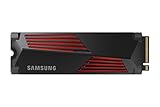


Our Top Picks
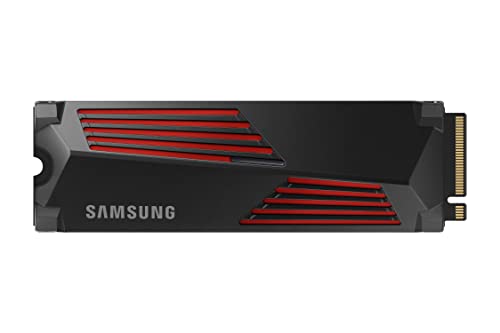


Top 3 picks at a glance
Quick comparison of the best drives for AMD systems
| Pick | Best for | Key specs (manufacturer-rated) | Typical price range |
|---|---|---|---|
| WD_Black SN850X (1-4TB) | Best overall game drive | PCIe 4.0 x4 NVMe, up to about 7,300 MB/s read | $80–$330 depending on capacity |
| Samsung 990 Pro (1-4TB) | Best for mixed gaming and creator work | PCIe 4.0 x4 NVMe, up to about 7,450 MB/s read | $90–$350 |
| Crucial T705 (1-4TB) | Best Gen5 for X870E/X670E/B850 boards | PCIe 5.0 x4 NVMe, up to about 14,500 MB/s read; needs a heatsink | $130–$500 |
| Crucial T500 (1-2TB) | Best value PCIe 4.0 step-up | PCIe 4.0 x4 NVMe, up to about 7,400 MB/s read | $70–$180 |
| Samsung 870 EVO / Crucial MX500 | Best SATA SSD for older AM4 builds | SATA III 6 Gb/s, about 560 MB/s read | $50–$200 |
| Seagate BarraCuda 3.5″ (2-8TB) | Best budget hard drive | SATA III, 3.5″, check rpm and cache per capacity | $55–$160 |
| Toshiba X300 (4-8TB+) | Best performance hard drive | SATA III, 7,200 rpm, 3.5″ | $100–$230 |
| Seagate IronWolf (4-8TB+) | Best for NAS or always-on storage | SATA III, CMR, built for multi-bay NAS use | $100–$250 |
First, what your AMD platform actually limits
Storage compatibility depends on the socket and chipset, not the drive brand. Per AMD’s platform specs and typical board designs:
- AM5 (Ryzen 7000/8000/9000 with X870E, X870, X670E, B850, B650): Every board has a CPU-attached M.2 slot. PCIe 5.0 x4 is common on X-series boards and many B850 boards. Extra M.2 slots may run at PCIe 4.0 and share lanes with USB4 or a second slot, so check the manual.
- AM4 (Ryzen 3000/5000 with B550, X570): The CPU M.2 slot is PCIe 4.0 on B550/X570 with a Ryzen 3000 or 5000 chip. Ryzen 3000G and some 5000G APUs are limited to PCIe 3.0.
- AM4 B450/X470: M.2 is PCIe 3.0 x4 at best, which caps NVMe drives at roughly 3,500 MB/s. A PCIe 4.0 drive still works but runs at Gen3 speed.
- SATA ports: Many compact B650/B850 boards have only 2-4. Some boards disable a SATA port when a particular M.2 slot is populated.
Every NVMe drive is backward compatible. A Gen4 SSD in a Gen3 slot works fine and only loses peak sequential speed. Game load times usually change far less than the spec sheet suggests.
Best overall: WD_Black SN850X
The SN850X suits nearly every Ryzen 5000, 7000 and 9000 build. It pairs high PCIe 4.0 speeds with strong random performance, which is what matters for installs and loading. It is available with or without a heatsink; the heatsink version helps if your M.2 slot sits under a GPU with no board cooling. Trade-off: pricing swings widely, and once Gen4 pricing nears that of the T500 the extra cost is hard to justify.
Best for mixed gaming and creative work: Samsung 990 Pro
The 990 Pro is a consistent PCIe 4.0 performer with good sustained write behavior, which helps if you also edit video or move large project files. It suits Ryzen builds where the drive doubles as a work scratch disk. Trade-off: it usually costs more than comparable Gen4 options, and the gaming gain over a cheaper Gen4 drive is small.
Best Gen5 option: Crucial T705
The T705 is for AM5 owners on an X870E, X870, X670E or B850 board with a PCIe 5.0 M.2 slot. It leads in sequential speed, but games rarely read data fast enough to use it. Large-file copies and creative work benefit more. Gen5 drives run hot, so use the board heatsink or the drive’s own cooler. Trade-off: a high price per TB and extra heat for a small real-world gaming gain.
Best value NVMe: Crucial T500
If you want PCIe 4.0 performance without paying a premium, the T500 is a sensible pick for a 1 TB or 2 TB game drive. It works well on B550, X570, B650 and B850 boards. Trade-off: its sustained write behavior and efficiency generally sit a step below the SN850X and 990 Pro, and the DRAM-less versions of other models in the same price range are weaker.
Best SATA SSD for older builds: Samsung 870 EVO or Crucial MX500
On an AM4 B450 or A520 board with a single M.2 slot already taken, a 2.5″ SATA SSD is the simplest way to add fast storage. At around 560 MB/s it still loads games far faster than any hard drive. Trade-off: it is limited by the SATA interface, so it is no match for NVMe in large transfers.
Best hard drives for AMD PCs
Seagate BarraCuda: best budget bulk storage
The 3.5″ BarraCuda is the default choice for a cheap 4-8 TB library of older titles, recordings and backups. Rotational speed and cache differ by capacity, so check the exact model’s spec sheet. Trade-off: some capacities use SMR recording, which can slow sustained writes, so verify the recording type before you buy.
Toshiba X300: best performance HDD
The X300 is a 7,200 rpm desktop drive with a large cache, built for people who want the quickest hard drive for a game library. Trade-off: it is noisier and runs warmer than 5,400 rpm drives, and it is still far slower than any SSD for game loading.
Seagate IronWolf: best for NAS or always-on use
If your Ryzen PC doubles as a media server or backup host, IronWolf drives are built for 24/7 duty and multi-drive enclosures. Trade-off: you pay extra for NAS features, such as vibration tolerance and rated workload, that a single-drive gaming PC rarely needs.
How to choose: a worked capacity and cost example
Start with how much you actually need, then add headroom. Suppose you keep 12 installed games averaging 90 GB, plus Windows and apps:
- Games: 12 × 90 GB = 1,080 GB
- Windows, drivers and apps: about 150 GB
- Capture clips and shader caches: about 100 GB
- Subtotal: about 1,330 GB
- Free-space headroom of 20% (keeps SSD write speeds steady): 1,330 ÷ 0.8 ≈ 1,660 GB
The result is about 1.7 TB, so buy a 2 TB NVMe SSD. A 1 TB drive would be full after about six large games. Moving a 100 GB game library folder also shows the speed gap. Assuming sustained rates of roughly 150 MB/s for a hard drive, 500 MB/s for SATA and 3,000 MB/s or more for NVMe (these vary by drive and file type), the copy takes about 11 minutes, 3.5 minutes and under 1 minute. Installs from Steam or other launchers are usually capped by your internet speed, so the SSD’s benefit there is smaller.
Decision matrix: match your Ryzen setup to a drive
| Your situation | Boot and game drive | Bulk storage | Why |
|---|---|---|---|
| Ryzen 5000 on B450/A520, one M.2 slot | 1-2 TB NVMe (Gen3 speed) or 870 EVO / MX500 | BarraCuda 4TB | Gen3 is the ceiling, so a premium Gen4 drive is wasted |
| Ryzen 5000 on B550/X570 | WD_Black SN850X or Crucial T500, 2 TB | Optional | Gen4 is fully supported on the CPU M.2 slot |
| Ryzen 7000/9000 on B650/B850, mainstream gaming | SN850X or 990 Pro, 2 TB | BarraCuda or X300 | The best price-to-performance mix for AM5 |
| Ryzen 9000 on X870E, creator workloads | Crucial T705, 2 TB, plus a Gen4 secondary | IronWolf for backups | Gen5 helps big file transfers; keep it cooled |
| Small-form-factor build (ITX/mATX) | 2 TB NVMe only | External or NAS | Few SATA ports and little room for 3.5″ drives |
| Home media server on a Ryzen PC | 500 GB-1 TB NVMe for OS | 2+ IronWolf in a NAS-style setup | Designed for continuous operation |
Setup tips that avoid common mistakes
- Read the manual’s M.2 lane table. Some boards drop to a lower speed or disable SATA ports when the second or third M.2 slot is populated.
- Install the chipset driver. Download the current AMD chipset package from AMD or your board vendor for the best power and storage behavior.
- Confirm the PCIe mode. A drive reported at Gen3 in a Gen4 slot often points to a BIOS setting or the wrong slot; update the BIOS first.
- Check SMR vs CMR on hard drives. SMR is fine for archives but can stall during long writes.
- Keep Gen5 drives cool. Use the board’s heatsink with proper contact and avoid placing the drive directly beneath a hot GPU.
Frequently Asked Questions
Do AMD processors need special hard drives?
No. Any standard SATA hard drive or NVMe SSD works with Ryzen processors. What matters is your motherboard’s chipset, M.2 generation and port count, not the drive’s brand.
Is a hard drive still worth buying for a Ryzen gaming PC in 2026?
Yes, but only for bulk storage such as game archives, recordings and backups. Install the games you play regularly on an NVMe or SATA SSD, because hard drives load much more slowly and can cause stutter in open-world titles.
Is PCIe 5.0 worth it on an AM5 board?
For most gaming builds, no. Today’s games rarely stream data fast enough to benefit, so a good PCIe 4.0 drive costs less and feels nearly the same. Gen5 is worth considering if you regularly move very large files, and you must keep it properly cooled.
How much storage should I buy for a Ryzen gaming PC?
Aim for at least 2 TB of SSD space if you keep several modern AAA games installed, since many titles exceed 100 GB. Add your game total, OS and apps, and then leave about 20% free space. A cheap 4 TB hard drive can then handle older games and media.
Will a PCIe 4.0 SSD work on an older B450 board?
Yes. It runs at PCIe 3.0 speed, roughly 3,500 MB/s at best, and loses nothing else. On such a board, a cheaper Gen3 or SATA drive is often the more sensible purchase.
What is the difference between SMR and CMR hard drives?
CMR drives write data in separate tracks and keep write speeds steadier, while SMR overlaps tracks to increase capacity and can slow sharply during long writes. For game libraries and general storage, both can work, but CMR is the safer choice for NAS use and heavy rewriting.
Related guides
More from Amazon
Programs that pair well with the guide above. Offers and eligibility are set by Amazon and may change.
A free business account with business pricing and bulk-buying tools for work, shop or home office.
Create a business accountFree shipping on eligible items, Prime Video and more. Eligible new members can start with a free trial.
Start a Prime free trialAudiobooks and podcasts to listen to on the go. Eligible new members can start with a free trial.
Try Audible freeAd-free music streaming. Eligible new subscribers can start with a free trial.
Try Music Unlimited freeAs an Amazon Associate we earn from qualifying purchases.


