The best affordable hard drive for most gaming PCs is a 3.5-inch 4TB–8TB CMR model such as the Seagate BarraCuda or Toshiba P300, which usually lands at roughly $15–$30 per terabyte. If you need to move the drive between a desktop and a laptop, a portable 2.5-inch drive like the Seagate Expansion Portable or WD Elements Portable is the better buy. In both cases, hard drives belong in the “library and backup” role, while your OS and most-played games should sit on an SSD.
As an Amazon Associate we earn from qualifying purchases at no extra cost to you.


Our Top Picks

Top 3 picks at a glance
Quick comparison of the affordable hard drive picks
Capacities, rotation speeds and cache sizes vary by SKU within each family, so confirm the exact model number on the manufacturer’s spec sheet before you buy. Prices are general market ranges and shift with supply.
| Pick | Best for | Key specs | Typical price range |
|---|---|---|---|
| Seagate BarraCuda 3.5″ (4TB–8TB) | Best overall game library drive | SATA 6Gb/s, 5400–7200 rpm depending on capacity, large cache, roughly 150–250 MB/s sequential | $70–$160 |
| Toshiba P300 3.5″ | Best 7200 rpm desktop drive | SATA 6Gb/s, 7200 rpm, CMR, up to about 6TB | $80–$150 |
| WD Blue 3.5″ (high capacity) | Best for cheap bulk capacity | SATA 6Gb/s, desktop-class, capacities up to 8TB | $70–$160 |
| WD Red Plus 3.5″ | Best for NAS and always-on backup | CMR, designed for 24/7 NAS use, 2TB–14TB range | $80–$300+ |
| Seagate Expansion Portable / WD Elements Portable (2TB–5TB) | Best portable drive | USB 3.0 / 3.2 Gen 1 (5Gbps), bus-powered, about 100–140 MB/s | $65–$160 |
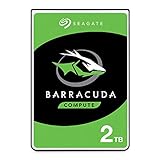
Best overall: Seagate BarraCuda 3.5-inch
The BarraCuda is the default choice because it is easy to find in 2TB, 4TB, 6TB and 8TB sizes and keeps the price per terabyte low. It suits anyone who wants a big Steam, Epic or GOG library drive, a video-clip archive, or a second internal drive for a desktop with a spare SATA port and power connector.
Main trade-off: some BarraCuda capacities use shingled magnetic recording (SMR), which is slower on large sustained rewrites. That rarely matters for game installs and media, but it matters if you plan to copy hundreds of gigabytes of changing data. Check the spec sheet for the recording method on your exact SKU.
Best 7200 rpm option: Toshiba P300
The P300 is a desktop drive built around 7200 rpm spindle speed and conventional (CMR) recording, which gives steadier performance when you write a lot. It suits a gamer who wants a snappier secondary drive for mods, recordings and installers without paying NAS-drive prices.
Main trade-off: capacity tops out lower than the cheapest bulk drives, and 7200 rpm drives run a bit louder and warmer. In a case with poor airflow around the drive bays, expect audible seek noise.
Best for cheap bulk capacity: WD Blue high-capacity
If your goal is the lowest cost per terabyte for an archive of old games, screenshots and downloads, the larger WD Blue 3.5-inch drives deliver that. They fit a standard desktop and are backed by a mainstream warranty.
Main trade-off: large desktop drives are tuned for capacity rather than speed, so sustained throughput and seek times are no better than a BarraCuda. Treat it as cold storage, not an active game drive for competitive titles with long load screens.
Best for NAS and backups: WD Red Plus
The Red Plus is aimed at small NAS enclosures and drives that run around the clock. Per the manufacturer’s positioning, it is tuned for multi-drive vibration and continuous operation. Seagate’s IronWolf line is the direct competitor. Choose one of these if the drive lives in a home server or Plex box.
Main trade-off: you pay more per terabyte than a desktop drive, and you gain little if the drive sits in a single-bay gaming PC that is off most of the day.
Best portable: Seagate Expansion Portable or WD Elements Portable
These 2.5-inch USB drives are plug-and-play, bus-powered and cheap per terabyte for something that fits in a jacket pocket. They suit console owners expanding PS4-era or Xbox backward-compatible libraries, laptop users, and anyone who wants an off-PC backup.
Main trade-off: speed is capped around 100–140 MB/s by the platters, and the drives are sensitive to drops while spinning. High-capacity portable models are often SMR too. For PS5 and Xbox Series X|S games you must use an SSD, because current-generation titles cannot run from a USB hard drive (only storage and backward-compatible games are supported, per the console makers).
How to choose: the numbers that matter
1. Calculate cost per terabyte, not sticker price
Divide price by capacity. A $100 4TB drive is $25/TB. A $150 8TB drive is about $18.75/TB. In this example, the larger drive saves roughly 25% per terabyte. A 1TB SATA SSD at $60–$90 is $60–$90/TB, so a hard drive is still about three to four times cheaper for bulk storage. Beyond roughly 8TB the savings flatten, and you concentrate more data on a single point of failure.
2. Work out how long your transfers will take
Hard drive speed is the real cost of going cheap. Using typical sustained rates:
| Task | 5400 rpm HDD (~110 MB/s) | 7200 rpm HDD (~190 MB/s) | SATA SSD (~500 MB/s) |
|---|---|---|---|
| Copy a 100 GB game | ~15 min | ~9 min | ~3.5 min |
| Copy a 1 TB library | ~2.5 hours | ~1.5 hours | ~33 min |
| Full 4 TB backup | ~10 hours | ~5.8 hours | ~2.2 hours |
The math is size divided by speed: 100,000 MB ÷ 110 MB/s ≈ 909 seconds, or about 15 minutes. These are best-case sequential figures. Real-world mixed small files or SMR rewrites can be much slower, so plan backups overnight.
3. Know CMR vs SMR
CMR drives write tracks independently, so performance stays consistent. SMR drives overlap tracks to fit more data, and rewriting existing data forces them to rewrite neighboring tracks, which can drop speeds to a fraction of normal during long writes. For game installs (write once, read often) SMR is acceptable. For a NAS, RAID or heavy video-editing scratch space, insist on CMR.
4. Match the drive to your situation
| Your situation | Choose | Why |
|---|---|---|
| Desktop, SSD already installed, want more game space | 4TB–8TB BarraCuda or WD Blue | Lowest cost per TB, speed is secondary |
| Recording gameplay or editing video | Toshiba P300 (CMR, 7200 rpm) | Steadier sustained writes |
| Home server or Plex | WD Red Plus or Seagate IronWolf | 24/7 rating, NAS firmware |
| Laptop or travel | Portable 2TB–5TB USB drive | No power brick, pocket size |
| Primary game drive for open-world titles | Skip the HDD; buy an SSD | Streaming assets and load times suffer on a hard drive |
5. Check power, noise and mounting
A 3.5-inch drive typically draws around 6–10 W under load and needs both a SATA data cable and a SATA power connector. Confirm your case has a 3.5-inch bay or a bracket. Many modern compact cases only have 2.5-inch mounts. Portable drives draw about 2–3 W from the USB port, which is fine on a desktop but can strain unpowered hubs.
6. Plan for failure
Every hard drive can fail, and cheap ones come with warranties of typically two to three years, according to the manufacturers’ published terms. Follow the 3-2-1 idea: three copies, on two kinds of media, with one off-site or in the cloud. A second affordable drive for backups is worth more than a bigger single drive.
Frequently Asked Questions
Is a hard drive still worth buying for gaming in 2026?
Yes, as secondary storage. Hard drives are still several times cheaper per terabyte than SSDs, which makes them ideal for rarely played games and archives. For your OS and the games you play daily, an SSD gives much faster load times and smoother asset streaming.
Is 5400 rpm or 7200 rpm better?
7200 rpm drives are generally faster in sequential transfers and seek times, often by 20–40%. They also run warmer and louder. For a game library that you read more than you write, 5400 rpm is usually fine, and the price difference should decide it.
Should I avoid SMR drives?
Avoid SMR for NAS, RAID arrays and heavy continuous writing, such as video capture and editing. For a game library or cold archive it is generally acceptable. Always check the exact model’s spec sheet, since manufacturers list the recording technology per SKU.
Can I play PS5 or Xbox Series X games from a cheap external hard drive?
No. According to the console makers, PS5 and Xbox Series X|S games must run from internal storage or a supported expansion SSD. A USB hard drive can store those games for later transfer and can run backward-compatible titles from older generations.
How much capacity should I buy?
Count your library, then add 50%. Large modern games commonly take 80–150 GB each, so 20 titles can fill 2–3TB. For most gamers, 4TB is the sweet spot, and 8TB makes sense if you also store recordings or backups.
How long do cheap hard drives last?
Many last five years or more, but there is no guarantee, and failure rates vary by model and usage. Keep an eye on SMART health with a tool like CrystalDiskInfo and keep important files copied elsewhere.
Related guides
More from Amazon
Programs that pair well with the guide above. Offers and eligibility are set by Amazon and may change.
A free business account with business pricing and bulk-buying tools for work, shop or home office.
Create a business accountFree shipping on eligible items, Prime Video and more. Eligible new members can start with a free trial.
Start a Prime free trialAudiobooks and podcasts to listen to on the go. Eligible new members can start with a free trial.
Try Audible freeAd-free music streaming. Eligible new subscribers can start with a free trial.
Try Music Unlimited freeAs an Amazon Associate we earn from qualifying purchases.


