- Top Pick: Sony INZONE M9 II
- Runner-up: LG UltraGear 32GS95UE
- Also consider: ASUS ROG Swift PG32UCDM
The PS5 Pro renders supported games at higher resolutions and steadier frame rates than the base console, but those gains only reach your eyes if the display can accept a full-bandwidth 4K signal at 120Hz with variable refresh rate. An older HDMI 2.0 monitor leaves the Pro’s extra output unused, and a panel without VRR can show tearing whenever a demanding scene dips below its target frame rate.
This roundup compares five monitors that meet the Pro’s requirements: native 4K resolution, a full-bandwidth HDMI 2.1 port, 120Hz support over HDMI, and VRR. The picks span budget, mid-range, and premium tiers, from fast IPS panels to 240Hz OLED models for players who also game on PC.
As an Amazon Associate, we earn from qualifying purchases.
Top 3 picks at a glance
Table of Contents
- Quick Answer
- Sony INZONE M9 II
- LG UltraGear 32GS95UE
- ASUS ROG Swift PG32UCDM
- LG UltraGear 27GR93U
- Dell G3223Q
- How to Choose
- Who Should Skip
- FAQ
- Final Verdict
- Product and ASIN Reference
Quick Answer
The Sony INZONE M9 II is the most direct match for the PS5 Pro, pairing a 4K 160Hz full-array local dimming panel with HDMI 2.1, VRR, and Auto HDR Tone Mapping for PlayStation consoles. Players who also game on PC should look at the LG UltraGear 32GS95UE or ASUS ROG Swift PG32UCDM, both 32-inch 4K OLEDs at 240Hz. The Dell G3223Q covers tighter budgets with 4K at 144Hz.
Sony INZONE M9 II

Sony designed the INZONE M9 II around its own consoles, and the spec sheet reflects that. The 27-inch IPS panel runs at 4K with a 160Hz refresh rate, and its full array local dimming backlight raises contrast well beyond an edge-lit IPS panel, with a rated peak brightness of 750 nits and VESA DisplayHDR 600 certification. With a PS5 Pro, Auto HDR Tone Mapping adjusts HDR output in step with the console, and Auto Genre Picture Mode switches settings between fast-paced and cinematic games.
For console play, the key figures are the HDMI 2.1 port with VRR support and a 1ms gray-to-gray response time. The panel covers more than 95 percent of the DCI-P3 color space, and backlight scanning reduces motion blur at lower frame rates. A DisplayPort 2.1 input, USB hub, and built-in speakers round it out, backed by a three-year warranty.
Specs
- Screen size: 27 inches
- Panel type: IPS with full array local dimming
- Resolution: 3840 x 2160 (4K UHD)
- Refresh rate: 160Hz
- Response time: 1ms (GtG)
- HDR: VESA DisplayHDR 600, peak brightness 750 nits
- Color gamut: DCI-P3 over 95 percent
- Ports: HDMI 2.1 with VRR, DisplayPort 2.1 (UHBR10), USB hub, 3.5mm audio out
- Extras: Auto HDR Tone Mapping, Auto Genre Picture Mode, built-in speakers
- Tier: Mid-range
LG UltraGear 32GS95UE
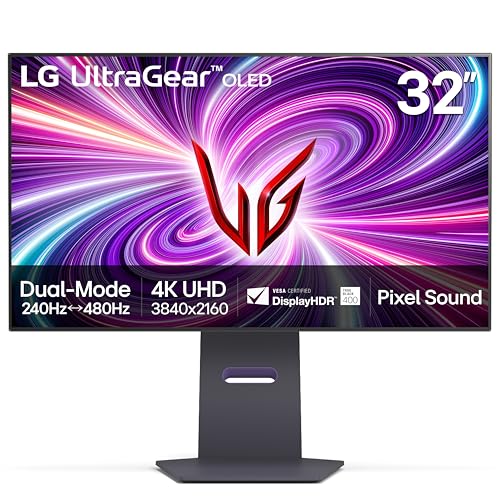
The 32GS95UE is LG’s dual-mode OLED flagship. Its 31.5-inch WOLED panel runs 4K at 240Hz, and a hotkey switches it to a 1080p mode at 480Hz for competitive PC play. A PS5 Pro tops out at 120Hz, so that headroom goes unused by the console, but the OLED panel’s per-pixel dimming delivers true blacks, a 1,500,000:1 contrast ratio, and DisplayHDR True Black 400 certification that LCD panels cannot match.
Response time is rated at 0.03ms gray-to-gray, and the monitor supports AMD FreeSync Premium Pro and NVIDIA G-Sync Compatible modes, with HDMI Forum VRR over its two HDMI 2.1 ports for console use. Color coverage is rated at 98.5 percent of DCI-P3. LG’s Pixel Sound system vibrates the panel itself to produce audio. Typical brightness is rated at 275 nits, modest next to the LCD picks here.
Specs
- Screen size: 31.5 inches
- Panel type: WOLED (OLED)
- Resolution: 3840 x 2160 (4K UHD)
- Refresh rate: 240Hz at 4K; dual mode 480Hz at 1080p
- Response time: 0.03ms (GtG)
- HDR: VESA DisplayHDR True Black 400
- Color gamut: DCI-P3 98.5 percent
- Ports: 2 x HDMI 2.1, DisplayPort 1.4, USB hub, 4-pole headphone jack
- Extras: Pixel Sound, FreeSync Premium Pro, G-Sync Compatible
- Tier: Premium
ASUS ROG Swift PG32UCDM

The PG32UCDM uses a third-generation QD-OLED panel, combining OLED’s perfect blacks with a quantum dot layer for color volume. It runs 4K at 240Hz with a 0.03ms gray-to-gray response time, covers 99 percent of the DCI-P3 color space, and is a true 10-bit panel. For PS5 Pro owners, the relevant inputs are the HDMI 2.1 ports with VRR, which accept the console’s 4K 120Hz output without downsampling.
ASUS addresses OLED longevity with a custom heatsink and graphene film behind the panel, plus OLED Care firmware features. A built-in KVM switch and a USB-C port with 90W power delivery make it practical to share the screen between the console and a laptop. Like the LG above, its refresh headroom serves PC gaming; on console it behaves as a 120Hz display with near-instant pixel response.
Specs
- Screen size: 31.5 inches
- Panel type: QD-OLED
- Resolution: 3840 x 2160 (4K UHD)
- Refresh rate: 240Hz
- Response time: 0.03ms (GtG)
- HDR: DisplayHDR True Black 400 class, Dolby Vision support
- Color gamut: DCI-P3 99 percent, true 10-bit
- Ports: HDMI 2.1, DisplayPort 1.4, USB-C with 90W power delivery, USB hub
- Extras: Custom heatsink with graphene film, built-in KVM, G-Sync Compatible
- Tier: Premium
LG UltraGear 27GR93U
The 27GR93U is the straightforward mid-range route to 4K 120Hz console play. Its 27-inch IPS panel runs at 144Hz with a 1ms gray-to-gray response time, and LG rates it for up to 120Hz from consoles over HDMI 2.1, exactly the ceiling the PS5 Pro outputs. It carries VESA DisplayHDR 400 certification and covers 95 percent of the DCI-P3 color space, a step down in HDR impact from the local-dimming and OLED picks here but consistent with its tier.
Adaptive sync support covers AMD FreeSync Premium and NVIDIA G-Sync Compatible modes, and VRR over HDMI keeps console frame pacing smooth when a Pro-enhanced title runs in an unlocked performance mode. The stand adjusts for tilt, height, and pivot, and a USB hub plus a four-pole headphone jack handle peripherals and headsets. There is no USB-C video input, so laptop users connect over HDMI or DisplayPort instead.
Specs
- Screen size: 27 inches
- Panel type: IPS
- Resolution: 3840 x 2160 (4K UHD)
- Refresh rate: 144Hz (up to 120Hz on consoles over HDMI 2.1)
- Response time: 1ms (GtG)
- HDR: VESA DisplayHDR 400
- Color gamut: DCI-P3 95 percent
- Ports: HDMI 2.1, DisplayPort 1.4, USB hub, 4-pole headphone jack
- Extras: FreeSync Premium, G-Sync Compatible, height and pivot stand
- Tier: Mid-range
Dell G3223Q

The G3223Q is the budget-tier way to get a large 4K panel in front of a PS5 Pro. The 32-inch Fast IPS screen runs at 144Hz on PC and accepts 4K at 120Hz from consoles over HDMI 2.1, with a 1ms gray-to-gray response time in its extreme mode. Dell rates peak brightness at 600 nits with VESA DisplayHDR 600 certification, strong for this tier, though the edge-lit panel has no local dimming.
Color coverage is rated at 95 percent of DCI-P3, and adaptive sync support includes AMD FreeSync Premium Pro and NVIDIA G-Sync Compatible certification, with VRR for console sources. Connectivity covers two HDMI 2.1 ports, DisplayPort 1.4, and a USB hub, and the stand adjusts for height, tilt, and swivel. Dell backs it with a three-year Advanced Exchange warranty. For console-only players who sit a few feet back, the 32-inch size is the main draw here.
Specs
- Screen size: 32 inches
- Panel type: Fast IPS
- Resolution: 3840 x 2160 (4K UHD)
- Refresh rate: 144Hz (120Hz on consoles over HDMI 2.1)
- Response time: 1ms (GtG, extreme mode)
- HDR: VESA DisplayHDR 600
- Color gamut: DCI-P3 95 percent
- Ports: 2 x HDMI 2.1, DisplayPort 1.4, USB hub, headphone jack
- Extras: FreeSync Premium Pro, G-Sync Compatible, 3-year Advanced Exchange warranty
- Tier: Budget
How to Choose
Start with the connection, because it decides whether the Pro’s output reaches the screen intact. The monitor needs an HDMI 2.1 port with full-bandwidth support for 4K at 120Hz and HDMI Forum VRR. Every pick here meets that bar; older 4K monitors with HDMI 2.0 top out at 4K 60Hz and waste the console’s performance modes.
Panel type is the second decision. OLED panels, in the LG 32GS95UE and ASUS PG32UCDM, deliver per-pixel dimming, true blacks, and near-instant response, at premium prices and with lower typical brightness. IPS panels with full array local dimming, like the Sony INZONE M9 II, are the middle path for HDR. Standard edge-lit IPS panels cost less and get brighter in full-screen scenes, but show less contrast in dark scenes.
Size depends on seating distance. At a desk, 27 inches keeps the whole 4K image in view with the sharpest pixel density. At couch distance, 32 inches reads better and makes the Pro’s higher rendering resolution easier to appreciate. Refresh rate beyond 120Hz only matters if a gaming PC shares the screen, since the PS5 Pro does not output above 120Hz.
Finally, check the extras. A KVM switch and USB-C input help mixed console, PC, and laptop desks. Built-in speakers are basic on every monitor here, so players who care about audio should plan on a headset or soundbar regardless.
Who Should Skip
Skip this category if you already own a 4K TV or monitor with HDMI 2.1, 120Hz support, and VRR. The PS5 Pro gains nothing from a second such display.
Skip the 240Hz OLED picks if the monitor will only ever connect to the console. Their refresh headroom and KVM extras are priced for PC use, and a 120Hz-class panel delivers an identical console image for less. Skip the 27-inch models if you play from a couch several feet away, where interface text becomes hard to read; a 32-inch panel or a TV suits that distance better. And skip every pick here if your library is mostly 60Hz titles, since a standard 4K 60Hz monitor already shows those games in full.
FAQ
Does the PS5 Pro need an HDMI 2.1 monitor?
For its full output, yes. The PS5 Pro sends 4K at up to 120Hz, and that signal requires HDMI 2.1 bandwidth. On an HDMI 2.0 monitor the console falls back to 4K at 60Hz, which works but gives up the high-frame-rate modes Pro-enhanced games add.
Is 1440p enough for the PS5 Pro, or is 4K better?
The PS5 Pro is built around 4K output, using its upscaling to target 4K resolution in enhanced titles. A 1440p monitor accepts the console’s 1440p output mode and looks sharp at a desk, but a native 4K panel shows the Pro’s image as intended and avoids an extra scaling step.
Do these monitors support VRR and ALLM with the PS5 Pro?
Each pick here supports variable refresh rate over HDMI 2.1, which lets the display match the console’s frame rate and reduces tearing in unlocked performance modes. Auto low latency mode is primarily a TV feature; monitors switch to their game picture settings automatically or with a single menu toggle.
Is an OLED monitor safe for console gaming menus and HUDs?
Modern OLED monitors include pixel-shift, panel-refresh cycles, and logo-dimming features to manage image retention. Following the manufacturer’s panel-care prompts keeps the risk low for typical mixed gaming use with static HUD elements.
Final Verdict
For a monitor bought mainly for the PS5 Pro, the Sony INZONE M9 II is the most complete package: genuine local dimming, console-specific HDR tone mapping, and a 160Hz ceiling that also serves a PC. The LG UltraGear 32GS95UE and ASUS ROG Swift PG32UCDM are the premium upgrades for hybrid console and PC desks. The LG 27GR93U covers the essentials at a mid-range tier, and the Dell G3223Q is the budget pick for players who want 32 inches of 4K.
Related guides
More from Amazon
Programs that pair well with the guide above. Offers and eligibility are set by Amazon and may change.
A free business account with business pricing and bulk-buying tools for work, shop or home office.
Create a business accountFree shipping on eligible items, Prime Video and more. Eligible new members can start with a free trial.
Start a Prime free trialAudiobooks and podcasts to listen to on the go. Eligible new members can start with a free trial.
Try Audible freeAd-free music streaming. Eligible new subscribers can start with a free trial.
Try Music Unlimited freeAs an Amazon Associate we earn from qualifying purchases.