- Top Pick: Samsung 990 PRO 2TB
- Runner-up: SK hynix Platinum P41 2TB
- Also consider: WD Black SN850X 2TB
A gaming laptop lives or dies by its storage. Modern titles routinely pass 100 GB each, load times shape how a machine feels day to day, and a cramped factory drive forces constant deleting and reinstalling. Swapping in a larger, faster NVMe SSD is the single most practical upgrade most gaming laptops accept, and it usually takes one screw and ten minutes.
The catch is that a laptop is not a desktop. Space is tight, cooling is limited, and every watt the drive draws comes out of the same power and thermal budget as the CPU and GPU. The best SSDs for gaming laptops are therefore not simply the fastest drives on paper. They are the drives that combine strong Gen4 or Gen5 speed with a slim single-sided layout, sensible heat output and good efficiency, in capacities that end the storage shuffle for good.
As an Amazon Associate, we earn from qualifying purchases.
Top 3 picks at a glance
Table of Contents
- Quick Answer
- Samsung 990 PRO 2TB
- SK hynix Platinum P41 2TB
- WD Black SN850X 2TB
- Crucial T700 2TB
- WD Black SN770 2TB
- How to Choose
- Who Should Skip
- FAQ
- Final Verdict
Quick Answer
For most gaming laptops, the Samsung 990 PRO 2TB is the best SSD upgrade: it pairs near-max Gen4 speeds with strong power efficiency and a slim single-sided design. The SK hynix Platinum P41 runs cooler on battery, the WD Black SN770 stretches a budget furthest, and the Crucial T700 suits the newest Gen5-ready machines.
Samsung 990 PRO 2TB

The 990 PRO is the safe premium choice for a gaming laptop, and it earns that spot on efficiency as much as speed. Samsung rates it at up to 7,450 MB/s sequential reads and 6,900 MB/s writes, which effectively saturates a PCIe 4.0 x4 slot, and its in-house controller is designed to deliver that performance without the heat spikes that throttle lesser drives in a sealed laptop chassis.
Specs
- Capacity: 2TB
- Interface: PCIe 4.0 x4, NVMe 2.0
- Form factor: M.2 2280, single-sided
- Sequential read: up to 7,450 MB/s
- Sequential write: up to 6,900 MB/s
- Random read: up to 1,400K IOPS
- Cache: DRAM (LPDDR4)
- Endurance: 1,200 TBW
- Warranty: 5 years
The single-sided layout matters in thin machines where a double-sided board can foul the chassis or the slot below it. Samsung Magician software handles firmware updates and drive health checks, and the 2TB capacity holds a realistic modern library without juggling installs. Pick this one if the laptop is a Gen4 machine and the goal is one upgrade that stays fast for the life of the laptop.
SK hynix Platinum P41 2TB

The Platinum P41 built its reputation on power efficiency, which makes it a natural fit for gaming laptops that spend real time away from the wall socket. Its Aries controller and 176-layer TLC NAND deliver up to 7,000 MB/s reads and 6,500 MB/s writes, close enough to the class leaders that no game will load noticeably slower, while drawing less power at idle and under load.
Specs
- Capacity: 2TB
- Interface: PCIe 4.0 x4, NVMe 1.4
- Form factor: M.2 2280, single-sided
- Sequential read: up to 7,000 MB/s
- Sequential write: up to 6,500 MB/s
- Random read: up to 1,400K IOPS
- Cache: DRAM
- Endurance: 1,200 TBW
- Warranty: 5 years
Lower power draw means less heat dumped into a crowded chassis and marginally better battery life during everyday use. The P41 is also single-sided at every capacity, so fitment is a non-issue in slim designs. It sits in the mid-range tier while performing like a premium drive, which is exactly the trade most laptop owners should make.
WD Black SN850X 2TB

The SN850X is Western Digital’s gaming flagship, tuned for sustained loads and large game installs. It is rated at up to 7,300 MB/s sequential reads and 6,600 MB/s writes, with a DRAM cache and an optional Game Mode 2.0 in the WD Black Dashboard software that keeps the drive in a high-performance state while a game is running.
Specs
- Capacity: 2TB
- Interface: PCIe 4.0 x4, NVMe
- Form factor: M.2 2280
- Sequential read: up to 7,300 MB/s
- Sequential write: up to 6,600 MB/s
- Random read: up to 1,200K IOPS
- Cache: DRAM
- Endurance: 1,200 TBW
- Warranty: 5 years
For a desktop replacement laptop with decent cooling, the SN850X is a premium pick that shrugs off long install sessions and big file copies. One caution: the 2TB version uses a single-sided board, but buyers should still confirm clearance, and the separate heatsink variant of this drive is meant for desktops and consoles, not laptop slots. Choose the bare drive listed here for any notebook upgrade.
Crucial T700 2TB

The T700 is the forward-looking pick, built for the small but growing set of gaming laptops with a PCIe 5.0 storage slot. Its Phison E26 controller and Micron 232-layer TLC NAND are rated at up to 12,400 MB/s sequential reads and 11,800 MB/s writes, roughly double the Gen4 class, with DirectStorage support for the games that use it.
Specs
- Capacity: 2TB
- Interface: PCIe 5.0 x4, NVMe 2.0
- Form factor: M.2 2280
- Sequential read: up to 12,400 MB/s
- Sequential write: up to 11,800 MB/s
- Random read: up to 1,500K IOPS
- Cache: DRAM
- Endurance: 1,200 TBW
- Warranty: 5 years
Two honest caveats keep this in the premium tier for a narrow audience. First, in a Gen4 laptop slot the T700 simply runs at Gen4 speeds, so it only makes sense in a Gen5-ready machine. Second, Gen5 drives run hot under sustained writes, and a laptop offers far less cooling than a desktop heatsink, so long transfers may throttle. The version listed here is the non-heatsink model, which is the one that physically fits a laptop.
WD Black SN770 2TB
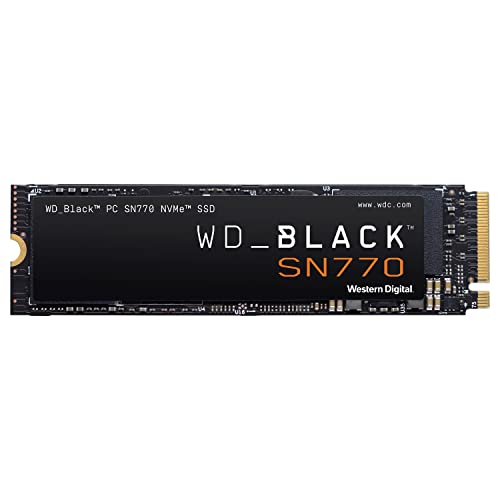
The SN770 is the budget-tier answer, and it gives up surprisingly little. It skips the DRAM cache and uses Host Memory Buffer instead, which keeps its rated speeds at 5,150 MB/s reads and 4,850 MB/s writes. That is well beyond what game loading can actually use, and in return the drive runs cool and sips power.
Specs
- Capacity: 2TB
- Interface: PCIe 4.0 x4, NVMe
- Form factor: M.2 2280, single-sided
- Sequential read: up to 5,150 MB/s
- Sequential write: up to 4,850 MB/s
- Random read: up to 740K IOPS
- Cache: DRAM-less (Host Memory Buffer)
- Endurance: 1,200 TBW
- Warranty: 5 years
For an older gaming laptop moving up from a small Gen3 drive or a hard disk, the SN770 transforms load times and doubles or quadruples capacity at the lowest cost in this roundup. The endurance rating matches the premium drives at 1,200 TBW, so the saving does not come from durability. It only starts to feel its limits during very large sustained writes, such as copying a whole library in one session.
How to Choose
Start with the slot, not the drive. Most gaming laptops use a single M.2 2280 slot, some add a second one, and the interface is PCIe 4.0 on the majority of current machines. A Gen5 drive only reaches its rated speed in a Gen5 slot, so match the drive generation to the laptop or accept Gen4 performance from a Gen5 drive.
Next, check physical fit. Single-sided 2280 drives fit almost every laptop; double-sided boards and any drive with a factory heatsink can clash with tight chassis designs. The listings in this roundup are bare or single-sided drives suited to notebooks, and the heatsink variants of the same models should be left to desktops and consoles.
Capacity is the third decision. A 1TB drive fills quickly once a few large titles land on it, so 2TB is the sensible default for a gaming laptop in 2026, with 4TB reserved for collectors who rarely uninstall anything. Finally, weigh efficiency. A drive with a good controller and DRAM cache, like the 990 PRO or Platinum P41, sustains speed with less heat, while a DRAM-less design like the SN770 trades peak numbers for cool, frugal running that suits thinner machines.
Who Should Skip
Skip this upgrade entirely if the laptop’s storage is soldered or the only slot is already filled with a drive of the same size and speed, since cloning effort buys nothing there. Owners of Gen3-only laptops should also temper expectations: any drive here will run at Gen3 speeds in that slot, so the budget SN770 is the rational buy rather than a premium model. Anyone whose laptop is still under a warranty that forbids opening the chassis should wait or use an external drive instead. And if the real problem is a failing drive rather than a full one, back up first and treat the replacement as a repair, not an upgrade.
FAQ
Will a Gen5 SSD work in a Gen4 gaming laptop?
Yes. PCIe generations are backward compatible, so a Gen5 drive such as the Crucial T700 installs and works in a Gen4 slot. It will simply run at Gen4 speeds, which is why Gen5 drives only make financial sense in laptops that actually have a Gen5 slot.
How much capacity does a gaming laptop need in 2026?
For most players, 2TB is the sweet spot. Individual games frequently exceed 100 GB, and a 2TB drive holds a working library of large titles plus the operating system and everyday files without constant uninstalling. A 1TB drive works for players who keep only a few games installed at once.
Does DRAM cache matter for gaming load times?
Only modestly. A DRAM cache helps most with sustained writes, large file copies and heavy multitasking, which is why the flagship drives include it. For pure game loading, a good DRAM-less drive such as the WD Black SN770 performs far closer to the flagships than the spec sheets suggest.
Can I add a second SSD to my gaming laptop instead of replacing the first?
Many gaming laptops include a second, empty M.2 slot, and adding a drive there is the easiest upgrade of all because nothing needs cloning. Check the manufacturer’s spec sheet for the exact model, since slot count and supported lengths vary, and confirm whether the second slot is Gen4 or Gen3 before choosing a drive.
Final Verdict
The Samsung 990 PRO 2TB is the best SSD for most gaming laptops: flagship Gen4 speed, a single-sided board that fits anywhere, and efficiency that respects a laptop’s thermal limits. The SK hynix Platinum P41 is the cooler, thriftier alternative, the WD Black SN850X suits powerful desktop replacements, the Crucial T700 serves the Gen5-ready few, and the WD Black SN770 proves a budget drive can still transform an older machine. Match the drive to the slot, buy 2TB, and the storage problem is solved for years.
Related guides
More from Amazon
Programs that pair well with the guide above. Offers and eligibility are set by Amazon and may change.
A free business account with business pricing and bulk-buying tools for work, shop or home office.
Create a business accountFree shipping on eligible items, Prime Video and more. Eligible new members can start with a free trial.
Start a Prime free trialAudiobooks and podcasts to listen to on the go. Eligible new members can start with a free trial.
Try Audible freeAd-free music streaming. Eligible new subscribers can start with a free trial.
Try Music Unlimited freeAs an Amazon Associate we earn from qualifying purchases.