- Top Pick: Elgato 4K X
- Runner-up: AVerMedia Live Gamer Ultra 2.1 (GC553G2)
- Also consider: Elgato 4K Pro
The best capture card for Xbox Series X is the Elgato 4K X if you want HDMI 2.1 capture up to 4K144 over USB, while the AVerMedia Live Gamer Ultra 2.1 is the stronger pick when party chat audio matters. This roundup compares five cards across premium, mid-range and budget tiers: external USB models, one internal PCIe card for dual-PC rigs, and a compact USB starter dongle.
Most cards below pass the Xbox signal through to your TV or monitor while sending a copy to your streaming PC for broadcasting or recording. The differences that matter are capture resolution, passthrough limits, party chat handling, and USB versus internal form factor. Specs come from each maker’s published listing data.
As an Amazon Associate, we earn from qualifying purchases.
Top 3 picks at a glance
Table of Contents
- Quick Answer
- Elgato 4K X
- AVerMedia Live Gamer Ultra 2.1 (GC553G2)
- Elgato 4K Pro
- Elgato HD60 X
- Elgato Cam Link 4K
- How to Choose
- Who Should Skip
- FAQ
- Final Verdict
- Product and ASIN Reference
Quick Answer
For most Xbox Series X streamers, the Elgato 4K X is the pick: it captures up to 4K144 over USB 3.2 Gen 2 and passes 4K120 gameplay through with VRR and HDR10. Choose the AVerMedia Live Gamer Ultra 2.1 for built-in party chat jacks, the Elgato 4K Pro for a dual-PC PCIe rig, the HD60 X for 1080p60 HDR streaming, or the Cam Link 4K as a budget starter.
Elgato 4K X

The Elgato 4K X is the flagship external pick for Xbox Series X because it removes the old compromise between playing at full quality and capturing at full quality. Its HDMI 2.1 input and output pass through up to 4K144 with HDR10 and VRR, covering the Series X at its best 4K120 output mode, and the capture side records at up to 4K144, 1440p144 or 1080p240. That headroom makes it a premium-tier card for streamers who record high-frame-rate footage for edited videos as well as live broadcasts.
Because it connects over USB 3.2 Gen 2, it works with a desktop streaming PC, a gaming laptop or an iPad, and Elgato lists compatibility with OBS and other leading broadcast apps. The box measures 112 x 72 x 18 mm and 91 g, and includes a USB 3.2 C-to-C cable and an 8K-rated HDMI cable. Full capture resolutions need a Gen 2 port; a slower Gen 1 port reduces the available capture modes.
Specs:
- Interface: USB 3.2 Gen 2 (USB-C)
- Video input: HDMI 2.1 (unencrypted)
- Video output: HDMI 2.1 lag-free passthrough
- Max capture resolution: up to 4K144, plus 1440p144 and 1080p240 modes
- Passthrough: up to 4K144 with HDR10 and VRR
- Dimensions: 112 x 72 x 18 mm
- Weight: 91 g
- System requirements: Windows 10 (64-bit), macOS 11 or iPadOS 17 or later, USB 3.2 Gen 2 port for full capture modes
- In the box: 4K X, USB 3.2 C-to-C cable, 8K HDMI cable
AVerMedia Live Gamer Ultra 2.1 (GC553G2)

The AVerMedia Live Gamer Ultra 2.1, model GC553G2, matches the 4K X on HDMI 2.1 passthrough and adds the feature Xbox streamers ask about most: party chat. It carries two 4-pole 3.5 mm audio jacks, one for your headset and one for your controller, so party chat routes into your stream or recording without extra adapters. Passthrough runs up to 2160p144 with HDR and VRR, plus 1440p240 and 1080p360 modes.
Capture tops out at 4K60 in standard use, with higher modes up to 2160p144 listed through AVerMedia’s Streaming Center software on Windows; macOS capture is listed at 4K60. A customizable RGB lightbar runs along the unit, and it connects over USB 3.2 Gen 2 Type-C. This is the premium-tier alternative to the Elgato flagship, and the better choice for squad-based streamers.
Specs:
- Interface: USB 3.2 Gen 2 Type-C
- Video input: HDMI 2.1
- Video output: HDMI 2.1 lag-free passthrough
- Max capture resolution: 4K60 standard, higher modes via AVerMedia Streaming Center on Windows
- Passthrough: up to 2160p144 HDR/VRR, 1440p240, 1080p360
- Audio: 4-pole 3.5 mm headset jack and 4-pole 3.5 mm gamepad jack for party chat
- Weight: 115 g
- System requirements: Windows 10 x64 or 11 x64 or later, macOS 13 or 14 or later
- Extras: customizable RGB lightbar, HDMI 2.1 cable and USB Type-C cable included
Elgato 4K Pro

The Elgato 4K Pro is the internal option, built for streamers whose Xbox feeds a dedicated streaming PC in a dual-PC setup. It installs in a PCIe x4, x8 or x16 slot and uses HDMI 2.1 in and out, capturing up to 4K60 HDR10 while passing through up to 8K60. It also records at up to 1080p240, and because it lives inside the PC there are no USB bandwidth limits or desk cables to manage.
For Xbox use, the 4K Pro passes the console’s 4K120 output through to your display with VRR support while the streaming PC handles encoding and overlays. It is a premium-tier card that only makes sense if your streaming machine is a desktop with a free slot; laptop streamers should look at the USB models instead.
Specs:
- Interface: PCIe x4, x8 or x16 slot (internal)
- Video input: HDMI 2.1 (unencrypted)
- Video output: HDMI 2.1 lag-free passthrough
- Max capture resolution: up to 4K60 HDR10, up to 1080p240 recording
- Passthrough: up to 8K60 with HDR10 and VRR
- Form factor: internal card for desktop streaming PCs and dual-PC setups
- System requirements: Windows 10 (64-bit) or higher, Intel Core i5 (8th gen) or AMD Ryzen 5 or better, NVIDIA GeForce GTX 10xx or better
Elgato HD60 X
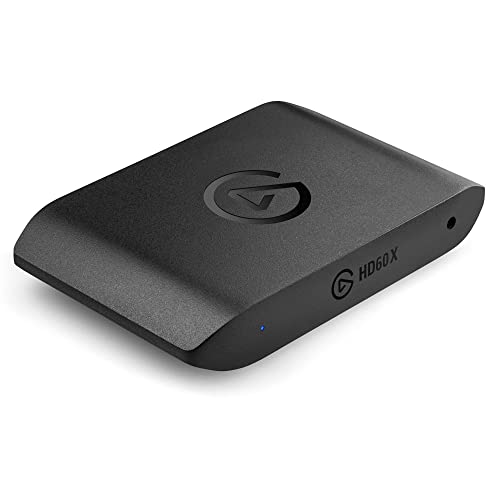
The Elgato HD60 X is the mid-range workhorse of this roundup. It captures at 1080p60 HDR10 or 4K30, which covers the settings most Twitch and YouTube streams actually use, while its passthrough runs up to 4K60 HDR10, 1440p120 and 1080p120 with VRR, so gameplay on your TV stays at full Series X quality. It is driverless on Windows and Mac, with ultra-low latency on the capture feed.
The HD60 X is the sensible pick if you stream at 1080p60, record at up to 1440p60 or 4K30, and do not need 4K60 or 4K120 capture. One buying caution: this card also circulates as an Amazon Renewed listing, so choose the standard new retail version rather than the refurbished one. The unit measures 112 x 72 x 18 mm, weighs 91 g, and connects over USB 3.0.
Specs:
- Interface: USB 3.0 (USB-C connector)
- Video input: HDMI (unencrypted)
- Video output: HDMI lag-free passthrough
- Capture resolutions: 2160p30, 1440p60, 1080p60 HDR10, 1080p30, 720p60 and lower
- Passthrough: up to 4K60 HDR10, 1440p120, 1080p120, 1080p240, VRR
- Dimensions: 112 x 72 x 18 mm
- Weight: 91 g
- System requirements: Windows 10 (64-bit), macOS 10.13 or later, built-in USB 3.0 port
Elgato Cam Link 4K

The Elgato Cam Link 4K is the budget-tier way into Xbox capture. This 20 g USB dongle turns an unencrypted HDMI feed into a USB 3.0 video source for your streaming software, capturing at 1080p60 or 4K30, with the latest model revision adding a 4K60 mode in MJPG format. Xbox game output is unencrypted, so the Series X works as a source, and the dongle doubles as a camera input if you later add a DSLR to your stream.
The trade-off is passthrough: the Cam Link 4K has no HDMI output, so your console signal ends at the dongle. Budget streamers usually play through the capture preview on the streaming PC or add an HDMI splitter, neither of which suits fast competitive play as well as a true passthrough card. Treat it as a starter device, not a long-term 4K120 solution.
Specs:
- Interface: USB 3.0
- Video input: HDMI (unencrypted), no passthrough output
- Supported capture resolutions: 4K30, 1080p60, 1080p30, 720p60 and lower; 4K60 in MJPG on the latest model revision
- Dimensions: 8.1 x 1.2 x 3.1 cm
- Weight: 20 g
- System requirements: USB 3.x port, Windows 10 (64-bit) or later, macOS 13 or later, or iPadOS 17 or later
- In the box: Cam Link 4K, USB 3.0 extension cable, quick start guide
How to Choose
Start with passthrough, because that is what you play through. If your TV or monitor runs the Series X at 4K120, you need an HDMI 2.1 card with 4K120 or higher passthrough and VRR support: the Elgato 4K X, AVerMedia Live Gamer Ultra 2.1 or Elgato 4K Pro. If you play at 4K60 or 1440p120, the HD60 X passthrough is enough, and capture resolution becomes the deciding factor.
Next, match capture resolution to your content. Live streams are usually encoded at 1080p60, so 1080p60 HDR10 capture covers most channels; step up to 4K60 capture if you record footage for edited videos. Then decide on form factor: USB cards suit laptops and single-PC console setups, while the PCIe 4K Pro suits a fixed dual-PC desk. Finally, think about audio: Xbox party chat needs a card with headset and controller jacks, like the GC553G2, or a separate chat adapter. Protected media apps on the console cannot be captured by any card, although games can.
Who Should Skip
Skip a capture card entirely if you only use the Xbox’s built-in broadcasting to Twitch, since the console streams directly without extra hardware, albeit with fewer overlay and audio options. Skip one if you only save short clips, because the Xbox DVR already records and uploads gameplay. Laptop-only streamers should skip the internal Elgato 4K Pro, and competitive 4K120 players should skip the Cam Link 4K, which has no passthrough output. If your streaming PC lacks USB 3.2 Gen 2, the flagship USB cards run in reduced capture modes, so choose the HD60 X instead.
FAQ
Do I need an HDMI 2.1 capture card for Xbox Series X?
Only if you play at 4K120 or want VRR passed through to your display. HDMI 2.1 cards such as the Elgato 4K X and AVerMedia Live Gamer Ultra 2.1 pass the full Series X output through untouched. At 4K60, an HDMI 2.0 card like the HD60 X still passes gameplay through at full quality.
Can I capture Xbox party chat with these cards?
Party chat is not carried over HDMI, so most cards cannot record it alone. The AVerMedia Live Gamer Ultra 2.1 includes headset and gamepad audio jacks that route party chat into your stream. With the other cards, you need a separate chat adapter or a headset that outputs chat audio to your PC.
Will a capture card add input lag to my gameplay?
Not on the passthrough output. All four passthrough cards here advertise lag-free passthrough, so the signal reaching your TV or monitor is not delayed. The preview inside your streaming software has a small delay on USB cards, which is why you should play from the passthrough display rather than the software preview.
Can I use a capture card with a laptop for Xbox streaming?
Yes, if the laptop meets the card’s USB requirement. The Elgato 4K X and AVerMedia Live Gamer Ultra 2.1 want a USB 3.2 Gen 2 port for full capture modes, while the HD60 X and Cam Link 4K work over USB 3.0. The internal Elgato 4K Pro cannot be used with a laptop because it needs a desktop PCIe slot.
Final Verdict
For Xbox Series X streaming, the Elgato 4K X is the best all-round capture card: HDMI 2.1 passthrough keeps 4K120 gameplay intact and capture headroom reaches 4K144 over USB. The AVerMedia Live Gamer Ultra 2.1 is the better buy for party-chat-heavy channels, the Elgato 4K Pro is the dual-PC internal choice, the HD60 X covers 1080p60 HDR streaming at a mid-range tier, and the Cam Link 4K is a budget starter dongle with a no-passthrough caveat.
Related guides
More from Amazon
Programs that pair well with the guide above. Offers and eligibility are set by Amazon and may change.
A free business account with business pricing and bulk-buying tools for work, shop or home office.
Create a business accountFree shipping on eligible items, Prime Video and more. Eligible new members can start with a free trial.
Start a Prime free trialAudiobooks and podcasts to listen to on the go. Eligible new members can start with a free trial.
Try Audible freeAd-free music streaming. Eligible new subscribers can start with a free trial.
Try Music Unlimited freeAs an Amazon Associate we earn from qualifying purchases.