- Top Pick: LG UltraGear 27GP850-B
- Runner-up: MSI Optix MAG274QRF-QD
- Also consider: HP OMEN 27q
The best 1440p 165Hz gaming monitor for most players is the LG UltraGear 27GP850-B: its Nano IPS panel pairs a native 165Hz refresh rate and 1ms response time with wide DCI-P3 color and both G-Sync and FreeSync support. Shoppers on a tighter budget should look at the LG UltraGear 27GR75Q-B, while players who want the widest color gamut here should step up to the quantum-dot MSI Optix MAG274QRF-QD.
A 165Hz refresh rate is the sweet spot for 1440p gaming. It is a clear step up from 144Hz without demanding the flagship graphics card that 240Hz panels need to stay fed, and mid-range GPUs can hold high frame rates at 2560 x 1440. Every monitor below is a 27-inch IPS model running at a native 165Hz, so the differences come down to color coverage, HDR support, ports and stand design.
As an Amazon Associate, we earn from qualifying purchases.
Top 3 picks at a glance
Quick Answer
The LG UltraGear 27GP850-B is the best 1440p 165Hz gaming monitor for most players, pairing a Nano IPS panel with G-Sync and FreeSync support. The LG UltraGear 27GR75Q-B is the budget pick, the MSI Optix MAG274QRF-QD adds quantum-dot color and USB-C, and the HP OMEN 27q suits console and PC desks.
Table of Contents
- LG UltraGear 27GP850-B
- MSI Optix MAG274QRF-QD
- Samsung Odyssey G50A
- HP OMEN 27q
- LG UltraGear 27GR75Q-B
- How to Choose a 1440p 165Hz Gaming Monitor
- Who Should Skip a 1440p 165Hz Monitor
- FAQ
- Final Verdict
- Product and ASIN Reference
The Best 1440p 165Hz Gaming Monitors
LG UltraGear 27GP850-B

The 27GP850-B is the most complete package in this roundup. Its Nano IPS panel runs at a native 165Hz and can be overclocked to 180Hz over DisplayPort, with a 1ms gray-to-gray response time and adaptive sync certified for both NVIDIA G-Sync and AMD FreeSync Premium. Color is the headline strength: the panel covers 98 percent of the DCI-P3 gamut and carries a VESA DisplayHDR 400 rating, so HDR highlights and saturated game worlds look richer than on standard sRGB screens. Connectivity is generous for the class, with two HDMI 2.0 ports, a DisplayPort 1.4 input and a two-port USB 3.0 hub for desk peripherals. The stand adjusts for height, tilt and pivot, which makes it easy to line up in a dual-monitor setup. This is the premium pick for players who want one screen that handles competitive play, story games and everyday desktop work equally well.
Specs:
- Panel: 27-inch Nano IPS, 2560 x 1440
- Refresh rate: 165Hz native, 180Hz overclocked via DisplayPort
- Response time: 1ms GtG
- Color: DCI-P3 98 percent, VESA DisplayHDR 400
- Adaptive sync: NVIDIA G-Sync Compatible, AMD FreeSync Premium
- Ports: 2x HDMI 2.0, 1x DisplayPort 1.4, USB 3.0 hub, headphone out
- Stand: height, tilt and pivot adjustable, VESA 100 x 100 mount
MSI Optix MAG274QRF-QD

The MAG274QRF-QD is the color specialist of the group. Its Rapid IPS panel uses a quantum-dot layer to reach 97 percent DCI-P3 coverage with 10-bit color depth (8-bit plus frame rate control), wider than most IPS gaming monitors at any tier. The panel runs at 165Hz over DisplayPort or USB-C, with a 1ms GTG response time and G-Sync Compatible adaptive sync, so fast-paced shooters stay smooth and tear-free. USB-C with DisplayPort Alt Mode and 15W power delivery is the standout extra: a gaming laptop can drive the screen and pick up a charge over a single cable, and the built-in KVM switch lets two computers share the same keyboard and mouse. HDMI inputs top out at 144Hz, so PC players should use DisplayPort or USB-C for the full refresh rate. For players who split time between gaming and color-sensitive work, this is the strongest hybrid pick here.
Specs:
- Panel: 27-inch Rapid IPS with quantum dot, 2560 x 1440
- Refresh rate: 165Hz via DisplayPort and USB-C, 144Hz via HDMI
- Response time: 1ms GTG
- Color: DCI-P3 97 percent, 1.07 billion colors, HDR ready
- Adaptive sync: NVIDIA G-Sync Compatible
- Ports: 1x DisplayPort 1.2a, 2x HDMI 2.0b, 1x USB-C (DP Alt, 15W PD), 2x USB 2.0, KVM
- Stand: height, tilt, swivel and pivot adjustable, VESA 100 x 100 mount
Samsung Odyssey G50A
The Odyssey G50A (model LS27AG500PNXZA) is Samsung’s mid-range entry in the 165Hz class, built around a flat IPS panel rather than the curved VA screens the Odyssey line is known for. It pairs the 165Hz refresh rate and 1ms response time with HDR10 support and dual adaptive-sync certification, covering both G-Sync and FreeSync Premium, which makes it a flexible choice for mixed PC and console desks. The stand is a highlight at this tier, offering height, tilt, swivel and pivot adjustment, including a full portrait rotation for a vertical second screen. The trade-off is connectivity: a single HDMI 2.0 port, a single DisplayPort 1.2 input and no USB hub, so players with several devices will be swapping cables or adding a switch. Players who value ergonomics and clean Samsung styling over port count will find this the balanced mid-range option.
Specs:
- Panel: 27-inch IPS, 2560 x 1440
- Refresh rate: 165Hz
- Response time: 1ms GtG
- Color: HDR10 support
- Adaptive sync: NVIDIA G-Sync Compatible, AMD FreeSync Premium
- Ports: 1x HDMI 2.0, 1x DisplayPort 1.2, headphone out
- Stand: height, tilt, swivel and pivot adjustable, VESA mount
HP OMEN 27q
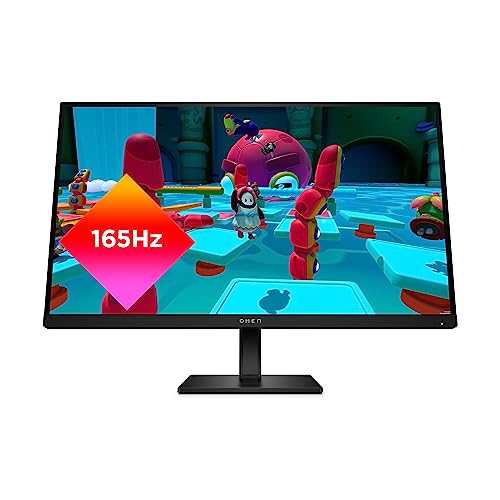
The OMEN 27q targets players who split their desk between a PC and a console. It carries two HDMI 2.0 ports alongside a DisplayPort 1.4 input, and HP rates the IPS panel for 165Hz with a 1ms GtG response time using overdrive. Color coverage is strong for the tier, at 99 percent sRGB and 95 percent DCI-P3, and the panel carries a VESA DisplayHDR 400 rating with a 400-nit peak brightness, brighter than most rivals here. AMD FreeSync Premium handles tear-free gaming on PC and Xbox, and the OMEN Gaming Hub software adds crosshair overlays and picture modes from the desktop. The stand adjusts for height, and the cabinet includes a VESA 100 x 100 mount for arm users. Note that Amazon also lists a Renewed version of this monitor under a separate listing; the ASIN in the reference table below is the standard new model.
Specs:
- Panel: 27-inch IPS, 2560 x 1440
- Refresh rate: 165Hz
- Response time: 1ms GtG with overdrive
- Color: sRGB 99 percent, DCI-P3 95 percent, VESA DisplayHDR 400
- Adaptive sync: AMD FreeSync Premium
- Ports: 2x HDMI 2.0, 1x DisplayPort 1.4, headphone out
- Stand: height adjustable, VESA 100 x 100 mount
LG UltraGear 27GR75Q-B

The 27GR75Q-B is the budget route into 1440p 165Hz gaming, and it keeps the specifications that matter most. The IPS panel delivers the full 165Hz refresh rate and 1ms GtG response time, with HDR10 support and 99 percent sRGB coverage for accurate, vivid color in everyday play. Adaptive sync covers both camps, with AMD FreeSync Premium and NVIDIA G-Sync Compatible certification, so it pairs cleanly with any current graphics card. Ports are straightforward: two HDMI inputs, one DisplayPort 1.4 and a headphone output. Where the savings show is the stand, which tilts only, so players who need height adjustment should budget for a VESA monitor arm, which the 100 x 100 mount supports. As a first high-refresh 1440p screen, this is the value pick of the roundup.
Specs:
- Panel: 27-inch IPS, 2560 x 1440
- Refresh rate: 165Hz
- Response time: 1ms GtG
- Color: sRGB 99 percent (Typ.), HDR10, 300 nits brightness
- Adaptive sync: AMD FreeSync Premium, NVIDIA G-Sync Compatible
- Ports: 2x HDMI, 1x DisplayPort 1.4, headphone out
- Stand: tilt adjustable, VESA 100 x 100 mount
How to Choose a 1440p 165Hz Gaming Monitor
Start with the connection. A native 165Hz rating only applies over DisplayPort or USB-C on most of these monitors; HDMI inputs commonly cap at 144Hz at 1440p, so PC players should plan on a DisplayPort cable to get the full refresh rate they paid for. Console players should check the HDMI specification instead, since 120Hz console modes depend on it.
Next, match adaptive sync to your graphics card. Every pick here supports AMD FreeSync, and most are also certified G-Sync Compatible for NVIDIA cards, so either GPU brand can use variable refresh to prevent tearing. If you run a laptop, a USB-C input with DisplayPort Alt Mode, as on the MSI, simplifies a single-cable desk.
Color and HDR separate the tiers. Budget models cover the sRGB gamut and carry basic HDR10 signal support, while premium Nano IPS and quantum-dot panels cover 95 percent or more of DCI-P3 and add VESA DisplayHDR 400 certification, which matters for HDR games and media. Finally, check the stand: height and pivot adjustment are worth having for long sessions, and a VESA mount keeps an arm upgrade open.
Who Should Skip a 1440p 165Hz Monitor
Competitive esports players who chase the lowest possible input lag should look at 240Hz models instead, including the 1440p OLED class, since 165Hz leaves motion clarity on the table in fast shooters. Players with an entry-level graphics card should also think twice: driving 2560 x 1440 at high frame rates takes more GPU power than 1080p, and an older card may sit below 100 frames per second in demanding titles, wasting the panel’s headroom. If your desk is built around movies and single-player spectacle rather than frame rate, a 4K 144Hz screen will deliver sharper image quality for a similar overall budget. And if you already own a good 144Hz 1440p monitor, the step to 165Hz is small enough that an upgrade rarely makes sense on its own.
FAQ
Is 165Hz noticeably smoother than 144Hz at 1440p?
The difference is modest but real. A 165Hz panel refreshes about 15 percent more often than a 144Hz one, which slightly reduces motion blur and input lag in fast games. Most players notice the jump from 60Hz to 144Hz far more, so treat 165Hz as a refinement rather than a transformation.
Can consoles use a 1440p 165Hz monitor at 120Hz?
Yes, within limits. Current consoles output 120Hz modes and accept 1440p displays, and monitors with HDMI 2.0 inputs, like the five here, can show those modes. The full 165Hz rate stays exclusive to PC over DisplayPort or USB-C, and console variable refresh support depends on the individual model.
Which cable do I need for the full 165Hz?
Use the DisplayPort cable included in the box. On most 1440p 165Hz monitors the HDMI ports are limited to 144Hz at this resolution, while DisplayPort unlocks the native rate. The MSI in this roundup also reaches 165Hz over USB-C with DisplayPort Alt Mode from a laptop.
Is 27 inches the right size for 1440p gaming?
For most desks, yes. At 27 inches, 2560 x 1440 gives a pixel density of about 109 pixels per inch, which looks sharp at a normal viewing distance without needing display scaling. Larger 32-inch models spread the same pixels thinner, while 24-inch 1440p screens make interface text small.
Final Verdict
For most players, the LG UltraGear 27GP850-B is the 1440p 165Hz monitor to buy: it combines the fastest overclock headroom here, the widest color coverage and the best port selection. The MSI Optix MAG274QRF-QD is the better pick for laptop users and color-focused players thanks to quantum-dot color and USB-C with KVM. On a budget, the LG UltraGear 27GR75Q-B keeps the full 165Hz IPS experience where it counts, and the HP OMEN 27q and Samsung Odyssey G50A round out the mid-range with console-friendly ports and fully adjustable stands.

Related guides
More from Amazon
Programs that pair well with the guide above. Offers and eligibility are set by Amazon and may change.
A free business account with business pricing and bulk-buying tools for work, shop or home office.
Create a business accountFree shipping on eligible items, Prime Video and more. Eligible new members can start with a free trial.
Start a Prime free trialAudiobooks and podcasts to listen to on the go. Eligible new members can start with a free trial.
Try Audible freeAd-free music streaming. Eligible new subscribers can start with a free trial.
Try Music Unlimited freeAs an Amazon Associate we earn from qualifying purchases.


