- Top Pick: EVGA XR1 lite
- Runner-up: AVerMedia Live Gamer Mini GC311
- Also consider: NZXT Signal HD60
The best budget capture cards record and stream clean 1080p60 gameplay while passing a full-resolution signal through to your TV or monitor, without the premium cost of flagship models. Every card here is an external USB device that works with OBS and Streamlabs, needs no free slot inside your PC, and handles current consoles including the PS5, Xbox Series X and S, and Nintendo Switch family.
The short version: the EVGA XR1 lite and AVerMedia Live Gamer Mini cover the true budget tier, the NZXT Signal HD60 and AVerMedia StreamLine MINI+ step up passthrough quality in the mid-range, and the Elgato HD60 X is the premium pick for HDR and high-refresh play.
As an Amazon Associate, we earn from qualifying purchases.
Top 3 picks at a glance
Table of Contents
- Quick Answer
- EVGA XR1 lite
- AVerMedia Live Gamer Mini GC311
- NZXT Signal HD60
- AVerMedia StreamLine MINI+ GC311G2
- Elgato HD60 X
- How to Choose a Budget Capture Card
- Who Should Skip a Budget Capture Card
- FAQ
- Final Verdict
- Product and ASIN Reference
Quick Answer
For most new streamers, the AVerMedia Live Gamer Mini is the budget capture card to buy: it records 1080p60 with a built-in hardware encoder, passes 1080p60 through to your display with zero lag, and works over USB with no drivers to install. If you play on a 4K TV, step up to the EVGA XR1 lite for 4K passthrough, or the Elgato HD60 X for HDR10 and VRR support.
EVGA XR1 lite

The EVGA XR1 lite is the budget pick for console players who game on a 4K screen but stream at 1080p. It captures at up to 1080p60 while passing through a signal of up to 4K60, so your gameplay on the TV looks exactly as it would without a capture device in the chain. It is also certified for OBS, which means it was validated to work cleanly with the software most streamers already use.
Setup is simple because the XR1 lite is a UVC device: plug in the HDMI cables and the USB 3.0 connection, and it appears as a video source in OBS or Streamlabs with no driver install. The trade-off at this tier is capture resolution: there is no 1440p or 4K capture mode and no HDR capture, so it suits creators whose output is standard 1080p streams and recordings.
Specs:
- Model: 141-U1-CB20-LR
- Capture resolution: up to 1080p60
- Passthrough: up to 4K60
- Interface: USB 3.0
- Certification: OBS certified
- Driver model: UVC plug and play, no drivers required
- Compatibility: PC, PS5, PS4, Xbox Series X and S, Xbox One, Nintendo Switch
AVerMedia Live Gamer Mini GC311

The AVerMedia Live Gamer Mini is the smallest card in this roundup, and it earns its place with a built-in H.264 hardware encoder. Because the card compresses the video itself, your PC does less work during a stream or recording, which matters if your streaming machine is an older desktop or a modest laptop. Capture and passthrough both run at 1080p60, so it is aimed squarely at Full HD gameplay rather than 4K screens.
The Live Gamer Mini uses a micro USB connection and UVC plug-and-play support on Windows and macOS, so there are no drivers to install before your first stream. Its compact body is easy to tuck behind a console or carry in a laptop bag. The limits are the flip side of the price: passthrough tops out at 1080p60, so a PS5 or Xbox Series X feeding a 4K TV will be downscaled on the display side, and there is no HDR support.
Specs:
- Model: GC311
- Capture resolution: 1080p60 with built-in H.264 hardware encoding
- Passthrough: 1080p60, zero-lag
- Interface: micro USB (USB 2.0)
- Driver model: UVC plug and play, no drivers required
- Dimensions: 3.93 x 2.24 x 0.74 inches
- Weight: 2.63 ounces
- Compatibility: Windows 10 and 11, macOS 12, PS5, Xbox Series X and S, Nintendo Switch
NZXT Signal HD60

The NZXT Signal HD60 is the mid-range step up for players who want to keep gaming at 4K while capturing at 1080p60. It accepts input signals up to 4K60 and passes them through to your display with zero lag, while the capture feed sent to your PC stays at a stream-friendly 1080p60. That split is what most Twitch and YouTube creators need: full fidelity on the couch, manageable file sizes on the PC.
The Signal HD60 connects over USB-C and is supported by NZXT CAM software for settings and firmware, and it works with the usual streaming applications as a standard capture source. There is no HDR capture and no 1440p capture mode, and high-refresh passthrough above 60 Hz is not part of the package. If your display is a 4K60 TV or monitor and your content is 1080p60, this is a tidy middle ground between the entry-level cards and the premium Elgato below.
Specs:
- Model: ST-EESC1-WW
- Capture resolution: 1080p60
- Passthrough: up to 4K60, zero-lag
- Input: HDMI 2.0
- Interface: USB-C (USB 3.2 Gen 1)
- Software: NZXT CAM support, works with OBS and Streamlabs
- Dimensions: 102 x 81 x 17 mm
- Compatibility: PC, Mac, PS5, Xbox Series X and S, Nintendo Switch
AVerMedia StreamLine MINI+ GC311G2

The AVerMedia StreamLine MINI+ is the pick for high-refresh gaming on a budget. Capture stays at 1080p60, but passthrough is the headline: it supports 2160p60 HDR, 1440p144 HDR, and 1080p240 HDR, so a fast monitor keeps its refresh rate and HDR while you stream. Most cards at this tier cap passthrough at 4K60, which makes it unusual value for PC players with 1440p high-refresh displays.
It connects over USB 3.0 Type-C, supports NV12, YUY2, and MJPEG video formats, and works across Windows, macOS, and even iPadOS on USB-C iPads, which opens up portable recording setups. The capture ceiling is still 1080p60 with no 4K recording, so creators who archive gameplay in 4K should look at the premium tier instead, but for live streaming at high refresh rates this is the strongest spec sheet in the roundup.
Specs:
- Model: GC311G2
- Capture resolution: 1080p60
- Passthrough: 2160p60 HDR, 1440p144 HDR, 1080p240 HDR
- Input and output: HDMI 2.0
- Interface: USB 3.0 Type-C
- Video formats: NV12, YUY2, MJPEG
- Dimensions: 4.43 x 2.6 x 0.82 inches
- Compatibility: Windows 10 and 11, macOS 13 and later, iPadOS 17, PS5, Xbox, Nintendo Switch 2
Elgato HD60 X
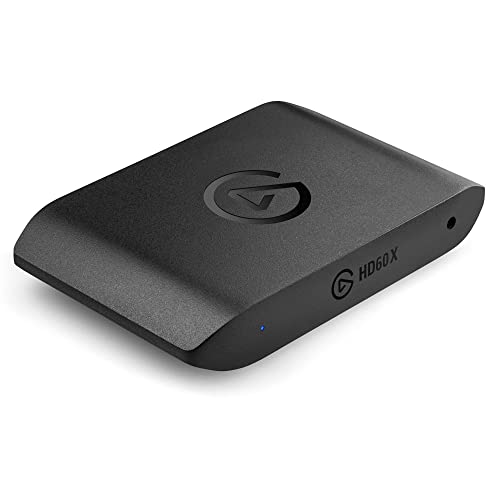
The Elgato HD60 X is the premium pick and the most capable device in this list. It captures at up to 2160p30 or 1080p60, adds HDR10 capture at 1080p60 on Windows, and passes through up to 4K60 HDR10, 1440p120, or 1080p240 with variable refresh rate support. For PS5 and Xbox Series X players with VRR displays, that passthrough keeps gameplay smooth in a way the cheaper cards cannot match.
The HD60 X connects over USB-C, needs no drivers on Windows or Mac, and works in OBS, Streamlabs, and Elgato’s own 4K Capture Utility. It is the card to choose if you record footage for edited videos as well as live streams, because the 4K30 and 1440p60 capture modes give you more to work with in post-production. It costs more than the rest of this roundup, and buyers should genuinely need HDR, VRR, or above-1080p capture; pure 1080p streamers will not use the extra headroom.
Specs:
- Model: 10GBE9901
- Capture resolutions: 2160p30, 1440p60, 1080p60, 1080p30, 720p60
- HDR: HDR10 capture at 1080p60 (Windows)
- Passthrough: up to 2160p60, 1440p120, 1080p240, with VRR and HDR10
- Interface: USB-C (USB 3.0)
- Dimensions: 112 x 72 x 18 mm
- Weight: 91 g
- Compatibility: Windows 10 (64-bit), macOS 10.13 or later, PS5, Xbox Series X and S, Nintendo Switch
How to Choose a Budget Capture Card
Start with passthrough, because it decides what you see while you play. If your console feeds a 1080p display, any card here works; if it feeds a 4K TV, you need 4K passthrough so the picture is not downscaled, and high-refresh PC players should look for 1440p144 or 1080p240 passthrough like the StreamLine MINI+ offers. Capture resolution matters less for live streaming, since most streams run at 1080p60 anyway, but it matters for recorded footage you plan to edit.
Next, check the connection and your PC. All five cards are external USB devices, so no PCIe slot is needed, but a USB 3.0 port is required for the higher-bandwidth models, and the Live Gamer Mini’s hardware encoder helps weaker machines. Console players should also remember that the PS5 and PS4 require HDCP to be disabled in system settings before any capture card can see the signal. Finally, match HDR and VRR support to your display: those features only survive the chain if the card explicitly passes them through, which is where the HD60 X separates itself.
Who Should Skip a Budget Capture Card
Skip this category if you only play on a gaming PC, because GPU encoding with OBS captures your gameplay without extra hardware. Also skip budget cards if you need to record at 4K60: every pick here tops out at 1080p60 capture except the HD60 X at 4K30, and that use case calls for a premium 4K60 card instead. Creators who stream from a camera rather than a console should look at capture devices built for cameras, and console streaming apps are protected by HDCP, which blocks capture regardless of the card.
FAQ
Do budget capture cards add input lag?
Not on the display you play on. These cards use passthrough, which sends the console signal straight to your TV or monitor, while the USB feed to the PC carries a small delay that only affects the preview window in your streaming software. Play on the passthrough display, not the OBS preview, and lag is a non-issue.
Can I stream PS5 gameplay with a budget capture card?
Yes. Every card in this roundup works with the PS5, as long as you turn off HDCP in the PS5 system settings first. For a 4K TV, pick a card with 4K passthrough such as the XR1 lite, Signal HD60, StreamLine MINI+, or HD60 X so the console is not limited to 1080p on your screen.
Do I need a powerful PC to use a capture card?
No. The capture card handles the video signal, and your PC only runs the streaming software and encoder. A card with a built-in hardware encoder, like the Live Gamer Mini, lowers the load further. A modest modern laptop is enough for 1080p60 streaming.
What is the difference between capture resolution and passthrough?
Capture resolution is what your PC records or streams, and passthrough is what reaches the display you play on. A card can capture at 1080p60 while passing through 4K60 at the same time, which is the combination most console streamers want.
Final Verdict
Budget capture cards have settled into a clear pattern: 1080p60 capture is standard, and your money buys better passthrough. The AVerMedia Live Gamer Mini is the default recommendation for 1080p setups and weaker PCs, the EVGA XR1 lite adds 4K passthrough at the budget tier, and the NZXT Signal HD60 covers the same ground with USB-C and CAM software support. High-refresh players should pick the StreamLine MINI+ for its 1440p144 and 1080p240 HDR passthrough, while the Elgato HD60 X is the premium upgrade for HDR10 capture, VRR passthrough, and recording above 1080p. Match the card to your display first, and any of the five will stream cleanly.
Related guides
More from Amazon
Programs that pair well with the guide above. Offers and eligibility are set by Amazon and may change.
A free business account with business pricing and bulk-buying tools for work, shop or home office.
Create a business accountFree shipping on eligible items, Prime Video and more. Eligible new members can start with a free trial.
Start a Prime free trialAudiobooks and podcasts to listen to on the go. Eligible new members can start with a free trial.
Try Audible freeAd-free music streaming. Eligible new subscribers can start with a free trial.
Try Music Unlimited freeAs an Amazon Associate we earn from qualifying purchases.


