- Top Pick: AMD Ryzen 7 9800X3D
- Runner-up: AMD Ryzen 5 9600X
- Also consider: Intel Core Ultra 7 265K
Black Friday turns CPU shopping into a timing decision. The spec sheets do not change during the event, but the offers do, and the right question shifts from which gaming CPU is fastest to whether this is the week to buy it, or whether your budget works harder if you wait for a restock or the next launch window.
This guide answers that question by scenario instead of by benchmark chart. A high-refresh esports player, a first-time AM5 builder, and a streamer who edits video on the same machine are solving three different problems, so each pick below is framed around who it suits, with an explicit buy-or-wait call.
One caution applies to every pick: event offers change quickly, sometimes within a single day, and availability moves with them. Nothing here assumes a specific promotion will be live when you read this. Check the current price and the current offers on the Amazon product page for any chip you shortlist, and judge it against the decision rules in this guide.
As an Amazon Associate, we earn from qualifying purchases.
Our Top Picks
Top 3 picks at a glance
Quick Answer
Buy this Black Friday if you are building on AM5, upgrading an older AM4 or Intel system, and the chip that fits your scenario shows a genuine event offer on its product page. Wait if your graphics card is the real bottleneck, if you bought a CPU within the last two generations, or if your platform forces a full motherboard and memory swap you have not budgeted for.
Buy Now or Wait: How to Decide
Start with the platform you already own, because it decides what a CPU purchase really costs. If you are on AM5, a new chip is a drop-in upgrade and the buy-or-wait call is mostly about the offer itself. If you are on AM4 or Intel LGA1700, both platforms are at the end of their upgrade paths: a final in-socket chip can extend a system, but money spent there is not saved toward a platform with years of upgrades ahead of it. LGA1851 sits at the opposite end: current, early in its life, a bet on a young platform.
Next, be honest about your bottleneck. At 1440p and 4K, most games are limited by the graphics card, not the processor. If your GPU is mid-range, a flagship CPU will spend much of its time waiting, and the gain will be far smaller than high-end-card charts suggest. In that situation the smart Black Friday move is often to wait on the CPU entirely and put the budget toward the graphics card first.
An older generation wins when the gap in gaming performance is small and the gap in offers is large. Previous-generation chips on a living socket keep most of their gaming speed, and money left over for a GPU, monitor, or memory upgrade usually improves a build more than new silicon. Waiting wins in the opposite case: when a successor launch is close, when your current system already plays what you want, or when stock sits only with unfamiliar marketplace sellers. A short wait costs little; a wrong-platform purchase costs a motherboard.
How to Choose
Treat the CPU, motherboard, and memory as one purchase. AM5 chips need a DDR5 board, so moving from AM4 means new memory as well. LGA1700 boards were sold in DDR4 and DDR5 versions, which can soften a final upgrade on that socket, while LGA1851 is DDR5 only. Before ordering, confirm the chip appears on your board maker’s CPU support list, and plan a BIOS update if you pair a newer processor with an earlier board.
For pure gaming, six to eight fast cores cover current titles comfortably, and per-core speed plus cache matter more than raw core count. AMD’s 3D V-Cache models exist because a large L3 cache lifts frame rates and smooths frame pacing in CPU-heavy games. Extra cores earn their place when the machine does more than play: streaming to an audience, recording, editing footage, compiling code, or running a stack of background tools while you play.
Finally, plan cooling before the box arrives. None of the five processors in this guide ships with a cooler in the box. Many AM4 air coolers carry over to AM5 with the same or an updated bracket, while Intel socket changes more often need new mounting hardware. Check your cooler’s stated TDP headroom and socket support against the chip you choose, especially for the higher TDP classes below.
AMD Ryzen 7 9800X3D
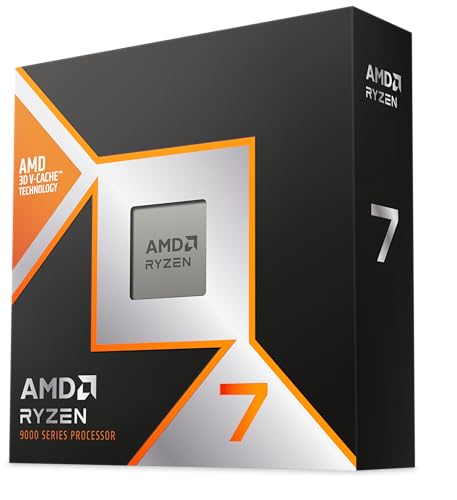
The esports and high-refresh pick. Eight Zen 5 cores with 3D V-Cache make this the processor competitive players reach for when the goal is feeding a high-refresh monitor at 1080p or 1440p, and it holds up just as well in CPU-heavy simulation and strategy titles. It suits players who already own a strong graphics card and can actually see the frames it adds.
Buy-or-wait: this is the chip to buy during the event if its product page shows a genuine offer and the seller is one you trust, because demand keeps it scarce in quiet weeks too. Wait only if your monitor or GPU cannot use the headroom, in which case the balanced pick below serves you better.
| Spec | Detail |
|---|---|
| Cores / Threads | 8 / 16 |
| Socket | AM5 |
| L3 Cache | 96MB |
| TDP Class | 120W |
AMD Ryzen 5 9600X

The balanced pick for a new AM5 build. Six Zen 5 cores at an efficient 65W TDP class cover current games comfortably, run cool in smaller cases, and leave budget room for the graphics card that decides most of your frame rate at 1440p. It suits first-time builders and anyone replacing an older platform who wants modern features without paying for cores games rarely touch.
Buy-or-wait: buy it during the event as the foundation of a new build, since platform parts like boards and DDR5 memory are worth timing together. Wait if you also stream or edit heavily, because the hybrid and no-compromises picks below fit that workload better.
| Spec | Detail |
|---|---|
| Cores / Threads | 6 / 12 |
| Socket | AM5 |
| L3 Cache | 32MB |
| TDP Class | 65W |
Intel Core Ultra 7 265K

The hybrid pick for gaming plus everything else. Twenty cores in a performance and efficiency split give the 265K strong multitasking manners: game on the performance cores while streaming software, voice chat, browser tabs, and recording tools live on the efficiency cores. It suits creators who play, and Intel loyalists building on the current LGA1851 socket with DDR5.
Buy-or-wait: buy during the event if your workload genuinely splits between games and production, and check board offers at the same time, because the young platform’s boards move independently. Wait if the machine is purely for gaming, where the cache-heavy AMD picks in this guide are the more focused spend.
| Spec | Detail |
|---|---|
| Cores / Threads | 20 (8P + 12E) / 20 |
| Socket | LGA1851 |
| L3 Cache | 30MB |
| TDP Class | 125W |
AMD Ryzen 7 7800X3D

The value pick from the previous generation. The 7800X3D pairs eight cores with the same generous 96MB of L3 cache as its successor, and in most games it sits close enough to the 9800X3D that the difference is hard to feel outside a benchmark chart. It suits AM5 owners upgrading from a first-wave chip and new builders watching total platform cost.
Buy-or-wait: the buy case lives or dies on the gap between the two X3D product pages during the event. If this chip’s current offer undercuts its successor by a wide margin, buy it and put the difference toward your GPU. If the two sit close together, wait or step up to the newer chip instead.
| Spec | Detail |
|---|---|
| Cores / Threads | 8 / 16 |
| Socket | AM5 |
| L3 Cache | 96MB |
| TDP Class | 120W |
AMD Ryzen 9 9950X3D

The no-compromises pick. Sixteen cores and 128MB of L3 cache make the 9950X3D the rare processor that can headline a gaming rig and a workstation in the same case, chewing through renders, compiles, and heavy multitasking between matches. It suits players who produce video, stream at high quality, or run demanding background workloads and refuse to choose between the two machines.
Buy-or-wait: buy during the event only if your non-gaming work regularly uses the extra cores, because for games alone it matches the 9800X3D while costing the platform more in cooling and power delivery. Pure gamers should wait, or simply redirect the budget to the high-refresh pick and a better graphics card.
| Spec | Detail |
|---|---|
| Cores / Threads | 16 / 32 |
| Socket | AM5 |
| L3 Cache | 128MB |
| TDP Class | 170W |
Who Should Skip It
Skip this event if you bought a processor within the last two generations and your games already run the way you want. A swap buys benchmark movement, not a new experience.
Skip it if your graphics card is the bottleneck at the resolution you play. A CPU upgrade cannot fix a GPU limit, and the money belongs there first.
Skip it if the chip you want forces a platform change you have not budgeted for. The processor is only part of the bill when a new motherboard and DDR5 memory join the cart.
Skip any listing from a seller you do not recognize at a level that looks out of line with the rest of the market. Event weeks attract inflated marketplace listings, and a short wait beats a risky order.
FAQ
Should I buy on Black Friday or hold out for Cyber Monday?
Offers run across the whole event window and change daily, so there is no reliable single day to target. When the chip that fits your scenario shows an offer you are comfortable with on its Amazon product page, that is the moment; holding out for a specific Monday is a gamble, not a strategy.
I am still on AM4. Is a last upgrade worth it, or should I move to AM5?
A final AM4 chip can extend a working system, but the platform has no further gaming upgrades coming. If the budget stretches to a board and DDR5 memory, AM5 is the better long-term spend; if not, buy the in-socket upgrade knowingly, as a last step.
Will a faster CPU raise frame rates with a mid-range graphics card?
Only where the processor is the limit: competitive titles at 1080p, high-refresh play, and CPU-heavy simulation games. At 1440p and 4K with a mid-range card, the graphics card decides most frame rates, and a CPU swap changes little.
What if the CPU I want is out of stock during the event?
Do not panic-buy a different socket or an unfamiliar seller. The same processors return to stock after the event rush, and a wrong-platform purchase costs far more than a short wait for the right chip.
Final Verdict
Buy with a scenario, not with a headline. The 9800X3D is the high-refresh answer, the 9600X the balanced foundation for a new AM5 build, the 265K the hybrid worker, the 7800X3D the value play when its offer clearly undercuts its successor, and the 9950X3D the one-machine answer for gamers who also produce. If none of those descriptions sounds like you, or your graphics card is the real limit, the correct Black Friday CPU decision is to wait, and this guide has done its job.
Related guides
More from Amazon
Programs that pair well with the guide above. Offers and eligibility are set by Amazon and may change.
Send a Prime gift membership to someone who would use free shipping and Prime Video.
Gift Amazon PrimeGive audiobooks to someone who loves to listen. Plans and prices are set by Amazon.
Gift AudibleA free business account with business pricing and bulk-buying tools for work, shop or home office.
Create a business accountFree shipping on eligible items, Prime Video and more. Eligible new members can start with a free trial.
Start a Prime free trialAs an Amazon Associate we earn from qualifying purchases.


