- Top Pick: G.Skill Trident Z5 Neo RGB DDR5 32GB 6000MHz CL30
- Runner-up: Corsair Vengeance DDR5 32GB 6000MHz CL30
- Also consider: Kingston FURY Beast DDR5 32GB 6000MHz CL30
Black Friday is the easiest week of the year to buy the wrong memory. Listings rotate fast, similar-looking kits sit side by side, and DDR4, DDR5, and two DDR5 kits with different profiles can all carry nearly identical names. None are interchangeable. A kit that does not match your motherboard generation will not boot at all, and one with the wrong profile or stick count can run slower than the memory you already own.
This guide works compatibility-first: the generation decision your motherboard has already made, then capacity, speed, and clearance checks, and only then the five kits worth shortlisting. Offers change quickly over the Black Friday period, so treat every pick as a specification to match, and check the current price and offers on the Amazon product page before you buy.
As an Amazon Associate, we earn from qualifying purchases.
Our Top Picks
 G.SKILL Trident Z5 Neo RGB Series DDR5 RAM32GB (2x16GB)1.1 x 9.7 x 6.5 inches0 poundsCheck on Amazon
Top 3 picks at a glance
Quick Answer
Start with your motherboard, not the banner. AM5 and current Intel boards need DDR5; older AM4 and earlier Intel boards need DDR4, and the two never mix. For DDR5 gaming, 32GB in two sticks at 6000MHz CL30 is the sweet spot: EXPO kits for AMD, XMP kits for Intel. The five kits below cover both platforms, tight clearances, and a 64GB option.
First Decision: DDR4 or DDR5
Your motherboard and CPU decide this before you spend anything. Memory generations are physically different: DDR4 and DDR5 modules use different notch positions, pin layouts, and voltages, so a DDR5 stick cannot be fitted into a DDR4 slot, and the reverse is equally impossible. No adapter or BIOS setting changes it.
The split is simple. AMD AM5 processors (Ryzen 7000 and 9000 series) and Intel 12th-generation Core and newer on 600- and 700-series boards are DDR5 platforms, although some Intel boards from those generations came in DDR4 versions, so check your exact model. AMD AM4 and older Intel platforms are DDR4 only.
Black Friday is exactly when this goes wrong. DDR4 kits are still sold in volume for upgrades, their listings look current, and product names differ from DDR5 kits by a single character in a long string. Under time pressure, buyers grab the familiar brand and skip the generation line. Before anything else, confirm your board’s memory type on its specification page. DDR4 owners should shop DDR4 kits such as 3600MHz CL18 two-stick sets and ignore every DDR5 pick below; DDR5 owners should read on.
How to Choose
Capacity. For gaming, 32GB is the sensible default: it covers modern titles, a browser, voice chat, and background apps without swapping to storage. 16GB still runs esports titles and older games, but leaves little headroom. 64GB is for gamers who also stream, edit video, run virtual machines, or keep creation tools open at once; it adds little to frame rates by itself.
Speed and latency. On AMD AM5, DDR5-6000 with CL30 is the recognised sweet spot: it pairs well with the platform’s memory controller and is widely validated on QVL lists. Intel DDR5 platforms generally tolerate higher speeds, and kits at 6400MHz CL32 and beyond are realistic there. Read latency with speed: a 6000MHz CL30 kit and a 6000MHz CL36 kit are not equals.
EXPO vs XMP. These stored overclocking profiles let a kit run at its rated speed instead of a slower default. AMD boards look for EXPO; Intel boards look for XMP. Many kits carry both, the safest buy if you may switch platforms later. A kit with only the other platform’s profile usually still works, but may need manual timings, a poor trade in a busy returns season.
Two sticks, not four. Buy capacity as a two-stick kit wherever possible. Four DDR5 sticks at high speed load the memory controller harder and commonly cause failed boots and silent downclocking, especially on AM5. A 2x32GB kit beats a 4x16GB kit for stability at the same capacity.
Clearance and RGB. Tall RGB heatspreaders can collide with large tower air coolers overhanging the slots. Measure the space above your DIMM slots or choose a low-profile kit. RGB adds height and lighting control; it adds no performance, so treat it as styling, not specification.
Compatibility Checklist Before You Buy
Check the exact kit in your basket against this list:
- Generation: the kit’s DDR generation matches your motherboard’s slots.
- Platform: your CPU and chipset appear in the kit’s stated platform support.
- Profile: the kit carries EXPO for an AMD board or XMP for an Intel board, ideally both.
- QVL: the kit’s model number appears on your motherboard’s memory support list.
- Configuration: two sticks, in the board’s recommended slots (usually the second and fourth).
- Clearance: module height clears your CPU cooler and any top-mounted fans or radiator.
- Capacity plan: the kit meets your needs now, because adding an unmatched kit later is a stability gamble.
G.Skill Trident Z5 Neo RGB DDR5 32GB 6000MHz CL30
This is the default recommendation for AM5 gaming builds. G.Skill’s AMD-focused Trident Z5 Neo line pairs the platform’s sweet-spot speed, DDR5-6000, with tight CL30-38-38-96 timings and a proper AMD EXPO profile, so full speed on a Ryzen 7000 or 9000 system is a single BIOS setting. It suits B650, X670, B850, and X870 builds where the owner wants set-and-forget stability. The trade-offs are the RGB light bar and tall heatspreader: check cooler clearance. Intel buyers should look at its sibling below.
| Spec | Detail |
|---|---|
| Capacity | 32GB (2x16GB) |
| Speed | DDR5-6000 |
| Latency | CL30-38-38-96 |
| Profile | AMD EXPO |
| Sticks | 2 |
G.Skill Trident Z5 RGB DDR5 32GB 6400MHz CL32
The Intel counterpart. This Trident Z5 RGB kit is built around an Intel XMP 3.0 profile at DDR5-6400 CL32-39-39-102, a speed AM5 owners should not chase but that Intel 12th- through 14th-generation and Core Ultra systems on Z-series boards can typically run with two sticks. It fits Intel gaming builds where the QVL lists the model and the owner wants the frequency headroom Intel’s controllers allow. The 1.40V profile is an overclock, so a board with solid memory support matters more than headline speed.
| Spec | Detail |
|---|---|
| Capacity | 32GB (2x16GB) |
| Speed | DDR5-6400 |
| Latency | CL32-39-39-102 |
| Profile | Intel XMP 3.0 |
| Sticks | 2 |
Corsair Vengeance DDR5 32GB 6000MHz CL30
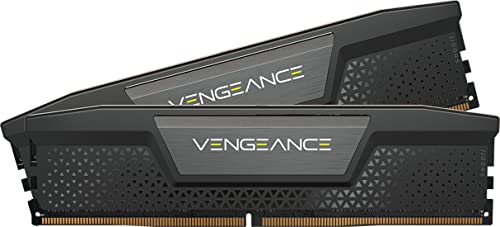
The low-profile answer for builds with big air coolers. Corsair’s non-RGB Vengeance DDR5 modules use a compact heatspreader that clears tower coolers overhanging the memory slots, a common problem with tall RGB kits. This 6000MHz CL30-36-36-76 kit carries an Intel XMP profile and matches the headline kits on speed and latency, so choosing it for clearance costs nothing in specification. It suits Intel builders running large dual-tower coolers, and anyone who prefers no lighting software. AMD owners should check the QVL carefully, since this variant is profiled for Intel first.
| Spec | Detail |
|---|---|
| Capacity | 32GB (2x16GB) |
| Speed | DDR5-6000 |
| Latency | CL30-36-36-76 |
| Profile | Intel XMP 3.0 |
| Sticks | 2 |
Kingston FURY Beast DDR5 32GB 6000MHz CL30

The value pick that does not cut the important corners. Kingston’s FURY Beast kit delivers the same headline specification as the premium options, 32GB of DDR5-6000 at CL30, with an AMD EXPO profile and a low-profile heatspreader that avoids most cooler conflicts. Kingston validates its kits broadly across motherboard brands, which helps owners of less common boards. It fits AM5 gamers who want the sweet-spot configuration without paying for lighting. Match the full model number, KF560C30BBEK2-32, against your board’s support list, because FURY Beast kits come in many speeds and latencies.
| Spec | Detail |
|---|---|
| Capacity | 32GB (2x16GB) |
| Speed | DDR5-6000 |
| Latency | CL30 |
| Profile | AMD EXPO |
| Sticks | 2 |
Corsair Vengeance DDR5 64GB 6000MHz CL30

The high-capacity pick, done the stable way. Instead of four 16GB sticks, this kit reaches 64GB with two 32GB modules, keeping the two-stick configuration DDR5 controllers handle most reliably at speed. It holds DDR5-6000 CL30-36-36-76 timings and carries both AMD EXPO and Intel XMP profiles, so it serves either platform. The audience is specific: gamers who stream and edit, run heavily modded titles, or keep creation software resident while playing. Pure gaming systems rarely use this much memory, so buy it for a workload you actually have.
| Spec | Detail |
|---|---|
| Capacity | 64GB (2x32GB) |
| Speed | DDR5-6000 |
| Latency | CL30-36-36-76 |
| Profile | AMD EXPO and Intel XMP |
| Sticks | 2 |
Mistakes That Waste a Black Friday RAM Budget
Mixing kits. Two separately bought kits with the same name are not a matched set. Chips and timings vary between production runs, and mixing them causes instability that appears days later.
Four sticks at full speed. Filling every slot looks generous, but four DDR5 sticks often will not hold their rated profile, particularly on AM5. Buy the capacity you need in two sticks.
Reading speed, ignoring latency. A high MHz number with loose timings can perform like a slower, tighter kit. Compare speed and CL together.
Buying for the wrong generation. DDR4 and DDR5 are physically incompatible, and the kit is unusable, not merely slow.
Skipping the QVL. A kit absent from your board’s support list may still work, but the list is the only pre-purchase evidence you get. Checking beats a returns process.
Who Should Skip It
Skip the RAM hunt if your current kit already matches your platform’s sweet spot; moving between similar 32GB 6000MHz CL30 kits changes nothing you can feel. Skip it if a platform change is coming soon, because DDR5 bought now only carries forward to a DDR5 board, and DDR4 bought now carries nowhere. Skip it if your bottleneck is the graphics card or CPU; memory does not fix a GPU-bound frame rate. And skip any kit you cannot match to your board’s support list.
FAQ
Can I use a DDR5 kit in my DDR4 motherboard if I press carefully?
No. The slots are keyed differently and the electrical standards differ. The module will not seat, and forcing it risks damaging both stick and board. Buy the generation your motherboard specifies.
Will an EXPO kit work on an Intel board, or an XMP kit on AMD?
Often, yes, but without the same one-click guarantee. The board may read the other profile, fall back to default speeds, or need manual timings. The kit carrying your platform’s own profile is the lower-risk choice.
Is 16GB still enough for gaming?
For esports titles and older games, generally yes. For current large releases played alongside a browser, chat, and recording tools, 32GB is safer, since upgrading later means replacing the kit.
Should I buy two kits to fill all four slots later?
No. If you may need more capacity, buy the larger two-stick kit now. Adding a second kit later, even with the same name, mixes production runs and frequently forces lower speeds.
Final Verdict
Buy the generation first and the brand second. AM5 owners should start with the G.Skill Trident Z5 Neo RGB at 6000MHz CL30; Intel owners with the Trident Z5 RGB 6400MHz kit, or the low-profile Corsair Vengeance if cooler clearance is tight. Anyone watching the budget should take the Kingston FURY Beast’s identical headline specification seriously, and step up to the 64GB Corsair kit only if a workload already uses the memory. Confirm the model number against your motherboard’s support list, and check the current price and offers on the Amazon product page before you commit.
Related guides
More from Amazon
Programs that pair well with the guide above. Offers and eligibility are set by Amazon and may change.
Send a Prime gift membership to someone who would use free shipping and Prime Video.
Gift Amazon PrimeGive audiobooks to someone who loves to listen. Plans and prices are set by Amazon.
Gift AudibleA free business account with business pricing and bulk-buying tools for work, shop or home office.
Create a business accountFree shipping on eligible items, Prime Video and more. Eligible new members can start with a free trial.
Start a Prime free trialAs an Amazon Associate we earn from qualifying purchases.


