- Top Pick: Samsung Odyssey G9 (G95C) 49-Inch
- Runner-up: Alienware AW3423DWF 34-Inch QD-OLED
- Also consider: ASUS TUF Gaming VG34VQL1B 34-Inch
A curved gaming monitor wraps the edges of the image toward your peripheral vision, which makes racing games, flight sims and open-world titles feel wider and more natural than the same panel left flat. The five monitors below cover the full spread of the category: a 49-inch super ultrawide flagship, two 34-inch ultrawides at premium and mid-range tiers, a second 34-inch option for tighter budgets, and a compact 27-inch QHD screen for smaller desks. Every pick lists its published curve radius, panel type, resolution and refresh rate, so you can match the screen to your GPU and your seating distance instead of buying on screen size alone.
As an Amazon Associate, we earn from qualifying purchases.
Top 3 picks at a glance
Table of Contents
- Quick Answer
- Samsung Odyssey G9 (G95C) 49-Inch
- Alienware AW3423DWF 34-Inch QD-OLED
- ASUS TUF Gaming VG34VQL1B 34-Inch
- AOC CU34G2X 34-Inch
- Samsung Odyssey G55C 27-Inch
- How to Choose
- Who Should Skip
- FAQ
- Final Verdict
- Product and ASIN Reference
Quick Answer
For most players, a 34-inch 3440 x 1440 ultrawide with a 1500R or 1800R curve is the sweet spot: the Alienware AW3423DWF leads on picture quality with its QD-OLED panel, while the ASUS TUF VG34VQL1B and AOC CU34G2X cover mid-range and budget tiers. The 49-inch Samsung Odyssey G9 is the maximum-immersion flagship, and the 27-inch Odyssey G55C is the compact budget pick.
Samsung Odyssey G9 (G95C) 49-Inch

The Odyssey G9 is the largest screen in this roundup and the one that defines the premium tier. Its 49-inch VA panel runs at 5120 x 1440, a 32:9 aspect ratio that matches two 27-inch QHD monitors side by side with no bezel in the middle. The aggressive 1000R curve follows the shape of the human field of view more closely than flatter radii, which matters at this width because the far edges would otherwise sit noticeably farther from your eyes than the center.
Samsung rates the panel at 240Hz with a 1ms GtG response time and DisplayHDR 1000 certification, backed by AMD FreeSync Premium Pro. Connectivity includes HDMI 2.1 and DisplayPort inputs plus a USB hub, and the stand offers height adjustment. This is the pick for sim racing rigs and players who want a single screen to replace a dual-monitor setup, provided the desk is deep enough to keep the whole panel in comfortable view.
Specs
- Screen size: 49 inches
- Resolution: 5120 x 1440 (DQHD), 32:9
- Panel type: VA
- Curvature: 1000R
- Refresh rate: 240Hz
- Response time: 1ms GtG
- HDR: DisplayHDR 1000
- Adaptive sync: AMD FreeSync Premium Pro
- Ports: HDMI 2.1, DisplayPort, USB hub
- Model: LS49CG950ENXZA
Alienware AW3423DWF 34-Inch QD-OLED

The AW3423DWF is the picture-quality leader here. Its 34-inch Quantum Dot OLED panel delivers per-pixel lighting, so dark scenes hold true blacks that VA and IPS panels cannot match, and Dell certifies it to VESA DisplayHDR True Black 400 with 99.3 percent DCI-P3 color coverage. The 1800R curve is gentler than the Samsung models in this list, which suits a mix of gaming and everyday desktop work.
Refresh rate is 165Hz over DisplayPort and up to 100Hz over HDMI, with a 0.1ms GtG response time and AMD FreeSync Premium Pro support. Console players get a dedicated console mode, and the port selection covers DisplayPort 1.4, two HDMI ports and a USB hub. If HDR impact and contrast matter more to you than raw screen width, this is the curved monitor to build around.
Specs
- Screen size: 34 inches
- Resolution: 3440 x 1440 (UWQHD), 21:9
- Panel type: QD-OLED
- Curvature: 1800R
- Refresh rate: 165Hz (DisplayPort), 100Hz (HDMI)
- Response time: 0.1ms GtG
- HDR: VESA DisplayHDR True Black 400
- Color gamut: 99.3 percent DCI-P3
- Adaptive sync: AMD FreeSync Premium Pro
- Ports: DisplayPort 1.4, 2 x HDMI, USB hub
- Model: AW3423DWF
ASUS TUF Gaming VG34VQL1B 34-Inch

The VG34VQL1B is the mid-range ultrawide benchmark in this group. It uses a 34-inch VA panel at 3440 x 1440 with a 1500R curve, a middle ground that wraps more noticeably than 1800R without the desk-depth demands of the 49-inch class. ASUS rates it at 165Hz with a 1ms MPRT response time, DisplayHDR 400 certification and AMD FreeSync Premium.
ASUS adds its Extreme Low Motion Blur feature for players who prefer backlight strobing in fast shooters, and the stand adjusts for height as well as tilt and swivel. Ports cover two HDMI 2.0 inputs, two DisplayPort 1.4 inputs and a USB hub, so a PC, a console and a work laptop can all stay connected. For a single ultrawide that handles gaming and weekday work, this is the balanced choice.
Specs
- Screen size: 34 inches
- Resolution: 3440 x 1440 (UWQHD), 21:9
- Panel type: VA
- Curvature: 1500R
- Refresh rate: 165Hz
- Response time: 1ms MPRT
- HDR: DisplayHDR 400
- Adaptive sync: AMD FreeSync Premium
- Ports: 2 x HDMI 2.0, 2 x DisplayPort 1.4, USB hub
- Model: VG34VQL1B
AOC CU34G2X 34-Inch
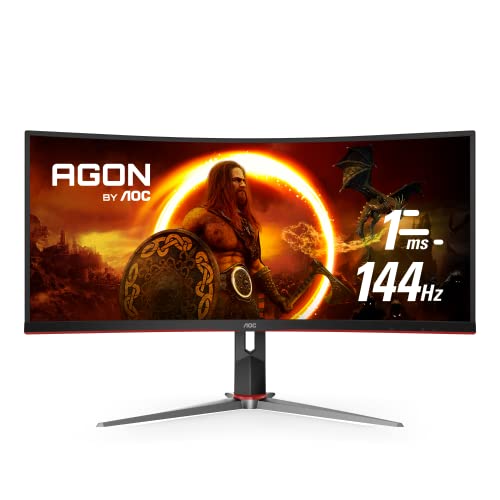
The CU34G2X brings the 34-inch ultrawide format down to the budget tier without giving up the core specs. It matches the ASUS on the fundamentals: a 3440 x 1440 VA panel, a 1500R curve and a height-adjustable stand. Refresh rate is 144Hz with a 1ms MPRT response time and Adaptive-Sync support, which works with both FreeSync and G-Sync compatible modes over DisplayPort.
AOC backs the panel with a three-year zero dead pixel guarantee, a meaningful detail at this tier. Connectivity includes two HDMI 2.0 ports, two DisplayPort 1.4 ports and a USB hub. Players stepping up from a 24-inch or 27-inch flat monitor get the full ultrawide field of view here for the least commitment, and the saved budget can go toward the GPU headroom that 3440 x 1440 gaming requires.
Specs
- Screen size: 34 inches
- Resolution: 3440 x 1440 (UWQHD), 21:9
- Panel type: VA
- Curvature: 1500R
- Refresh rate: 144Hz
- Response time: 1ms MPRT
- Adaptive sync: Adaptive-Sync (FreeSync and G-Sync compatible)
- Ports: 2 x HDMI 2.0, 2 x DisplayPort 1.4, USB hub
- Warranty note: 3-year zero dead pixel guarantee
- Model: CU34G2X
Samsung Odyssey G55C 27-Inch
Not every desk can take an ultrawide, and the Odyssey G55C is the curved option built for those setups. It is a 27-inch VA panel at 2560 x 1440 with the steepest curve in this roundup relative to its size: 1000R on a 16:9 screen pulls the corners in noticeably, which helps keep the full frame readable at close seating distances.
Samsung rates it at 165Hz with a 1ms MPRT response time, HDR10 support and AMD FreeSync. Eye Saver mode and flicker reduction are included for longer sessions. The trade-offs for the budget tier are a tilt-only stand and a single HDMI plus single DisplayPort input, so plan on a monitor arm if you need height adjustment. For a compact battlestation or a second screen that still feels immersive, it is the natural fit.
Specs
- Screen size: 27 inches
- Resolution: 2560 x 1440 (QHD), 16:9
- Panel type: VA
- Curvature: 1000R
- Refresh rate: 165Hz
- Response time: 1ms MPRT
- HDR: HDR10
- Adaptive sync: AMD FreeSync
- Ports: HDMI, DisplayPort
- Model: LS27CG552ENXZA
How to Choose
Start with the curve radius. The R number describes the radius of the circle the panel follows, so a lower number means a deeper curve. 1000R screens such as the two Samsung models wrap the most and suit single-player immersion at close range. 1500R is the balanced middle ground used by the ASUS and AOC ultrawides, and 1800R on the Alienware is subtle enough that text and spreadsheets still look natural across a workday.
Next, match resolution to your graphics card. A 3440 x 1440 ultrawide pushes roughly a third more pixels than 2560 x 1440, and the 49-inch G9 at 5120 x 1440 approaches 4K pixel counts. High refresh rates only help if your GPU can feed them, so a mid-range card pairs more honestly with the 27-inch G55C or the 144Hz AOC than with the 240Hz flagship.
Panel type decides image character. QD-OLED on the AW3423DWF gives the strongest contrast and fastest response, with the usual OLED care considerations for static desktop elements. VA panels, used by the other four picks, offer strong native contrast at lower tiers but slower dark transitions. Finally, check the stand and ports: height adjustment matters on deep ultrawides, and console players should confirm HDMI bandwidth, since the Alienware caps HDMI at 100Hz while the G9 carries full HDMI 2.1.
Who Should Skip
Skip curved monitors entirely if your work depends on judging straight lines across the whole screen, such as CAD drafting or print layout, where the bend can make edge geometry harder to eyeball. Competitive players who sit close and play at smaller sizes may also find a flat 24-inch or 25-inch esports panel easier to track at a glance.
Skip the ultrawide models if the games you play most do not support 21:9 or 32:9 output, since unsupported titles render with black bars and waste the extra width. Skip the 49-inch G9 if your desk is shallow; a super ultrawide viewed too closely forces constant head turning. And skip the OLED pick if your screen shows the same static interface all day, every day, and you do not want to manage pixel-care habits.
FAQ
Does a curved monitor help with eye comfort?
A curve keeps the edges of the screen closer to the same distance from your eyes as the center, which reduces the need to refocus across a wide panel. The benefit grows with screen size: it is subtle at 27 inches and much more noticeable on 34-inch and 49-inch ultrawides.
What curve radius is best for gaming?
For most gaming desks, 1500R on a 34-inch ultrawide is the balanced choice. 1000R feels more immersive for racing and simulation titles, especially on the 49-inch format, while 1800R is the safer pick if the same monitor doubles as your main work display.
Can a PS5 or Xbox use these curved monitors?
Yes, with limits. Consoles output 16:9, so ultrawide models show black side bars, and the refresh ceiling depends on the HDMI port: the Odyssey G9 supports 120Hz console output over HDMI 2.1, while the Alienware AW3423DWF caps at 100Hz over HDMI. The 27-inch G55C is a standard 16:9 screen, so it fills the frame but its HDMI input tops out below its 165Hz DisplayPort rate.
Is QD-OLED better than VA for a curved gaming monitor?
For contrast, HDR highlights and response time, yes: the AW3423DWF’s QD-OLED panel outperforms the VA models here. VA panels answer with higher sustained brightness, no burn-in management and lower tiers, which is why four of the five picks in this roundup use them.
Final Verdict
The Alienware AW3423DWF is the best curved gaming monitor for most players, pairing the strongest panel technology in this group with a sensible 34-inch ultrawide format. The Samsung Odyssey G9 is the pick when maximum immersion is the goal and the desk and GPU can support it. On a budget, the AOC CU34G2X delivers the ultrawide experience at the entry tier, the ASUS VG34VQL1B is the well-rounded mid-range option, and the 27-inch Odyssey G55C covers compact desks that still want a real curve.
Related guides
More from Amazon
Programs that pair well with the guide above. Offers and eligibility are set by Amazon and may change.
A free business account with business pricing and bulk-buying tools for work, shop or home office.
Create a business accountFree shipping on eligible items, Prime Video and more. Eligible new members can start with a free trial.
Start a Prime free trialAudiobooks and podcasts to listen to on the go. Eligible new members can start with a free trial.
Try Audible freeAd-free music streaming. Eligible new subscribers can start with a free trial.
Try Music Unlimited freeAs an Amazon Associate we earn from qualifying purchases.


