- Top Pick: Samsung Odyssey OLED G9 (G95SC)
- Runner-up: Samsung Odyssey Neo G9 (G95NA)
- Also consider: MSI MPG 491CQP QD-OLED
A 49-inch super ultrawide monitor replaces a dual-monitor setup with one seamless 32:9 panel. Every model here runs a 5120 x 1440 Dual QHD resolution, exactly two 27-inch 1440p screens side by side with no bezel gap in the middle. That makes this format a favorite for sim racing, flight sims and immersive RPGs.
The five picks below split into three panel camps. QD-OLED models deliver perfect blacks and near-instant response times. Mini LED and VA models answer with far higher HDR brightness and no burn-in worries. Refresh rates run from 144Hz to 240Hz, and every pick supports adaptive sync.
As an Amazon Associate, we earn from qualifying purchases.
Top 3 picks at a glance
Table of Contents
- Quick Answer
- Samsung Odyssey OLED G9 (G95SC)
- Samsung Odyssey Neo G9 (G95NA)
- MSI MPG 491CQP QD-OLED
- LG UltraGear 49GR85DC-B
- Samsung Odyssey G9 (G95T)
- How to Choose a 49-Inch Super Ultrawide
- Who Should Skip a Super Ultrawide
- FAQ
- Final Verdict
- Product and ASIN Reference
Quick Answer
For most buyers, the Samsung Odyssey OLED G9 (G95SC) is the best 49-inch super ultrawide monitor: a QD-OLED panel at 240Hz with a 0.03ms response time and perfect blacks. If HDR brightness matters more, the Odyssey Neo G9’s Mini LED backlight is the stronger pick. The MSI MPG 491CQP is the mid-range QD-OLED alternative, while the LG 49GR85DC-B and Odyssey G9 (G95T) cover the VA side at 240Hz.
Samsung Odyssey OLED G9 (G95SC)

The Odyssey OLED G9 is Samsung’s flagship super ultrawide and the premium tier of this roundup. Its QD-OLED panel pairs the 5120 x 1440 resolution with a 240Hz refresh rate and a 0.03ms gray-to-gray response time, while the 1800R curve wraps the full width into your peripheral vision. OLED’s per-pixel lighting means true blacks and no backlight blooming in dark scenes.
Samsung adds its smart platform with the Gaming Hub, so the monitor can stream games and apps without a PC attached. Connectivity covers HDMI 2.1, Micro HDMI 2.1 and DisplayPort 1.4, plus a USB hub. The trade-off is brightness: the panel is rated at 250 nits typical, which suits controlled lighting better than a sunlit room, and OLED owners should use the built-in panel care features to limit static-element wear.
Specs
- Panel: 49-inch QD-OLED, 1800R curve
- Resolution: 5120 x 1440 (32:9)
- Refresh rate: 240Hz
- Response time: 0.03ms (GtG)
- HDR: DisplayHDR True Black 400, HDR10+
- Color: 99 percent DCI-P3 (typical)
- Sync: AMD FreeSync Premium Pro, G-Sync Compatible
- Ports: HDMI 2.1, Micro HDMI 2.1, DisplayPort 1.4, USB hub
- Model: Ls49cg954snxza
Samsung Odyssey Neo G9 (G95NA)

The Odyssey Neo G9 takes the opposite approach to HDR. Instead of OLED, it uses a VA panel with a Quantum Mini LED backlight divided into 2,048 local dimming zones. Samsung rates it for Quantum HDR 2000 with a peak brightness of 2,000 nits, so highlights in HDR games hit far harder than any OLED in this class, and there is no burn-in risk from static HUD elements left on screen for hours.
The aggressive 1000R curve pulls the screen edges noticeably closer than an 1800R panel. It runs at 240Hz with a 1ms response time, supports both FreeSync Premium Pro and G-Sync, and includes an HDMI 2.1 port alongside DisplayPort 1.4, which also makes it friendly to current consoles at 120Hz. It sits in the premium tier, and its wide footprint demands a big desk.
Specs
- Panel: 49-inch VA with Quantum Mini LED backlight, 1000R curve
- Resolution: 5120 x 1440 (32:9)
- Refresh rate: 240Hz
- Response time: 1ms (GtG)
- HDR: Quantum HDR 2000, 2,048 local dimming zones
- Peak brightness: 2,000 nits
- Sync: AMD FreeSync Premium Pro, G-Sync Compatible
- Ports: HDMI 2.1, DisplayPort 1.4, USB hub
- Model: Ls49ag952nnxza
MSI MPG 491CQP QD-OLED

MSI’s MPG 491CQP is the mid-range route into a 49-inch QD-OLED. It runs the same 5120 x 1440 resolution on an 1800R curved panel, but at 144Hz rather than 240Hz, which keeps it a step below the Samsung OLED G9 in tier while still doubling the refresh rate of a standard office monitor. The 0.03ms response time and DisplayHDR True Black 400 certification match the class standard for QD-OLED.
Where the MSI stands out is connectivity. It offers two HDMI 2.1 ports, DisplayPort 1.4 and a USB-C input with 90W power delivery, so a gaming laptop can drive the display and charge from one cable. A built-in KVM switch and USB hub help it double as a work display. MSI backs the panel with OLED Care 2.0 features and a 3-year warranty that covers burn-in.
Specs
- Panel: 49-inch QD-OLED, 1800R curve
- Resolution: 5120 x 1440 (32:9)
- Refresh rate: 144Hz
- Response time: 0.03ms (GtG)
- HDR: DisplayHDR True Black 400
- Color: 98 percent DCI-P3
- Sync: Adaptive-Sync (FreeSync and G-Sync compatible)
- Ports: 2 x HDMI 2.1, DisplayPort 1.4, USB-C with 90W PD, USB hub with KVM
- Model: MPG 491CQP QD-OLED
LG UltraGear 49GR85DC-B

LG’s UltraGear 49GR85DC-B is the VA-based 240Hz option for buyers who want high refresh speed without OLED pricing concerns or brightness limits. The 1000R curved VA panel is VESA DisplayHDR 1000 certified, covers 95 percent of DCI-P3 per LG’s published specs, and reaches a 1ms gray-to-gray response time with motion blur reduction. FreeSync Premium Pro handles adaptive sync.
LG adds a few extras the Samsung models skip: a 4-pole headphone output with DTS Headphone:X support, a USB 3.0 hub, and Picture-by-Picture modes that let the screen act as two separate displays from two sources. It uses HDMI 2.1 and DisplayPort 1.4 inputs. As a VA panel it cannot match OLED black levels, and viewing angles narrow at the far edges, which the steep curve partly offsets. It lands in the mid-range to premium tier.
Specs
- Panel: 49-inch VA, 1000R curve
- Resolution: 5120 x 1440 (32:9)
- Refresh rate: 240Hz
- Response time: 1ms (GtG)
- HDR: VESA DisplayHDR 1000
- Color: 95 percent DCI-P3 (typical)
- Sync: AMD FreeSync Premium Pro
- Ports: HDMI 2.1, DisplayPort 1.4, USB 3.0 hub, 4-pole headphone out (DTS Headphone:X)
- Model: 49Gr85dc-B
Samsung Odyssey G9 (G95T)
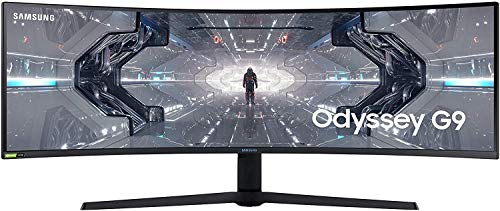
The original Odyssey G9 is now the budget tier entry into this format, and it still holds up on core specs. Its QLED VA panel delivers the same 5120 x 1440 resolution, a 1000R curve and a 240Hz refresh rate with a 1ms response time. Quantum dot color and HDR1000 support give it strong brightness and saturation for a VA screen, and it carries both G-Sync Compatible and FreeSync Premium Pro certification.
The compromises are in the connections. You get two DisplayPort 1.4 inputs and a single HDMI 2.0 port, so console gaming is capped at lower refresh rates than the HDMI 2.1 models above, and there is no USB-C video input. For a pure PC gaming desk, though, DisplayPort 1.4 with DSC drives the full resolution and refresh rate without issue, making this a sensible value pick.
Specs
- Panel: 49-inch QLED VA, 1000R curve
- Resolution: 5120 x 1440 (32:9)
- Refresh rate: 240Hz
- Response time: 1ms (GtG)
- HDR: HDR1000, HDR10+
- Color: Quantum dot, 125 percent sRGB (typical)
- Sync: G-Sync Compatible, AMD FreeSync Premium Pro
- Ports: 2 x DisplayPort 1.4, HDMI 2.0, USB hub
- Model: Lc49g95tssnxza
How to Choose a 49-Inch Super Ultrawide
Start with the panel. QD-OLED (Samsung OLED G9, MSI 491CQP) gives perfect blacks, the fastest response times and the best dark-scene detail, but peak brightness is modest and static content needs panel-care habits. Mini LED and VA panels (Neo G9, LG 49GR85DC-B, Odyssey G9) are brighter, shrug off static HUDs and suit bright rooms, at the cost of some blooming and slower dark transitions.
Next, match the refresh rate to your GPU. Driving 5120 x 1440 is close to 4K in pixel count, so holding 240Hz takes a high-end graphics card in most titles; a 144Hz model like the MSI is the more realistic target for mid-range GPUs. Check the curve as well: 1000R panels wrap tighter and feel more immersive for racing and flight sims, while 1800R panels are gentler for mixed work and gaming.
Finally, confirm the ports. DisplayPort 1.4 with DSC runs full resolution at full refresh on PC. HDMI 2.1 matters if a console shares the screen, and USB-C with power delivery plus a KVM is worth having if a laptop joins the setup. Measure your desk first: these monitors are roughly 47 inches wide with deep stands.
Who Should Skip a Super Ultrawide
Skip this format if you mostly play competitive shooters. Many esports titles cap their field of view or render a 16:9 image with black bars on a 32:9 screen, and a smaller 240Hz or 360Hz 1440p monitor is the better tool there. Also skip it if your desk is shallow, since a 49-inch panel plus its stand can crowd out speakers and peripherals.
Console-only players should think twice as well: current consoles output 16:9, so most of the screen goes unused. And if your GPU already struggles at 1440p, the near-4K pixel count of Dual QHD will force lower settings or heavy upscaling. A 34-inch 21:9 ultrawide is the cheaper middle ground.
FAQ
Is 5120 x 1440 the same as two 1440p monitors?
Yes, in pixel terms. A 5120 x 1440 panel has exactly twice the horizontal pixels of a 2560 x 1440 screen, so it matches two 27-inch 1440p monitors side by side, but with no bezel in the middle and a single cable and stand. Most models also offer a Picture-by-Picture mode that splits the screen into two virtual 16:9 displays.
What GPU do I need for a 49-inch super ultrawide?
Plan on a high-end card. The resolution is about 7.4 million pixels, close to 4K, so a current upper-tier GPU is the realistic minimum for high settings at 144Hz, and 240Hz in demanding games takes flagship hardware or upscaling. Sim racing and older titles are far less demanding and run well on mid-range cards.
Do all games support 32:9?
No. Most modern PC games support 21:9 and 32:9, but some competitive and older titles lock the aspect ratio to 16:9 and show black bars at the sides. A few games stretch the image instead. Checking your main titles before buying avoids surprises, and every monitor here still displays a clean 16:9 or 21:9 image in the center when needed.
OLED or Mini LED: which is better for a super ultrawide?
It depends on the room and the games. OLED wins on contrast, black levels and response time, which suits dark, cinematic games in a dim room. Mini LED wins on HDR brightness and has no burn-in risk, which suits bright rooms and games with static HUD elements. Neither is universally better; the Neo G9 and OLED G9 exist at the same tier for exactly this reason.
Final Verdict
The Samsung Odyssey OLED G9 (G95SC) is the best overall 49-inch super ultrawide: QD-OLED contrast, 240Hz speed and a full smart feature set. The Odyssey Neo G9 is the pick for HDR impact and bright rooms, and the MSI MPG 491CQP is the smart mid-range QD-OLED buy with the best connectivity. On the VA side, the LG UltraGear 49GR85DC-B adds useful extras like DTS headphone output, while the original Odyssey G9 (G95T) remains the budget way into a 240Hz 1000R setup.
Related guides
More from Amazon
Programs that pair well with the guide above. Offers and eligibility are set by Amazon and may change.
A free business account with business pricing and bulk-buying tools for work, shop or home office.
Create a business accountFree shipping on eligible items, Prime Video and more. Eligible new members can start with a free trial.
Start a Prime free trialAudiobooks and podcasts to listen to on the go. Eligible new members can start with a free trial.
Try Audible freeAd-free music streaming. Eligible new subscribers can start with a free trial.
Try Music Unlimited freeAs an Amazon Associate we earn from qualifying purchases.


