- Top Pick: HUANUO Single Monitor Arm (HNSSK1)
- Runner-up: VIVO Pneumatic Dual Monitor Mount (STAND-V002O)
- Also consider: VIVO Dual Monitor Desk Mount (STAND-V002)
A monitor arm is one of the simplest upgrades you can make to a gaming desk. It lifts the screen off its factory stand, frees the desk space underneath, and lets you set the panel at true eye level. For most gaming setups, the Ergotron LX is the arm to beat: it holds a single screen up to 34 inches and 25 pounds, moves with a light push, and carries a 10-year warranty. Tighter budgets get the same basic freedom from the HUANUO gas-spring arm, while dual-screen and ultrawide setups are better served by the VIVO pneumatic dual mount and the heavy-duty Ergotron HX.
As an Amazon Associate, we earn from qualifying purchases.
Top 3 picks at a glance
Quick Answer
For a single gaming monitor, buy the Ergotron LX if your screen weighs between 7 and 25 pounds, or the HUANUO HNSSK1 if you want gas-spring adjustment on a budget. For two screens, the VIVO STAND-V002O adds pneumatic arms, while the VIVO STAND-V002 is the low-cost pole mount. For a heavy ultrawide up to 49 inches, step up to the Ergotron HX.
Table of Contents
- Quick Answer
- Ergotron LX Desk Monitor Arm
- HUANUO Single Monitor Arm (HNSSK1)
- VIVO Pneumatic Dual Monitor Mount (STAND-V002O)
- VIVO Dual Monitor Desk Mount (STAND-V002)
- Ergotron HX Premium Heavy Duty Monitor Arm
- How to Choose a Monitor Arm for a Gaming Setup
- Who Should Skip a Monitor Arm
- FAQ
- Final Verdict
- Product and ASIN Reference
Ergotron LX Desk Monitor Arm
The Ergotron LX is the reference point for single-monitor arms. Its Constant Force spring mechanism is rated by Ergotron for a 10,000-cycle motion test and backed by a 10-year warranty, the longest cover in this roundup. The published weight window is 7 to 25 pounds, covering most 24 to 34 inch gaming monitors once the factory stand is removed, with 13 inches of lift, up to 25 inches of extension, 75 degrees of tilt and full rotation.
One detail matters before ordering: the arm also has a minimum weight. A screen lighter than 7 pounds cannot hold the spring down and will drift upward. Weigh your monitor without its stand and, if it lands inside the window, the LX is the arm most buyers can stop researching after.
Specs:
- Model: 45-241-026; screens up to 34 inches
- Weight capacity: 7 to 25 lb
- VESA: 75 x 75 mm, 100 x 100 mm
- Lift: 13 inches; extension up to 25 inches; tilt 75 degrees; rotation 360 degrees
- Mounting: desk clamp (0.4 to 2.4 inch edges) or grommet base, both included
- Warranty: 10 years
HUANUO Single Monitor Arm (HNSSK1)

The HUANUO HNSSK1 is the budget way to get genuine gas-spring movement. Its spring counterbalances screens from 17 to 32 inches weighing 3.3 to 17.6 pounds, covering most 24 and 27 inch gaming monitors as long as you confirm the panel weight without the stand. It provides about 12.2 inches of height adjustment, and the head tilts, swivels and rotates for portrait use. Both a C-clamp and a grommet base are in the box, and the listing even bundles an HDMI cable.
The trade-offs are the expected ones at this tier: the 17.6 pound ceiling rules out heavier 32 inch panels and most ultrawides, and the finish is functional rather than premium. For a single mainstream gaming monitor, the HNSSK1 still delivers the core benefit of an arm, fingertip height adjustment and a clear desk, at the lowest tier in this guide.
Specs:
- Model: HNSSK1; screens 17 to 32 inches
- Weight capacity: 3.3 to 17.6 lb
- VESA: 75 x 75 mm, 100 x 100 mm
- Mechanism: gas spring, about 12.2 inches of height adjustment; tilt, swivel, 360 degree rotation
- Mounting: C-clamp or grommet base, both included
- Extras: HDMI cable included in the listing
VIVO Pneumatic Dual Monitor Mount (STAND-V002O)
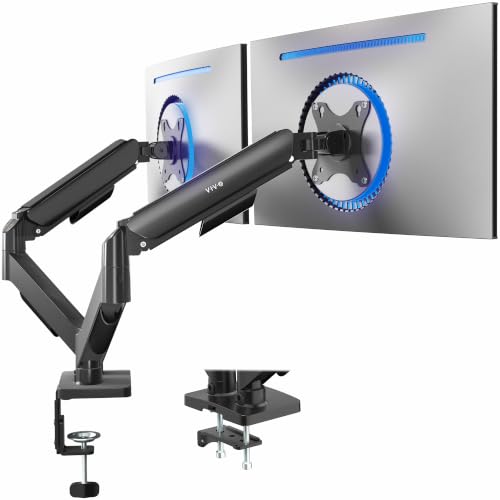
Running two screens is the standard gaming desk layout, one panel for the game and one for Discord or a stream dashboard, and the VIVO STAND-V002O is built for exactly that. Each of its two arms is pneumatic, so both screens float on counterbalanced springs and can be repositioned with one hand.
VIVO rates each arm for screens up to 32 inches and 4.4 to 19.8 pounds, with plus or minus 90 degrees of tilt, 180 degrees of swivel, 360 degrees of rotation and up to about 19.75 inches of extension. The clamp fits desk edges from 0.4 to 3.1 inches; a grommet option covers 0.4 to 1.9 inches. Two cautions from the listing: the backs of the arms extend past the rear edge of the desk at some angles, so a desk pushed against a wall limits how far screens pull back, and the 19.8 pound per-arm limit sits below heavy 32 inch panels, so weigh both monitors first.
Specs:
- Model: STAND-V002O; two screens up to 32 inches each
- Weight capacity: 4.4 to 19.8 lb per arm
- VESA: 75 x 75 mm, 100 x 100 mm
- Mechanism: pneumatic counterbalance; tilt plus or minus 90 degrees, swivel 180 degrees, rotation 360 degrees
- Extension: up to about 19.75 inches per arm
- Mounting: clamp (0.4 to 3.1 inch edges) or grommet (0.4 to 1.9 inches)
VIVO Dual Monitor Desk Mount (STAND-V002)

The VIVO STAND-V002 takes the opposite approach: a solid center pole, two articulating steel arms, and a published rating of 22 pounds per screen, the highest per-screen figure among the dual mounts here. It fits two screens from 13 to 30 inches, and each arm tilts plus or minus 90 degrees, swivels 180 degrees and rotates 360 degrees, with height set by sliding the arms along the pole.
That pole design is the key difference. Height changes are a set-and-forget job with a hex key rather than a fingertip push, which suits a desk that stays in one configuration. In exchange you get a sturdy, simple structure backed by a 3-year manufacturer warranty. The heavy-duty C-clamp mounts to desks up to 3.25 inches thick, suiting chunkier tops that defeat smaller clamps.
Specs:
- Model: STAND-V002; two screens, 13 to 30 inches each
- Weight capacity: up to 22 lb per screen
- VESA: 75 x 75 mm, 100 x 100 mm
- Motion: tilt plus or minus 90 degrees, swivel 180 degrees, rotation 360 degrees; height along center pole
- Mounting: heavy-duty C-clamp (desks up to 3.25 inches thick) or optional grommet
- Construction: steel and aluminum; 3-year manufacturer warranty
Ergotron HX Premium Heavy Duty Monitor Arm
Ultrawide gaming monitors break ordinary arms. A 49 inch super-ultrawide is heavy and deep, and its weight sits far from the mount, which is why screens in this class sag on arms rated by diagonal size alone. The Ergotron HX is the answer here: a heavy-duty single arm rated for screens up to 49 inches weighing 20 to 42 pounds, in this case the matte black version, model 45-475-224. Its VESA support covers 75 x 75, 100 x 100, 200 x 100 and 200 x 200 millimeter patterns, with 11.5 inches of lift, up to 23.6 inches of extension, 75 degrees of tilt and a 10-year warranty.
Read the fine print if you run a strongly curved panel. Ergotron states that the Samsung 49 inch Odyssey G9 needs the separate HX Heavy Duty Tilt Pivot accessory with this standard-pivot version, or a bundled model that includes the HD pivot. Also note the 20 pound minimum: the HX is engineered for heavy screens and is the wrong tool for a light 27 inch monitor.
Specs:
- Model: 45-475-224 (matte black); screens up to 49 inches
- Weight capacity: 20 to 42 lb
- VESA: 75 x 75 mm, 100 x 100 mm, 200 x 100 mm, 200 x 200 mm
- Lift: 11.5 inches; extension up to 23.6 inches; tilt 75 degrees; rotation 360 degrees
- Mounting: desk clamp (0.4 to 2.6 inch edges) or grommet (up to 2.8 inches)
- Warranty: 10 years
How to Choose a Monitor Arm for a Gaming Setup
Start with weight, not screen size. The figure that matters is your monitor’s weight without its factory stand. Stay inside the arm’s published window, including the minimum: the Ergotron LX and HX both have lower limits, and a screen that is too light will not stay down.
Check the VESA pattern. Most gaming monitors use 75 x 75 or 100 x 100 millimeter mounting holes. Large ultrawides may use 200 x 100 or 200 x 200, which is one reason the HX lists the wider patterns. A monitor with no VESA holes needs a bracket adapter or a different solution.
Match the mechanism to how often you move the screen. Gas-spring and pneumatic arms, like the HUANUO and the VIVO STAND-V002O, reposition with one hand and suit desks that change through the day. Pole mounts like the STAND-V002 are set once and are the simpler budget route for a fixed layout.
Measure the desk before the arm. Confirm the edge thickness against the clamp range, and leave room behind the desk: articulated arms fold backward, and a desk flush against a wall steals some of their range. Glass and hollow-core desks are poor candidates for clamp loads.
Who Should Skip a Monitor Arm
Skip the arm if your monitor lacks VESA mounting holes and you do not want an adapter bracket. Skip it if your desk is glass, very thin, or has no accessible rear edge for a clamp and no grommet hole. Players with a heavy 49 inch ultrawide should skip every standard arm and go straight to a heavy-duty model such as the HX.
FAQ
Will a monitor arm work with a curved gaming monitor?
Yes, as long as the weight and VESA pattern fit the arm’s published limits. Curve depth matters on very large panels: a deep 1000R ultrawide concentrates weight far from the pivot, which is why Ergotron specifies the Heavy Duty Tilt Pivot accessory for the 49 inch Odyssey G9 on the standard HX.
How do I know my monitor’s weight without the stand?
Check the manufacturer’s specification page for your exact model, which normally lists weight with and without the stand. Use the without-stand figure, and include any bracket you plan to mount, since the arm carries everything on the VESA plate.
Is a dual arm better than two single arms?
A dual arm keeps both screens on one clamp and suits most two-screen gaming desks. Two single arms give independent placement and let you mix arm types, but they need two mounting points and more room behind the desk.
Can I use a monitor arm with a standing desk?
Yes. Clamp and grommet arms move with the desktop, so the screen keeps its position relative to the desk surface as it rises. Just route the display and power cables with enough slack for the desk’s full height range.
Final Verdict
The Ergotron LX is the best monitor arm for most gaming setups: smooth one-hand movement, a wide 7 to 25 pound window and a 10-year warranty. The HUANUO HNSSK1 covers the same job on a budget for mainstream 24 and 27 inch monitors. For two screens, choose the VIVO STAND-V002O for pneumatic adjustment or the STAND-V002 for a sturdy pole mount with the highest per-screen rating here. For a heavy ultrawide, the Ergotron HX is the only pick on this list built for the job.


Related guides
More from Amazon
Programs that pair well with the guide above. Offers and eligibility are set by Amazon and may change.
A free business account with business pricing and bulk-buying tools for work, shop or home office.
Create a business accountFree shipping on eligible items, Prime Video and more. Eligible new members can start with a free trial.
Start a Prime free trialAudiobooks and podcasts to listen to on the go. Eligible new members can start with a free trial.
Try Audible freeAd-free music streaming. Eligible new subscribers can start with a free trial.
Try Music Unlimited freeAs an Amazon Associate we earn from qualifying purchases.


