- Top Pick: Final Verdict
- Runner-up: Final Verdict
- Also consider: Final Verdict
Grand Theft Auto VI launched on 19 November 2026 for PlayStation 5 and Xbox Series X|S, published by Rockstar Games, and it is the kind of release that pulls players into very long sessions. No PC version has been announced, so every buying decision in this guide starts with the two consoles that can actually play the game today. A monitor that suits those machines, and stays comfortable through hours of continuous play, matters more than a spec sheet built for a PC you may not use for this title.
So what should you choose for long GTA VI sessions? Start with the connection: both consoles output over HDMI, and HDMI 2.1 unlocks their higher refresh output modes. Match that with a native resolution the console can feed cleanly, variable refresh rate support to smooth out frame pacing, auto low latency mode so the display switches to its fastest setting on its own, and HDR handling that holds up in bright and dark scenes. The five monitors below cover 4K and 1440p, flat and curved, IPS, VA and OLED panels, all with published specifications that fit console play.
As an Amazon Associate, we earn from qualifying purchases.
Top 3 picks at a glance
Quick Answer
For long GTA VI sessions on PS5 or Xbox Series X|S, pick a monitor with at least one full HDMI 2.1 port, VRR and ALLM support, and a native resolution of 4K or 1440p. The Sony INZONE M9 and LG UltraGear 27GP950-B lead this list for 4K play, the Samsung Odyssey Neo G7 suits players who want a larger curved screen, and the LG UltraGear 27GS95QE covers 1440p OLED.
Sony INZONE M9
The INZONE M9 was designed with PlayStation 5 features in mind, which makes it a natural anchor for a console-first desk setup. Its 27-inch 4K IPS panel pairs a 144Hz refresh rate with full array local dimming, so contrast holds up better than on a basic edge-lit IPS screen in dark scenes. Sony lists dedicated PS5 functions including auto HDR tone mapping and an auto genre picture mode, and the HDMI 2.1 ports support VRR and ALLM, so the monitor follows the console’s output mode without manual switching. A height, tilt and swivel stand helps keep posture under control across long sessions.
Specs
- Screen size: 27 inches
- Resolution: 3840 x 2160 (4K UHD)
- Panel type: IPS with full array local dimming
- Refresh rate: 144Hz
- Response time: 1ms GtG
- HDR: DisplayHDR 600
- Ports: 2 x HDMI 2.1, 1 x DisplayPort 1.4, USB-C, USB hub
- Adaptive sync: NVIDIA G-SYNC Compatible, VRR over HDMI 2.1
- Console features: ALLM, auto HDR tone mapping for PS5
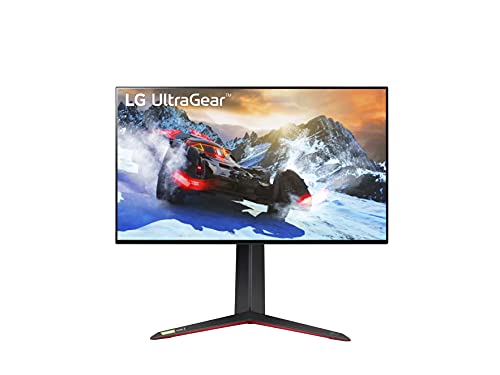
LG UltraGear 27GP950-B
The 27GP950-B is a premium 27-inch 4K Nano IPS monitor with two full-bandwidth HDMI 2.1 ports, so a PS5 and an Xbox Series X|S can both stay connected at full output capability without cable swapping. LG rates the panel at 144Hz natively, with an overclock to 160Hz over DisplayPort for PC use, and VRR up to 120Hz over HDMI for consoles. The Nano IPS panel covers a wide color gamut and carries a DisplayHDR 600 certification, a step above entry-level HDR labels. A height-adjustable stand with pivot and tilt supports longer desk sessions, and low input lag in game mode suits fast-paced action.
Specs
- Screen size: 27 inches
- Resolution: 3840 x 2160 (4K UHD)
- Panel type: Nano IPS
- Refresh rate: 144Hz native, 160Hz overclock via DisplayPort
- Response time: 1ms GtG
- HDR: VESA DisplayHDR 600
- Color gamut: DCI-P3 98 percent
- Ports: 2 x HDMI 2.1 (48Gbps), 1 x DisplayPort 1.4 with DSC, USB hub
- Adaptive sync: AMD FreeSync Premium Pro, NVIDIA G-SYNC Compatible, VRR over HDMI 2.1
Gigabyte M28U
The M28U is the mid-range value anchor of this list: a 28-inch 4K Super Speed IPS panel at 144Hz with two HDMI 2.1 ports that Gigabyte itself positions for PS5 and Xbox connections. It adds a built-in KVM switch and USB-C input, genuinely useful if the same desk alternates between console sessions and a work laptop. FreeSync Premium Pro covers variable refresh on the Xbox side, and the panel carries a DisplayHDR 400 certification. Flicker-free backlighting matters across multi-hour sessions. It gives up the stronger local dimming of the Sony and Samsung picks, which is the honest trade at this tier.
Specs
- Screen size: 28 inches
- Resolution: 3840 x 2160 (4K UHD)
- Panel type: Super Speed IPS
- Refresh rate: 144Hz
- Response time: 1ms GtG
- HDR: VESA DisplayHDR 400
- Color gamut: DCI-P3 94 percent
- Ports: 2 x HDMI 2.1, 1 x DisplayPort 1.4, USB-C, USB hub, built-in KVM switch
- Adaptive sync: AMD FreeSync Premium Pro
Samsung Odyssey Neo G7
Players who want a bigger screen should look at the 32-inch Odyssey Neo G7. Its curved VA panel wraps the view more than a flat 27-inch monitor, and the Quantum Mini LED backlight with 1,196 local dimming zones delivers the strongest HDR contrast on this list, rated under Samsung’s Quantum HDR 2000 label. The panel runs at up to 165Hz, with FreeSync Premium Pro and G-SYNC compatibility for variable refresh. The 1000R curve is aggressive, so it suits a single-player desk viewed from the center seat rather than a shared couch. Height, tilt and swivel adjustment are built into the stand.
Specs
- Screen size: 32 inches, 1000R curved
- Resolution: 3840 x 2160 (4K UHD)
- Panel type: VA with Quantum Mini LED backlight
- Local dimming: 1,196 zones
- Refresh rate: 165Hz
- Response time: 1ms GtG
- HDR: Quantum HDR 2000
- Color gamut: DCI-P3 95 percent
- Ports: 2 x HDMI 2.1, 1 x DisplayPort 1.4, USB hub
- Adaptive sync: AMD FreeSync Premium Pro, NVIDIA G-SYNC Compatible
LG UltraGear 27GS95QE
Not every console setup needs 4K. Both the PS5 and Xbox Series X|S support 1440p output, and the 27GS95QE is the 1440p OLED option here: a 27-inch panel with a 240Hz refresh rate and a 0.03ms GtG response time. Consoles feed it up to their 120Hz output modes, while OLED contrast, with self-lit pixels and a DisplayHDR True Black 400 rating, gives dark scenes a depth LCD panels cannot match. Two HDMI 2.1 ports handle VRR from either console. The trade-offs are resolution headroom versus the 4K picks and the usual OLED care considerations for static screen elements, which the built-in panel care features are designed to manage.
Specs
- Screen size: 27 inches
- Resolution: 2560 x 1440 (QHD)
- Panel type: OLED
- Refresh rate: 240Hz
- Response time: 0.03ms GtG
- HDR: DisplayHDR True Black 400
- Color gamut: DCI-P3 98.5 percent
- Ports: 2 x HDMI 2.1, 1 x DisplayPort 1.4, USB hub
- Adaptive sync: AMD FreeSync Premium Pro, NVIDIA G-SYNC Compatible, VRR over HDMI 2.1
How to Choose
HDMI 2.1 ports and bandwidth. This is the first spec to check. The PS5 and Xbox Series X|S use HDMI output, and 4K output at 120Hz requires HDMI 2.1 bandwidth. Prefer two HDMI 2.1 ports if both consoles share one desk, and check whether the ports are full bandwidth, since some models limit one port. An HDMI 2.0 monitor caps console output at lower refresh modes.
Native resolution versus console output. Both consoles can output 4K and 1440p signals. A native 4K panel shows the 4K signal without scaling, while a native 1440p panel matches the 1440p output mode cleanly and usually costs less at the same panel quality. Avoid ultrawide panels, since neither console outputs an ultrawide signal and the image would be stretched or pillarboxed.
Refresh rate and VRR. The consoles top out at 120Hz output, so any monitor rated 120Hz or higher covers console play fully; higher ratings only pay off with a PC. What matters more is variable refresh rate support over HDMI, which keeps motion smooth when frame rates fluctuate. Confirm the VRR range in the published specs and that VRR works over HDMI, not only over DisplayPort.
HDR standard and panel type. Look for a named HDR certification and, on LCD panels, local dimming, which separates a real HDR presentation from a label. OLED panels handle HDR contrast per pixel but carry brightness and burn-in considerations. IPS panels offer wide viewing angles and strong color, VA panels offer deeper native contrast, and Mini LED backlights narrow the gap between LCD and OLED contrast.
Input lag and ALLM. Low input lag in game mode keeps controls feeling direct. ALLM lets the console switch the monitor into that fast mode automatically, which matters in long sessions where nobody wants to dig through menus. Ergonomics close out the list: height adjustment, a stable stand and flicker-free backlighting reduce fatigue.
Who Should Skip
Skip this entire category if you play on a large TV you already like, since a good HDMI 2.1 television serves these consoles well. Skip the 4K picks if your desk is small and you sit close, where 1440p at 27 inches already looks sharp. Skip the OLED pick if your sessions involve many hours of static on-screen elements daily and you do not want to manage panel care settings. And skip any monitor purchase made in hope of a PC version of GTA VI: no PC version has been announced, so buy for the consoles that play the game now, or for the PC library you already own.
FAQ
Do PS5 and Xbox Series X|S need HDMI 2.1 for GTA VI sessions?
HDMI 2.1 is what allows the consoles to use their 4K at 120Hz output modes where supported, and it carries VRR and ALLM signals. A monitor without HDMI 2.1 still displays the consoles’ output, but at reduced refresh modes, so HDMI 2.1 is the baseline this guide recommends.
Is 1440p enough, or should console players buy 4K?
Both consoles support 1440p output, and at a typical desk distance a 27-inch 1440p screen looks sharp, with lower cost at a given panel quality. A 4K panel is the better match if you sit farther back, use a 32-inch screen, or want the console’s 4K output shown without scaling.
Does a 240Hz monitor help on console?
Only up to the console’s own output limit of 120Hz. A 240Hz panel such as the 27GS95QE still benefits console play through fast pixel response and VRR behavior, but the extra headroom is only fully used by a PC. Buy it for panel quality, not console frame rates above 120Hz.
Can these monitors also work with a gaming PC?
Yes. Every pick here includes DisplayPort input and a refresh rate at or above 144Hz, so the same screen can serve a PC between console sessions. That dual use is about your existing PC library, including other open-world games, and not about any announced PC version of GTA VI, which does not exist at the time of writing.
Final Verdict
For most players settling in for long GTA VI sessions, the Sony INZONE M9 is the most complete console-first pick, with full array local dimming, DisplayHDR 600 and PS5-specific features over HDMI 2.1. The LG UltraGear 27GP950-B matches it closely and adds full-bandwidth ports for a two-console desk. The Gigabyte M28U covers the same core requirements at a mid-range tier with KVM convenience, the Samsung Odyssey Neo G7 is the large-screen HDR choice, and the LG UltraGear 27GS95QE is the 1440p OLED alternative. Any of the five respects what the consoles actually output.



Related guides
More from Amazon
Programs that pair well with the guide above. Offers and eligibility are set by Amazon and may change.
A free business account with business pricing and bulk-buying tools for work, shop or home office.
Create a business accountFree shipping on eligible items, Prime Video and more. Eligible new members can start with a free trial.
Start a Prime free trialAudiobooks and podcasts to listen to on the go. Eligible new members can start with a free trial.
Try Audible freeAd-free music streaming. Eligible new subscribers can start with a free trial.
Try Music Unlimited freeAs an Amazon Associate we earn from qualifying purchases.


