The best gaming desk mat for most players is a large cloth mat from SteelSeries, Razer or Corsair: the SteelSeries QcK 3XL for wide control-focused coverage, the Razer Gigantus V2 XXL for a thicker, comfortable surface, and the Corsair MM700 RGB Extended for lighting and a USB hub. Pick by desk width, mouse style and whether you want cushioning or a firmer glide.
A desk mat does three jobs: it gives a mouse sensor a consistent surface, protects the desk and softens the wrist and forearm contact zone. Roundup specs below come from Rigworthy’s comparison and other 2026 guides. Reviewers disagree on thickness for some mats, probably because sizes and versions differ, so read the exact size on a maker’s listing before you buy.
As an Amazon Associate we earn from qualifying purchases at no extra cost to you.

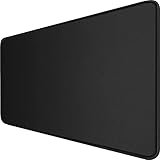
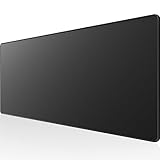
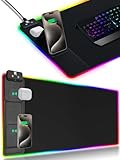
Top 3 picks at a glance
Desk Mats at a Glance
| Mat | Reported size and thickness | Surface and base | Best for | Trade-off |
|---|---|---|---|---|
| SteelSeries QcK 3XL | 1220 x 590 mm, 3 mm (Rigworthy) | Micro-woven cloth, silicone rubber base, unstitched edges | Wide coverage and consistent control | Thin, so less wrist cushioning; edges not stitched |
| Razer Gigantus V2 XXL | 940 x 410 mm, 4 mm | Textured micro-weave cloth, high-density foam base | Cushioning and value | Shallower depth than some rivals |
| Corsair MM700 RGB Extended | 930 x 400 mm, 4 mm | Woven textile, stitched edges, RGB ring | Lighting and a built-in USB hub | Needs a USB connection; higher tier |
| Razer Strider XXL | 940 x 410 mm, 3 mm | Hybrid soft and hard surface, grooved anti-slip base | Easy cleaning, fast glide | Firmer feel for wrists |
| Artisan Hien (XL, Soft) | 490 x 420 mm, 4 mm | Hien weave, Poron foam base, stitched edges | Enthusiasts after surface quality | Mouse-zone size only |
Choosing the Right Size
Size is the first decision. A mouse pad covers only the mouse area, while an extended or desk-size mat also carries the keyboard. Measure your desk, then leave a small gap from the edges so the mat lies flat.
- Under about 700 mm of desk width: a mouse-zone mat such as the Artisan Hien, or a standard large pad.
- About 900 mm: an extended mat in the 930 to 940 mm range, such as the Gigantus V2 XXL or MM700 Extended.
- Wide desks (over a metre): the QcK 3XL at 1220 mm or similar, per Rigworthy’s listing. The MM700 also comes in a 3XL size of 1,220 x 610 mm with two USB ports.
Depth matters as well. If your monitor stand or arm clamp sits near the back edge, a deeper mat may not lie flat. Check the clamp location before choosing a 590 or 610 mm depth.
Surface, Thickness and Base
Cloth versus hybrid
Cloth surfaces are the usual starting point because they give predictable tracking with both optical and laser sensors. Hybrid designs like the Strider are easier to wipe clean and glide faster, but reviewers describe them as firmer and less forgiving for wrists.
Thickness
Thicker mats of about 4 to 6 mm cushion the wrist and smooth out small desk irregularities. Thinner ones sit flatter and feel more connected to the desk. Sources disagree on the QcK’s thickness: Rigworthy lists 3 mm for the 3XL, while other guides cite different values for other sizes, which suggests that thickness varies by version. Read the maker’s page for the exact model.
Base and edges
A rubber or foam base keeps the mat from sliding. Stitched edges resist fraying over time; unstitched edges, as on the QcK and Gigantus per Rigworthy, are simpler and lie flatter but can wear at the border. Use a lightly damp cloth to clean most fabric mats, and follow the maker’s care guide, since some should not go in a washing machine.
Pick Details
SteelSeries QcK 3XL
Several 2026 roundups place the QcK first. The attraction is a micro-woven surface that reviewers call a reference control surface, plus the broad 1220 mm width. The main limit is the thin profile, which provides less padding for wrists. It suits players who use a low-sensitivity setup with big arm movements, and anyone who wants the keyboard and mouse on one mat.
Razer Gigantus V2 XXL
Rigworthy lists it as a value pick with a 4 mm thickness and a foam base. One reviewer found it kept its rebound over time rather than compressing, and comfort seekers often choose it. Its depth of 410 mm is smaller than some competitors, so keep that in mind if you use a wide wrist sweep.
Corsair MM700 RGB Extended
This mat has a three-zone RGB ring around the edge that syncs through iCUE, and a built-in USB hub. It is the choice for players with an RGB setup. The trade-off is a higher cost and the need for a spare USB port for power and data.
Razer Strider XXL
The Strider combines a soft and hard surface and is described as water-resistant and easy to clean. It is the one to consider if you often spill drinks or want a quick glide, but it feels firmer than the Gigantus.
Artisan Hien
Rigworthy lists the Hien as the enthusiast option with a dry, fast glide and tunable foam hardness. Its size covers only the mouse zone, so you will need to pair it with a separate keyboard surface or mat.
Pick X If You Want Y
| If you want… | Pick | Reason |
|---|---|---|
| Full-desk coverage | SteelSeries QcK 3XL | 1220 mm width |
| Cushioning at a modest tier | Razer Gigantus V2 XXL | 4 mm foam base |
| RGB and a USB hub | Corsair MM700 RGB Extended | Three-zone lighting, iCUE sync |
| A wipe-clean surface | Razer Strider XXL | Water-resistant hybrid |
| Premium glide for aim | Artisan Hien | Hien weave, Poron foam |
Budget Tiers
- Budget: Razer Gigantus V2 XXL and the standard QcK sizes.
- Mid-range: QcK 3XL and Razer Strider XXL.
- Premium: Corsair MM700 RGB and Artisan Hien.
Sensor and Setup Compatibility
Most gaming mice with optical sensors track well on cloth. If you use a very high DPI wireless mouse, a smoother surface can reduce skating. Check the mouse maker’s manual if you have a glass or glossy desk, since these can interfere with sensors regardless of the mat. For the Corsair MM700, confirm that your PC has a free USB port, and check that iCUE supports your operating system.
When you unroll a new mat it may have creases from packaging. Lay it flat for a day and avoid tightly rolling it again.
Alternatives
- Standard mouse pads. A large pad covers the mouse area and leaves the desk free.
- Leather or felt desk pads. These work well for general desk protection but are not made for sensor tracking.
- Hard mouse pads. Hard surfaces glide faster and clean easily, though they can feel less comfortable on wrists.
Care, Setup and Common Mistakes
Start with a clean, dry desk. Dust and crumbs under a mat can create bumps that affect both sensor tracking and comfort. Unroll the mat, let it settle, and smooth it from the centre outward. If the edges curl, a few hours under a flat weight usually helps, though results vary by base material.
Avoid placing a mat over a desk edge with a sharp lip, since that can lift the surface under your wrist. Rounded desk edges or a mat sized slightly smaller than the desk give a better fit. If you use a standing desk, check that the mat’s width does not interfere with the frame or cable trays.
Common mistakes include buying a very large mat for a small desk, ignoring the position of a monitor arm clamp, and choosing RGB without a spare USB port. Another is expecting a mat to fix a worn mouse sensor or mouse feet. If your mouse skates poorly, check the feet first and consult the mouse maker’s manual. Finally, remember that surface feel is personal: some players want a slower control surface, others a faster glide, so read how reviewers describe each mat before assuming it will suit your style.
Frequently Asked Questions
Is a bigger desk mat always better?
Not always. A large mat helps with keyboard and mouse coverage, but it must fit your desk depth and the monitor stand or arm clamp. Measure before you buy.
Do RGB mats affect performance?
The lighting does not change tracking. The practical points are the USB cable and the extra cost. Choose RGB for the look, not for performance.
How do I clean a gaming desk mat?
Wipe it with a damp cloth and mild soap, then let it dry flat. Follow the maker’s instructions, because some mats should not be machine washed.
Which thickness is best?
Thicker mats of about 4 mm or more give wrist padding. Thinner mats of about 3 mm feel more connected to the desk. Choose by whether you rest your wrist on the mat.
Will a desk mat work with a glass desk?
A mat generally gives the sensor a reliable surface even on glass, which is why many players use one. Confirm that the base grips the desk and that the mouse maker has no restrictions.
How long does a mat last?
It depends on use and care. Stitched edges resist fraying, and foam bases tend to hold their shape better than very thin ones. Replace a mat when the surface becomes uneven.
Related guides
More from Amazon
Programs that pair well with the guide above. Offers and eligibility are set by Amazon and may change.
A free business account with business pricing and bulk-buying tools for work, shop or home office.
Create a business accountFree shipping on eligible items, Prime Video and more. Eligible new members can start with a free trial.
Start a Prime free trialAudiobooks and podcasts to listen to on the go. Eligible new members can start with a free trial.
Try Audible freeAd-free music streaming. Eligible new subscribers can start with a free trial.
Try Music Unlimited freeAs an Amazon Associate we earn from qualifying purchases.


