The Razer BlackWidow V4 Pro suits buyers who want the most dedicated macro keys on a full-size mechanical board, the BlackWidow V4 X suits those who want six macro keys at a lower tier, and the Corsair K55 CORE RGB suits anyone who wants six macro keys on a basic, budget board. The Corsair K100 and K70 families come up in many roundups, but sources disagree about their macro keys, so read the maker’s key list before treating them as macro keyboards.
As an Amazon Associate we earn from qualifying purchases at no extra cost to you.
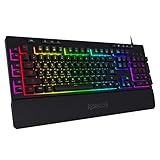


Top 3 picks at a glance
Macro keyboards at a glance
| Keyboard | Best for | Stated macro and key features | Limits |
|---|---|---|---|
| Razer BlackWidow V4 Pro | MMO, creative and streaming users who want maximum controls | Maker lists 8 dedicated macro keys, a Command Dial with 30 steps per turn, per-key RGB with underglow, magnetic wrist rest, multi-function roller and 4 media keys; wired only | Premium tier; large footprint; Tom’s Hardware notes macro keys are off by default |
| Razer BlackWidow V4 X | Mid-range macro users | Six macro keys on the left, Chroma RGB, doubleshot ABS keycaps, roller and media keys, per reviewers’ and retailer listings | No command dial; fewer extras than the Pro |
| Corsair K55 CORE RGB | Budget and first-time macro users | Spec sheet lists 6 macro keys, 10-zone RGB, media controls, USB 2.0 wired | Rubber dome rather than mechanical; 12-key rollover |
| Corsair K70 Core RGB | Mechanical typists who want iCUE control | One programmable button plus a media dial, as reported by a comparison | Not a true macro-key board |
| Corsair K100 RGB | Premium build and lighting | Optical switches and up to 8,000 Hz polling per one roundup | Sources disagree on dedicated macro keys |
What macro keys actually do
A macro key is a dedicated key that runs a stored sequence of key presses, commands or application shortcuts. Gamers use them for ability rotations in MMOs, for build orders in strategy games, and for simple repeated actions. Creators use them for editing shortcuts. A keyboard with dedicated macro keys keeps those buttons out of the standard layout, so you do not have to give up a regular key. Most makers need their own software, such as Razer Synapse or Corsair iCUE, to assign the actions, and some boards record a macro directly on the keyboard.
Check the rules of any online game before using automated sequences. Many competitive titles prohibit macros that automate multiple actions from a single press, while shortcuts that map one key to one in-game action are generally accepted. The game’s terms of service decide what is allowed.
Razer BlackWidow V4 Pro: the feature-heavy option
Razer lists the BlackWidow V4 Pro with eight dedicated macro keys: five on the left side and three along the left edge, plus a Command Dial that offers 30 steps per revolution with eight default modes including brightness, zoom, app switching and track jogging. Up to 100 custom dial modes can be created in Razer Synapse. The keyboard is wired only, uses a USB Type-C cable, and offers three switch types from Razer: Green (clicky), Orange (quiet tactile) and Yellow (silent linear). Tom’s Hardware names it its premium full-size wired pick and reports onboard memory for up to five profiles, full N-key rollover and polling up to 8,000 Hz. The magnetic leatherette wrist rest and underglow add comfort and look. It is a large, heavy board, so measure your desk space.
Razer BlackWidow V4 X: the lower-tier macro board
The V4 X trims the V4 Pro’s extras but keeps six macro keys, Chroma RGB, doubleshot ABS keycaps and a multi-function roller with media keys. Its listed size is about 466 by 152.5 by 43.9 mm, and a comparison with the Corsair K70 Core RGB lists a 1000 Hz polling rate for both. Switch type depends on the version, with Green clicky and Yellow linear options both appearing in listings. It suits players who want a dedicated macro column without the Pro’s dial or wrist rest.
Corsair K55 CORE RGB: the budget entry
Corsair’s spec sheet lists six macro keys, 10-zone RGB, dedicated media buttons, a 110-key matrix and a wired USB 2.0 connection. PC Perspective notes it uses rubber dome switches, not mechanical ones, but praises spill resistance and iCUE customization. The older K55 RGB offered three-zone lighting, six macro keys, IP42 dust and spill resistance and a detachable palm rest. For a first macro board, it is the lowest-cost route.
Corsair K100 and K70: what to read before buying
Roundups describe the K100 RGB as a premium board with optical switches, per-key lighting and up to 8,000 Hz polling. One guide says it has six macro keys, while Keeb-finder’s comparison says its specifications list no dedicated macro keys, and a rival listing positions it as a top MMO board because of its programmability. The K70 Core RGB, according to one comparison, has one programmable button plus a media dial. Read Corsair’s own key diagram for the exact version you plan to buy, since the model family has several variants. If dedicated macro keys are the point of the purchase, Razer’s boards and the K55 are clearer matches.
Alternatives to a macro-key keyboard
- Programmable layers on a compact board: Many keyboards map macros to a function layer, which saves desk space but needs more finger gymnastics.
- Separate keypad: A left-hand gaming keypad adds as many programmable keys as you want and can sit beside any keyboard.
- Logitech G915 and SteelSeries Apex Pro Gen 3: Both appear in 2026 roundups as strong premium boards. The Logitech has dedicated G-keys on some models, so confirm before buying.
- Corsair K70 RGB Pro: Gamingkeyboards.net names it a strong full-size all-rounder, though not a dedicated macro board.
Fit and compatibility notes
- Software required: Razer boards use Synapse and Corsair boards use iCUE. Both run on Windows and need installation to set up macros beyond default settings.
- Desk size: A full-size board with a left macro column and wrist rest is wide. The BlackWidow V4 X is listed at about 466 mm long.
- Wired or wireless: The V4 Pro is wired only per Razer. If you want wireless, check each model carefully.
- Switch type: Clicky switches are loud and may disturb others, while linear and quiet tactile options are better for shared rooms.
- Polling rate: High rates need a quality USB port and the included cable. For most players the difference over 1000 Hz is small.
Pick X if
| If you want | Pick | Reason |
|---|---|---|
| The most controls in one board | Razer BlackWidow V4 Pro | Eight macro keys and a command dial per Razer |
| Six macro keys at a mid-range tier | Razer BlackWidow V4 X | Left-side column, roller and media keys |
| The lowest cost route to macro keys | Corsair K55 CORE RGB | Six macro keys on a spill-resistant dome board |
| Premium lighting and build over macro keys | Corsair K100 RGB | Optical switches and high polling, though macro keys are disputed |
| A quiet typing feel | V4 Pro with Orange or Yellow switches | Quiet tactile and silent linear options |
Getting started with macros
- Install the maker’s software and update the keyboard firmware.
- Create a profile for each game or application.
- Assign simple one-key actions first, then try short sequences.
- Save the profile to onboard memory if the board supports it, so it follows the keyboard to other computers.
- Read the game’s rules on macros before using them online.
Who benefits most from macro keys
MMO and strategy players gain the most because their games carry long lists of abilities and commands. Streamers use them for scene switching, and editors and designers map app shortcuts. Shooter players usually do better with a compact board and a mouse with side buttons, since a left-hand column of keys makes the keyboard wider and pushes the mouse farther away. If desk space is limited, count the extra width of a macro column and wrist rest before buying. Typing comfort also counts: a wrist rest helps long sessions, and switch feel is personal, so a quiet tactile switch is a safer default for shared rooms.
Care and software upkeep
Keep the maker software updated so profiles load reliably, and back up profiles to the cloud or a file. Clean the keyboard following the maker guidance, and unplug it first. Boards labeled spill resistant, such as the K55 family, still have limits, so follow the manual.
Frequently Asked Questions
Which keyboard has the most dedicated macro keys?
Razer lists eight dedicated macro keys on the BlackWidow V4 Pro, more than the six on the V4 X and the Corsair K55 CORE. Its Command Dial adds more control options.
Does the Corsair K100 have macro keys?
Sources disagree. One guide says six, while Keeb-finder says its specifications list none. Read Corsair’s key diagram for your exact model before buying.
Are macros allowed in online games?
It depends on the game. Many competitive titles ban macros that run multiple actions from one press, and one-key remaps are often fine. Check the game’s terms of service.
Do I need software to use macro keys?
Usually yes. Razer boards use Synapse and Corsair boards use iCUE, and some boards let you record a macro on the keyboard itself.
Are budget rubber dome macro keyboards worth it?
They are useful if you want macro keys at the lowest cost. The Corsair K55 CORE is rubber dome and not mechanical, so it feels different and lacks mechanical durability claims.
Is wireless an option on macro keyboards?
The V4 Pro is wired only per Razer. Wireless boards with macro keys exist, but confirm the key list and battery details for each model.
Related guides
More from Amazon
Programs that pair well with the guide above. Offers and eligibility are set by Amazon and may change.
A free business account with business pricing and bulk-buying tools for work, shop or home office.
Create a business accountFree shipping on eligible items, Prime Video and more. Eligible new members can start with a free trial.
Start a Prime free trialAudiobooks and podcasts to listen to on the go. Eligible new members can start with a free trial.
Try Audible freeAd-free music streaming. Eligible new subscribers can start with a free trial.
Try Music Unlimited freeAs an Amazon Associate we earn from qualifying purchases.


