For most desks the sweet spot is a 20Gbps USB 3.2 Gen 2×2 case, but the right UGREEN listing in this group depends on one thing before any other: what the port on your computer can actually deliver. A 10Gbps model suits plain USB-C ports, a 20Gbps model suits ports that advertise Gen 2×2, and the 40Gbps and 80Gbps cases only make sense with Thunderbolt or USB4 sockets. Ten listings follow. Nobody on the team used or measured these units; the notes come from titles, manufacturer documentation and buyer reviews, and anything the title leaves out is marked “check the listing”.
As an Amazon Associate we earn from qualifying purchases at no extra cost to you.


Our Top Picks


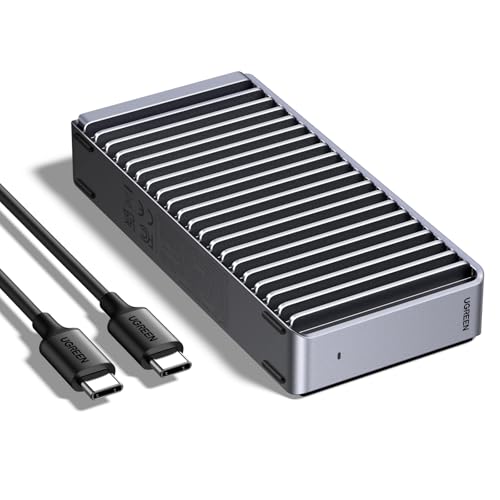
Top 3 picks at a glance
Top picks at a glance
| Model (ASIN) | Key point from the title | Price tier | Best for |
|---|---|---|---|
| 10Gbps Tool-Free (B09T97Z7DM) | M and B+M keys, 2230 to 2280, tool-free | Budget | Everyday backups |
| 10Gbps for Mac mini (B0D53K7HK9) | UASP, TRIM, 2230 to 2280 | Budget | Plain USB-C hosts |
| 20Gbps Built-In Cable (B0H3P4L8BD) | Aluminum, attached cable, SMART | Mid | Travel with fewer loose parts |
| 20Gbps Gen 2×2 (B0DN5ZM2ZR) | Up to 8TB, UASP, TRIM | Mid | Fast USB desktops |
| 20Gbps NVMe and SATA (B0D2NHJT6T) | Dual protocol named | Mid | Mixed drive collections |
| 40Gbps Finned (B0F62NG7K3) | Double-sided fins, SSD not included | Mid to premium | Silent Thunderbolt use |
| 40Gbps with Fan (B0CLV3D3H6) | Cooling fan, anti-drop | Mid to premium | Long sustained copies |
| 40Gbps Dual-Bay Cloner (B0FMKDY3HZ) | Two M.2 bays, software RAID | Premium | Cloning and RAID |
| Thunderbolt 5 with Fan (B0DP9GYKVX) | Up to 6600MB/s, 2280, 8TB | Premium | Thunderbolt 5 workstations |
| 80Gbps (B0GG9PS1F6) | Thunderbolt 5/4/3, fins, SSD not included | Premium | Mac or TB5 laptops |
What separates these listings
The headline number on each title is the link speed, not the speed you will see. An enclosure’s bridge chip, the SSD inside, the cable and the port on your computer all set a ceiling, and the lowest of them wins. Heat comes second: the faster the link, the more the controller works, and the more a case needs to move warmth away from the drive.
Three listings are not ordinary single-slot cases. One is a dual-bay cloner with software RAID, one is a Thunderbolt 5 model whose title reads “Portable NVMe SSD” even though the parenthesis says “Only Enclosure”, and one 80Gbps title spells “Silent” with a typo. Titles with muddled wording deserve a careful read of the specification table before you click buy.
The ten UGREEN enclosures
UGREEN USB-C M.2 NVMe SSD Enclosure, 10Gbps, Tool-Free
This listing is the simple one: USB-C, 10Gbps, tool-free opening, M and B+M key support, drive sizes 2230, 2242, 2260 and 2280, and a Mac mini mention. Tool-free means you slide or snap the drive in without a screwdriver, which helps if you swap drives often. The ceiling is roughly 1,000MB/s in practice, so a fast PCIe drive will not reach its rated speed, but for photos, documents and game libraries that is usually fine. Ask whether the thermal pad is included and how the lid latches.
A typical buyer is someone who pulled a 1TB drive out of a laptop during an upgrade and wants to reuse it as a pocket backup. Tool-free cases make that a thirty-second job: pop the lid, seat the drive, close it. The question to ask before buying is how snug the latch feels on a 2230 drive, since shorter drives sit loosely in cases built around 2280. Also check whether a thermal pad is shipped in the box, and whether the cable is USB-C to USB-C or ends in a USB-A plug. Check the listing for the supplied cable, the pad thickness and any screw or standoff for short drives.
- Pros: tool-free design; wide length support; lowest cost tier.
- Cons: 10Gbps cap wastes a fast SSD; no heat features named in the title.
UGREEN 10Gbps M.2 NVMe SSD Enclosure for Mac mini
Nearly the same specification as the tool-free listing above: 10Gbps, UASP, TRIM, sizes 2230 to 2280, M-key and B+M key. The title does not say tool-free, and the “for Mac mini” wording is a use case rather than a restriction; any host with a matching port should be able to use it. If both 10Gbps listings sit at similar cost, the difference you can verify is the opening mechanism, so read the images and description. Otherwise it fits a secondary drive on a compact desktop.
Where this listing helps is a desk with a small-form-factor computer whose internal storage is soldered or expensive to upgrade. An external NVMe drive on a 10Gbps link will not match internal speed, but it will hold a photo library, a project archive or a Steam library without trouble. Compare the two 10Gbps pages line by line: if one has a screwdriver in the image and the other a latch, that is the whole difference, and it is worth knowing before you pay. Check the listing for the lid design, the cable type and whether any accessory is included.
- Pros: UASP and TRIM named; lengths from 2230 to 2280.
- Cons: near-duplicate of the tool-free listing; no tool-free claim in the title.
UGREEN M.2 NVMe SSD Enclosure, Aluminum, Built-In USB-C Cable, 20Gbps
The built-in cable is the feature here, which removes the single most common loss with external drives: the cable. It also fixes the cable length, so check the listing for how long it is and what happens if it fails. The title adds 20Gbps, aluminum, UASP, TRIM, SMART support and Windows, macOS and Linux compatibility. SMART support lets you read the drive’s health data, handy for older SSDs. A 20Gbps rate needs a matching Gen 2×2 port; otherwise it falls back.
Consider a photographer who carries an SSD in a laptop bag and plugs it in at client sites. A cable that is part of the case never gets left behind, and the metal body doubles as a heat spreader. The trade-off shows up when the connector frays: a detachable cable is a three-minute fix, while a built-in one may mean replacing the whole unit. Ask the seller about cable length, strain relief, and which port types the plug supports. Check the listing for cable length, connector shape and the maximum capacity it accepts.
- Pros: nothing to lose; SMART pass-through named; metal body.
- Cons: cable cannot be swapped; length not in title.
UGREEN USB-C M.2 NVMe SSD Enclosure, 20Gbps, USB 3.2 Gen 2×2
This is the clearest 20Gbps description in the set, naming USB 3.2 Gen 2×2, UASP, TRIM, sizes 2230 to 2280, M and B+M keys and capacities up to 8TB. Gen 2×2 is a feature of specific ports; many motherboards and laptops have only 10Gbps USB-C. Plug it into one and the speed halves. Ask whether the box includes a USB-C to USB-C cable rated for 20Gbps, and test the drive size with your SSD’s heatsink before installing.
This suits a desktop builder whose motherboard has a front-panel or rear Gen 2×2 USB-C port and wants to take advantage of it for large game installs or video scratch space. Gen 2×2 ports are rare on laptops, so a laptop buyer should confirm the label first. Another question is the drive’s own limit: a mainstream NVMe drive in this case can reach roughly twice the speed of a 10Gbps case in a large sequential copy, assuming the SSD sustains it. Check the listing for the cable in the box and the pad that touches the controller.
- Pros: explicit Gen 2×2 wording; 8TB support stated.
- Cons: useless at full speed without a Gen 2×2 port; no cooling feature named.
UGREEN 20Gbps M.2 NVMe and SATA SSD Enclosure
This one names both NVMe and SATA M.2 support, which is unusual and useful if you have an old SATA M.2 drive from a laptop upgrade. Its title also says “compatible with USB 3.2 Gen 2”, and that standard is 10Gbps, so the “20Gbps” claim and the compatibility line do not obviously agree. Read the specification table to see which link speed applies to which mode. UASP and TRIM are listed, with sizes 2230 to 2280 and M/B+M keys.
A common scenario is a drawer holding two or three old M.2 SSDs of different kinds from retired laptops. A dual-protocol case lets one enclosure read all of them instead of buying two. The risk is the title’s contradictory speed wording, so read the specification table and buyer feedback to learn what rate each protocol gets. Also ask whether B-key-only SATA drives fit the connector, because the title names M and B+M keys, which is not the same thing. Check the listing for per-protocol speeds, the supplied cable and any size limits.
- Pros: handles both drive protocols per the title; UASP and TRIM named.
- Cons: speed wording is contradictory; check which mode gets 20Gbps.
UGREEN 40Gbps M.2 NVMe Enclosure, Finned Aluminum
Sold without an SSD, this case uses double-sided fins to shed heat and is described as silent, meaning no fan. The title lists compatibility with Thunderbolt 4 and 3, USB4, USB 3.2 and even USB 2.0, which tells you it falls back to lower speeds on lesser ports. Passive cooling suits quiet rooms and shorter copies; for hours-long sustained writes, ask whether the fins can match a fan. Mac mini appears as a use case.
This fits a quiet recording corner or living-room media setup where fan noise would be annoying. A heat-sinking shell is also one fewer part to fail. The honest limit is physics: a finned shell with no airflow will warm up during long, continuous writes, and the drive may slow itself to protect the controller. Ask whether a thermal pad touches both the drive and the shell, and consider placing the case upright with space around it rather than flat on a soft surface. Check the listing for the cable length, the thermal pad and the host ports it was designed around.
- Pros: no moving parts; broad port compatibility; 40Gbps link.
- Cons: passive cooling may throttle on long copies; SSD sold separately.
UGREEN 40Gbps M.2 NVMe Enclosure with Cooling Fan
The counterpart to the finned case: aluminum with a fan, an “anti-drop” claim, Thunderbolt 3 and 4, USB4, USB 3.2 and 3.1 support, and sizes 2230 to 2280 with M and B+M keys. A fan adds noise and a part that can wear, but it keeps a hot drive cooler on big transfers such as video exports. Ask about fan noise at idle, whether the fan can be turned off, and how the case stands up to being knocked.
Think of an editor offloading two hours of high-bitrate footage between sessions. Sustained writes are where fan-cooled cases earn their keep, because the controller stays below its throttle point for longer. Before buying, ask what the fan sounds like in a quiet room, whether it runs all the time or only when warm, and how easy it is to clean. The anti-drop wording in the title is a seller claim, so look for how the case is built before trusting it on a hard floor. Check the listing for fan noise comments, power draw and the cable included.
- Pros: active cooling for sustained work; anti-drop wording.
- Cons: audible fan; extra component; SSD not mentioned as included.
UGREEN 40Gbps Dual-Bay M.2 NVMe SSD Cloner with Software RAID
This is a different product class: two M.2 bays rather than a single-drive enclosure, with a cloning function and software RAID. The title is short and gives no key types, sizes or drive support, so check the listing for all three. Software RAID means the operating system or bundled utility manages striping or mirroring, so be sure you understand how it behaves if one drive fails. It is a workbench tool for migrating or duplicating drives more than a portable case.
The scenario here is a technician or enthusiast migrating a laptop’s drive to a larger one without reinstalling the operating system. A cloner copies a source drive to a target and finishes much faster than a network copy. The questions that matter are different from those for an enclosure: which M.2 sizes fit, whether it clones to a smaller drive, and what happens to the RAID array if the unit fails. Do not treat software RAID as a backup. Check the listing for supported drive sizes, host connection, software platforms and cloning rules.
- Pros: two drives at once; cloning and RAID in one device.
- Cons: sparse title; software RAID adds complexity; not a single-slot case.
UGREEN Thunderbolt 5 Portable NVMe SSD Enclosure with Cooling Fan
The title claims up to 6600MB/s and supports M-key and B+M key 2280 SSDs up to 8TB, with a cooling fan, and says “Only Enclosure”. The phrase “Portable NVMe SSD” at the front can mislead; the parenthesis suggests no drive is included. To reach anything near the stated speed you need a Thunderbolt 5 host and a PCIe 4.0 or 5.0 SSD capable of it. Ask for 2230 and 2242 support, because the title mentions only 2280.
The buyer is a professional with a Thunderbolt 5 laptop or workstation, working with files so large that every minute saved counts, such as raw video or large scientific datasets. In that case the fan makes sense, since drives running at several thousand MB/s generate real heat. Check that your SSD is a PCIe 4.0 or 5.0 model, otherwise the stated 6600MB/s is out of reach. Ask what happens on an older Thunderbolt 4 or USB4 port; it will almost certainly drop to a lower rate. Check the listing for the cable, fan behaviour, power needs and smaller drive sizes.
- Pros: highest speed claim in the group; fan for sustained loads.
- Cons: needs a Thunderbolt 5 host and a fast SSD; 2280 only per title; confusing wording.
UGREEN 80Gbps M.2 NVMe SSD Enclosure
The 80Gbps figure matches the Thunderbolt 5 class, and the title says it works with Thunderbolt 5, 4 and 3, USB4 and USB 3.2/3.0, plus Mac M1-M5 Pro and Max hosts. Like the other finned case, it is silent, with double-sided heat-dissipation fins, and the SSD is not included. The title’s typo (“Slient”) is a small reminder to read the specification table. Check whether the 80Gbps rate is bidirectional marketing, and what the real one-direction ceiling is.
This listing suits a Thunderbolt 5 owner who wants a silent, fanless case and is willing to trade some sustained headroom for no noise. It also lists Mac M1 to M5 Pro and Max hosts and fallbacks down to USB 3.0, so it can double as a general-purpose case on slower ports. The question to ask is how the case keeps temperatures in check on a long write at the top link rate, and whether drive lengths other than 2280 are supported. Check the listing for the cable included, the pad layout and sustained-write comments from buyers.
- Pros: broadest port compatibility among fast cases; passive and silent.
- Cons: few hosts can use the full link; no drive length list in the title.
Buying guide: keys, lengths and link speeds
| Spec concept | What to look for | Why it matters |
|---|---|---|
| M key vs B+M key | Titles listing M and B+M | NVMe SSDs are M key; B+M often SATA |
| Length | 2230, 2242, 2260, 2280 | Short drives need a standoff |
| Link speed | 10, 20, 40, 80Gbps | Port and drive set the real limit |
| UASP and TRIM | Named in title | Lower overhead and tidier SSD housekeeping |
| Cooling | Fins, fan or none | Sustained copies throttle hot controllers |
| Tool-free | Latch or slide design | Convenience for frequent swaps |
Pick the enclosure by the port first, the drive second, the cooling third. Gen 2×2 USB, Thunderbolt and USB4 ports often look identical, so check the labels or the manual instead of guessing.
Worked example: moving 1TB of footage
Assumptions: one terabyte (1,000,000MB) of large video files, an enclosure ceiling of 1,000MB/s at 10Gbps, 2,000MB/s at 20Gbps, a Thunderbolt or USB4 40Gbps ceiling of about 3,000MB/s, and a Thunderbolt 5 ceiling of about 6,000MB/s. Drive A is a PCIe 3.0 SSD sustaining 3,000MB/s, Drive B a PCIe 4.0 model sustaining 5,000MB/s. These are illustration numbers, not published results.
| Enclosure class | Drive A speed | Drive B speed | 1TB time with Drive B |
|---|---|---|---|
| 10Gbps | 1,000MB/s | 1,000MB/s | about 16.7 minutes |
| 20Gbps | 2,000MB/s | 2,000MB/s | about 8.3 minutes |
| 40Gbps | 3,000MB/s | 3,000MB/s | about 5.6 minutes |
| Thunderbolt 5 or 80Gbps | 3,000MB/s | 5,000MB/s | about 3.3 minutes |
The lesson: with Drive A, the top case is no faster than the 40Gbps one. A faster enclosure only pays off when the SSD can keep up and the cooling lets it hold that speed.
Which one for which user
| User | Start with | Note |
|---|---|---|
| Backups and game library | 10Gbps tool-free | Cheapest and simplest |
| Mixed old and new drives | 20Gbps NVMe and SATA | Confirm speed per mode |
| Quiet studio | 40Gbps finned | Passive cooling |
| Video editor with long exports | 40Gbps fan or Thunderbolt 5 fan | Active cooling |
| Migrating drives | Dual-bay cloner | Learn the RAID mode first |
Mistakes buyers make
| Mistake | Fix |
|---|---|
| Buying 40Gbps for a 10Gbps port | Check for Thunderbolt or USB4 labels |
| Putting a SATA M.2 into an NVMe case | Choose the dual-protocol listing |
| Using a cheap cable | Use the supplied or a certified cable |
| Ignoring heat | Add a thermal pad, pick fins or a fan |
| Assuming the SSD is included | Several titles say “SSD Not Included” |
Verdict by use case
Pick the 10Gbps tool-free case for cheap everyday storage. Pick a 20Gbps Gen 2×2 case if your desktop has that port. Choose the 40Gbps fan model for long exports and the finned model for quiet rooms. Treat the Thunderbolt 5 and 80Gbps cases as premium specialist tools, and treat the dual-bay cloner as a separate product with its own rules.
Related guides
- Replacement Cables For Gaming Mice And Headsets
- Nvidia Control Panel Best Settings For Gaming
- How To Test Gpu Stability After Overclocking
Frequently asked questions
Can I put a SATA M.2 drive in an NVMe enclosure?
Only if the listing says so. NVMe and SATA M.2 drives can share the same slot shape but speak different protocols, so an NVMe-only bridge will not recognise a SATA M.2 SSD. In this group, one 20Gbps listing names both NVMe and SATA in its title, while most others state NVMe only. Check the key type of your drive and the listing’s compatibility list before buying.
Is a 40Gbps enclosure worth it with a USB-C port on my PC?
Only if the port is Thunderbolt or USB4. A plain USB 3.2 Gen 2 port runs at 10Gbps, and a 40Gbps case will fall back to that speed. Look for the Thunderbolt lightning mark or USB4 label beside the port, or read your motherboard or laptop manual. If you have neither, a 10Gbps or 20Gbps model is the better use of the budget.
Will an NVMe enclosure overheat my SSD?
Fast drives get warm under long copies, and a tight sealed case can make it worse. Controllers reduce speed when they hit their thermal limit, which looks like a transfer that starts quick and then slows. Finned aluminium and fan models are built to address this, but a short copy of a few gigabytes will rarely show a problem. Watch large sustained transfers.
What does UASP do?
UASP is a USB protocol that lets the host queue commands efficiently instead of waiting for each one to finish, which cuts overhead on storage over USB. Both Windows and macOS support it in modern versions. Titles that mention UASP and TRIM are describing support for faster command handling and for letting the operating system tell the SSD which blocks are free.
Which drive length fits these cases?
Many titles list 2230, 2242, 2260 and 2280, which are the common M.2 lengths in millimetres. The 2280 is the usual desktop and laptop size, while 2230 is common in handheld consoles. A few listings only name 2280, so if your drive is shorter, confirm that the case includes a spacer or adjustable standoff before ordering.
Do these cases work on a PlayStation or a handheld?
The titles here do not say. Consoles and handhelds have their own rules about external storage, and some only accept specific drive types or formats. Treat any such use as unverified until the listing or the console maker confirms it, and read buyer comments for your exact device before relying on an enclosure for game storage.