The real decision is whether a dedicated sound card or external DAC audibly beats your motherboard’s onboard audio with the headphones and speakers you actually own. Onboard audio often sounds thin into demanding headphones, and it can hiss under graphics load. If an upgrade is justified, the next choice is form: an internal PCIe card keeps the desk clean but lives in one desktop, while an external USB unit works with laptops and moves between machines.
The picks below serve four groups: high-impedance headphone listeners who need real drive, analog 5.1 speaker owners who need discrete outputs, laptop and small-form-factor listeners with no free expansion slot, and anyone plagued by onboard-audio hiss. Both were chosen from the names and specifications published on their Amazon product pages, with playback quality as the only yardstick.
Quick Picks
As an Amazon Associate we earn from qualifying purchases
| Product | Best for | Key spec from title |
|---|---|---|
| Creative Sound Blaster AE-7 | Desktop listeners with high-impedance headphones and analog surround speakers | Hi-res PCIe DAC with Xamp headphone amp and Audio Control Module |
| Creative Sound BlasterX G6 | Laptop and multi-device listeners who want hi-res playback anywhere | 130 dB, 32-bit/384 kHz external USB DAC/sound card |
How to Choose
Match the DAC and Headphone Amp to Your Headphones
Dynamic range and signal-to-noise figures describe the DAC chip’s ceiling, but the headphone amplifier decides what you actually hear. A demanding 250 or 600 ohm headphone on a weak onboard output sounds quiet, flat, and short on bass, no matter how good the source file is. Look for a stated drive range, such as 16 to 600 ohms, and a discrete amplifier design rather than an amplified line-out. A bi-amp design that drives each channel separately also keeps crosstalk low at high volume. If your headphones are easy 32 ohm models, almost any card drives them well, and the DAC quality becomes the deciding factor instead.
Decide Between Internal PCIe and External USB
An internal PCIe card sits inside the case, surrounded by electrically noisy components, so shielding and layout quality matter; in exchange it needs no desk space, no extra cable, and draws power from the slot. An external USB DAC moves the conversion outside the case entirely, which sidesteps internal interference and lets the same unit serve a desktop, a laptop, and even a console. The trade-offs are desk footprint and one more device to move. Before choosing internal, confirm your motherboard actually has a free PCIe slot that is not covered by a thick graphics card.
Check Hi-Res Format Support Against Your Library
If your library is mostly streaming and CDs, standard playback already covers you, and hi-res support is a bonus. If you own downloaded albums at 24-bit/96 kHz or higher, or a collection of DSD files, the card’s ceiling matters: a DAC rated to 32-bit/384 kHz with native DSD playback handles those files without downsampling them to a lower rate. Check the stated bit depth and sample-rate limits rather than assuming a hi-res logo guarantees full-rate playback, because some products cap USB input below their headline figure. Native DSD support matters separately: without it, the player software converts DSD to PCM before the card ever sees it, which many collectors with SACD rips want to avoid.
Match the Outputs to Your Speaker Setup
Headphone listeners need one good amplified output; speaker owners need to count channels. An analog 5.1 setup requires discrete front, rear, center, and subwoofer outputs, which most small USB DAC boxes simply do not have, while an internal card usually provides them. If your powered speakers or receiver accept optical input, a digital output lets that device do the conversion instead. Decide which device you want converting the signal, then buy the card whose rear panel matches: analog multi-channel outs, optical or coaxial digital out, or a simple line-out. Also check whether the headphone output shares a jack with the line-out, because swapping cables every time you switch between headphones and speakers gets old fast.
The 2 Best Options
Creative Sound Blaster AE-7
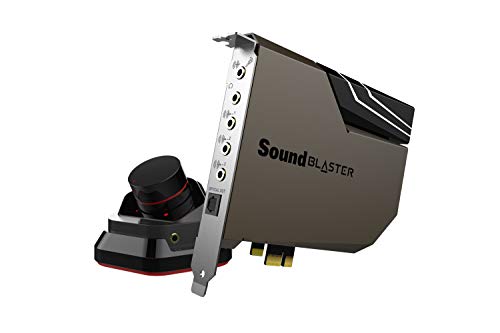
The AE-7 is the pick for desktop listeners who want one internal card to handle both demanding headphones and a real speaker rig. Its ESS SABRE-class 9018 DAC and 127 dB dynamic range give quiet backgrounds and clean detail, while the Xamp discrete bi-amp drives headphones from 16 to 600 ohms with authority that onboard audio cannot match. The included Audio Control Module puts a volume knob and microphone input on the desk, and the analog outputs plus Dolby Digital Live and DTS encoding cover surround speaker setups properly.
Specs
- 127 dB dynamic range (DNR)
- ESS SABRE-class 9018 DAC
- Xamp discrete headphone bi-amp, driving 16-600 ohm headphones
- Included Audio Control Module with desktop volume knob and built-in microphone input
- Dolby Digital Live and DTS encoding for optical surround output
- PCIe interface
Best for: Desktop owners with high-impedance headphones or an analog 5.1 speaker system who want one internal card for both.
Watch out for: The Audio Control Module can distort at high volumes with high-impedance headphones, so many users plug headphones into the card directly instead; drivers are Windows-first, and the card is desktop-only, needing a free PCIe slot.
ASIN: B07T9YYVV6
Creative Sound BlasterX G6

The G6 suits listeners whose music lives on more than one machine. As an external USB DAC it bypasses the noisy interior of any PC, works with laptops that have no expansion slot at all, and even connects to consoles. Its DAC reaches 32-bit/384 kHz with a 130 dB dynamic range, and the same Xamp discrete bi-amp design drives headphones from 16 to 600 ohms, so portable does not mean underpowered. Optical and line-in connections add flexibility for speakers and other sources, making it the flexible hi-res option here.
Specs
- 130 dB dynamic range (DNR)
- 32-bit/384 kHz DAC
- Xamp discrete headphone bi-amp, driving 16-600 ohm headphones
- 7.1 virtual surround and Dolby Digital decoding
- USB, optical, and line-in connectivity
- Works with PC, PS5, PS4, Xbox One, and Nintendo Switch
Best for: Laptop and small-form-factor listeners, and anyone who wants one hi-res DAC shared across a PC and consoles.
Watch out for: The original unit uses a micro-USB connector rather than USB-C, and its gaming-first processing such as virtual surround and sidetone sits off-path for pure music listening, so use direct mode; there are no recording inputs beyond mic and line-in.
ASIN: B07FY45F2S
Which One Fits Your Situation
Your High-Impedance Headphones Sound Thin and Quiet
If your 250 or 600 ohm headphones barely reach satisfying volume from the motherboard jack and lose their low-end weight, the problem is amplifier drive, not your files. Both picks solve it with the Xamp discrete bi-amp rated for 16 to 600 ohms. Choose the AE-7 if the headphones live at one desktop, because its DAC and outputs are the stronger fixed installation; choose the G6 if you also listen from a laptop.
You Own an Analog 5.1 Speaker System
Discrete analog surround needs discrete analog outputs, and that requirement settles the question. The AE-7 provides the multi-channel analog outs an analog 5.1 rig needs, plus Dolby Digital Live and DTS encoding for an optical link to a receiver. The G6 is a headphone and stereo device at heart, with virtual rather than discrete surround, so it cannot feed your speaker system channel by channel. For this setup, the internal card is the only fit.
You Listen on a Laptop or Small-Form-Factor PC
With no free PCIe slot, the internal card is not an option at all, and the G6 was built for exactly this case. It connects over USB, draws no slot, and moves from laptop to desktop to console in seconds while keeping the same 32-bit/384 kHz conversion and headphone drive everywhere. Listeners plagued by fan and GPU noise on a cramped motherboard also benefit, because the conversion happens outside the chassis entirely.
Onboard Hiss and Buzz Follow Your GPU Load
Interference that rises when a game or render loads the graphics card means the audio path is picking up noise inside the case. The G6 removes conversion from the case altogether, which is the most direct cure. The AE-7 attacks the same problem from inside with a dedicated card designed for a high dynamic range, and it works well when the noise is mild; for severe buzz tied to GPU load, the external unit is the safer answer.
Common Mistakes
- Buying a card for its headline DAC numbers while ignoring whether its headphone amp can drive the impedance of the headphones you own, a mismatch no DAC chip can fix.
- Ordering a PCIe card before checking that a free slot exists and is not blocked by a thick graphics card.
- Paying for hi-res and DSD support when the entire library is standard streaming quality that never uses it. That is money spent on a spec sheet, not on sound.
- Choosing a compact USB DAC for an analog 5.1 speaker system that needs discrete multi-channel outputs it does not have.
- Leaving virtual surround and other processing switched on for music, which colors playback that should stay in direct mode. Leaving it on quietly reshapes the tonal balance the recording engineer intended.
Frequently Asked Questions
Will a sound card improve sound over my motherboard audio?
It can, most clearly in two situations. Demanding headphones gain volume and control from a proper amplifier, which onboard outputs rarely provide. Quiet passages also benefit from the higher dynamic range, because hiss and interference sit further below the music. With easy-to-drive headphones and casual listening, the difference is smaller, so match the upgrade to your gear. That gain comes from hardware, not processing effects.
Is an external USB DAC better than an internal sound card?
Neither is automatically better; they solve different problems. An external DAC avoids electrical noise inside the case and works with laptops and consoles, while an internal card offers analog multi-channel outputs for surround speaker systems and keeps the desk clear of extra boxes and cables. Choose by your machines and speakers first, then compare DAC specifications within that form factor. Both forms can sound excellent when well designed.
Do I need 32-bit/384 kHz support for music?
Only if your library actually contains files recorded at those rates. Standard CDs and most streaming sit far below that ceiling and gain nothing from it directly. A high ceiling does confirm a capable DAC design, and listeners with downloaded hi-res albums or DSD collections need the support to play those files at their native rates instead of having the software downsample them silently before playback begins.
Can one of these cards drive 600 ohm headphones?
Yes. Both picks use the Xamp discrete headphone bi-amp, which is rated to drive headphones from 16 to 600 ohms, covering everything from sensitive in-ear models to high-impedance studio headphones. On the AE-7, plug demanding headphones into the card itself rather than the Audio Control Module, which can distort at high volume with such loads. On the G6, the same amplifier design delivers that drive over a USB connection.
Related guides
More from Amazon
Programs that pair well with the guide above. Offers and eligibility are set by Amazon and may change.
A free business account with business pricing and bulk-buying tools for work, shop or home office.
Create a business accountFree shipping on eligible items, Prime Video and more. Eligible new members can start with a free trial.
Start a Prime free trialAudiobooks and podcasts to listen to on the go. Eligible new members can start with a free trial.
Try Audible freeAd-free music streaming. Eligible new subscribers can start with a free trial.
Try Music Unlimited freeAs an Amazon Associate we earn from qualifying purchases.


