The best router for a 100 Mbps connection is a Wi-Fi 6 model with gigabit ports, such as the TP-Link Archer AX21, which usually sells for $60–$90. You don’t need a fast or expensive router. What matters is that the router doesn’t bottleneck the line (gigabit WAN and LAN ports, not Fast Ethernet) and that its Wi-Fi stays stable when several devices compete for the same 100 Mbps.
As an Amazon Associate we earn from qualifying purchases at no extra cost to you.

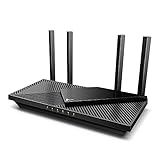


Our Top Picks
 TP-Link Dual-Band AX3000 Wi-Fi 6 Wireless Gigabit InternetAX300012.99 x 9.45 x 2.87 inches1.66 poundsCheck on Amazon
 TP-Link AC1200 Gigabit Dual Band WiFi RouterWi-Fi 5 AC12008.46 x 4.92 x 1.81 inches0.71 poundsCheck on Amazon

Top 3 picks at a glance
Quick comparison of the best 100 Mbps Wi-Fi routers
| Pick | Best for | Key specs | Price range |
|---|---|---|---|
| TP-Link Archer AX21 | Best overall | Wi-Fi 6, AX1800 class, gigabit WAN and 4 gigabit LAN | $60–$90 |
| TP-Link Archer C6 (AC1200) | Best budget | Wi-Fi 5, dual-band, gigabit ports | $30–$50 |
| TP-Link Archer AX55 (AX3000 class) | Best for gaming and many devices | Wi-Fi 6, 2×2 on 5 GHz with 160 MHz support, gigabit ports | $80–$120 |
| TP-Link Deco X20 (2-pack) | Best for larger homes | Wi-Fi 6 mesh, AX1800 class, gigabit ports per node | $120–$200 |
| Entry Wi-Fi 7 router (BE3600 class) | Best to keep through a speed upgrade | Wi-Fi 7, 2.5 GbE WAN on most models, 6 GHz band | $90–$160 |
Prices and availability shift often, and manufacturers sometimes revise a model’s hardware. Check the hardware version and the port speeds on the spec sheet before you buy.
Best overall: TP-Link Archer AX21
The AX21 is a Wi-Fi 6 router in the AX1800 class (up to 1,201 Mbps on 5 GHz and 574 Mbps on 2.4 GHz, per the manufacturer’s spec sheet). Those are link rates, not real throughput, but they leave plenty of room above 100 Mbps. It has gigabit WAN and LAN ports, so a wired console or PC can use the whole line.
Who it suits: apartments and small to mid-size homes with 5–15 devices and a 100 Mbps plan. Trade-off: there are no multi-gig ports, so a later move to a 1 Gbps plan will still work, but anything faster is capped by the gigabit ports.
Best budget: TP-Link Archer C6 (AC1200)
The Archer C6 is a Wi-Fi 5 dual-band router with gigabit ports. Real-world 5 GHz Wi-Fi 5 speeds near the router often exceed 300 Mbps, which is plenty for a 100 Mbps plan. It suits a studio apartment, a bedroom console or a secondary router.
Trade-off: Wi-Fi 5 handles crowded households less gracefully, because it lacks OFDMA and has weaker multi-device scheduling. Some older hardware versions of budget routers use Fast Ethernet ports, so confirm gigabit ports before buying.
Best for gaming and many devices: AX3000-class Wi-Fi 6 (Archer AX55)
The Archer AX55 uses a 2×2 5 GHz radio that supports 160 MHz channels, which is why it is rated at AX3000. On a 100 Mbps plan you won’t use the extra speed. The benefit is headroom: lower airtime use per device, better handling of many simultaneous clients and stronger performance through walls.
Who it suits: households with a console, a PC, phones, smart-home gear and 4K streaming running together. Trade-off: it costs about $20–$40 more than an AX1800 router for gains you notice mainly in busy or large homes.
Best for larger homes: TP-Link Deco X20 mesh
If the router sits at one end of a house and your gaming PC or console is at the other, a single router won’t fix the signal. A Wi-Fi 6 mesh kit such as the Deco X20 puts a second node closer to your devices. For a 100 Mbps plan, mesh often fixes slow speeds in far rooms better than a faster single router does.
Trade-off: wireless backhaul uses part of the node’s airtime, so wire the nodes together with Ethernet when you can. Mesh kits usually have fewer settings than standalone gaming routers.
Best to keep through an upgrade: entry Wi-Fi 7 (BE3600 class)
An entry-level Wi-Fi 7 router costs more than you need today. It makes sense if you expect your internet provider to move you to 500 Mbps or 1 Gbps within a couple of years, or if your devices are crowding the 5 GHz band. Wi-Fi 7 brings a 6 GHz band with more free channels, and many models include a 2.5 GbE WAN port.
Trade-off: you pay for features your current plan cannot use, and Wi-Fi 7 gains only appear if your phones, laptops or PC adapters also support Wi-Fi 7.
How much bandwidth does a 100 Mbps household actually need?
A 100 Mbps plan is enough for a gaming household, but it fills up faster than people expect. Use these typical per-activity figures (rounded, and they vary by service and quality settings):
| Activity | Typical bandwidth |
|---|---|
| Online gaming (per player, traffic only) | 3–10 Mbps |
| 4K video stream | 15–25 Mbps |
| 1080p video stream | 5–8 Mbps |
| Cloud gaming at 1080p/60 | 15–30 Mbps |
| Cloud gaming at 4K | 35–45 Mbps |
| Video call | 2–5 Mbps |
| Game download | Uses as much as is available |
Worked example: one person plays online (8 Mbps), one watches a 4K stream (25 Mbps), one is on a video call (4 Mbps), and background phone and smart-home traffic adds about 5 Mbps. That totals about 42 Mbps, leaving roughly 58 Mbps. Add a console download and it will take all of that spare capacity, and without traffic control the download can raise ping for the player.
Download time: 100 Mbps equals 12.5 MB/s at best. Wired real-world throughput is typically around 92–95 Mbps because of protocol overhead. A 100 GB game is 800,000 megabits, so 800,000 ÷ 100 = 8,000 seconds, about 2 h 13 min at the theoretical rate and roughly 2 h 20 min–2 h 25 min at 94% efficiency. No router upgrade shortens that. Only a faster plan does.
How to choose: decision criteria with numbers
1. Gigabit WAN and LAN ports are mandatory
A Fast Ethernet (100 Mbps) port tops out near 94 Mbps in practice. Your line also carries overhead, and the first wired device you connect will use almost all of it. Gigabit ports remove that ceiling and leave you ready for a plan upgrade.
2. Wi-Fi standard: Wi-Fi 6 is the sweet spot
Wi-Fi 6 adds OFDMA and better multi-client scheduling, which helps in households with many devices. Wi-Fi 5 is acceptable only in small spaces. Wi-Fi 7 is worth it only when you plan to upgrade the plan or devices.
3. Coverage matters more than rated speed
Match the router to the home, not the plan. Typical guidance:
| Your situation | Choose |
|---|---|
| Studio or 1-bedroom, 1–6 devices | AC1200 Wi-Fi 5 (Archer C6 class) |
| 2–3 bedrooms, 8–20 devices | AX1800 Wi-Fi 6 (Archer AX21 class) |
| Console and PC in use at the same time, many smart devices | AX3000 Wi-Fi 6 (Archer AX55 class) |
| Large or multi-floor home, thick walls | Wi-Fi 6 mesh, 2 nodes (Deco X20 class) |
| Plan upgrade planned within 1–2 years | Entry Wi-Fi 7 with 2.5 GbE WAN |
4. Quality of service and security updates
QoS lets you prioritize your game console or PC over other traffic. With 100 Mbps this is worth enabling. Also check the manufacturer’s support page for recent firmware releases, since a router with no updates in years is a security risk.
Settings that make a 100 Mbps connection feel faster
- Wire your console or PC: Ethernet removes Wi-Fi interference and keeps ping stable. A short Cat5e or Cat6 cable is enough for 100 Mbps.
- Use 5 GHz for gaming devices: give the 2.4 GHz band to smart-home gear, which gets longer range at lower speed. If you have two SSIDs, a separate 5 GHz name stops devices from falling back to 2.4 GHz.
- Set the 5 GHz channel width to 80 MHz in crowded buildings: 160 MHz offers more speed than a 100 Mbps plan can use, and it picks up more interference. Use 40 MHz if neighbors cause drops.
- Enable QoS or a smart queue and set the limits to about 90–95% of your real speed: if a speed test shows 96 Mbps down, enter about 90 Mbps. This keeps the queue on your router so a download doesn’t raise latency (bufferbloat).
- Reserve an IP for your console or PC: a DHCP reservation keeps port forwarding and QoS rules attached to the same device.
- Update the firmware: new releases often fix Wi-Fi stability bugs and security flaws.
Common mistakes to avoid
- Buying by the “AX6000” or “AX11000” label. Those numbers add the speeds of different bands together and don’t describe what one device receives.
- Using the provider’s gateway Wi-Fi when your router is better. If the gateway can’t be switched to bridge mode, you may end up with double NAT, which can cause problems with online games and chat.
- Placing the router on the floor or inside a cabinet. A central, elevated spot gives noticeably better coverage.
Frequently Asked Questions
Do I need a Wi-Fi 6 router for a 100 Mbps plan?
No, but it’s worth having. A Wi-Fi 5 router can deliver 100 Mbps at close range. Wi-Fi 6 handles many devices at once better and usually offers a stronger signal, and it costs only slightly more than Wi-Fi 5 models.
Will a faster router increase my internet speed above 100 Mbps?
No. Your plan sets the maximum speed. A better router can make sure you get the full 100 Mbps in every room and keep it stable, but it can’t exceed what your internet provider delivers.
Are Fast Ethernet routers good enough for 100 Mbps?
They are not recommended. A 100 Mbps port delivers around 94 Mbps at best, and protocol overhead makes a bottleneck likely. Gigabit routers are inexpensive, so there is little reason to accept the limit.
Is a mesh system worth it on a 100 Mbps plan?
It’s worth it when coverage is the problem, such as slow speeds in far rooms of a large or multi-floor home. For an apartment or a small house, a single Wi-Fi 6 router is cheaper and works just as well.
Can I play online games on 100 Mbps Wi-Fi without lag?
Yes. Online games use only a few Mbps, so latency and stability matter more than speed. Wire the device if you can, enable QoS, and avoid heavy downloads during matches.
What should I check before buying a used or older router?
Check for gigabit ports, the Wi-Fi standard and whether the manufacturer still releases security updates. Also look at the hardware version, because identical model names sometimes hide different hardware.
Related guides
More from Amazon
Programs that pair well with the guide above. Offers and eligibility are set by Amazon and may change.
A free business account with business pricing and bulk-buying tools for work, shop or home office.
Create a business accountFree shipping on eligible items, Prime Video and more. Eligible new members can start with a free trial.
Start a Prime free trialAudiobooks and podcasts to listen to on the go. Eligible new members can start with a free trial.
Try Audible freeAd-free music streaming. Eligible new subscribers can start with a free trial.
Try Music Unlimited freeAs an Amazon Associate we earn from qualifying purchases.


