
Photographers rarely run out of storage at the moment they expect. The problem usually arrives in a cramped editing room: a laptop is full, a memory card needs to be cleared, and a growing photo library has no comfortable second home. A good external drive must balance capacity, speed, portability, and price without turning a tidy workspace into a cable pile.
For this roundup, we compared eight storage options for different photography setups, from fast portable SSDs to large desktop hard drives and compact flash drives. The best high capacity external drive for photography depends on whether you need a travel-friendly working drive, an archive for a desktop, or a simple way to move a smaller batch of images. Our picks are ranked in the order below, with capacity, interface, stated transfer speed, protection features, and price all considered for 2026 buying decisions.
As an Amazon Associate we earn from qualifying purchases at no extra cost to you.








Our Top Picks
 Western Digital 6TB My Book Desktop External Hard6TB3.46 x 8.5 x 6.7 inches2.3 poundsCheck on Amazon




Top 3 picks at a glance
Quick Picks
| Product | Best for | Price |
|---|---|---|
| Sandisk 8TB Extreme Portable SSD | Fast, high-capacity portable storage | Check on Amazon |
| SSK Portable SSD 4TB | Portable SSD value | Check on Amazon |
| Western Digital 6TB My Book | Desktop photo libraries and backups | Check on Amazon |
| Amazon Basics 256 GB Ultra Fast USB 3.1 Flash Drive | Small transfers on a budget | Check on Amazon |
| Lexar 512GB JumpDrive D400 Dual Flash Drive | USB-C and USB-A sharing | Check on Amazon |
| G-Technology 6TB G-DRIVE USB-C | Large desktop storage with USB-C | Check on Amazon |
| 512G External SSD Magnetic Portable SSD | Phone-based photo and video capture | Check on Amazon |
| LaCie d2 Professional 16TB | Maximum desktop capacity | Check on Amazon |
How We Compared
We looked first at the storage format and capacity. SSDs are the natural fit for photographers who move files often, while desktop HDDs make more sense when the priority is a large archive at a lower cost per terabyte. Compact flash drives serve a different role: they are convenient for quick handoffs, but their capacities are much smaller than those of the dedicated SSDs and desktop drives.
We also considered the connection listed by each manufacturer, including USB-C, USB-A, USB 3.0, USB 3.1, and USB 3.2. Stated transfer speeds are included as product specifications, not as independent lab results. Finally, we weighed useful extras such as password protection, backup software, IP65 water and dust resistance, a retractable design, and a magnetic form factor. Prices range from around $41 to around $1,500, so the right choice depends heavily on how much storage you actually need.
The 8 Best Picks
1. Sandisk 8TB Extreme Portable SSD
The Sandisk Extreme Portable SSD is the most capable all-around choice for photographers who need a large working library away from a desk. Its 8TB capacity gives extensive room for photo collections, exports, and project files, while the stated speed reaches up to 1050MB/s. USB-C and USB 3.2 Gen 2 make it a strong match for modern computers. IP65 water and dust resistance adds reassurance for location work, and the updated firmware is another practical detail. At around $1,400, it is a serious investment, but it combines the most useful portable features here.
- Pros: 8TB capacity and up to 1050MB/s speed.
- Pros: USB-C connection with IP65 water and dust resistance.
- Con: The around $1,400 price is difficult to justify for casual users.
Skip it if your library stays at home or you only need occasional file transfers.
2. SSK Portable SSD 4TB
SSK’s 4TB Portable SSD is a straightforward choice for photographers who want solid-state storage without moving all the way up to an 8TB drive. The listed capacity is large enough for a substantial active library, and the drive is rated for speeds up to 1050MB/s. Its USB-C connection suits current laptops and tablets, making it a sensible travel or studio companion. At around $420, it occupies a middle ground: considerably more than a small flash drive, but less expensive than the highest-capacity portable option in this group. Its simple feature set may appeal to buyers who do not need ruggedness or bundled backup tools.
- Pros: 4TB capacity in a portable SSD format.
- Pros: USB-C and stated speeds up to 1050MB/s.
- Con: It does not list the Sandisk’s IP65 protection.
Skip it if you need desktop-scale capacity or USB-A and USB-C flexibility.
3. Western Digital 6TB My Book
The Western Digital 6TB My Book is built for a different kind of photography problem: keeping a sizable library in one desktop location. It is a desktop external hard drive with USB 3.0, password protection, and auto backup software. Those features make it well suited to an organized home office where the drive can remain connected and perform archival duties. The 6TB capacity is generous for a single drive, and its around $320 price is notably lower than the two premium portable SSDs above. Because it is a desktop HDD rather than a portable SSD, it is best treated as stationary storage rather than a frequent travel drive.
- Pros: 6TB capacity with password protection and auto backup software.
- Pros: Much lower price than high-capacity portable SSD options.
- Con: USB 3.0 and desktop HDD design are less suited to mobile work.
Skip it if you need a compact drive for shoots or rapid file movement.
4. Amazon Basics 256 GB Ultra Fast USB 3.1 Flash Drive
This Amazon Basics flash drive is best viewed as a handy transfer tool, not a complete photography archive. Its 256GB capacity can hold a modest batch of photos, and the listed transfer speed is 130MB/s. USB 3.1 provides a familiar connection, while the retractable design removes the need for a separate cap. At around $41, it is the least expensive pick here and a practical option for sending selects to a client, moving images between computers, or keeping a temporary copy. Its limited capacity means it is not the best choice for a large RAW collection or a multi-year backup.
- Pros: Low around $41 price and retractable design.
- Pros: Stated 130MB/s transfer speed.
- Con: 256GB is small for a primary photo library.
Skip it if you need multi-terabyte storage or a long-term archive.
5. Lexar 512GB JumpDrive D400 Dual Flash Drive
The Lexar JumpDrive D400 is the most convenient pick for photographers who regularly move files between newer and older devices. Its dual USB-C/A design avoids carrying an adapter, while USB 3.2 and a stated read speed of 170MB/s make it more capable than a basic thumb drive. The 512GB capacity is still compact, but it doubles the space of the Amazon Basics option and offers more room for a client delivery or travel selection. At around $79, it is reasonably priced for a dual-connector drive. It is better for portability and sharing than for preserving a complete working archive.
- Pros: USB-C/A connectivity supports a wide range of devices.
- Pros: 512GB capacity and stated 170MB/s read speed.
- Con: Capacity remains limited beside the 4TB and larger drives.
Skip it if your main need is a high-capacity desktop backup.
6. G-Technology 6TB G-DRIVE USB-C
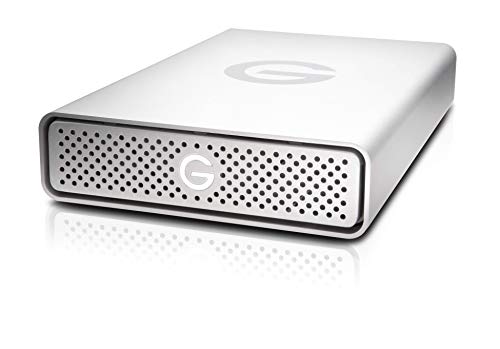
The G-Technology 6TB G-DRIVE is a desktop external hard drive for photographers who want USB-C connectivity and a substantial archive. Its 6TB capacity places it alongside the Western Digital My Book in storage class, while USB-C and USB 3.1 Gen 1 make it a natural fit for a modern editing workstation. The main complication is price: at around $1,500, it costs more than every other option here despite offering the same listed capacity as two less expensive drives. That makes it a specialist choice for buyers who specifically prefer this USB-C desktop setup or the G-DRIVE line.
- Pros: 6TB desktop capacity with USB-C connectivity.
- Pros: USB 3.1 Gen 1 interface for a current workstation.
- Con: Its around $1,500 price is exceptionally high for the capacity.
Skip it if value per terabyte is your primary concern.
7. 512G External SSD Magnetic Portable SSD
This magnetic portable SSD is aimed at photographers and creators who work directly with a phone, tablet, or laptop. It lists USB 3.2 Gen 2×2 connectivity and speeds up to 2000MB/s, along with support for 4K 120 fps ProRes HDR video recording and compatibility with the iPhone 16 Pro Max, smartphone, tablet, and laptop categories named in its listing. The metal design and magnetic format are convenient for mobile setups. However, 512GB is modest for a primary photo archive. At around $87, it makes the most sense as a fast companion drive for mobile capture and short-term storage.
- Pros: Stated speeds up to 2000MB/s and magnetic portable design.
- Pros: Designed for phone, tablet, and laptop workflows.
- Con: 512GB is limited for a large photography collection.
Skip it if you need several terabytes in one drive.
8. LaCie d2 Professional 16TB
The LaCie d2 Professional is the capacity leader, offering 16TB in a desktop external hard drive. That makes it particularly attractive for photographers with large RAW libraries, video files, or several years of projects who would rather consolidate storage than manage multiple smaller drives. USB 3.1 Type-C gives it a modern connection, and the 3.5-inch designation identifies it as a substantial desktop-oriented drive. At around $640, it costs more than the smaller desktop HDDs but offers far more capacity. Its size and stationary format make it a poor travel choice, yet an excellent archive candidate.
- Pros: The largest listed capacity at 16TB.
- Pros: USB 3.1 Type-C connection for desktop workflows.
- Con: Desktop design is less convenient for mobile photography.
Skip it if you only need a small transfer drive or portable SSD.
Buying Guide
Choose capacity for your working library
For quick transfers, 256GB or 512GB may be enough. Photographers with an active multi-project library should look toward 4TB or 8TB SSDs. If your priority is archiving, the 6TB and 16TB desktop drives offer more room without relying on several small devices. Remember that a single drive should not be your only copy of irreplaceable images.
Match the drive to your workspace
Portable SSDs and flash drives make sense for travel, client meetings, and location shoots. Desktop HDDs are better when the drive can stay in one editing room. USB-C is convenient for current computers, while USB-C/A flexibility is useful if your equipment includes older USB-A ports. Check the ports on your computer before buying.
Balance speed, protection, and price
SSD models generally suit active editing and frequent transfers, while HDDs can provide more capacity for the money. If you work outdoors, IP65 water and dust resistance may matter more than peak speed. For a stationary archive, password protection and auto backup software may be more valuable. The options here span around $41 to around $1,500, so avoid paying for capacity or features your workflow will not use.
Our Verdict
The Sandisk 8TB Extreme Portable SSD is the best high capacity external drive for photography when you need speed, portability, USB-C, and added water and dust resistance in one package. For a desktop archive, the LaCie d2 Professional’s 16TB capacity is the standout. The SSK 4TB Portable SSD is a more approachable portable alternative, while the Western Digital 6TB My Book is the strongest value-oriented desktop pick. Smaller flash drives are best reserved for transfers and sharing rather than primary storage.
FAQ
What is the best high capacity external drive for photography?
The Sandisk 8TB Extreme Portable SSD is the strongest overall choice for photographers who need portable, high-capacity solid-state storage. The LaCie d2 Professional is better for a stationary 16TB archive.
Is an SSD or HDD better for photos?
An SSD is a good fit for frequent transfers and mobile editing. An HDD can be a better choice for a large desktop archive when capacity and purchase price matter more than portability.
Is 4TB enough for photography?
For many active libraries, 4TB is a useful middle ground. It is more spacious than a flash drive but less expensive and less bulky than the largest desktop options. Your RAW, video, and backup habits will determine how quickly it fills.
Should photographers keep a backup of an external drive?
Yes. An external drive should not be the only copy of important photos. Use a second storage location or a separate backup drive, and consider features such as auto backup software when they fit your workflow.









