The best camera for a city live webcam is a weatherproof 4K PoE IP camera such as the Reolink RLC-810A, or the RLC-811A if you need optical zoom to pick out distant landmarks. A USB webcam like the Logitech Brio 4K only makes sense if the camera sits indoors behind a window. This guide is for people who want to build their own live city view (a skyline, street or harbor stream), not just watch other people’s feeds. The right pick depends on distance to the subject, mounting position and upload speed.
As an Amazon Associate we earn from qualifying purchases at no extra cost to you.


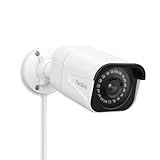
Top 3 picks at a glance
Quick comparison of the picks
| Pick | Best for | Key specs (per manufacturer) | Typical price |
|---|---|---|---|
| Reolink RLC-810A | Best overall, outdoor fixed view | 4K (8MP), PoE, weatherproof, RTSP support | $60–$100 |
| Reolink RLC-811A | Best for distant landmarks | 4K (8MP), PoE, about 5x optical zoom | $100–$170 |
| Reolink Duo 3 PoE | Best for wide panoramas | Dual-lens, 16MP, roughly 180° view, PoE | $150–$260 |
| Logitech Brio 4K | Best indoor window cam | 4K USB webcam, HDR, USB connection to a PC | $130–$200 |
| Insta360 Link | Best for tracking and framing | 4K USB webcam on a 3-axis gimbal, indoor use | $200–$300 |
| Raspberry Pi + HQ Camera (12MP) | Best DIY and timelapse | 12.3MP Sony IMX477 sensor, C/CS-mount lenses | $100–$220 as a kit |
Best overall: Reolink RLC-810A
A PoE camera needs one Ethernet cable for power and data, so it can run unattended for months. The RLC-810A gives you an 8MP sensor, an outdoor-rated housing and standard RTSP, which most streaming software and restreaming tools can ingest. It suits a rooftop, balcony rail or gable mount looking over a street or small skyline.
Trade-off: the lens is fixed. Distant buildings stay small, and you cannot push in on a landmark without cropping and losing resolution.
Best for distant landmarks: Reolink RLC-811A
The RLC-811A has the same 4K-class resolution with optical zoom of about 5x, according to the manufacturer. For a city cam that is the useful difference: zoom gives real detail on a tower or bridge that digital cropping cannot. Set the zoom once during install and leave it.
Trade-off: a longer lens gathers less light and has a narrower field of view. It does worse at dusk, which is when skyline streams look best.
Best for wide panoramas: Reolink Duo 3 PoE
Two lenses stitched into one roughly 180° image cover a whole harbor or valley with a single camera. This suits wide scenic views where one fixed lens would need a fisheye look.
Trade-off: the stitched image is wide but not tall, and the bitrate is high. A 16MP stream needs a strong uplink and more storage than a standard 4K camera.
Best indoor window cam: Logitech Brio 4K
If the view is from your apartment window, a USB 4K webcam is the simplest route. It works with OBS Studio and needs no network setup. Its HDR handling helps when bright sky and dark buildings share the frame.
Trade-off: USB cable length is limited, and webcam lenses are wide with small sensors. Skylines look distant and soft, and glass reflections are your biggest enemy.
Best for tracking and framing: Insta360 Link
The gimbal lets you pan and tilt remotely and re-aim between a morning and evening view. It is a good choice for a small indoor setup where you want to switch between a few angles.
Trade-off: it costs more than the outdoor PoE cameras and has no weather protection. It also uses the same small webcam sensor.
Best DIY and timelapse: Raspberry Pi with the HQ Camera
The Raspberry Pi High Quality Camera takes interchangeable C/CS-mount lenses, so you can fit a telephoto or wide lens that suits your exact view. It is the cheapest way to get a long lens. It also works well for timelapse, where you capture a still every few seconds instead of streaming continuously.
Trade-off: you need a case, lens, power supply and some setup work, and 24/7 reliability depends on your own configuration.
How to choose: the numbers that matter
1. Work out what a pixel covers
The field of view decides whether your landmark is readable. The width of the scene at a given distance is 2 × distance × tan(FOV ÷ 2). Divide by horizontal pixels to get meters per pixel.
- 90° lens, subject at 1 km: 2 × 1000 × tan(45°) = 2,000 m wide. On a 3,840 px 4K sensor that is about 0.52 m per pixel. A car is under 10 pixels long.
- 30° lens, same distance: 2 × 1000 × tan(15°) ≈ 536 m wide, or about 0.14 m per pixel. A car is roughly 30 pixels long.
If your main subject is more than a few hundred meters away, prioritize a narrower lens or optical zoom over extra megapixels.
2. Budget your upload bandwidth
Convert the bitrate to data with: Mbps ÷ 8 × 3,600 = MB per hour. YouTube’s published encoder guidance suggests roughly 3–6 Mbps for 1080p30 and about 13–34 Mbps for 4K30. Check current figures on the platform before you set values.
| Stream | Bitrate | Data per hour | Per day | Per 30 days |
|---|---|---|---|---|
| 1080p30 | 5 Mbps | 2.25 GB | 54 GB | 1.6 TB |
| 4K30 | 15 Mbps | 6.75 GB | 162 GB | 4.9 TB |
| 4K30 (local recording, H.265) | 8 Mbps | 3.6 GB | 86 GB | 2.6 TB |
Two practical rules follow. First, keep your upload speed at least 1.5 times the stream bitrate, so 15 Mbps needs about 22 Mbps of steady upload. Second, check any data cap, because a 24/7 4K stream can use close to 5 TB a month. If you also record locally, a 2 TB drive holds about 23 days of 8 Mbps footage (2,000 GB ÷ 86 GB per day).
3. Match the camera to your situation
| Your situation | Choose | Why |
|---|---|---|
| Window view, PC always on | Logitech Brio 4K | USB plug-and-play, no network setup |
| Window view, need re-aiming | Insta360 Link | Remote pan and tilt |
| Rooftop or balcony, landmark 300 m+ away | Reolink RLC-811A | Optical zoom and PoE reliability |
| Rooftop, wide skyline or harbor | Reolink Duo 3 PoE | About 180° in one image |
| Rooftop, simple street scene | Reolink RLC-810A | Lowest cost, 4K, outdoor rated |
| Long lens on a budget, timelapse | Raspberry Pi HQ Camera | Interchangeable telephoto lenses |
Settings that make a city stream look better
- Frame rate: 15–25 fps. City scenes change slowly, and a lower rate lets you spend bitrate on detail instead.
- Keyframe interval: 2 seconds. Streaming platforms generally expect this, and it avoids buffering at start-up.
- Codec: H.264 for the live feed. It is the safest for RTMP ingest. Use H.265 for local recording, where it saves roughly 30–50% of the space.
- Shutter and exposure: use manual exposure if the camera allows it. Auto exposure will pump brightness every time a bright cloud passes.
- Night mode: turn off infrared if the camera has it. IR reflects off glass and washes out the whole frame, while city lights alone usually give a better night image.
- Window mounting: press the lens close to the glass with a black cloth or rubber hood around it. This removes most reflections. Use a clean, flat pane.
Mounting and legal basics
Point the camera away from windows and balconies of neighbors, and avoid framing identifiable faces or license plates at readable resolution. Privacy rules for public streaming differ by country and city, so check local rules before you publish. Use a PoE switch or injector with a surge protector for outdoor runs, and a drip loop in the cable at the camera.
Frequently Asked Questions
What is the best camera for a 24/7 city live stream?
A weatherproof PoE IP camera is the most reliable choice because it needs only one cable and does not depend on a PC staying awake. The Reolink RLC-810A is a good value choice, and the RLC-811A adds zoom for distant landmarks.
Can I use a normal USB webcam for a city view?
Yes, if it sits indoors behind a clean window. A 4K webcam like the Logitech Brio 4K works, but its wide lens makes distant buildings small. Expect reflections at night unless you shield the lens from room light.
How much upload speed do I need?
Keep your upload at least 1.5 times the stream bitrate. A 1080p stream at 5 Mbps needs about 8 Mbps up, and a 4K stream at 15 Mbps needs about 22 Mbps. Wired Ethernet is far more stable than Wi-Fi for a stream that runs around the clock.
Is 4K worth it for a skyline camera?
Often yes, because 4K lets viewers zoom into detail and gives you room to crop. It also triples or quadruples your bitrate and data use, so a 1080p stream with a better lens can look sharper than a 4K stream with a wide one. Put the money into the lens or zoom first.
How do I put the camera feed on YouTube or another platform?
Most PoE cameras output an RTSP stream. Open that stream in OBS Studio as a media source, then send it to the platform by RTMP using the stream key. Hardware encoders and restreaming services can do the same job without a PC.
If I just want to watch city webcams, what should I do?
You do not need to buy any hardware. Established webcam networks such as EarthCam and Skyline Webcams list live city views by location. Use a wired connection or a good Wi-Fi signal for smooth playback.
Related guides
More from Amazon
Programs that pair well with the guide above. Offers and eligibility are set by Amazon and may change.
A free business account with business pricing and bulk-buying tools for work, shop or home office.
Create a business accountFree shipping on eligible items, Prime Video and more. Eligible new members can start with a free trial.
Start a Prime free trialAudiobooks and podcasts to listen to on the go. Eligible new members can start with a free trial.
Try Audible freeAd-free music streaming. Eligible new subscribers can start with a free trial.
Try Music Unlimited freeAs an Amazon Associate we earn from qualifying purchases.


